2021-2022 Audi Connect User Management Greyed Out TSB
Audi has released a Technical Service Bulletin (TSB 91 23 72 2052299/7) for 2021-2022 Audi vehicles addressing issues where the Audi connect "User management" screen is greyed out or the SOS emergency button is non-functional, often with DTCs P169A00 or U13EB00.

Gilt auch für
- Audi A3
- 2022
- Audi A4
- 2021–2022
- Audi A4 allroad
- 2021–2022
- Audi A5
- 2021–2022
- Audi A6
- 2021–2022
- Audi A6 allroad
- 2021–2022
- Audi A7
- 2021–2022
- Audi A7 e
- 2021–2022
- Audi A8 L e
- 2021
- Audi e-tron
- 2021
- Audi e-tron GT
- 2022
- Audi Q3
- 2021–2022
- Audi Q5
- 2021
- Audi Q7
- 2021–2022
- Audi Q8
- 2021–2022
- Audi R8
- 2021–2022
- Audi RS 5
- 2021–2022
- Audi RS 6 Avant
- 2021–2022
- Audi RS 7
- 2021–2022
- Audi RS e-tron GT
- 2022
- Audi RS Q8
- 2021–2022
- Audi S3
- 2022
- Audi S4
- 2021–2022
- Audi S5
- 2021–2022
- Audi S6
- 2021–2022
- Audi S7
- 2021–2022
- Audi S8
- 2021
- Audi SQ5
- 2021–2022
- Audi SQ7
- 2021–2022
- Audi SQ8
- 2021–2022
- Audi TT
- 2021–2022
- Audi TT RS
- 2021–2022
- Audi TTS
- 2021–2022
▸ 27 weitere anzeigen▾ Weniger anzeigen
Symptoms
Owners of 2021-2022 Audi vehicles may experience one or more of the following issues related to the Audi connect user management system or emergency services:
- The Audi connect "User management" screen appears greyed out, preventing key user pairing.
- The SOS emergency button is red or flashing red, indicating a malfunction.
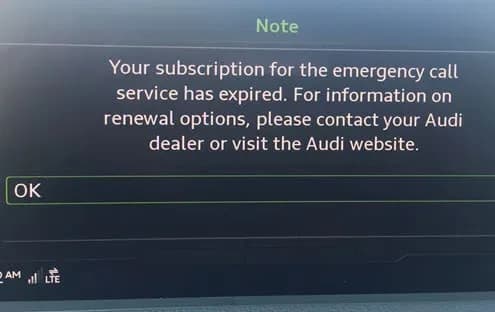
- When the SOS button is pressed, the infotainment system displays the message: "Your subscription for the emergency call service has expired. For information on renewal options, please contact your Audi dealer or visit the Audi website."
Fault Codes / DTCs
These symptoms are typically accompanied by specific Diagnostic Trouble Codes (DTCs) stored in the vehicle's system:
| Code | Description | Module / Address Word |
|---|---|---|
| P169A00 | Transport mode active | ECM (J623) / 0001 |
| U13EB00 | Emergency call module and communication unit Flight mode activated | J949 / 0075 |
| U142100 | Control module for emergency call module and communication unit no communication | Gateway Module |
Diagnosis and Technical Background
Starting with Model Year 2019, Audi vehicles utilize a new telematics module known as the "Control Module for Emergency Call Module and Communication Unit, J949," often referred to as the ConBox. This module, located at diagnostic address 0075, handles key user pairing, remote services, SOS, and roadside assistance features. The ConBox supports LTE connectivity, a significant upgrade from the previous 3G GSM capable gateway.
To properly activate the ConBox's LTE data connection and take the vehicle out of transport mode, a specific diagnostic tool, the VAS 6154 wireless diagnostic head, is required. Older diagnostic heads, such as the VAS 5054, cannot correctly communicate with this new control unit due to a different diagnostic protocol. If the VAS 6154 is not used, the ConBox may remain in transport mode (Flight mode), leading to the aforementioned DTCs P169A00 and U142100.
Important Warnings and Information
- This Technical Service Bulletin (TSB 91 23 72 2052299/7) is for informational purposes only and is not applicable to any Audi warranty.
- If your vehicle is a Model Year 2023 and experiences flight mode issues, please refer to TSB 2069329 (91 ConBox - Flight mode resets on its own after having been successfully removed at PDI (DTC U13EB00)).
- Do not use older diagnostic tools (e.g., VAS 5054) to address the ConBox. This will not resolve the issue and will result in the ConBox remaining in transport mode, setting DTCs P169A00 and U142100.
Repair Procedure Summary
The resolution involves deactivating the flight mode within the ConBox (J949) using the appropriate diagnostic equipment. The general steps are as follows:
- Access diagnostic address 0075 via
Self-diagnosis. - Navigate to
Adaptation values, thenBasis connect function, and selectFlight modetoDeactivate. - Apply the changes.
- Cycle the vehicle's ignition off and then back on.
- Perform a DTC readout for diagnostic address 0075 and clear any stored DTCs.
- Cycle the ignition off and then back on again.
- Verify that the SOS light is green and that the Audi connect user management option is now selectable.
- If the issue persists, disconnect the diagnostic tester, roll up all windows, close all doors, and lock the vehicle for 2-3 minutes. This allows the car to enter a sleep cycle. After this, retry steps 4-6.
Owner Action
If you are experiencing a greyed-out Audi connect user management screen, an inoperative SOS button, or any of the described warning messages, it is recommended to schedule an appointment with an authorized Audi service center. They have the specialized diagnostic tools (VAS 6154) and technical knowledge to correctly diagnose and resolve the transport mode issue in your vehicle's ConBox.
Frequently Asked Questions
- What does a greyed-out Audi connect user management screen mean?
- A greyed-out "User management" screen typically indicates that your Audi's Connectivity Box (ConBox) is stuck in transport or flight mode. This prevents key user pairing and can affect other connected services like SOS and roadside assistance.
- What are DTCs P169A00 and U13EB00 related to in my Audi?
- DTC P169A00 (Transport mode active) and U13EB00 (Emergency call module and communication unit Flight mode activated) are fault codes that often appear when the ConBox module has not been properly taken out of transport mode, leading to issues with Audi connect features and the SOS emergency system.
- Can I fix the Audi connect user management issue myself?
- Resolving this issue requires specialized diagnostic equipment, specifically the VAS 6154 wireless diagnostic head, to properly deactivate the flight mode in the ConBox. It is recommended to visit an authorized Audi service center for diagnosis and repair.
- Why is my Audi SOS emergency button not working?
- If your SOS emergency button is red or flashing and displays a message like "Your subscription for the emergency call service has expired," it's likely due to the ConBox remaining in transport or flight mode, which can be identified by DTCs like U13EB00. A dealer can resolve this by deactivating the mode.
Weitere Revisionen dieses TSB
- 2022-2024 Audi SOS Emergency Call Warning TSB 2076052/2U142100
- 2022-2024 Audi SOS Emergency Call Warning TSBU142100
- 2022-2024 Audi U142100 and U164200 DTCs in GatewayU142100
- 2021-2024 Audi U142100 U164200 Communication DTCsU142100
- 2023 Audi SOS Malfunction ConBox High TSBU13EB00, U142100
- 2023 Audi e-tron SOS Malfunction TSB 2074410/2U13EB00, U142100
- 2023 Audi SOS Emergency Call Malfunction TSB 91 24 22 2074410/1U13EB00, U142100
- 2023 Audi SOS Malfunction Instrument Cluster WarningU13EB00, U142100
What Audi e-tron owners report
Counted from the records in our database across 5 model years.
- 158
- Owner complaints
- 14
- Recalls
- 1,706
- Service bulletins
- 7
- Crashes reported
- 6
- Fires reported
- 3
- Injuries reported
The 2022 model year
31 complaints, the 3rd most of 5 model years on file. Owners reported 1 crash, 2 fires and 2 injuries for this year, which also has 6 recalls on file.
Equipment and Electrical System, the system this article covers, accounts for 81 of 158 complaints (51%), including 17 for 2022.
Complaints by model year
| 2019 | 84 | |
|---|---|---|
| 2020 | 1 | |
| 2021 | 36 | |
| 2022 | 31 | |
| 2023 | 6 |
Most-reported systems
- Electrical System — 81
- Power Train — 24
- Engine — 23
- Fuel/Propulsion System — 18
- Service Brakes — 18
Latest recalls for the 2022 model year
- 26V240000 — Service Brakes, Hydraulic (Apr 2026)
- 25V900000 — Back Over Prevention (Dec 2025)
- 23V867000 — Electrical System (Dec 2023)
Recent owner reports about equipment and electrical system
While driving, the vehicle displayed three simultaneous warnings — “Drive system malfunction, safely stop vehicle,” “Electrical system malfunction, restart not possible, contact service,” and “All-wheel drive malfunction, limited stability” — and lost…
Read owner complaints →The vehicle is experiencing an intermittent but active 'Electrical system: malfunction!' safety alert on the dashboard and myAudi app, caused by an internal high-voltage battery cell circuit fault (Diagnostic Trouble Code P0DB400 / U04A300) and a failure in…
Complaints are owner reports filed with NHTSA. They are unverified, and counts depend on how many vehicles were sold, so they are not a failure rate.
Related Articles
2022 Audi e-tron Electrical System Problems: Complaints & TSBs
Owners of the 2022 Audi e-tron frequently report significant electrical system malfunctions, ranging from sudden power loss and charging hazards to software crashes. Braking issues and unexpected automatic emergency braking are also common concerns, alongside numerous technical service bulletins…
2022-2026 Audi Guided Fault Finding Reporting Obligation
Audi has issued Technical Service Bulletin TPI 2033392, also known as Transaction No. 2081531/1, regarding a reporting obligation for technicians when Guided Fault Finding produces an unexpected result. This TSB outlines the process for contacting Audi Product Support for diagnostic assistance.
2022-2026 Audi Infotainment System Complaints
Audi has released Technical Service Bulletin (TSB) 2081405/1 to address various customer complaints regarding infotainment systems in 2022-2026 Audi vehicles. This TSB helps technicians diagnose issues often caused by external media or mobile devices, rather than vehicle technology.
2018-2026 Audi Models Cracking Noise TSB 2061464/11
Audi Technical Service Bulletin 2061464/11 describes a cracking noise from the front or rear axle when changing direction in various 2018-2026 Audi models. The issue is due to stub axle movement and is resolved by bonding the stub axle to the wheel bearing with locking fluid.
2022-2026 Audi Parking Aid False Warnings TSB 2024323/13
Audi has released Technical Service Bulletin 2024323/13 to address customer complaints of false parking aid warnings. This bulletin details various environmental and vehicle-specific conditions that can cause the parking aid system to issue alerts even when no obstacles are present. It provides…
Leave a comment
Comments are moderated and may take a moment to appear. Only your first name and the initial of your last name are shown publicly.
Comments
Be the first to comment.