2022-2026 Audi MIB3 Software Update Instructions TSB
Audi has released TSB 2060523/5 detailing instructions for MIB3 infotainment system software updates. This bulletin addresses potential error messages and ensures proper function of navigation, communication, and entertainment features in various 2022-2026 Audi models.

Gilt auch für
- Audi A3
- 2022–2025
- Audi A4
- 2021–2025
- Audi A4 allroad
- 2021–2025
- Audi A5
- 2021–2024
- Audi A6
- 2021–2025
- Audi A6 allroad
- 2021–2025
- Audi A7
- 2021–2025
- Audi A7 e
- 2021–2022
- Audi e-tron
- 2021, 2023
- Audi e-tron GT
- 2022–2025
- Audi e-tron Sportback
- 2021–2022
- Audi Q3
- 2021–2025
- Audi Q5
- 2021–2025
- Audi Q5 e
- 2021, 2023, 2024, 2025
- Audi Q7
- 2021–2025
- Audi Q8
- 2021–2025
- Audi RS 3
- 2022–2024
- Audi RS 5
- 2021–2024
- Audi RS 6 Avant
- 2021–2025
- Audi RS 7
- 2021–2025
- Audi RS e-tron GT
- 2022–2024
- Audi RS Q8
- 2021–2025
- Audi S e-tron GT
- 2026
- Audi S3
- 2022–2025
- Audi S4
- 2021–2025
- Audi S5
- 2021–2024
- Audi S6
- 2021–2025
- Audi S7
- 2021–2025
- Audi S8
- 2021–2025
- Audi SQ5
- 2021–2025
- Audi SQ7
- 2021–2025
- Audi SQ8
- 2021–2025
▸ 26 weitere anzeigen▾ Weniger anzeigen
Audi has issued Technical Service Bulletin (TSB) 2060523/5, providing comprehensive instructions for performing an Audi MIB3 software update. This bulletin addresses concerns related to the MIB3 MMI (Multi Media Interface) system, which may display error messages or experience issues with various infotainment functions.
The TSB outlines the necessary steps and equipment for technicians to update the MIB3 system's software, ensuring optimal performance of navigation, communication, entertainment, and other drive device functions. This proactive measure helps resolve potential software-related glitches in affected 2022-2026 Audi vehicles.
Symptoms
Owners may experience various issues related to the MIB3 MMI system, often indicated by an error message. These symptoms can affect several vehicle functions, including:
- Information and navigation systems.
- Communication and entertainment features.
- Radio and other MMI functions.
- General drive device functions that rely on the information electronics control module.
These issues typically point to a need for an Audi MIB3 software update to restore full functionality and eliminate error messages.
Repair Procedure Summary
The Audi MIB3 software update procedure involves specific steps to ensure the new software is correctly installed. Technicians will typically follow one of two methods:
Method 1: General MMI Software Update Process
- Preparation: Deactivate Bluetooth or Wi-Fi connections in the ODIS diagnostic system.
- Connection: Connect the diagnostic head to the vehicle using a USB cable.
- ODIS Flash Feature: Open the "Flash" feature in ODIS and select "SVM code input" or "SVM – Authorized multiple code entry." Perform a check to verify applicability.
- SVM Code Entry: Enter the specific SVM code for the update. The system will then display the part number of the update medium.
- USB Flash Drive Insertion: Insert the prepared USB flash drive into the vehicle's center console USB port. The ODIS tester will guide the technician through the update process, configure the new software, and report the build status to the server.
This method typically takes between 45 to 75 minutes, including the software update and SVM process.
Method 2: Using the Red Engineering Menu (If Update Aborts)
If the initial software update process is interrupted or aborts, technicians can use the red engineering menu. This involves:
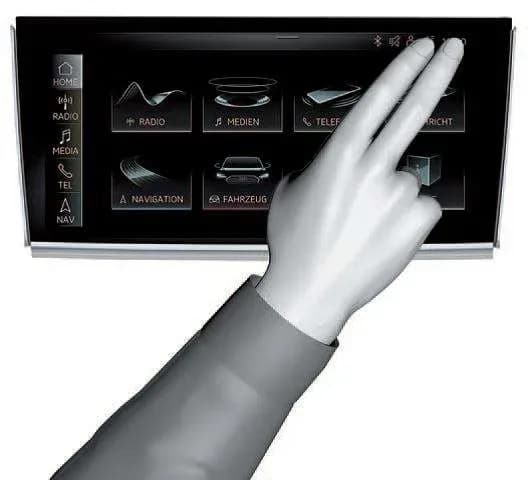
- Accessing the Menu: Touching the screen with two fingers in the top right corner to enter the red engineering menu.
- Navigation: Using the volume control to navigate to the update menu and select USB as the update source.
- Update Restart: Starting the update. If the update aborts again, the technician may try unplugging and replugging the USB stick multiple times, reformatting the USB stick to NTFS, or trying a different USB stick or port.
After a manual update via the red engineering menu, the SVM code must be run again to ensure proper configuration and reporting to the SVM server.
Required Tools or Parts
Performing an Audi MIB3 software update requires specific equipment and media:
- ODIS Tester: A diagnostic tool used to interface with the vehicle's systems.
- SVM Code: A specific code provided by Audi for the software update.
- USB Flash Drive: A USB-C stick is required as the update medium. It should be formatted as NTFS. A 32GB USB-C stick is generally sufficient, but a 64GB USB-C stick may be necessary for larger navigation database updates. SD cards are not to be used.
For information on setting up and using the Flash Media Center (FMC) to obtain vehicle software updates, technicians should refer to TSB 2047812.
Owner Action
If your 2022-2026 Audi vehicle is experiencing MMI error messages or other infotainment system malfunctions, it is recommended to contact an authorized Audi dealership. They have the necessary diagnostic tools and software to perform the Audi MIB3 software update outlined in TSB 2060523/5.
Warranty coverage for this service depends on your vehicle's current warranty status. While the TSB is informational for vehicles outside of warranty, certain additional work (Method 2) may be billable if required.
NHTSA ID: 11025265
Frequently Asked Questions
- What is Audi TSB 2060523/5 about?
- Audi TSB 2060523/5 provides detailed instructions for performing a software update on the MIB3 MMI infotainment system in various 2022-2026 Audi models. It addresses issues and error messages related to the information electronics control module.
- What are the common symptoms that indicate a need for an Audi MIB3 software update?
- Symptoms typically include error messages displayed on the MMI system, or malfunctions in navigation, communication, entertainment, radio, and other MMI-related drive device functions. These issues suggest that an Audi MIB3 software update may be required.
- How is the Audi MIB3 software update performed?
- The update is performed by an authorized Audi technician using an ODIS Tester and a specific SVM code. The software is loaded onto a USB-C flash drive (not an SD card) and then installed into the vehicle's MIB3 system. There are two methods, one standard and one for when the update process aborts.
- What tools or parts are needed for this software update?
- Key tools and parts include an ODIS Tester, the specific SVM code for the update, and a USB-C flash drive (32GB or 64GB for navigation maps) formatted to NTFS. Technicians may also refer to TSB 2047812 for guidance on using the Flash Media Center (FMC).
- Will the Audi MIB3 software update be covered under warranty?
- Warranty coverage for the Audi MIB3 software update depends on whether your vehicle is still within its factory warranty period. If the vehicle is outside of warranty, the TSB is informational, though specific additional work may be billable.
What Audi e-tron owners report
Counted from the records in our database across 5 model years.
- 158
- Owner complaints
- 14
- Recalls
- 1,706
- Service bulletins
- 7
- Crashes reported
- 6
- Fires reported
- 3
- Injuries reported
The 2022 model year
31 complaints, the 3rd most of 5 model years on file. Owners reported 1 crash, 2 fires and 2 injuries for this year, which also has 6 recalls on file.
Electrical System, the system this article covers, accounts for 81 of 158 complaints (51%), including 17 for 2022.
Complaints by model year
| 2019 | 84 | |
|---|---|---|
| 2020 | 1 | |
| 2021 | 36 | |
| 2022 | 31 | |
| 2023 | 6 |
Most-reported systems
- Electrical System — 81
- Power Train — 24
- Engine — 23
- Fuel/Propulsion System — 18
- Service Brakes — 18
Latest recalls for the 2022 model year
- 26V240000 — Service Brakes, Hydraulic (Apr 2026)
- 25V900000 — Back Over Prevention (Dec 2025)
- 23V867000 — Electrical System (Dec 2023)
Recent owner reports about electrical system
While driving, the vehicle displayed three simultaneous warnings — “Drive system malfunction, safely stop vehicle,” “Electrical system malfunction, restart not possible, contact service,” and “All-wheel drive malfunction, limited stability” — and lost…
Read owner complaints →The vehicle is experiencing an intermittent but active 'Electrical system: malfunction!' safety alert on the dashboard and myAudi app, caused by an internal high-voltage battery cell circuit fault (Diagnostic Trouble Code P0DB400 / U04A300) and a failure in…
Complaints are owner reports filed with NHTSA. They are unverified, and counts depend on how many vehicles were sold, so they are not a failure rate.
Related Articles
2022 Audi e-tron Electrical System Problems: Complaints & TSBs
Owners of the 2022 Audi e-tron frequently report significant electrical system malfunctions, ranging from sudden power loss and charging hazards to software crashes. Braking issues and unexpected automatic emergency braking are also common concerns, alongside numerous technical service bulletins…
2022-2026 Audi Guided Fault Finding Reporting Obligation
Audi has issued Technical Service Bulletin TPI 2033392, also known as Transaction No. 2081531/1, regarding a reporting obligation for technicians when Guided Fault Finding produces an unexpected result. This TSB outlines the process for contacting Audi Product Support for diagnostic assistance.
2022-2026 Audi Infotainment System Complaints
Audi has released Technical Service Bulletin (TSB) 2081405/1 to address various customer complaints regarding infotainment systems in 2022-2026 Audi vehicles. This TSB helps technicians diagnose issues often caused by external media or mobile devices, rather than vehicle technology.
2018-2026 Audi Models Cracking Noise TSB 2061464/11
Audi Technical Service Bulletin 2061464/11 describes a cracking noise from the front or rear axle when changing direction in various 2018-2026 Audi models. The issue is due to stub axle movement and is resolved by bonding the stub axle to the wheel bearing with locking fluid.
2022-2026 Audi Parking Aid False Warnings TSB 2024323/13
Audi has released Technical Service Bulletin 2024323/13 to address customer complaints of false parking aid warnings. This bulletin details various environmental and vehicle-specific conditions that can cause the parking aid system to issue alerts even when no obstacles are present. It provides…
Leave a comment
Comments are moderated and may take a moment to appear. Only your first name and the initial of your last name are shown publicly.
Comments
Be the first to comment.