2022-2026 Audi MIB3 Navigation Database Reinstallation TSB
Experiencing navigation errors or functionality issues in your 2022-2026 Audi MIB3 system? Technical Service Bulletin 2062115/14 provides instructions for reinstalling the navigation database, addressing software-related problems that lead to error messages and navigation failures.
 David Chen2022 Audi e-tron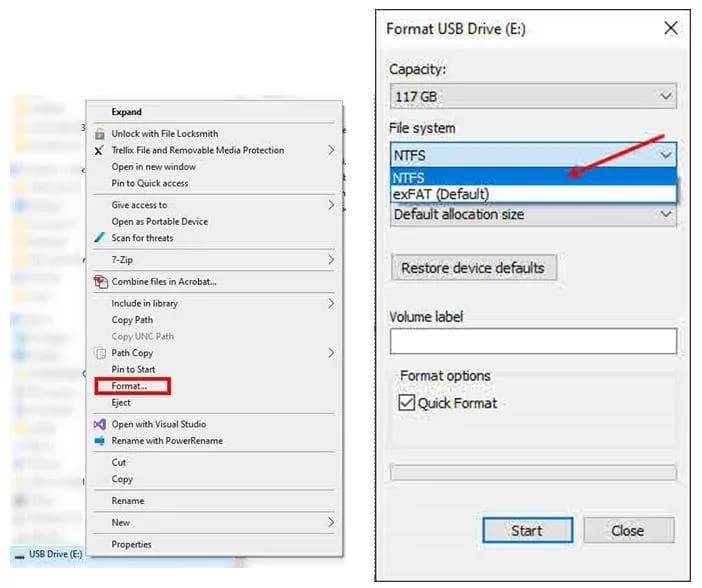
Gilt auch für
- Audi A3
- 2023–2025
- Audi A4
- 2021–2025
- Audi A4 allroad
- 2021–2025
- Audi A5
- 2021–2024
- Audi A6
- 2021–2025
- Audi A6 allroad
- 2021–2025
- Audi A7
- 2021–2025
- Audi A7 e
- 2021–2022
- Audi A8 L e
- 2021
- Audi e-tron
- 2021, 2023
- Audi e-tron GT
- 2022–2025
- Audi e-tron Sportback
- 2021–2022
- Audi Q3
- 2023–2025
- Audi Q5
- 2021–2025
- Audi Q5 e
- 2021, 2023, 2024, 2025
- Audi Q7
- 2021–2025
- Audi Q8
- 2021–2025
- Audi RS 3
- 2023–2024
- Audi RS 5
- 2021–2024
- Audi RS 6 Avant
- 2021–2025
- Audi RS 7
- 2021–2025
- Audi RS e-tron GT
- 2022–2024
- Audi RS Q8
- 2021–2025
- Audi S e-tron GT
- 2026
- Audi S3
- 2023–2025
- Audi S4
- 2021–2025
- Audi S5
- 2021–2024
- Audi S6
- 2021–2025
- Audi S7
- 2021–2025
- Audi S8
- 2021–2025
- Audi SQ5
- 2021–2025
- Audi SQ7
- 2021–2025
- Audi SQ8
- 2021–2025
▸ 27 weitere anzeigen▾ Weniger anzeigen
Symptoms of Audi MIB3 Navigation Database Issues
Owners of 2022-2026 Audi vehicles equipped with the MIB3 system may encounter various problems related to the navigation database. These issues are typically software-related and can manifest in several ways.
Common symptoms include:
- The navigation system, trip recorder, or navigation unit displaying an "error message" related to control modules or services.
- The navigation mode showing "no function" when attempting to select it.
- General navigation functionality problems, indicating a failure in the system.
Technical Background
Audi has identified that these navigation system issues stem from a software problem within the MIB3 MMI system. This Technical Service Bulletin (TSB) outlines a procedure for technicians to delete and reinstall the navigation database, which is expected to resolve the underlying software fault.
Important Warnings for Owners and Technicians
Several critical warnings are provided in this TSB to ensure proper procedure and prevent potential issues:
- Deletion of Navigation Database: Technicians should only delete the navigation database if explicitly specified in a TSB or if instructed by the Technical Assistance Center (TAC).
- Warranty and Recalls: If this TSB procedure is performed in conjunction with recall 91DZ, the standard warranty instructions for this TSB do not apply, as reimbursement will be handled under the recall's scope. If the vehicle is outside of warranty, this TSB is for informational purposes only.
- Software Download Browser: When downloading the necessary files for the update, technicians must not use Internet Explorer. Recommended browsers include Edge, Firefox, Chrome, or Safari.
- USB Flash Drive Management: The USB-C flash drive containing the navigation data should be retained as a workshop tool. It is not necessary to contact TAC or re-download the data if the drive is already prepared. Future updated navigation databases (NavDB) will automatically install via online updates after the initial NavDB is installed. It is also not required to keep the vehicle in a service bay or supervise the update once it has begun.
Repair Procedure Summary
The repair involves a multi-step process to prepare a USB-C drive with the latest navigation data and then use it to reinstall the Audi MIB3 navigation database in the vehicle's MMI system. This procedure addresses the software issue causing navigation problems.
- Download Navigation Data: Obtain the most current MIB3 Navigation database files from the provided Audi link.
- Prepare USB-C Drive: Format a 64GB or larger USB-C drive to the NTFS file system. This step will erase all existing data on the drive.
- Transfer Files: Extract the downloaded navigation files using a program like 7-Zip. Copy these extracted files directly to the root directory of the formatted USB-C drive. The files must not be placed in a subfolder.
- Eject USB-C Drive: Safely eject the USB-C drive from the computer.
- Erase Old Database: In the vehicle, use ODIS (Offboard Diagnostic Information System) to access Guided Fault Finding/Guided Functions. Select the test plan to
Frequently Asked Questions
- What does Audi TSB 2062115/14 address?
- This TSB addresses software issues within the MIB3 MMI navigation system in 2022-2026 Audi vehicles, providing a procedure to reinstall the navigation database and resolve error messages or functionality problems.
- What are the symptoms of an Audi MIB3 navigation database issue?
- Owners may experience an "error message" display related to the navigation system or find that the navigation functionality shows "no function" when trying to select navigation mode. These indicate a problem with the Audi MIB3 navigation database.
- What is involved in reinstalling the Audi MIB3 navigation database?
- The process involves downloading the latest navigation data, preparing a 64GB or larger USB-C drive by formatting it to NTFS and copying the data, then using ODIS to erase the old database and allowing the MMI system to install the new data from the USB drive.
- Is there a specific tool required for this repair?
- Yes, a USB-C Flash Drive of 64GB or larger is required to transfer the navigation database files for reinstallation.
- Are there any warnings for technicians performing this update?
- Technicians are cautioned to only delete the nav database if specified in a TSB or by TAC, and to use browsers like Edge, Firefox, Chrome, or Safari for downloading files, not Internet Explorer. Also, if combined with recall 91DZ, warranty instructions may differ.
Related Articles
2022 Audi e-tron Electrical System Problems: Complaints & TSBs
Owners of the 2022 Audi e-tron frequently report significant electrical system malfunctions, ranging from sudden power loss and charging hazards to software crashes. Braking issues and unexpected automatic emergency braking are also common concerns, alongside numerous technical service bulletins…
2022-2026 Audi Guided Fault Finding Reporting Obligation
Audi has issued Technical Service Bulletin TPI 2033392, also known as Transaction No. 2081531/1, regarding a reporting obligation for technicians when Guided Fault Finding produces an unexpected result. This TSB outlines the process for contacting Audi Product Support for diagnostic assistance.
2022-2026 Audi Infotainment System Complaints
Audi has released Technical Service Bulletin (TSB) 2081405/1 to address various customer complaints regarding infotainment systems in 2022-2026 Audi vehicles. This TSB helps technicians diagnose issues often caused by external media or mobile devices, rather than vehicle technology.
2018-2026 Audi Models Cracking Noise TSB 2061464/11
Audi Technical Service Bulletin 2061464/11 describes a cracking noise from the front or rear axle when changing direction in various 2018-2026 Audi models. The issue is due to stub axle movement and is resolved by bonding the stub axle to the wheel bearing with locking fluid.
2022-2026 Audi Parking Aid False Warnings TSB 2024323/13
Audi has released Technical Service Bulletin 2024323/13 to address customer complaints of false parking aid warnings. This bulletin details various environmental and vehicle-specific conditions that can cause the parking aid system to issue alerts even when no obstacles are present. It provides…
Leave a comment
Comments are moderated and may take a moment to appear. Only your first name and the initial of your last name are shown publicly.
Comments
Be the first to comment.