2021-2024 Audi MIB3 Software Update Instructions
Audi has released Technical Service Bulletin 91 23 63 2060523/2, providing detailed instructions for updating the MIB3 MMI system software in 2021-2024 Audi vehicles. This update ensures proper functionality and addresses any potential software-related issues.
 Ahmet Topcu2021 Audi e-tron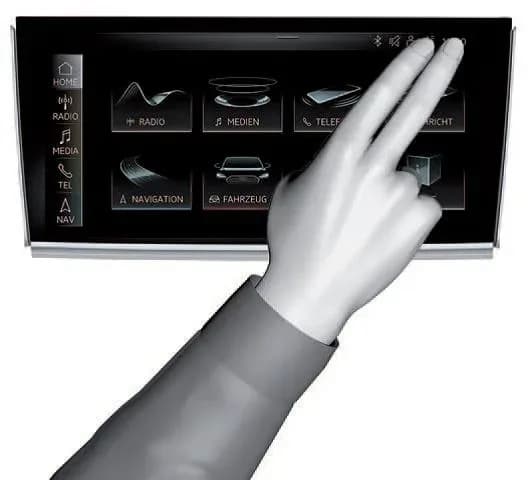
Gilt auch für
- Audi A3
- 2022–2024
- Audi A4
- 2021–2024
- Audi A4 allroad
- 2021–2022
- Audi A5
- 2021–2024
- Audi A6
- 2021–2024
- Audi A6 allroad
- 2021–2022
- Audi A7
- 2021–2024
- Audi A7 e
- 2021–2022
- Audi A8 L e
- 2021
- Audi e-tron
- 2022–2023
- Audi e-tron GT
- 2022–2024
- Audi Q3
- 2021–2024
- Audi Q5
- 2021, 2023, 2024
- Audi Q5 e
- 2024
- Audi Q7
- 2021–2024
- Audi Q8
- 2021–2024
- Audi R8
- 2021–2023
- Audi RS 3
- 2022–2024
- Audi RS 5
- 2021–2024
- Audi RS 7
- 2021–2024
- Audi RS e-tron GT
- 2022–2024
- Audi RS Q8
- 2021–2024
- Audi S3
- 2022–2024
- Audi S4
- 2021–2024
- Audi S5
- 2021–2024
- Audi S6
- 2021–2024
- Audi S7
- 2021–2024
- Audi S8
- 2021–2024
- Audi SQ5
- 2021–2024
- Audi SQ7
- 2021–2024
- Audi SQ8
- 2021–2024
- Audi TT
- 2021–2023
- Audi TT RS
- 2021–2022
- Audi TTS
- 2021–2023
▸ 28 weitere anzeigen▾ Weniger anzeigen
Audi has issued Technical Service Bulletin (TSB) 91 23 63 2060523/2 to address the need for a software update on the MIB3 MMI system in various 2021-2024 Audi vehicles. This bulletin, dated January 27, 2023, supersedes an earlier TSB, Group 91 number 20-05, from August 27, 2020, to provide updated instructions and cover additional model years.
The Audi MIB3 software update is a routine maintenance procedure to ensure the infotainment system operates with the latest software version.
Important Warnings
When performing the Audi MIB3 software update, it is crucial to follow specific media requirements:
- For MIB3 vehicles, a USB flash drive must be used instead of an SD card. Do not use a USB SD card reader and an SD card to attempt the update.
- The USB flash drive should be formatted as “NTFS”. To do so, select "NTFS" from the "File Format” dropdown on the ribbon of SD Creator.
Technical Background
The MIB3 MMI system was first introduced in the 2020 model year A4/A5 models. Starting with the 2021 model year, all Audi vehicles are equipped with a MIB3 system. This TSB provides the necessary steps for technicians to perform the required software update.
For additional information regarding the SD Creator tool, technicians should refer to TSB 2047812, titled "00 SD Creator: how to set up and use the SD Creator for obtaining vehicle software updates via the MirrorServer."
Repair Procedure Summary
The Audi MIB3 software update procedure involves several steps, taking approximately 45 to 75 minutes in total. This includes 15-45 minutes for the software update itself and 30 minutes for the SVM (Software Version Management) process.
General MMI Software Update Process:
- Deactivate the Bluetooth or Wi-Fi connection option in the ODIS diagnostic system.
- Connect the diagnostic head to the vehicle using a USB cable.
- Open the "Flash" feature in ODIS, then click on "SVM code input" and "Perform check."
- Enter the SVM code for the update. The system will verify the applicability of the code for the vehicle, and the part number of the update medium will be displayed on the tester.
- Insert the prepared USB flash drive into the USB port located in the vehicle's center console area. The tester will guide the technician through the update process.
- The program will configure the new software and report the build status to the server. Technicians must follow all commands displayed on the tester screen.
- After a successful update, remove the USB flash drive. It can be reused for other vehicles.
If the update is canceled, proceed as follows:
- Enter the red engineering menu by touching the screen with two fingers in the top right corner of the MMI display (as shown in Figure 2 of the TSB).
- Use the volume control to navigate the red engineering menu. Select "Update" and choose the USB as the update source. Scroll down to start the update for all control units.
- After a manual successful update, perform the SVM code again to ensure the ODIS tester configures the vehicle and reports the new configuration to the SVM server.
Required Tools or Parts
To perform the Audi MIB3 software update, the following equipment is required:
- ODIS Tester
- SVM Code
- MIB3 software update on a USB flash drive (obtained from the MirrorServer using the SD Creator Program)
Warranty Information
Warranty claims for this Audi MIB3 software update are covered under specific conditions:
- Claim Type 110: Up to 48 Months/50,000 Miles.
- Claim Type G10: For CPO (Certified Pre-Owned) Covered Vehicles – verification of owner required.
- If the vehicle is outside of warranty, this Technical Service Bulletin is for informational purposes only.
The Service Number associated with this procedure is 9196. All warranty claims must adhere to the Audi Warranty Policies and Procedures Manual, and claims are subject to review or audit by Audi Warranty.
Labor Operations and Diagnostic Time
Damage Code: 0039
| Labor Operations | Code | Time Units (TU) |
|---|---|---|
| Method 1: Automated update using ODIS | ||
| Check control unit & Test Functionality | 9196 0199 | 10 TU |
| Method 2: Manual update due to SVM server issues | ||
| Program infotainment control unit & Test Functionality | 0150 0000 | 70 TU |
| Diagnostic Time | Code | Max Time Units (TU) |
|---|---|---|
| Method 1: Automated update using ODIS | ||
| GFF | 0150 0000 | 175 TU |
| Method 2: Manual update due to SVM server issues | ||
| GFF | 0150 0000 | 75 TU |
| Road test prior to the service procedure | No allowance | 0 TU |
| Road test after the service procedure | No allowance | 0 TU |
Claim Comment: As per TSB 2060523/1.
Source: NHTSA ID 10231080
Galerie
1 Bild
Frequently Asked Questions
- What is the purpose of the Audi MIB3 software update?
- The Audi MIB3 software update, detailed in TSB 91 23 63 2060523/2, ensures that the MIB3 MMI infotainment system in 2021-2024 Audi vehicles is running the latest software version for optimal performance and to address any potential software-related issues.
- Which Audi models and years are affected by this MIB3 software update?
- This software update applies to various 2021-2024 Audi vehicles equipped with the MIB3 MMI system. Please refer to the official NHTSA document for a complete list of affected models.
- What tools are needed for the Audi MIB3 software update?
- Technicians will need an ODIS Tester, an SVM Code, and the MIB3 software loaded onto a USB flash drive. The USB drive must be formatted as “NTFS” and an SD card should not be used for this update.
- How long does the MIB3 software update take?
- The entire Audi MIB3 software update process, including the software update and SVM process, typically takes between 45 to 75 minutes to complete.
- Is the MIB3 software update covered under warranty?
- Yes, the update is generally covered under warranty for up to 48 months or 50,000 miles (Claim Type 110) and for CPO vehicles (Claim Type G10). If the vehicle is outside these warranty periods, the TSB serves as informational guidance.
Related Articles
2021 Audi e-tron Electrical Malfunction and Power Loss
A 2021 Audi e-tron owner reported a severe 'Electrical Malfunction' resulting in complete loss of power on the highway. The issue has persisted despite dealer attempts to fix it over five months, posing significant safety risks.
2021-2026 Audi UTR Troubleshooting & FAQs TSB 2081409/1
This Audi Technical Service Bulletin (TSB 2081409/1) provides comprehensive answers to frequently asked questions and troubleshooting steps for the Audi Universal Traffic Recorder (UTR) accessory, covering topics like SD card compatibility, video playback, Wi-Fi issues, and more.
2021-2025 Audi Emergency Call System Fault TSB
Audi has released Technical Service Bulletin 2059528/18 to address an "Emergency call function: malfunction! Function unavailable. Please contact service" warning, often accompanied by a red SOS LED and DTC B200000. This issue affects various 2021-2025 Audi models and is due to a software problem…
2021-2026 Audi Adaptive Light System Fault C12B3FA TSB
Audi has released Technical Service Bulletin 2054202/7 to address an intermittent 'Audi adaptive light: system fault' message and DTC C12B3FA in various 2021-2026 models. This TSB outlines diagnosis and resolution for driver assistance system malfunctions.
2021-2026 Audi Parking Aid False Warnings TSB 2024323/12
This Technical Service Bulletin (TSB 2024323/12) details diagnostic and repair procedures for 2021-2026 Audi vehicles experiencing false parking aid warnings. Learn about environmental factors, sensor checks, and proper installation to resolve issues like 'Parking aid does not work / warning is…
Leave a comment
Comments are moderated and may take a moment to appear. Only your first name and the initial of your last name are shown publicly.
Comments
Be the first to comment.