2018-2024 Toyota Head Unit Data Download Instructions TSB
Toyota's Tech Tip T-TT-0780-25 provides detailed instructions for technicians to download Multimedia Recorder (MMR) data from the head unit of various 2018-2024 models. This data helps diagnose audio, connectivity, and screen-related concerns.

Também se aplica a
- Toyota 4Runner
- 2021–2024
- Toyota Avalon
- 2021–2022
- Toyota C-HR
- 2021–2022
- Toyota Camry
- 2021, 2022, 2024
- Toyota Corolla
- 2021–2022
- Toyota Corolla Cross
- 2022
- Toyota Highlander
- 2021–2022
- Toyota Land Cruiser
- 2021
- Toyota Mirai
- 2021–2022
- Toyota Prius
- 2021–2022
- Toyota RAV4
- 2021–2022
- Toyota Sequoia
- 2021–2022
- Toyota Tacoma
- 2021–2023
- Toyota Tundra
- 2021
▸ Mostrar mais 8▾ Mostrar menos
Toyota has issued Tech Tip T-TT-0780-25, providing detailed instructions for technicians to download Multimedia Recorder (MMR) data from the head unit of various 2018-2024 Toyota models. This procedure is crucial for the early detection and resolution of audio-related concerns. The TSB specifies that these instructions are to be used only when requested by Field Technical Specialists (FTS) or Field Product Engineers (FPE) to gather diagnostic information.
The Multimedia Recorder (MMR) system captures data related to the head unit's operation. This data is stored internally and can be extracted to help identify the root cause of intermittent or complex issues. The process involves accessing a hidden service menu and using a USB drive to transfer the recorded information.
Symptoms
This procedure for a Toyota head unit data download is applicable for diagnosing a range of audio and telematics issues. These include general audio concerns, problems with rebooting, screen malfunctions, connectivity issues, and communication errors. It also covers specific problems related to settings, Apple CarPlay, Android Auto, and Bluetooth connectivity. By analyzing the MMR data, technicians can gain insights into the conditions leading to these symptoms.
Important Warnings for Owners
Owners should be aware of specific conditions that can affect MMR data collection:
- "If volume/power knob has been used to restart the head unit, MMR data will be lost. Do not restart the head unit if you are trying to capture MMR data for a concern."
- If a concern has been experienced, make sure to record the date and time of the occurrence and provide this along with the MMR data.
- "If MMR is pulled, a report is required, but please DO NOT attach MMR data to DPR/FTR." Similarly, "Please DO NOT attach MMR data to field report."
- MMR is a quality investigation tool, not a diagnostic tool for case-by-case support.
Required Tools or Parts
To perform the Multimedia Recorder (MMR) data download, technicians will need an empty USB flash drive with a capacity between 4GB and 32GB, formatted to FAT32. For an alternate method of accessing the diagnostic menu, the Toyota Global Techstream (GTS+) diagnostic tool is required.
MMR Data Download Procedure Summary
The process for a Toyota head unit data download involves several steps performed by a technician:
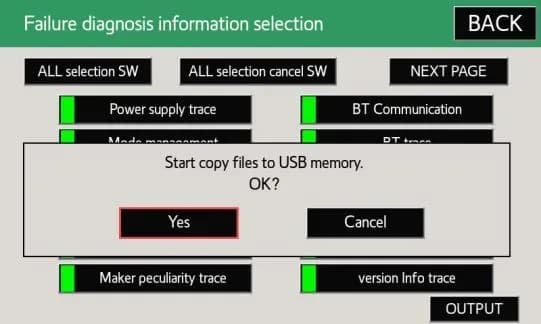
- With the ignition ON and the vehicle safely stopped, press and hold the "MENU" button on the faceplate while cycling the headlight switch from off to on three times. Alternatively, use GTS+ to navigate to Body Electrical > Navigation System > Utility > Diagnostic Mode.
- From the Service Menu, select "Failure Diagnosis".
- Then, select "Diagnosis Recorder".
- Deselect "Recording ON/OFF" to turn it white/grey, indicating it's off.
- Press and hold a hidden button for up to 30 seconds.
- Insert the FAT32 formatted USB drive into the vehicle's USB port.
- Press and hold the "output" button for up to 10 seconds.
- On the pop-up screen, select "Yes".
- Select the "OK" button on the next pop-up screen.
- Wait for the files to copy to the USB drive.
- Once copying is complete, select the "OK" button.
- Select the "BACK" button, then turn "Recording ON/OFF" back to the ON position (green).
- Turn the ignition OFF. Once the USB light turns off, remove the USB drive.
- Confirm that the MMR file (17DISP_DREC.zip) was saved correctly.
- The MMR zip file can then be uploaded to a TAS case or shared with FTS for analysis, including the report number and timestamp.
Owner Action
If you are experiencing audio, connectivity, or screen issues with your 2018-2024 Toyota vehicle, especially those that might require a Toyota head unit data download, it is recommended to visit an authorized Toyota dealership. Provide your technician with specific details about the concern, including the date and time it occurred. This information is critical for them to effectively utilize the MMR data for diagnosis and resolution.
NHTSA ID: 11019332
Galeria
8 imagens
Frequently Asked Questions
- What is Toyota's Multimedia Recorder (MMR) data?
- MMR data is information collected by your Toyota's head unit about its operation. It's used by technicians to diagnose complex audio, connectivity, and screen-related issues, as detailed in Toyota Tech Tip T-TT-0780-25.
- Which Toyota models are covered by TSB T-TT-0780-25 for MMR data download?
- Toyota Tech Tip T-TT-0780-25 applies to a wide range of 2018-2024 Toyota models, including the Camry, Mirai, Land Cruiser, Sienna HV, Venza HV, Corolla Cross, Tundra, Corolla HV, RAV4, Corolla Hatchback, RAV4 HV, Camry HV, Sienna HV MaaS, Sienna, Prius, Avalon, Avalon HV, Highlander, Highlander HV, Tacoma, 4Runner, RAV4 Prime, Prius Prime, Corolla, and Sequoia.
- What kind of issues can MMR data help diagnose?
- MMR data helps diagnose various audio-related concerns, including problems with rebooting, screen malfunctions, connectivity issues, communication errors, and specific issues with Apple CarPlay, Android Auto, and Bluetooth systems. This data is crucial for a thorough Toyota head unit data download analysis.
- Can owners download MMR data themselves?
- No, the process for downloading MMR data is a technical procedure intended for trained Toyota technicians. It involves accessing hidden service menus and requires specific tools and knowledge. Owners should report any concerns to their dealership.
- What should I do if my Toyota head unit has problems?
- If you experience issues with your Toyota head unit, such as audio problems, screen malfunctions, or connectivity issues, contact your authorized Toyota dealership. Be sure to note the exact date and time of the occurrence, as this information is vital for technicians when performing a Toyota head unit data download and diagnosis.
What Toyota Camry owners report
Counted from the records in our database across 44 model years.
- 19,642
- Owner complaints
- 74
- Recalls
- 1,998
- Service bulletins
- 2,952
- Crashes reported
- 433
- Fires reported
- 2,097
- Injuries reported
The 2023 model year
66 complaints, the 37th most of 44 model years on file. Owners reported 10 crashes, 2 fires and 7 injuries for this year, which also has 2 recalls on file.
Electrical System, the system this article covers, accounts for 1,441 of 19,642 complaints (7%), including 9 for 2023.
Complaints by model year
| 2002 | 953 | |
|---|---|---|
| 2003 | 782 | |
| 2004 | 638 | |
| 2005 | 721 | |
| 2007 | 3,490 | |
| 2008 | 1,095 | |
| 2009 | 1,412 | |
| 2012 | 645 | |
| 2018 | 782 | |
| 2023 | 66 |
Most-reported systems
- Vehicle Speed Control — 3,431
- Service Brakes — 2,805
- Structure — 1,910
- Power Train — 1,796
- Air Bags — 1,712
Latest recalls for the 2023 model year
- 24V128000 — Seats (Feb 2024)
- 23V432000 — Wheels (Jun 2023) — Do not drive
Recent owner reports about electrical system
My 2023 Toyota Camry has developed an intermittent defect where the ignition key becomes stuck and cannot be removed even though the dashboard shows the vehicle is in Park.
Read owner complaints →Electrical light the car didn't want to start even the battery is good No risk to other maybe if I stay stuck in the middle of no where I have not taking the car to no one No one has inspected Yes they were light on the dashboard
Complaints are owner reports filed with NHTSA. They are unverified, and counts depend on how many vehicles were sold, so they are not a failure rate.
Related Articles
2021-2024 Toyota Low Oil Pressure DTCs P05202A P052477
An obsolete Lexus Technical Service Bulletin (L-SB-0021-25) addressed issues in certain 2021-2024 Toyota models, including the Toyota Camry, related to low oil pressure DTCs P05202A and P052477, a MIL ON, and milky/discolored engine oil in freezing temperatures. This bulletin was declared obsolete…
2023-2026 Toyota Models AC Leak Detection TSB
Toyota has issued T-SB-0058-23 Rev1 to detail procedures for identifying and repairing air conditioning refrigerant leaks using dye injection and O-ring joint inspections for various 2023-2026 models.
2021-2024 Toyota Navigation Map Update TSB
Toyota has issued Technical Service Bulletin T-SB-0106-22 detailing the process for updating navigation maps and system software on 2021-2024 Toyota vehicles equipped with Premium Audio and Dynamic Navigation Systems. This update requires a Special Service Tool (SST) USB flash drive and may…
2023-2025 Toyota Wheel Film for Brake Rotor Rust
Toyota Technical Service Bulletin T-SB-0038-24 describes the use of wheel film on 2023-2025 Toyota vehicles to prevent brake rotor rust during transportation and storage. This film should remain on the wheels until just before customer delivery. Learn about its purpose and removal.
2022-2024 Toyota Camry, RAV4 Oil Leak from Engine Oil Level Sensor
Toyota has identified a potential issue with oil leaks originating from the Engine Oil Level Sensor area in certain 2022-2024 Camry and RAV4 vehicles. This Tech Tip advises technicians on how to handle and report these leaks to Toyota's technical assistance.
Leave a comment
Comments are moderated and may take a moment to appear. Only your first name and the initial of your last name are shown publicly.
Comments
Be the first to comment.