2021-2024 Toyota Navigation Map Update TSB
Toyota has issued Technical Service Bulletin T-SB-0106-22 detailing the process for updating navigation maps and system software on 2021-2024 Toyota vehicles equipped with Premium Audio and Dynamic Navigation Systems. This update requires a Special Service Tool (SST) USB flash drive and may…

Şu araçlar için de geçerli
- Toyota 4Runner
- 2021–2024
- Toyota Avalon
- 2021–2022
- Toyota C-HR
- 2021–2022
- Toyota Camry
- 2021, 2022, 2024
- Toyota Corolla
- 2021–2022
- Toyota Corolla Cross
- 2022
- Toyota Highlander
- 2021–2022
- Toyota Mirai
- 2021–2022
- Toyota Prius
- 2021–2022
- Toyota RAV4
- 2021–2022
- Toyota Sequoia
- 2021–2022
- Toyota Tacoma
- 2021–2023
- Toyota Tundra
- 2021
▸ 7 tane daha göster▾ Daha az göster
Toyota has released Technical Service Bulletin T-SB-0106-22 to provide instructions for updating the navigation maps, points of interest, and system software on certain 2021-2024 Toyota vehicles. These vehicles are equipped with a Premium Audio system and Dynamic Navigation System. The update process utilizes a Special Service Tool (SST) USB flash drive, and the method for generating license keys has been revised from previous generations.
Revision History
This bulletin, T-SB-0106-22 Rev2, was issued on December 7, 2022, and supersedes Service Bulletin No. T-SB-0119-20. Any previously printed versions of T-SB-0119-20 are now obsolete and should be discarded. The bulletin includes forward-looking revision notices:
- February 20, 2024 Rev1: Updated the Required Tools & Equipment section.
- February 11, 2025 Rev2: Applicability will be updated to include 2022 model year Corolla Cross, 2023 model year Tacoma, and 2023-2024 model year Camry, 4Runner, and Sienna Hybrid vehicles. The Introduction, Required Tools & Equipment, and Dynamic Navigation Update sections will also be updated.
What's Affected
This Technical Service Bulletin applies to the following 2021-2024 Toyota vehicles equipped with Premium Audio and Dynamic Navigation Systems:
Important Warnings
Toyota has provided several critical warnings for technicians and owners regarding this navigation update process:
- Discard Previous Bulletins: Service Bulletin No. T-SB-0119-20 is obsolete, and any printed versions should be discarded.
- SST USB Flash Drive Storage: The map data is released annually via an SST USB flash drive to each dealer. The SST MUST be stored in the SST cabinet to ensure it can be easily found.
- Incorrect Data Entry: If ANY of the navigation data is entered incorrectly into the Navigation Update Wizard, the update will NOT complete successfully, and it is possible a NEW Activation Card Number (ACN) will be required.
- Do Not Interrupt Update: During the head unit software and navigation map data copying processes, it is crucial not to remove the update media from the vehicle or turn off the vehicle power. Doing so can interrupt the update and potentially cause issues.
- Embedded Update Limitations: If performing an Embedded Navigation Update without an ACN, this process will NOT extend the dynamic navigation system subscription.
Required Tools and Parts
To perform the navigation map update, specific tools and parts are required:
- NAV ACN Card V.20.00: Part Number 86271-HDD09-00 (Quantity: 1)
- USB Drive Navigation Update – AWTEC: Part Number TLAW-SD017-24F (Quantity: 1). This is an Essential Special Service Tool (SST).
Additional SSTs can be ordered by calling 1-800-368-6787 or by visiting the Toyota Special Service Tools section on the Home – Service Resources website.
Understanding the Toyota Navigation Update
There are two primary types of navigation updates covered in this bulletin for the Toyota Camry navigation update and other applicable models:
- Dynamic Navigation Update: This update requires the purchase of an Activation Card Number (ACN). It performs both the embedded navigation update and extends dynamic map services for two years from the update date. This is recommended if the dynamic subscription has expired or is expiring within 90 days.
- Embedded Navigation Update: This update does not require an ACN and does not extend the dynamic map services subscription. It is suitable if the head unit's expiration date is valid and not expiring within 90 days, or if the customer specifically wants the embedded map update without extending dynamic services.
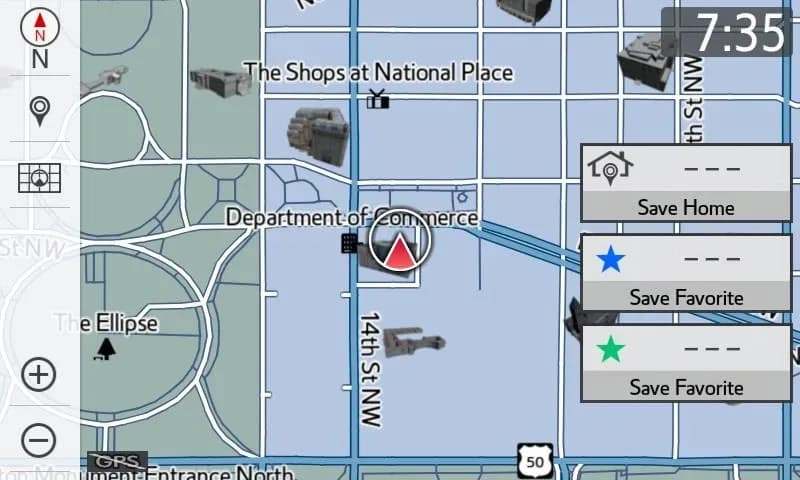
Before initiating any update, technicians must check the expiration date of the dynamic subscription stored in the head unit. This can be viewed on the navigation screen (Figure 5) or by logging into TIS (Toyota Information System) and checking the Telematics tab (Figure 7).
Repair Procedure Summary
The overall process for a Toyota Camry navigation update involves several key steps, whether performing a Dynamic or Embedded Navigation Update:
- Check for Firmware Updates: Before installing map data, search TIS for any available firmware updates for the specific vehicle model and year and complete them.
- Ignition Cycle: Turn the ignition ON. For vehicles without a Smart Key system, turn the ignition key to the ON position. For vehicles with a Smart Key system, press the Engine Start/Stop switch two times with the brake pedal released.
- Record Current Map Data: Access the Map menu on the navigation head unit (Figure 1), select Map Data (Figure 3), and record the old map date and map update ID (Figure 4, Figure 9).
- Access Navigation Update Wizard: Log into TIS and navigate to the Navigation Update Wizard (Figure 10). Re-enter your password to proceed.
- Enter Vehicle Information: Select AWTEC as the navigation manufacturer. Enter the vehicle's VIN and the head unit's expiration date (Figure 11). For Dynamic Navigation Updates, you will also enter the ACN from the pamphlet (Figure 12).
- Input Navigation Data: Fill in the Navigation Update Wizard form with the correct USB part number (e.g., TLAW-SD017-24F), map update ID (without hyphens), old map date (YYYYMMD format, without hyphens), VIN, repair order number, and expiration date (Figure 13).
- Confirm and Generate License Key: Review all entered information (Figure 14). If correct, confirm to generate the license key (Figure 15). It is recommended to print this page.
- Insert USB Flash Drive: Insert the SST USB flash drive into the vehicle's USB port (typically under the head unit, in the center console/armrest, or glove box).
- Initiate Update: On the Map Data screen, select "Update Map" (Figure 16). Select "YES" when prompted.
- Enter License Key: Enter the generated license key (Figure 17) and select "OK."
- Head Unit Software Update: The head unit software will update first (Figure 18). This process takes approximately 10 minutes. If the software is already updated, the system will proceed to the map data update (Figure 20).
- Ignition Cycle (if prompted): The head unit may prompt to cycle the ignition OFF, then ON (Ready OFF/Engine OFF) to complete the software update (Figure 19).
- Navigation Map Data Update: After the head unit software update, the navigation map update will begin automatically (Figure 20). This process takes approximately 45 minutes.
- Completion: When prompted, remove the USB flash drive (Figure 21). The map update is complete. Verify navigation operation.
Owner Action
If you own a 2021-2024 Toyota Camry or another affected model and believe your navigation maps or system software need an update, especially if your dynamic navigation subscription is expiring or has expired, contact your authorized Toyota dealer. They can perform the necessary checks and apply the appropriate update using the procedures outlined in TSB T-SB-0106-22. Be aware that extending dynamic navigation services may require purchasing an Activation Card Number (ACN).
NHTSA ID: 11015500
Galeri
23 görsel
Frequently Asked Questions
- What is Toyota TSB T-SB-0106-22 about?
- Toyota TSB T-SB-0106-22 details the process for updating navigation maps, points of interest, and system software on 2021-2024 Toyota vehicles equipped with Premium Audio and Dynamic Navigation Systems. This includes models like the Toyota Camry navigation update.
- What is the difference between a Dynamic Navigation Update and an Embedded Navigation Update?
- A Dynamic Navigation Update requires an Activation Card Number (ACN) and extends your dynamic map services for two years, in addition to updating the embedded maps. An Embedded Navigation Update does not require an ACN and does not extend dynamic services; it only updates the embedded map data.
- What tools and parts are needed for this update?
- The update requires a NAV ACN Card V.20.00 (Part Number 86271-HDD09-00) for Dynamic Updates and a Special Service Tool (SST) USB Drive Navigation Update – AWTEC (Part Number TLAW-SD017-24F) for both types of updates.
- How long does the navigation map update process take?
- The head unit software update portion takes about 10 minutes, and the navigation map data update takes approximately 45 minutes. It is crucial not to interrupt the process by removing the USB drive or turning off the vehicle.
What Toyota Camry owners report
Counted from the records in our database across 44 model years.
- 19,642
- Owner complaints
- 74
- Recalls
- 1,998
- Service bulletins
- 2,952
- Crashes reported
- 433
- Fires reported
- 2,097
- Injuries reported
The 2023 model year
66 complaints, the 37th most of 44 model years on file. Owners reported 10 crashes, 2 fires and 7 injuries for this year, which also has 2 recalls on file.
Electrical System, the system this article covers, accounts for 1,441 of 19,642 complaints (7%), including 9 for 2023.
Complaints by model year
| 2002 | 953 | |
|---|---|---|
| 2003 | 782 | |
| 2004 | 638 | |
| 2005 | 721 | |
| 2007 | 3,490 | |
| 2008 | 1,095 | |
| 2009 | 1,412 | |
| 2012 | 645 | |
| 2018 | 782 | |
| 2023 | 66 |
Most-reported systems
- Vehicle Speed Control — 3,431
- Service Brakes — 2,805
- Structure — 1,910
- Power Train — 1,796
- Air Bags — 1,712
Latest recalls for the 2023 model year
- 24V128000 — Seats (Feb 2024)
- 23V432000 — Wheels (Jun 2023) — Do not drive
Recent owner reports about electrical system
My 2023 Toyota Camry has developed an intermittent defect where the ignition key becomes stuck and cannot be removed even though the dashboard shows the vehicle is in Park.
Read owner complaints →Electrical light the car didn't want to start even the battery is good No risk to other maybe if I stay stuck in the middle of no where I have not taking the car to no one No one has inspected Yes they were light on the dashboard
Complaints are owner reports filed with NHTSA. They are unverified, and counts depend on how many vehicles were sold, so they are not a failure rate.
Related Articles
2021-2024 Toyota Low Oil Pressure DTCs P05202A P052477
An obsolete Lexus Technical Service Bulletin (L-SB-0021-25) addressed issues in certain 2021-2024 Toyota models, including the Toyota Camry, related to low oil pressure DTCs P05202A and P052477, a MIL ON, and milky/discolored engine oil in freezing temperatures. This bulletin was declared obsolete…
2023-2026 Toyota Models AC Leak Detection TSB
Toyota has issued T-SB-0058-23 Rev1 to detail procedures for identifying and repairing air conditioning refrigerant leaks using dye injection and O-ring joint inspections for various 2023-2026 models.
2018-2024 Toyota Head Unit Data Download Instructions TSB
Toyota's Tech Tip T-TT-0780-25 provides detailed instructions for technicians to download Multimedia Recorder (MMR) data from the head unit of various 2018-2024 models. This data helps diagnose audio, connectivity, and screen-related concerns.
2023-2025 Toyota Wheel Film for Brake Rotor Rust
Toyota Technical Service Bulletin T-SB-0038-24 describes the use of wheel film on 2023-2025 Toyota vehicles to prevent brake rotor rust during transportation and storage. This film should remain on the wheels until just before customer delivery. Learn about its purpose and removal.
2022-2024 Toyota Camry, RAV4 Oil Leak from Engine Oil Level Sensor
Toyota has identified a potential issue with oil leaks originating from the Engine Oil Level Sensor area in certain 2022-2024 Camry and RAV4 vehicles. This Tech Tip advises technicians on how to handle and report these leaks to Toyota's technical assistance.
Yorum bırakın
Yorumlar moderasyondan geçer ve görünmesi biraz zaman alabilir. Sadece adınız ve soyadınızın baş harfi herkese açık olarak gösterilir.
Yorumlar
İlk yorum sizden olsun.