2020-2022 Audi MIB3 Lost Favorites and Blue Screen TSB
Audi has released Technical Service Bulletin (TSB) 91 24 89 2069112/5 to address various MIB3 infotainment system issues, including lost favorites, home addresses, destinations, blue screens, and the MMI getting stuck on the welcome screen. This TSB provides a software update solution.
 Ahmet Topcu2022 Audi e-tron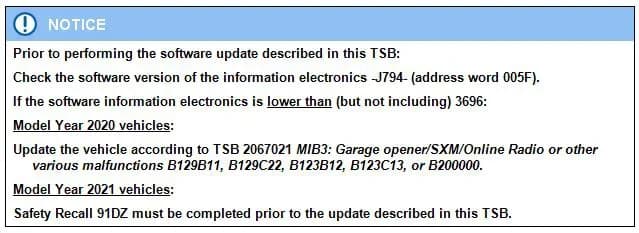
Also applies to
- Audi A3
- 2022
- Audi A4
- 2021–2022
- Audi A4 allroad
- 2021–2022
- Audi A5
- 2021–2022
- Audi A6
- 2021–2022
- Audi A6 allroad
- 2021–2022
- Audi A7
- 2021–2022
- Audi A7 e
- 2021–2022
- Audi A8 L e
- 2021
- Audi e-tron
- 2021
- Audi e-tron GT
- 2022
- Audi e-tron Sportback
- 2022
- Audi Q3
- 2022
- Audi Q5
- 2021–2022
- Audi Q7
- 2021–2022
- Audi Q8
- 2021–2022
- Audi RS 3
- 2022
- Audi RS 5
- 2021–2022
- Audi RS 6 Avant
- 2021–2022
- Audi RS 7
- 2021–2022
- Audi RS e-tron GT
- 2022
- Audi RS Q8
- 2021–2022
- Audi S3
- 2022
- Audi S4
- 2021–2022
- Audi S5
- 2021–2022
- Audi S6
- 2021–2022
- Audi S7
- 2021–2022
- Audi S8
- 2021–2022
- Audi SQ5
- 2021–2022
- Audi SQ7
- 2021–2022
- Audi SQ8
- 2021–2022
▸ Show 25 more▾ Show fewer
Audi has issued Technical Service Bulletin (TSB) 91 24 89 2069112/5 to address a range of software-related concerns affecting the MIB3 infotainment system in various 2020-2022 Audi models. Owners may experience issues such as lost saved data, display malfunctions, or system freezes. This TSB, dated March 29, 2024, supersedes an earlier bulletin, Group 91 number 24-74 dated February 23, 2024, and provides a comprehensive software update to rectify these problems.
This bulletin specifically targets common complaints like Audi MIB3 lost favorites, disappearing home addresses, and navigation destinations. It also addresses instances where the MMI screen turns completely blue or gets stuck on the welcome screen during startup.
Symptoms Owners May Notice
Owners of affected Audi vehicles may observe one or more of the following issues with their MIB3 infotainment system:
- Lost Saved Data: Saved addresses (including the home address), favorites, last destinations, and/or icon and shortcut order are lost sporadically.
- Display Malfunctions: In extremely rare cases, the screen may turn completely blue until a bus sleep, or an MMI reboot is performed.
- System Freezes: For MY22 Q3 models only, the MMI gets stuck on the welcome screen while loading user information from the backend on startup.
Related Issues and Previous Bulletins
This TSB 91 24 89 2069112/5 replaces several previous Pending Service Solutions (PSS) and TSBs related to similar MIB3 issues:
- TSB 2062266: PSS 91 MIB3: favorites, home address, stored destinations, tile arrangement, and user-defined HVAC buttons are lost.
- TSB 2063702: PSS 91 MIB3: MMI display turns blue.
- TSB 2067569: PSS 91 MIB3: System gets stuck on the welcome screen at startup.
- TSB 2064429: PSS 91 MIB3: Function assignment to the star button is lost.
If radio station favorites are lost, refer to PSS 2073135: "91 PSS MIB3: Radio favorites lost / shortcuts grayed out on lower screen." For lost HVAC favorites, refer to PSS 2072285: "91 PSS MIB3: air conditioning function favorite on the lower display is lost."
Diagnostic Information
No relevant Diagnostic Trouble Codes (DTCs) are typically stored for the primary issues described in this TSB. The problem is identified as a software-related issue that can be resolved with an updated series software, available with MY23.
Repair Procedure Summary
The repair involves updating the MIB3 infotainment system software. This procedure requires specific tools and adherence to prerequisite steps:
Required Equipment and Tools
- ODIS Tester
- SVM code (CL35MHI3P3853 for A3/A4/A5/Q3/Q5, CL35MPR3P3853 for A6/A7/A8/Q7/Q8/e-tron/e-tron GT)
- MIB3 Software update on USB Flash Drive. The USB flash drive can be downloaded from MirrorServer using the SD Creator Program or ordered from parts using part numbers:
- 8W0906961BB (for A3/A4/A5/Q3/Q5)
- 8W0906961AT (for A6/A7/A8/Q7/Q8/e-tron/e-tron GT)
Important Prerequisites
Before performing the software update, technicians must:
- Check the software version of the information electronics -J794- (address word 005F). If the software version is lower than (but not including) 3696:
- For Model Year 2020 vehicles: Update the vehicle according to TSB 2067021 "MIB3: Garage opener/SXM/Online Radio or other various malfunctions" which may involve DTCs such as B129B11, B129C22, B123B12, B123C13, or B200000.
- For Model Year 2021 vehicles: Safety Recall 91DZ must be completed prior to this update.
Update Methods
The MIB3 infotainment system can be updated using either Method 1 (Automated using ODIS) or Method 2 (Manual update due to SVM code or Server issues), as detailed in TSB 2060523: "91 MIB3 Software Update Instructions." Additional necessary TSBs for this procedure include TSB 2011732: "00 Software Version Management (SVM), operating instructions" and TSB 2047812: "00 SD Creator: how to set up and use the SD Creator for obtaining vehicle software updates via the MirrorServer."
Estimated Time
The complete update process, including software update and SVM work, is estimated to take approximately 30-60 minutes.
Warranty Information
This service is covered under warranty for up to 48 months or 50,000 miles. For Certified Pre-Owned (CPO) vehicles, the claim type is G10, requiring owner verification. If the vehicle is outside of any warranty, this TSB serves as informational guidance only.
- Service Number: 9196
- Damage Code: A839
- Labor Operations:
- Software Update: 0151 0010
- Diagnostic Time (Includes checking for DTCs): 0151 0060
- Claim Comment: As per TSB 2069112/5
All warranty claims must comply with the Audi Warranty Policies and Procedures Manual and are subject to review.
NHTSA ID: 10252873
Gallery
1 image
Frequently Asked Questions
- What is TSB 91 24 89 2069112/5 about?
- TSB 91 24 89 2069112/5 addresses various software-related issues with the MIB3 infotainment system in 2020-2022 Audi vehicles, including lost saved addresses, favorites, destinations, MMI blue screens, and the system getting stuck on the welcome screen.
- Will I receive a notification for this TSB?
- Technical Service Bulletins (TSBs) are primarily for dealer technicians and are not typically sent directly to vehicle owners like recall notices. If you are experiencing symptoms like **Audi MIB3 lost favorites**, you should contact your authorized Audi dealer.
- Are there any diagnostic trouble codes (DTCs) associated with these MIB3 issues?
- For the primary issues described in TSB 91 24 89 2069112/5, no relevant DTCs are typically stored. However, if your 2020 model year vehicle requires a prerequisite update (TSB 2067021), it might have DTCs such as B129B11, B129C22, B123B12, B123C13, or B200000.
- What is the repair for the MIB3 infotainment system problems?
- The repair involves a software update to the MIB3 infotainment system. This update is performed by an authorized Audi dealer using specialized diagnostic equipment and specific SVM codes, such as CL35MHI3P3853 or CL35MPR3P3853, depending on the vehicle model.
- How long does the MIB3 software update take?
- The software update procedure, including diagnostic checks and SVM work, is estimated to take approximately 30-60 minutes at an authorized Audi service center. This service is typically covered under warranty for eligible vehicles.
Related Articles
2022 Audi e-tron Problems: Electrical System & Braking Concerns
The 2022 Audi e-tron has faced significant owner complaints regarding its electrical system, including sudden power loss and charging hazards, as well as various braking malfunctions. This profile details these issues and relevant service bulletins.
2022-2026 Audi Guided Fault Finding Reporting Obligation
Audi has issued Technical Service Bulletin TPI 2033392, also known as Transaction No. 2081531/1, regarding a reporting obligation for technicians when Guided Fault Finding produces an unexpected result. This TSB outlines the process for contacting Audi Product Support for diagnostic assistance.
2022-2026 Audi Infotainment System Complaints
Audi has released Technical Service Bulletin (TSB) 2081405/1 to address various customer complaints regarding infotainment systems in 2022-2026 Audi vehicles. This TSB helps technicians diagnose issues often caused by external media or mobile devices, rather than vehicle technology.
2018-2026 Audi Models Cracking Noise TSB 2061464/11
Audi Technical Service Bulletin 2061464/11 describes a cracking noise from the front or rear axle when changing direction in various 2018-2026 Audi models. The issue is due to stub axle movement and is resolved by bonding the stub axle to the wheel bearing with locking fluid.
2022-2026 Audi Parking Aid False Warnings TSB 2024323/13
Audi has released Technical Service Bulletin 2024323/13 to address customer complaints of false parking aid warnings. This bulletin details various environmental and vehicle-specific conditions that can cause the parking aid system to issue alerts even when no obstacles are present. It provides…
Leave a comment
Comments are moderated and may take a moment to appear. Only your first name and the initial of your last name are shown publicly.
Comments
Be the first to comment.