2021 Audi Driver Assist Malfunctions DTC B200FF9
Audi has released Technical Service Bulletin 90 23 92 2063502/6 to address various driver assist system malfunctions, including issues with lane change assist, traffic sign recognition, and Adaptive Cruise Assist, often accompanied by DTC B200FF9.

También aplica a
- Audi A6
- 2021
- Audi A6 allroad
- 2021
- Audi A7
- 2021
- Audi A7 e
- 2021
- Audi A8 L e
- 2021
- Audi Q7
- 2021
- Audi Q8
- 2021
- Audi RS 7
- 2021
- Audi RS Q8
- 2021
- Audi S6
- 2021
- Audi S7
- 2021
- Audi S8
- 2021
- Audi SQ7
- 2021
- Audi SQ8
- 2021
▸ Mostrar 8 más▾ Mostrar menos
Symptoms
Owners of affected 2021 Audi vehicles may experience a range of issues with their driver assist systems. These symptoms often point to underlying electronic control unit malfunctions.
Common customer complaints include:
- Lane Change Assist/Intersection Assist: The system may sporadically stop working, accompanied by one of the following messages in the instrument cluster:
- "Intersection assist: fault. Please contact service."
- "Side assist and exit warning system: fault. Please contact service."
- "Rear cross-traffic assist: fault. Please contact service."
- "Audi pre sense: fault. Please contact service."
- Traffic Sign Recognition: Speed limit settings based on traffic signs are not permanently stored and are lost with every ignition cycle.
- Adaptive Cruise Assist (ACA): Vehicles equipped with steel suspension may experience ACA disengaging or losing calibration when towing a trailer or bike rack.
Fault Codes / DTCs
Technicians investigating these issues may find specific Diagnostic Trouble Codes (DTCs) stored in various control modules. The primary DTC associated with these Audi e-tron driver assist malfunctions is B200FF9.
| Code | Description | Module(s) Affected | Symptom Code(s) |
|---|---|---|---|
| B200FF9 | Internal malfunction | Front corner radar control modules (J1088/J1089) | 1311089 |
| B200FF9 | Internal Malfunction | Lane change assist control modules (J769/J770) | 1311057, 1311058, 1311059, 1311060 |
It's important to note that some customer concerns, as described above, may not always trigger a DTC in the vehicle. Additionally, related Technical Service Bulletin 2062601 addresses instances where DTC U110100 is stored in the driver assistance systems control module.
Diagnosis / Trigger Conditions
Diagnosis for these Audi e-tron driver assist malfunctions typically involves checking for the presence of DTC B200FF9 in the front corner radar control modules (J1088/J1089) or the lane change assist control modules (J769/J770). The issue is often resolved by a software update that optimizes multiple driver assist features.
This update affects several key control modules responsible for driver assistance, including:
- Driver assist systems control module, J1121 (address word 00A5)
- Adaptive cruise control module, J428 (address word 0013)
- Lane change assist control module, J769/J770 (address words 003C/00CF)
- Front left/front right radar sensor control module for object detection, J1088/J1089 (address words 00DB/00DC)
- Control module for laser distance control, J1122 (address word 00CD)
- Airbag control module, J234 (address word 0015)
Important Warnings
Owners and technicians should be aware of several critical warnings and advisories before proceeding with any diagnosis or repair related to these Audi driver assist system malfunctions:
- Pre-Update Requirements: All outstanding campaigns must be completed before running this update. Familiarize yourself with all steps of this update before proceeding.
- Risk of Bricking Control Module: "If any warning messages are displayed in the instrument cluster, those have to be addressed prior to updating the vehicle as running the update with active instrument cluster warning messages may brick the driver assist control module, J1211 (address word 00A5)."
- Event Data Recorder (EDR) Backup: "Federal law requires the airbag's Event Data Recorder (EDR) to be backed up prior to running the update in this TSB (required only for MY20 Audi e-tron quattro and Audi e-tron Sportback, skip to Step 4 for all other vehicles)." For other vehicles, this step is not required.
- Customer Consent: Customers must sign a declaration of consent, which is available in the TSB attachments, and a picture/scan of it must be uploaded to DOC-IT.
- Personalization Settings Reset: "This update includes multiple control modules. Certain customer personalization settings might be reset to factory settings by this update."
- Third-Party Modifications: "The dealership/workshop, Audi of America, and/or Audi AG are not liable for third-party modifications, like undocumented retrofits, non-genuine accessories, or any other modification not approved by Audi of America that might be rendered inoperable by this update."
- Update Method: "Always start the update out of ODIS. Please do not perform the update via the red engineering menu (method 2) unless you have been given prior approval from TAC."
Repair Procedure Summary
The repair for these Audi e-tron driver assist malfunctions involves a software update using the ODIS diagnostic system. The process takes approximately 60-120 minutes, including 50-110 minutes for the software update and 10 minutes for SVM (Software Version Management) work.
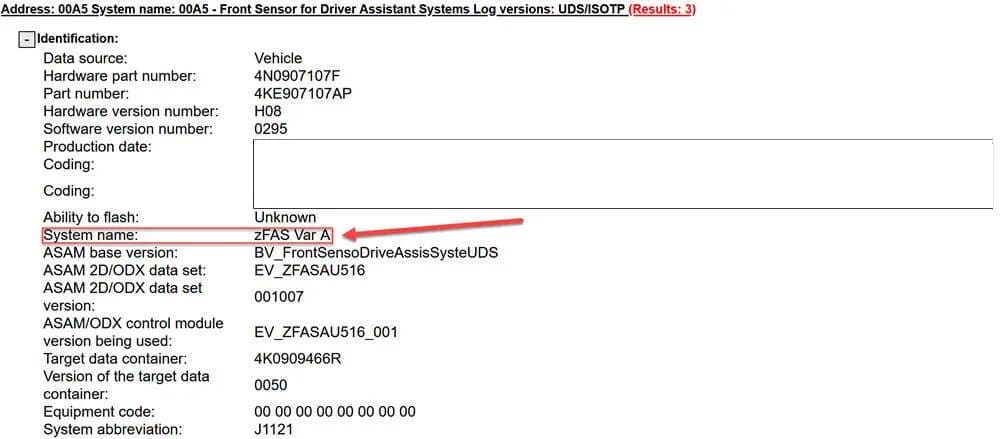
- Determine zFAS System Designation: Technicians must first identify the driver assist systems control module (zFAS), J1121 (address word 00A5), system designation using ODIS.
- Select Required Media: Based on the zFAS variant (A or B/C), the appropriate SD Card or USB-C drive is selected:
- For zFAS Var A, no SD Card is required.
- For MY20 Audi e-tron quattro and Audi e-tron Sportback with zFAS Var B/C, SD Card P/N 4N0906961AR is needed.
- For all other vehicles with zFAS Var B/C, USB-C drive P/N 4N1906961 is required.
- Pre-Update Steps: Back up the Event Data Recorder (EDR) for MY20 Audi e-tron models, obtain customer consent, and run the ODIS test program “J234 – Technical Service Bulletin (TSB) 2061023”. The diagnostic session results must be uploaded to GFF Paperless.
- Peripheral Control Module Update: Update the peripheral control modules using SVM code FASISKD5A001. This step takes 20-30 minutes.
- Exit Flash Context: Exit the flash context in ODIS to prepare for the next steps.
- Insert Update Media: Insert the required SD Card or USB-C drive into the vehicle. Refer to TSB 2056558 for MY20 MIB2+ software updates and TSB 2060523 for other MIB3 software updates.
- zFAS Application Software Update: Update the zFAS application software using SVM Code FASISKD5A002. This update takes approximately 30 minutes.
- Bus Sleep Cycle: After the update, allow the vehicle to perform a bus sleep cycle by exiting the flash context, turning off the ignition, removing the battery charger and diagnostic dongle, closing all doors, hood, and trunk, locking the vehicle, and waiting approximately six minutes without handling the vehicle.
Required Tools and Parts
To perform the software update, specific tools and parts are necessary:
- ODIS Tester
- SVM code (FASISKD5A001, FASISKD5A002)
- Software update package on SD Card (if required), or downloadable via MirrorServer using the SD Creator Program.
- SD Card P/N 4N0906961AR (for MY20 Audi e-tron quattro, Audi e-tron sportback quattro with zFAS B/C)
- USB-C drive P/N 4N1906961 (for A6, A7, A8, Q7, Q8, MY21 Audi e-tron quattro, and Audi e-tron sportback quattro with zFAS B/C)
This Technical Service Bulletin, 90 23 92 2063502/6, supersedes Group 91 number 22-98 dated May 4, 2022. Other referenced TSBs include 2011732 (SVM operating instructions), 2056558 (MIB2+ update), 2047812 (SD Creator), 2060523 (MIB3 update), and 2062601 (DTC U110100).
Warranty Information
This repair is covered under warranty for up to 48 months or 50,000 miles. For Certified Pre-Owned (CPO) vehicles, G10 claim type applies, requiring owner verification. If the vehicle is outside of warranty, this TSB is for informational purposes only.
- Service Number: 9093
- Damage Code: 0039
- Labor Operations:
- Software Update (Includes checking for DTCs): 0151 0000 (Max 200 TU)
- Road test after the service procedure: 0121 0004 (10 TU)
All warranty claims must adhere to the Audi Warranty Policies and Procedures Manual.
Owner Action
If you are experiencing any of the described Audi e-tron driver assist malfunctions or see related warning messages in your instrument cluster, it is recommended to schedule an appointment with an authorized Audi dealership. The software update is crucial for resolving these issues and ensuring the proper functioning of your vehicle's safety systems. Be prepared for your vehicle's personalization settings to potentially reset after the update.
NHTSA ID: 10230995
Frequently Asked Questions
- What does DTC B200FF9 mean for my Audi?
- DTC B200FF9 indicates an internal malfunction within your Audi's driver assist control modules, such as the front corner radar or lane change assist modules. This can lead to various driver assist system malfunctions, including issues with lane change assist, traffic sign recognition, and Adaptive Cruise Assist.
- My Audi's instrument cluster shows 'Intersection assist: fault.' What should I do?
- This message, along with others like 'Side assist and exit warning system: fault,' indicates a problem with your Audi's driver assist systems. Audi Technical Service Bulletin 90 23 92 2063502/6 addresses these Audi e-tron driver assist malfunctions with a software update. You should contact your Audi dealership to schedule a service appointment.
- Will fixing these driver assist malfunctions reset my car's settings?
- Yes, the software update outlined in TSB 90 23 92 2063502/6 affects multiple control modules, and 'Certain customer personalization settings might be reset to factory settings by this update.' Your dealership should inform you about this possibility.
- Is the software update for Audi driver assist malfunctions covered under warranty?
- Yes, this software update is generally covered under Audi's warranty for up to 48 months or 50,000 miles. For Certified Pre-Owned vehicles, specific conditions apply. If your vehicle is outside of warranty, the bulletin serves as informational guidance.
Otras revisiones de este TSB
- 2025 Audi A5/Q5 Driver Assist System Fault U110100 TSBU110100
- 2025 Audi Driver Assist System Fault U110100 TSBU110100
- 2023-2026 Audi SOS Emergency Assist Malfunction TSBB200FF9
- 2021-2026 Audi Adaptive Light System Malfunction TSBB200FF9
- 2022-2026 Audi Emergency Assist System Malfunctions TSBB200FF9
- 2023-2026 Audi Adaptive Light System Malfunction TSB 2054202/6B200FF9
- 2025 Audi A5/S5 Driver Assist Fault U110100U110100
- 2023-2024 Audi Night Vision Assist Fault DTC U110100 TSBU110100
What Audi e-tron owners report
Counted from the records in our database across 5 model years.
- 158
- Owner complaints
- 14
- Recalls
- 1,706
- Service bulletins
- 7
- Crashes reported
- 6
- Fires reported
- 3
- Injuries reported
The 2021 model year
36 complaints, the 2nd most of 5 model years on file. Owners reported 0 crashes, 1 fire and 0 injuries for this year, which also has 10 recalls on file.
Lane Departure, the system this article covers, accounts for 3 of 158 complaints (2%).
Complaints by model year
| 2019 | 84 | |
|---|---|---|
| 2020 | 1 | |
| 2021 | 36 | |
| 2022 | 31 | |
| 2023 | 6 |
Most-reported systems
- Electrical System — 81
- Power Train — 24
- Engine — 23
- Fuel/Propulsion System — 18
- Service Brakes — 18
Latest recalls for the 2021 model year
- 26V240000 — Service Brakes, Hydraulic (Apr 2026)
- 25V900000 — Back Over Prevention (Dec 2025)
- 23V867000 — Electrical System (Dec 2023)
Complaints are owner reports filed with NHTSA. They are unverified, and counts depend on how many vehicles were sold, so they are not a failure rate.
Related Articles
2021 Audi e-tron Electrical Malfunction and Power Loss
A 2021 Audi e-tron owner reported a severe 'Electrical Malfunction' resulting in complete loss of power on the highway. The issue has persisted despite dealer attempts to fix it over five months, posing significant safety risks.
2021-2026 Audi UTR Troubleshooting & FAQs TSB 2081409/1
This Audi Technical Service Bulletin (TSB 2081409/1) provides comprehensive answers to frequently asked questions and troubleshooting steps for the Audi Universal Traffic Recorder (UTR) accessory, covering topics like SD card compatibility, video playback, Wi-Fi issues, and more.
2021-2025 Audi Emergency Call System Fault TSB
Audi has released Technical Service Bulletin 2059528/18 to address an "Emergency call function: malfunction! Function unavailable. Please contact service" warning, often accompanied by a red SOS LED and DTC B200000. This issue affects various 2021-2025 Audi models and is due to a software problem…
2021-2026 Audi Adaptive Light System Fault C12B3FA TSB
Audi has released Technical Service Bulletin 2054202/7 to address an intermittent 'Audi adaptive light: system fault' message and DTC C12B3FA in various 2021-2026 models. This TSB outlines diagnosis and resolution for driver assistance system malfunctions.
2021-2026 Audi Parking Aid False Warnings TSB 2024323/12
This Technical Service Bulletin (TSB 2024323/12) details diagnostic and repair procedures for 2021-2026 Audi vehicles experiencing false parking aid warnings. Learn about environmental factors, sensor checks, and proper installation to resolve issues like 'Parking aid does not work / warning is…
Leave a comment
Comments are moderated and may take a moment to appear. Only your first name and the initial of your last name are shown publicly.
Comments
Be the first to comment.