2021-2022 Audi e-tron Battery Software Update 93N6
Audi has issued Technical Service Bulletin 93N6 for 2021-2022 e-tron and e-tron Sportback vehicles. This proactive software update addresses potential issues with the battery modules control unit, improving cell balancing and voltage stability. Owners should check eligibility.

Gilt auch für
- Audi e-tron
- 2022
- Audi e-tron Sportback
- 2021–2022
Audi has released Technical Service Bulletin (TSB) 93N6 UPDATE to proactively address potential issues with the Battery Modules Control Unit in certain 2019-2022 Audi e-tron and e-tron Sportback vehicles. This software update is crucial for optimizing the performance and longevity of the high-voltage battery system. The goal of this 2021 Audi e-tron battery software update is to ensure proper cell balancing and stable cell voltage measurements.
This TSB, identified as 93N6 UPDATE, applies to a significant number of vehicles: 20,067 E-TRON QUATTRO and 3,968 E-TRON SPORTBACK QUATTRO in the USA, and 1,349 E-TRON QUATTRO and 505 E-TRON SPORTBACK QUATTRO in Canada. The update is in effect until removed.
Revision History
The 93N6 UPDATE has undergone several revisions:
- Revision 4 (09/25/2024): Updated work procedure information.
- Revision 3 (05/30/2024): Updated warranty parameters.
- Revision 2 (02/14/2024): Updated work procedure information.
- Revision 1 (04/26/2022): Original publication.
Condition and Technical Background
The high-voltage battery system in Audi e-tron vehicles is composed of numerous individual battery cells. These cells naturally have slight variations in capacity and voltage. Without an effective balancing function, the overall capacity of the battery system can be limited by the weakest cell. This can lead to individual cells being overloaded and aging prematurely.
This 2021 Audi e-tron battery software update specifically targets a possible error in cell voltage measurement that could affect the efficiency of the battery's balancing function. By updating the software for the Battery Modules Control Unit, Audi aims to optimize the balancing process and stabilize cell voltage measurements, thereby preventing these potential issues from occurring.
Important Warnings for Owners and Technicians
Owners and technicians should be aware of several critical advisories related to this update:
- Radiator Fan Safety: "Radiator Fan(s) may cycle ON high speed during the Update Process! There is a serious risk that personal injury may result if contact is made with spinning fan blades. Keep hands and all objects away from Radiator Fan(s) during Update Process!"
- Vehicle Delivery: Applicable vehicles in dealer inventory "cannot be delivered until the Update is completed."
- Pre-existing Recalls: If safety recalls 93V2 or 93U9 are open for your vehicle, their evaluation steps must be completed before the 93N6 UPDATE. The 93N6 software update will erase high-voltage battery historical data, which could lead to inaccurate evaluations for 93V2 or 93U9 if performed out of order. "All Safety Recalls must be completed prior to completing this campaign."
- Diagnostic Tool Usage: Technicians are explicitly instructed: "DO NOT USE Guided Fault Finding (GFF) to perform this flash." and "Using GFF will cause the flash to take longer. Requests for additional time will not be considered." Also, "Performing a software update using a Bluetooth or WiFi connection increases the risk of losing connection during the update, which could result in damage to the control module. It also greatly increases the time required to perform the update. Requests for additional time or parts will be denied if the GFF log shows the update was performed using Bluetooth or WiFi."
- Battery Charger Connection: When connecting a charger, technicians must "DO NOT connect the ground cable directly to negative terminal of the battery." Instead, the negative cable should be connected to a grounding lug on the chassis.
- Voltage Maintenance: Battery voltage "must remain above 12.5 volts for the duration of the software update. Failure to do so may cause the update to fail, which could result in damage to the control module. Control modules damaged by insufficient voltage will not be covered."
- Diagnostic Tester Power: "Under no circumstances should the tester be used on battery power alone during the software update. Failure to do so may result in the tester powering off during the update, which could result in damage to the control module."
- Hazard Warning Lights: "The procedure may cancel itself if the hazard warning lights are not switched on. The hazard warning lights prevent the system from switching to bus sleep mode during the update."
- Warranty Claim Reimbursement: "A warranty claim may not be reimbursed if there is no confirmation response to support the claim."
Repair Procedure Summary
The 93N6 UPDATE involves a software flash for the Battery Modules Control Unit. The procedure requires specific conditions and tools to be met, and must be performed by an authorized Audi technician.
Eligibility and Pre-Conditions
- Eligibility Check: The vehicle must show the 93N6 code in the Elsa Campaign/Action Information screen on the day of repair to confirm eligibility. Elsa is the only valid inquiry/verification source. Technicians must print the Elsa screen showing an "open" status for the campaign.
- ODIS Software: The ODIS software on the VAS Diagnostic Tester must be completely up to date. Technicians should refer to the "Alerts" section on ServiceNet for the current ODIS version.
- Battery Charger: A battery charger, such as the GRX3000VAS (or equivalent), must be connected to the vehicle battery and remain connected throughout the update. Battery voltage must be maintained above 12.5 volts.
- Diagnostic Tester Settings: Screen saver and power saving settings on the diagnostic tester must be turned off to prevent the tester from entering power save mode during the update.
- Tester Power Supply: The VAS Diagnostic Tester must be plugged in using its supplied power adapters, not relying on battery power alone.
- Connection Method: The VAS Diagnostics Interface MUST ONLY be connected to the tester with a USB cable. Bluetooth or WiFi connections are prohibited.
- Hot-Fix Patches: Any ODIS "Hot-Fix" patches installed must be removed from the scan tool before beginning this operation.
Step-by-Step Update Process
- Vehicle Preparation: Open the hood and the battery cover. Attach the GRX3000VAS Tester/Charger (or equivalent) in power supply mode to the vehicle battery or underhood charging posts. Connect the positive cable to the positive terminal and the negative cable to a grounding lug on the chassis (DO NOT connect to the negative terminal of the battery).
- Hazard Lights: Switch on the hazard warning lights to prevent the system from entering bus sleep mode.
- Connect Diagnostic Tester: Connect the VAS6150X/VAS6160X Diagnostic Tester to the vehicle using a USB cable. Start the ODIS program.
- Confirm USB Connection: Confirm that the scan tool is communicating with the diagnostic head via USB. If Bluetooth or WiFi symbols are shown, disconnect and reconnect the USB cable.
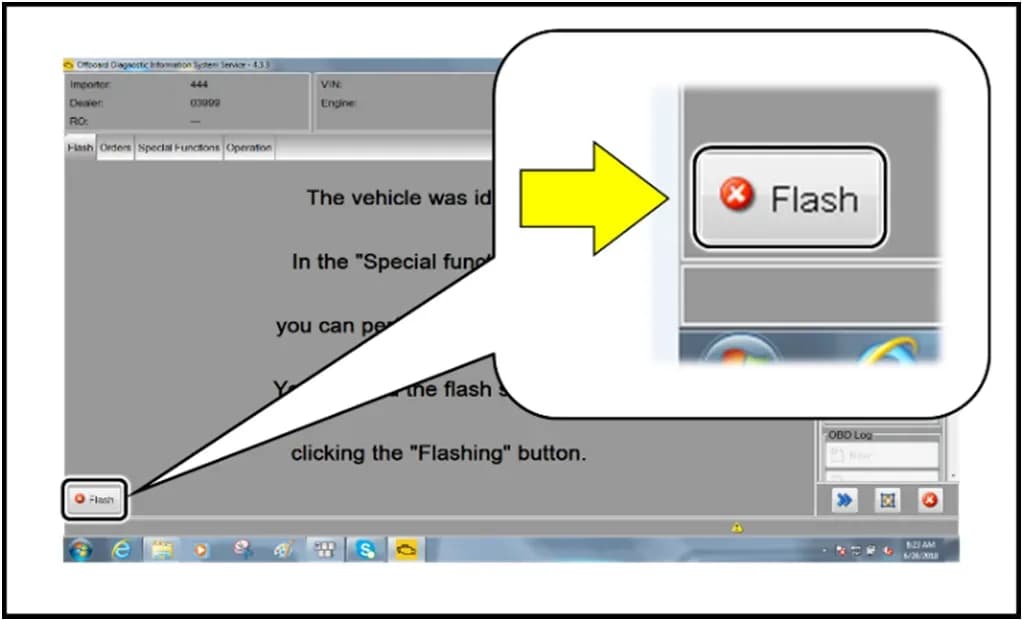
- Initiate Flash: From the ODIS home screen, highlight "Flash" (not "Diagnosis" or Guided Fault Finding). Select "Starting Flashing" and follow the on-screen prompts. When prompted for an RO, select "No RO".
- SVM Code Input: Highlight "SVM – Code Input" and select "Perform test." Enter the corrective action code 93N6A268. Select "Accept" and follow any further on-screen prompts.
- Post-Flash Procedures: After the flash is successfully completed, select "Send" to send the diagnostic protocol online. Click "Flash" to exit the flash session. To clear any event memory entries generated during the flashing, put the vehicle into bus sleep mode by disconnecting the diagnostic tester, removing the key from the vehicle, and locking the vehicle with the remote for 6 minutes.
Required Tools
Authorized Audi service centers will utilize specific equipment for this software update:
- Battery Tester/Charger: GRX3000VAS (or equivalent)
- Diagnostic Tester: VAS6150X/VAS6160X (or equivalent)
Warranty Information
This 2021 Audi e-tron battery software update is performed under the High-Voltage Battery Warranty. After the update, the claim must be entered as soon as possible to prevent work from being duplicated. The Service Number for this campaign is 93N6, with a Damage Code of 0099 and Parts Vendor Code 002. The Causal Indicator should be marked as "Mark labor as causal."
Claim Types are 710 for sold vehicles and 790 for unsold vehicles. The following labor operations and time units are specified:
| Labor Op | Time Units | Description |
|---|---|---|
| 2706 89 50 | 10 | Connect battery charger |
| 9301 25 99 | Time stated on diagnostic protocol | Update battery module control module software |
| 9035 33 99 | 10 | Activate bus sleep mode |
If the customer refused campaign work or the vehicle is outside the specified warranty parameters, U.S. dealers must submit a request through Audi Warranty Online under the Campaigns/Update option. Canadian dealers must upload the repair order to Audi WIN/Operations/Campaign Closure.
Owner Action
If you own a 2019-2022 Audi e-tron or e-tron Sportback, it is recommended to contact an authorized Audi dealer. They can check your vehicle's eligibility for the 93N6 UPDATE using the Elsa Campaign/Action Information screen. This proactive software update is performed under the High-Voltage Battery Warranty. The dealer will inform you in writing of all work performed, including this 2021 Audi e-tron battery software update.
Source: NHTSA ID: 11009284
Galerie
11 Bilder
Frequently Asked Questions
- What is the Audi 93N6 UPDATE?
- The Audi 93N6 UPDATE is a Technical Service Bulletin (TSB) providing a software update for the Battery Modules Control Unit in certain Audi e-tron and e-tron Sportback vehicles. Its purpose is to optimize battery cell balancing and stabilize cell voltage measurements.
- Which Audi models are affected by the 93N6 battery software update?
- This 93N6 battery software update applies to 2019-2022 Audi e-tron Quattro and e-tron Sportback Quattro models in both the USA and Canada. You should confirm your specific vehicle's eligibility with an authorized Audi dealer.
- What are the benefits of the 93N6 software update?
- The 93N6 software update proactively prevents issues related to battery cell imbalances. By optimizing the control unit's balancing function and stabilizing cell voltage measurement, it helps ensure the high-voltage battery operates efficiently and extends its lifespan.
- How do I know if my Audi e-tron needs the 93N6 UPDATE?
- You should contact an authorized Audi dealer. They can check your vehicle's eligibility by looking for the 93N6 code in the Elsa Campaign/Action Information screen. This update is performed under the High-Voltage Battery Warranty.
- Are there any other recalls or campaigns I should be aware of before the 93N6 update?
- Yes, if your vehicle has open safety recalls 93V2 or 93U9, their evaluation steps must be completed before the 93N6 update. All safety recalls must be completed prior to this campaign to ensure proper data recording and avoid potential issues.
What Audi e-tron owners report
Counted from the records in our database across 5 model years.
- 158
- Owner complaints
- 14
- Recalls
- 1,706
- Service bulletins
- 7
- Crashes reported
- 6
- Fires reported
- 3
- Injuries reported
The 2021 model year
36 complaints, the 2nd most of 5 model years on file. Owners reported 0 crashes, 1 fire and 0 injuries for this year, which also has 10 recalls on file.
Complaints by model year
| 2019 | 84 | |
|---|---|---|
| 2020 | 1 | |
| 2021 | 36 | |
| 2022 | 31 | |
| 2023 | 6 |
Most-reported systems
- Electrical System — 81
- Power Train — 24
- Engine — 23
- Fuel/Propulsion System — 18
- Service Brakes — 18
Latest recalls for the 2021 model year
- 26V240000 — Service Brakes, Hydraulic (Apr 2026)
- 25V900000 — Back Over Prevention (Dec 2025)
- 23V867000 — Electrical System (Dec 2023)
Recent owner reports
I own a 2021 Audi e-tron with approximately 58000 miles. Beginning in March 2026, the vehicle developed intermittent Virtual Cockpit/instrument-cluster problems with blank display. I reported the condition to Audi dealer of Princeton NJ.
Read owner complaints →Moisture build-up in the high-voltage electrical system through a faulty seal on the charging socket, which can cause a short circuit and significantly increase the risk of a vehicle fire.
Complaints are owner reports filed with NHTSA. They are unverified, and counts depend on how many vehicles were sold, so they are not a failure rate.
Related Articles
2021 Audi e-tron Electrical Malfunction and Power Loss
A 2021 Audi e-tron owner reported a severe 'Electrical Malfunction' resulting in complete loss of power on the highway. The issue has persisted despite dealer attempts to fix it over five months, posing significant safety risks.
2021-2026 Audi UTR Troubleshooting & FAQs TSB 2081409/1
This Audi Technical Service Bulletin (TSB 2081409/1) provides comprehensive answers to frequently asked questions and troubleshooting steps for the Audi Universal Traffic Recorder (UTR) accessory, covering topics like SD card compatibility, video playback, Wi-Fi issues, and more.
2021-2025 Audi Emergency Call System Fault TSB
Audi has released Technical Service Bulletin 2059528/18 to address an "Emergency call function: malfunction! Function unavailable. Please contact service" warning, often accompanied by a red SOS LED and DTC B200000. This issue affects various 2021-2025 Audi models and is due to a software problem…
2021-2026 Audi Adaptive Light System Fault C12B3FA TSB
Audi has released Technical Service Bulletin 2054202/7 to address an intermittent 'Audi adaptive light: system fault' message and DTC C12B3FA in various 2021-2026 models. This TSB outlines diagnosis and resolution for driver assistance system malfunctions.
2021-2026 Audi Parking Aid False Warnings TSB 2024323/12
This Technical Service Bulletin (TSB 2024323/12) details diagnostic and repair procedures for 2021-2026 Audi vehicles experiencing false parking aid warnings. Learn about environmental factors, sensor checks, and proper installation to resolve issues like 'Parking aid does not work / warning is…
Leave a comment
Comments are moderated and may take a moment to appear. Only your first name and the initial of your last name are shown publicly.
Comments
Be the first to comment.