2011-2022 Hyundai BCM Software Update & Anti-Theft Decals
Hyundai TSB 23-01-014H-5 (SERVICE CAMPAIGN 993) updates IBU/BCM software and adds anti-theft decals for 2011-2022 Hyundai models lacking immobilizers or START/STOP buttons. This supersedes 23-01-014H-4, enhancing burglar alarm and ignition logic. Dealers must perform this update on affected…

Gilt auch für
- Hyundai Accent
- 2021–2022
- Hyundai Elantra
- 2021–2022
- Hyundai Kona
- 2021–2022
- Hyundai Palisade
- 2021
- Hyundai Santa Fe
- 2021–2022
- Hyundai Tucson
- 2021
- Hyundai Veloster
- 2021
- Hyundai Venue
- 2021
▸ 2 weitere anzeigen▾ Weniger anzeigen
Hyundai has released Technical Service Bulletin (TSB) 23-01-014H-5, which supersedes the previous TSB 23-01-014H-4. This bulletin details a critical service campaign, identified as SERVICE CAMPAIGN 993, focused on enhancing vehicle security. The campaign involves a software update for the Integrated Body Control Unit/Body Control Module (IBU/BCM) and the installation of two anti-theft decals on the front windows.
The primary goal of this Hyundai BCM software update is to revise the OEM Hyundai burglar alarm system operation and ignition start logic. This update specifically targets certain 2011-2022 Hyundai models that were not originally equipped with an immobilizer or a START/STOP ignition button. Owners of affected vehicles should be aware of this important update to ensure their vehicle's security systems are functioning optimally.
What This Service Campaign Addresses
Many modern vehicles rely on immobilizer systems or push-button start functionality for enhanced security. However, certain Hyundai models from 2011-2022 were produced without these features. This TSB addresses potential vulnerabilities by updating the IBU/BCM software, which controls various electrical functions including the vehicle's security and ignition systems.
The software revision aims to improve the burglar alarm system's effectiveness and refine the ignition start logic, making these vehicles more secure against theft. In addition to the software update, the campaign includes the installation of visible anti-theft decals on the front windows, serving as a deterrent and indicating the vehicle has received this security enhancement. This comprehensive approach ensures that the Hyundai BCM software update provides a robust security improvement.
Important Warnings and Owner Information
Hyundai has provided several crucial advisories for both technicians and vehicle owners regarding this service campaign, TSB 23-01-014H-5:
- Dealer Obligation: Dealers are mandated to perform this service campaign on all affected vehicles prior to customer retail delivery. Furthermore, the update must be completed whenever an affected vehicle is brought into the shop for any maintenance or repair.
- Aftermarket Systems: Owners should be aware that "Vehicles equipped with aftermarket/add-on alarms or remote start systems may not operate normally if the IBU/BCM is updated with this software." It is crucial to inform your dealer about any such systems before the update is performed.
- Manual Update Caution: If an automatic software update fails due to an unidentified ROM ID, technicians are explicitly instructed: "DO NOT perform the update using Manual Mode, call Techline for further instructions."
- Error Message Handling: In case the software update fails at any percentage (not related to GDS disconnection or battery issues), technicians should "Select OK when the error message pops up, and DO NOT SELECT ANYTHING ELSE, LEAVE EVERYTING AS IS." The ignition should then be turned OFF for 15 seconds, then ON, and the manual update procedure followed.
- Key Fob Activation: "Once the upgrade procedure has been completed, the key fob buttons to lock and unlock the vehicle are required to activate/deactivate the anti-theft system. After using the key fob to activate the anti-theft system, the key fob must be used to first disarm the system prior to attempting to start the vehicle."
- Tinted Windows: "If the window is tinted with a non-legal shade, inform the customer of the possible poor visibility of the anti-theft decals."
Parts Required
For this service campaign, the following part is required:
- Part Name: Anti-Theft Decal
- Part Number: NP001-SC993
- Quantity: 2 decals per vehicle
Note that the anti-theft decals are ordered in a roll of 500. Ordering information can be found in the SC993 Parts Bulletin located in the Documents Library in WebDCS.
Warranty Claim Information
All claims related to this service campaign (SERVICE CAMPAIGN 993) must be submitted through the Campaign Claim Entry Screen. Hyundai's Digital Documentation Policy requires strict adherence to validation procedures for all claims. This includes VIN and mileage validation via VCI connection or photo capture, and photo capture(s) of the inspection/repair part as outlined in the TSB. Claims with incomplete, illegible, or missing documentation will be subject to debit.
- Inspection Only (Vehicles with START/STOP button or Immobilizer Lamp):
- OP. TIME: 0.1 M/H
- Causal Part: 114
- Nature: ZZ3
- Inspection and IBU/BCM Upgrade and Decals Application (Vehicles without START/STOP button or Immobilizer Lamp):
- OP. TIME: 0.3 M/H or 0.4 M/H (depending on model, see TSB for specifics)
- Causal Part: 114
- Nature: ZZ3
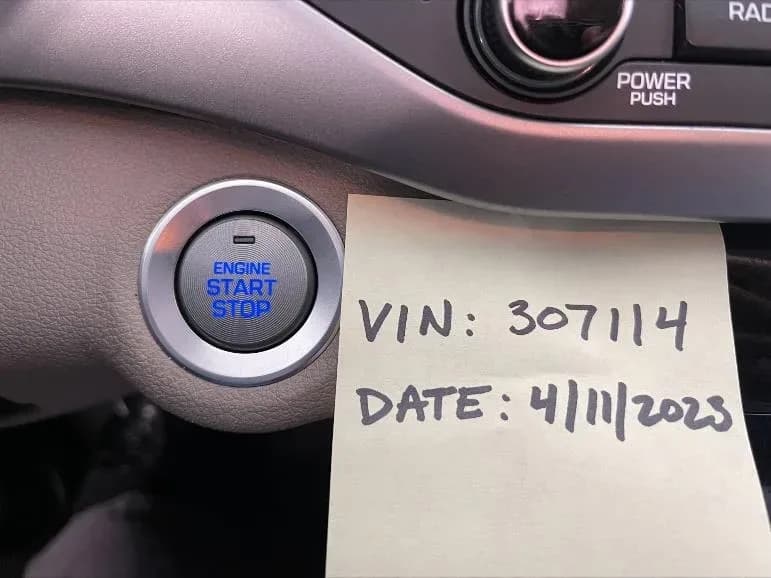
These operation times include inspection, completing decal installation while the software updates, taking STUI photos, and uploading. STUI photos must clearly show the anti-theft decals on the driver and passenger front windows, along with a piece of paper displaying the last 6 digits of the VIN and the repair date.
Detailed Service Procedure
This service procedure, outlined in TSB 23-01-014H-5, involves three main steps: an initial inspection, the IBU/BCM software update, and the anti-theft decal installation. A guided video for the software update is available at https://vimeo.com/796843448/49ace103a8.
1. Initial Vehicle Inspection
Before proceeding with the software update, technicians must inspect the vehicle to determine if it is equipped with a START/STOP button or an immobilizer lamp. This is crucial as the update is only for vehicles not equipped with these features.
- Check for START/STOP Button: Visually confirm if the vehicle has a START/STOP button. If present, use the STUI system to take a picture of the button with a piece of paper showing the last 6 digits of the VIN and the repair date. Upload these photos to STUI.
- Check for Immobilizer Lamp: If the vehicle does not have a START/STOP button, proceed to check for an immobilizer lamp. For vehicles with a mechanical key ignition, turn the ignition to the ON position. Visually confirm if an immobilizer lamp is displayed on the instrument cluster. If present, use STUI to take a picture of the lamp on the instrument cluster with a piece of paper showing the last 6 digits of the VIN and the repair date. Upload these photos to STUI.
- Decision Point:
- If the vehicle is equipped with a START/STOP button or an immobilizer lamp, the procedure is complete. Submit an "INSPECTION ONLY" campaign claim.
- If the vehicle is not equipped with a START/STOP button or an immobilizer lamp, proceed to perform the software update and decal installation.
2. IBU/BCM Software Update
This step involves updating the Integrated Body Control Unit/Body Control Module (IBU/BCM) software using the GDS system.
- System Selection: On the GDS system, select "IBU/BCM" as the system to update.
- ID Check: Perform an ID Check. The GDS will display the "Currently in Vehicle" ROM ID and the "Latest Update" ROM ID. Technicians must compare the current ROM ID to the ROM ID information tables provided in the TSB to determine if an update is needed. It is critical to "Take a picture/write down the current ROM ID in case manual update is required." This information will be used to select the correct manual passcode/event if auto update fails.
- GDS Software Update: Perform the GDS software update. Technicians should refer to TSB 15-GI-001 for detailed procedures on tablet-based Mobile GDS ECU updates. The update must initially be performed in Auto Mode.
- Simultaneous Decal Installation: While the software is updating, proceed with the anti-theft decals installation as outlined below.
- Verification: After the update, ensure it was successful by checking the latest ROM ID.
- DTC Check: After the software has updated, check for Diagnostic Trouble Codes (DTCs) in all menus and erase any stored DTCs.
- Completion: The software update is now complete.
3. Anti-Theft Decals Installation
This procedure involves installing two anti-theft decals on the front driver and passenger windows.
- Template Preparation: Print the last page of TSB 23-01-014H-5, which serves as the anti-theft decals installation template. "The anti-theft decal template can be reused for all models."
- Cut Template: Fold the template from the bottom upward to the solid line, then cut out the two indicated rectangular sections.
- Window Preparation: Roll both the front driver and passenger windows to their uppermost position. Clean the inside lower left corner of the front driver side window and the lower right corner of the front passenger side window using rubbing alcohol and a new rag.
- Template Alignment: Align the template approximately 1/4 inch next to the existing label's/decal's edge on the window. Use masking tape to secure the template onto the glass and door panel.
- Decal Application: Tear or cut two anti-theft decals from the roll. Without touching the bottom (glue side) of the decal – as "Avoid touching the bottom (glue side) of the decal as the fingerprint will reduce the adhesive strength to the window glass." – carefully pull back the paper side halfway. Align the decal within the cut-out rectangle template and firmly press it down onto the window glass with your thumb.
- Final Steps: Remove the template. Continue pressing down on the decal to ensure there are no visible bubbles within it. Repeat steps 5-9 for the other window.
- STUI Documentation: Use STUI to take pictures of both the driver and passenger anti-theft decals on the front windows. These photos must include a piece of paper showing the last 6 digits of the VIN and the date of the repair. Upload these photos to STUI.
ROM ID and Passcode Information
The TSB provides extensive tables detailing ROM ID information and manual mode passcodes for various models and model years, including Sonata (YFa, LFa), Elantra (UD/MD, AD/ADa, CN7/CN7a, GT GD, GT PD), Venue (QX), Veloster (FS, JS), Kona (OS), Accent (HC), Tucson (LM, TL, NX4/NX4a), Santa Fe Sport (AN), Santa Fe (NC, TMa), Palisade (LX2), and Genesis Coupe (BK).
These tables list the BCM/IBU Part Numbers, corresponding Old ROM IDs, and the New ROM IDs after the update. They also provide specific passcodes for manual updates, which are crucial if an automatic update fails. For example, for Kona (OS) models, technicians are advised: "When selecting the manual update PASSCODE for Kona (OS), only look at the first 5 prefix of the BCM number. For example 95400-J9GE0, use the passcode 4485 because the first 5 prefix are 95400."
NHTSA ID: 10243452
Galerie
16 Bilder
Frequently Asked Questions
- What is the purpose of the Hyundai BCM software update?
- The Hyundai BCM software update, detailed in TSB 23-01-014H-5 (SERVICE CAMPAIGN 993), aims to revise the OEM burglar alarm system operation and ignition start logic for certain 2011-2022 Hyundai models that lack an immobilizer or START/STOP button. This enhances vehicle security.
- Are anti-theft decals part of this service campaign?
- Yes, the service campaign includes the installation of two anti-theft decals (part number NP001-SC993) on the front windows of affected vehicles. These decals serve as a visual deterrent and indicate the vehicle has received the security enhancement.
- What should I do if my vehicle has an aftermarket alarm or remote start system?
- Hyundai advises that "Vehicles equipped with aftermarket/add-on alarms or remote start systems may not operate normally if the IBU/BCM is updated with this software." It is crucial to inform your dealer about any such systems before the update is performed.
- What happens after the BCM software update is completed?
- After the update, you will need to use your key fob buttons to lock and unlock the vehicle to activate/deactivate the anti-theft system. The key fob must be used to disarm the system before attempting to start the vehicle for the first time after the update.
- How can I check if my Hyundai is affected by this BCM software update?
- You can check if your 2011-2022 Hyundai model is affected by contacting your Hyundai dealer or by checking for open campaigns using the 'Vehicle Information' screen via WEBDCS, which dealers use to identify open campaigns. This update applies specifically to vehicles not equipped with an immobilizer or START/STOP ignition button.
What Hyundai Tucson owners report
Counted from the records in our database across 22 model years.
- 6,738
- Owner complaints
- 37
- Recalls
- 564
- Service bulletins
- 276
- Crashes reported
- 145
- Fires reported
- 256
- Injuries reported
The 2022 model year
509 complaints, the 3rd most of 22 model years on file. Owners reported 31 crashes, 5 fires and 56 injuries for this year, which also has 3 recalls on file.
Electrical System, the system this article covers, accounts for 849 of 6,738 complaints (13%), including 83 for 2022.
Complaints by model year
| 2012 | 255 | |
|---|---|---|
| 2013 | 266 | |
| 2014 | 202 | |
| 2015 | 229 | |
| 2016 | 1,626 | |
| 2017 | 1,095 | |
| 2018 | 399 | |
| 2019 | 385 | |
| 2022 | 509 | |
| 2025 | 451 |
Most-reported systems
- Engine — 2,451
- Power Train — 1,273
- Electrical System — 849
- Service Brakes — 761
- Forward Collision Avoidance — 432
Latest recalls for the 2022 model year
- 25V893000 — Trailer Hitches (Dec 2025) — Park outside
- 23V038000 — Structure (Jan 2023)
- 21V938000 — Electrical System (Dec 2021)
Recent owner reports about electrical system
The contact owns a 2022 Hyundai Tucson. The contact stated while driving at an undisclosed speed, several unknown warning lights illuminated. The vehicle was taken to an independent mechanic, where it was diagnosed with ECU software error.
Read owner complaints →While driving my 2022 Hyundai Tucson Hybrid, the vehicle suddenly lost power, began shaking, and all warning lights illuminated at once. The car would not accelerate properly and became unsafe to operate in traffic.
Complaints are owner reports filed with NHTSA. They are unverified, and counts depend on how many vehicles were sold, so they are not a failure rate.
Related Articles
2021-2024 Hyundai Santa Fe / Tucson DTC U028700 EOP
Hyundai has issued Technical Service Bulletin (TSB) 26-AT-002H for certain 2021-2024 Santa Fe and Tucson vehicles. This TSB addresses diagnostic trouble code U028700, indicating a "Lost Communication With Trans Fluid Pump Module," which can cause the Idle Stop & Go (ISG) system to become…
2022 Hyundai Tucson Inoperable Horn Warranty Extension
Hyundai has issued a warranty extension for certain 2022 Tucson (NX4A) vehicles experiencing an inoperable horn. This issue, detailed in TSB 26-BE-004H, is caused by foreign substances oxidizing internal horn parts. Coverage is extended to 10 years/120,000 miles.
2022 Hyundai Tucson Inoperative Horn TSB 26-BE-004H
Hyundai has issued Technical Service Bulletin 26-BE-004H for certain 2022 Tucson (NX4A) vehicles experiencing an inoperative horn. This TSB extends warranty coverage to 10 years/120,000 miles for horn replacement due to internal oxidation from foreign substances.
2021-2022 Hyundai Anti-Theft Ignition Cylinder Protector TSB
Hyundai has issued Technical Service Bulletin 25-01-089H (Customer Satisfaction Campaign P33) to address vehicle theft concerns by installing an anti-theft ignition cylinder protector and anti-theft decals on various 2021-2022 models.
2021-2022 Hyundai Anti-Theft Ignition Cylinder Protector Campaign P33
Hyundai has launched Customer Satisfaction Campaign P33 for 2021-2022 models, offering a free anti-theft ignition cylinder protector and decals. This hardware upgrade, detailed in TSB 25-01-089H, is available upon customer request to counter social media theft methods.
Leave a comment
Comments are moderated and may take a moment to appear. Only your first name and the initial of your last name are shown publicly.
Comments
Be the first to comment.