2011-2022 Hyundai Immobilizer Logic & Anti-Theft Update
Hyundai TSB 23-01-014H-3 outlines a critical software update for the Integrated Body Control Unit (IBU/BCM) and the application of anti-theft decals for certain 2011-2022 Hyundai models. This update enhances the burglar alarm system and ignition start logic, addressing a potential security…
 Sarah Mitchell2022 Hyundai Tucson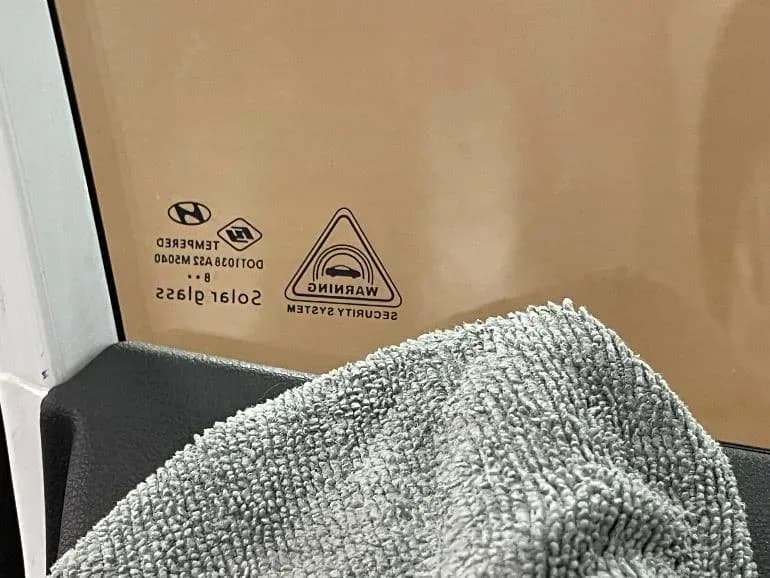
Also applies to
- Hyundai Accent
- 2021–2022
- Hyundai Elantra
- 2021–2022
- Hyundai Kona
- 2021–2022
- Hyundai Tucson
- 2021
- Hyundai Veloster
- 2021
- Hyundai Venue
- 2021
Hyundai has issued Technical Service Bulletin (TSB) 23-01-014H-3, also known as Service Campaign 993, to address security enhancements for a range of its vehicles. This bulletin focuses on an IBU/BCM software update and the application of anti-theft decals. The primary goal of this campaign is to revise the OEM Hyundai burglar alarm system operation and ignition start logic, particularly for vehicles that were not originally equipped with an immobilizer.
This initiative aims to provide a Hyundai immobilizer logic improvement for affected models, bolstering their protection against theft. The TSB supersedes a previous version, 23-01-014H-2, indicating an expansion of affected models and refinements to the update procedure.
Why This Update Matters
The absence of an immobilizer in certain vehicles can leave them vulnerable. This TSB directly addresses this by implementing a Hyundai immobilizer logic improvement through a software update to the Integrated Body Control Unit (IBU/BCM). The IBU/BCM is a central control module responsible for various body electrical functions, including security systems. By updating its software, Hyundai can enhance the vehicle's inherent security, making it more difficult for unauthorized individuals to start the engine or bypass the alarm system.
In addition to the software update, the installation of anti-theft decals serves as a visible deterrent. These combined measures contribute significantly to the overall security posture of the affected vehicles, providing owners with greater peace of mind regarding their vehicle's protection.
Important Warnings and Notices
Owners and technicians should be aware of several critical advisories outlined in TSB 23-01-014H-3:
- Dealer Obligation: Dealers must perform this service campaign on all affected vehicles prior to customer retail delivery and whenever an affected vehicle is in the shop for any maintenance or repair.
- Aftermarket Systems: Vehicles equipped with aftermarket/add-on alarms or remote start systems may not operate normally if the IBU/BCM is updated with this software.
- Pre-Update Check: Before proceeding with the update, technicians must confirm that the vehicle is not equipped with a START/STOP push button. Additionally, it's crucial to ensure that the vehicle does not have an "immobilizer lamp displayed on the instrument cluster when ignition is turned ON."
- GDS Update Mode: If the IBU/BCM update starts but then fails in Auto Mode, technicians must perform the update in Manual Mode to recover. If Auto Mode update is not available due to unidentified ROM ID, then DO NOT perform the update using Manual Mode, and call Techline for further instructions.
- Tinted Windows: If the window is tinted with a non-legal shade, inform the customer of the possible poor visibility of the anti-theft decals.
- Post-Update Activation: Once the upgrade procedure has been completed, the key fob buttons to lock and unlock the vehicle are required to activate/deactivate the anti-theft system. After using the key fob to activate the anti-theft system, the key fob must be used to first disarm the system prior to attempting to start the vehicle.
Parts Required
To complete this service campaign, the following part is required:
- Anti-Theft Decal: Part Number NP001-SC993. Two decals are required per vehicle. These decals are typically ordered in rolls of 500. Further ordering information can be found in the SC993 Parts Bulletin located in the Documents Library in WebDCS (HD.com/Parts/DocumentsLibrary/Reference Materials/Parts Bulletin).
Warranty Information
Warranty claims for this campaign should be submitted on the Campaign Claim Entry Screen. The operation involves a BCM/IBU UPGRADE AND DECALS APPLICATION. The labor operation time varies by model, with some models allocated 0.3 M/H and others 0.4 M/H. The causal part number varies depending on the specific model and BCM/IBU P/N, with Nature code I14 and Cause code ZZ3. The operation times include completing the decal installation for both front windows, taking STUI photos, and uploading them. All claims submitted with illegible, incomplete, missing, or incorrect pictures are subject to debit. If a part not covered by this campaign is found to need replacement while performing this service and is under warranty, a separate claim should be submitted. For out-of-warranty parts, a Prior Approval request for goodwill consideration is required.
Service Procedure Overview
The service procedure for this Hyundai immobilizer logic improvement involves two main components: a software update to the Integrated Body Control Unit (IBU/BCM) and the physical installation of anti-theft decals on the front windows. Both procedures are designed to be performed concurrently to optimize service time. Technicians must refer to TSB 15-GI-001 for tablet-based Mobile GDS ECU update procedures.
Software Update Procedure
- System Selection: On the GDS ECU Upgrade screen, select "IBU/BCM" as the system to update.
- ID Check: Perform an ID Check to verify the current software version. Compare the vehicle's IBU/BCM ROM ID to the ROM ID information tables provided in the TSB to determine if an update is necessary. These tables list old ROM IDs and their corresponding new ROM IDs for each specific model and BCM/IBU part number.
- GDS Software Update: Initiate the GDS software update in Auto Mode. If the update fails or Auto Mode is unavailable due to an unidentified ROM ID, follow the instructions to switch to Manual Mode or contact Techline.
- Verification: After the software update is complete, ensure that it was successful and that the IBU/BCM now reflects the latest ROM ID.
- DTC Check: Following the software update, check for any Diagnostic Trouble Codes (DTCs) in all menus and erase them if present.
Anti-Theft Decal Installation Procedure
This procedure is performed while the BCM software is being updated:
- Template Preparation: Print the last page of TSB 23-01-014H-3, which serves as the installation template. Fold the template upward from the bottom along the solid line.
- Template Cutting: Cut out the two rectangular sections from the folded template.
- Window Positioning: Roll both the front driver and passenger windows completely up.
- Surface Cleaning: Clean the inside lower left corner of the front driver side window and the inside lower right corner of the front passenger side window using rubbing alcohol and a new rag.
- Template Alignment: Align the prepared template approximately 1¼ inches from the edge of any existing label or decal on the window. Secure the template to the glass and door panel using masking tape.
- Decal Application: Tear or cut two anti-theft decals from the roll. Carefully peel back the paper backing halfway, ensuring not to touch the glue side of the decal to avoid reducing its adhesive strength. Align the decal within the cut-out rectangle of the template.
- Firm Press: Use your thumb to firmly press the decal onto the window glass.
- Final Adhesion: Remove the template and continue pressing down on the decal to ensure there are no visible bubbles.
- Repeat: Repeat steps 5-9 for the other window.
Post-Update Information
After both the software update and decal installation are complete, technicians must take pictures of both the driver and passenger anti-theft decals on the front windows. These pictures, along with a piece of paper displaying the last 6 digits of the VIN and the date of repair, must be uploaded to STUI. This documentation is crucial for warranty claim processing, as claims without proper STUI photos will be subject to debit.
NHTSA ID: 10243453
Gallery
14 images
Frequently Asked Questions
- What is Hyundai Service Campaign 993?
- Hyundai Service Campaign 993, detailed in TSB 23-01-014H-3, is a manufacturer initiative to update the Integrated Body Control Unit (IBU/BCM) software and install anti-theft decals on specific models. This aims to improve the burglar alarm system operation and ignition start logic, particularly for vehicles not originally equipped with an immobilizer.
- Which Hyundai models are affected by the immobilizer logic improvement?
- This campaign affects various 2011-2022 Hyundai models, including certain Tucson, Elantra, Kona, Accent, Veloster, and Venue vehicles that are not equipped with an immobilizer and do not have a START/STOP ignition button. For a complete list of affected vehicles, please refer to the 'Also applies to' section above.
- What does the 'IMMOBILIZER (BCM) LOGIC IMPROVEMENT' entail?
- The 'IMMOBILIZER (BCM) LOGIC IMPROVEMENT' involves a software update to the vehicle's Integrated Body Control Unit (IBU/BCM). This update modifies the vehicle's security protocols to enhance the burglar alarm system and ignition start logic, providing a more robust anti-theft mechanism for vehicles that previously lacked an immobilizer.
- Are there any warnings for vehicles with aftermarket alarms or remote start systems?
- Yes, Hyundai TSB 23-01-014H-3 explicitly states that vehicles equipped with aftermarket or add-on alarms or remote start systems may not operate normally if the IBU/BCM is updated with this new software. It is recommended to consult with your Hyundai dealer if your vehicle has such modifications.
- What should I do if my Hyundai is affected by this campaign?
- If your Hyundai is an affected model, you should contact your authorized Hyundai dealer to schedule the IBU/BCM software update and anti-theft decal installation. This service is performed free of charge under Service Campaign 993 (TSB 23-01-014H-3) and is a crucial step in enhancing your vehicle's security.
Related Articles
2021-2024 Hyundai Santa Fe / Tucson DTC U028700 EOP
Hyundai has issued Technical Service Bulletin (TSB) 26-AT-002H for certain 2021-2024 Santa Fe and Tucson vehicles. This TSB addresses diagnostic trouble code U028700, indicating a "Lost Communication With Trans Fluid Pump Module," which can cause the Idle Stop & Go (ISG) system to become…
2022 Hyundai Tucson Inoperable Horn Warranty Extension
Hyundai has issued a warranty extension for certain 2022 Tucson (NX4A) vehicles experiencing an inoperable horn. This issue, detailed in TSB 26-BE-004H, is caused by foreign substances oxidizing internal horn parts. Coverage is extended to 10 years/120,000 miles.
2022 Hyundai Tucson Inoperative Horn TSB 26-BE-004H
Hyundai has issued Technical Service Bulletin 26-BE-004H for certain 2022 Tucson (NX4A) vehicles experiencing an inoperative horn. This TSB extends warranty coverage to 10 years/120,000 miles for horn replacement due to internal oxidation from foreign substances.
2021-2022 Hyundai Anti-Theft Ignition Cylinder Protector TSB
Hyundai has issued Technical Service Bulletin 25-01-089H (Customer Satisfaction Campaign P33) to address vehicle theft concerns by installing an anti-theft ignition cylinder protector and anti-theft decals on various 2021-2022 models.
2021-2022 Hyundai Anti-Theft Ignition Cylinder Protector Campaign P33
Hyundai has launched Customer Satisfaction Campaign P33 for 2021-2022 models, offering a free anti-theft ignition cylinder protector and decals. This hardware upgrade, detailed in TSB 25-01-089H, is available upon customer request to counter social media theft methods.
Leave a comment
Comments are moderated and may take a moment to appear. Only your first name and the initial of your last name are shown publicly.
Comments
Be the first to comment.