2020-2025 Audi MIB3 Software Update TSB 2060523/3
This Audi Technical Service Bulletin (TSB) 2060523/3 provides detailed instructions for updating the MIB3 MMI system software in various 2020-2025 Audi models. It outlines required tools and the update procedure.
 Ahmet Topcu2022 Audi e-tron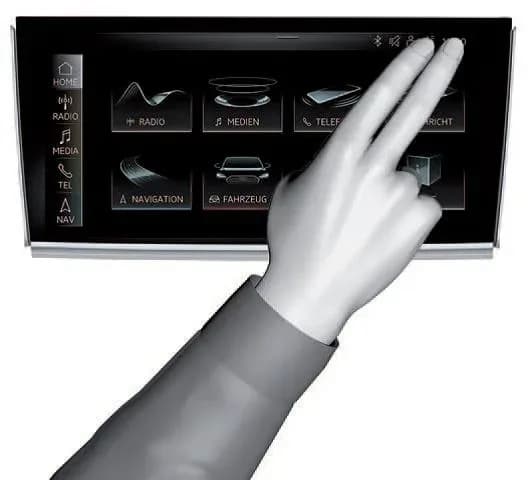
Also applies to
- Audi A3
- 2022–2024
- Audi A4
- 2021–2024
- Audi A4 allroad
- 2021–2024
- Audi A5
- 2021–2024
- Audi A6
- 2021–2024
- Audi A6 allroad
- 2021–2024
- Audi A7
- 2021–2024
- Audi A7 e
- 2021–2022
- Audi A8 L e
- 2021
- Audi e-tron
- 2021, 2023
- Audi e-tron GT
- 2022–2024
- Audi e-tron Sportback
- 2021–2022
- Audi Q3
- 2021–2024
- Audi Q5
- 2021–2024
- Audi Q5 e
- 2021, 2023, 2024
- Audi Q7
- 2021–2025
- Audi Q8
- 2021–2025
- Audi R8
- 2021–2023
- Audi RS 3
- 2022–2024
- Audi RS 5
- 2021–2024
- Audi RS 6 Avant
- 2021–2024
- Audi RS 7
- 2021–2024
- Audi RS e-tron GT
- 2022–2024
- Audi RS Q8
- 2021–2025
- Audi S3
- 2022–2024
- Audi S4
- 2021–2024
- Audi S5
- 2021–2024
- Audi S6
- 2021–2024
- Audi S7
- 2021–2024
- Audi S8
- 2021–2024
- Audi SQ5
- 2021–2024
- Audi SQ7
- 2021–2025
- Audi SQ8
- 2021–2025
- Audi TT
- 2021–2023
- Audi TT RS
- 2021–2022
- Audi TTS
- 2021–2023
▸ Show 30 more▾ Show fewer
Audi has released Technical Service Bulletin (TSB) 2060523/3, titled "MIB3: Software Update Instructions," to provide guidance for updating the MIB3 MMI system software. This bulletin, issued on August 9, 2024, supersedes previous TSB Group 91 number 23-63 dated January 27, 2023.
This TSB is crucial for ensuring that the MIB3 MMI system in affected vehicles receives necessary software updates. Owners of 2020-2025 Audi models, including the 2022 Audi e-tron, should be aware of this bulletin.
What is the MIB3 MMI System?
The MIB3 MMI system is Audi's third-generation modular infotainment platform. It was first introduced in the 2020 model year A4 and A5 models. Starting with the 2021 model year, all Audi vehicles are equipped with an MIB3 system, making this Audi MIB3 software update widely applicable.
Why This Update is Important
This Technical Service Bulletin (TSB) 2060523/3 addresses situations where a customer's vehicle, equipped with an MIB3 MMI system, requires a software update. The update ensures optimal performance and addresses any underlying issues that necessitate a software revision.
Required Tools and Materials
To perform the Audi MIB3 software update, technicians will need specific equipment:
- ODIS Tester: This diagnostic tool is essential for communicating with the vehicle's systems.
- SVM Code: A specific SVM code is required to initiate and validate the software update.
- MIB3 Software Update on USB Flash Drive: The update software must be loaded onto a USB flash drive. This drive must be formatted as "NTFS" to ensure proper functionality. Technicians can download the software from the MirrorServer using the SD Creator Program.
Important Notice
It is critical to use a USB flash drive instead of an SD card for MIB3 vehicles. Do not attempt the update with a USB SD card reader and an SD card. The USB flash drive must be formatted as "NTFS" by selecting "NTFS" from the "File Format" dropdown in the SD Creator ribbon.
Software Update Procedure Summary
The software update process typically takes between 45 to 75 minutes, including 15-45 minutes for the software update itself and 30 minutes for the SVM process. There are two primary methods for performing the update.
General MMI Software Update Process (Method 1)
This is the standard procedure for the Audi MIB3 software update:
- Deactivate Bluetooth or Wi-Fi connections in the ODIS tester.
- Connect the diagnostic head to the vehicle using a USB cable.
- Open the "Flash" feature in ODIS, then click "SVM code input" and "Perform check."
- Enter the SVM code for the update. The system will verify its applicability to the vehicle.
- Insert the prepared Update USB flash drive into the USB port in the vehicle's center console. The ODIS tester will guide the technician through the update, configure the new software, and report the build status to the server. Always follow the commands displayed on the tester screen.
Handling a Cancelled Update (Method 2)
If the update process is cancelled, a manual method can be used:
- Enter the red engineering menu by touching the screen with two fingers in the top right corner of the MMI display.
- Use the volume control to navigate the red engineering menu. Select "Update" and choose the USB as the source for the update medium.
- All control units scheduled for update will be displayed. Scroll down and initiate the update.
- After a successful manual update, perform the SVM code again using the ODIS tester. This ensures proper configuration and reports the new vehicle configuration to the SVM server.
Related Technical Service Bulletins
For more information regarding the SD Creator tool, refer to TSB 2047812, titled "00 SD Creator: how to set up and use the SD Creator for obtaining vehicle software updates via the MirrorServer." This document provides essential details on preparing the USB flash drive with the necessary software.
Warranty Information
For warranty claims related to this Audi MIB3 software update, technicians should refer to the warranty claiming instructions provided in the referring TSBs.
NHTSA ID: 11007258
Gallery
1 image
Frequently Asked Questions
- What is the purpose of Audi TSB 2060523/3?
- Audi Technical Service Bulletin 2060523/3 provides detailed instructions for performing a software update on the MIB3 MMI system in various Audi vehicles. This ensures the infotainment system is running the latest software version.
- Which Audi models are affected by this MIB3 software update?
- This TSB applies to a wide range of 2020-2025 Audi models equipped with the MIB3 MMI system, including the A3, A4, A5, A6, A7, A8, Q3, Q5, Q7, Q8, e-tron, R8, and TT series. The 2022 Audi e-tron is among the affected vehicles.
- What tools are needed to perform the Audi MIB3 software update?
- Technicians require an ODIS Tester, a specific SVM Code, and the MIB3 software update loaded onto a USB flash drive. The USB drive must be formatted as "NTFS" using the SD Creator Program.
- How long does the Audi MIB3 software update take?
- The entire software update process, including the software installation and the SVM process, is estimated to take approximately 45 to 75 minutes.
- What should I do if the Audi MIB3 software update is cancelled?
- If the update is cancelled, technicians can proceed with a manual update. This involves accessing the red engineering menu on the MMI screen, selecting "Update," and choosing the USB as the source, followed by re-running the SVM code with the ODIS tester.
Related Articles
2022 Audi e-tron Electrical System Problems: Complaints & TSBs
Owners of the 2022 Audi e-tron frequently report significant electrical system malfunctions, ranging from sudden power loss and charging hazards to software crashes. Braking issues and unexpected automatic emergency braking are also common concerns, alongside numerous technical service bulletins…
2022-2026 Audi Guided Fault Finding Reporting Obligation
Audi has issued Technical Service Bulletin TPI 2033392, also known as Transaction No. 2081531/1, regarding a reporting obligation for technicians when Guided Fault Finding produces an unexpected result. This TSB outlines the process for contacting Audi Product Support for diagnostic assistance.
2022-2026 Audi Infotainment System Complaints
Audi has released Technical Service Bulletin (TSB) 2081405/1 to address various customer complaints regarding infotainment systems in 2022-2026 Audi vehicles. This TSB helps technicians diagnose issues often caused by external media or mobile devices, rather than vehicle technology.
2018-2026 Audi Models Cracking Noise TSB 2061464/11
Audi Technical Service Bulletin 2061464/11 describes a cracking noise from the front or rear axle when changing direction in various 2018-2026 Audi models. The issue is due to stub axle movement and is resolved by bonding the stub axle to the wheel bearing with locking fluid.
2022-2026 Audi Parking Aid False Warnings TSB 2024323/13
Audi has released Technical Service Bulletin 2024323/13 to address customer complaints of false parking aid warnings. This bulletin details various environmental and vehicle-specific conditions that can cause the parking aid system to issue alerts even when no obstacles are present. It provides…
Leave a comment
Comments are moderated and may take a moment to appear. Only your first name and the initial of your last name are shown publicly.
Comments
Be the first to comment.