2021-2022 Audi Driver Assist System Warnings and Flicker TSB
Audi has released Technical Service Bulletin 2069244/1 to address various driver assist system warnings and flickering intersection assist arrows in 2021-2022 models. This TSB outlines a software update to resolve issues indicated by DTCs like C12D5FA, B200FF9, and B107A16.
 Marcus Weber2021 Audi e-tron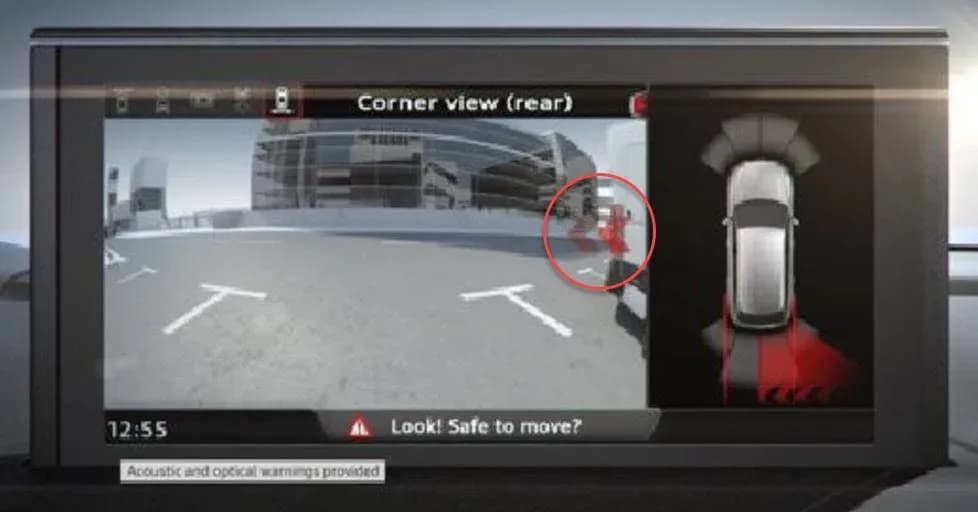
También aplica a
- Audi A6
- 2021–2022
- Audi A6 allroad
- 2021–2022
- Audi A7
- 2021–2022
- Audi A7 e
- 2021–2022
- Audi A8 L e
- 2021
- Audi e-tron
- 2022
- Audi e-tron GT
- 2022
- Audi Q7
- 2021–2022
- Audi Q8
- 2021–2022
- Audi RS 6 Avant
- 2021–2022
- Audi RS 7
- 2021–2022
- Audi RS e-tron GT
- 2022
- Audi RS Q8
- 2021–2022
- Audi S6
- 2021–2022
- Audi S7
- 2021–2022
- Audi S8
- 2021–2022
- Audi SQ7
- 2021–2022
- Audi SQ8
- 2021–2022
▸ Mostrar 12 más▾ Mostrar menos
Symptoms
Owners of 2021-2022 Audi vehicles may experience issues with their driver assist systems. The primary symptoms include:
- The "intersection assist arrows flicker for a short period after the vehicle is started" (as visually represented in Figure 1, showing RCTA/Intersection assist arrows with a "Look! Safe to move?" message).
- "Various driver assist warnings are displayed on the instrument cluster."
Fault Codes / DTCs
Technicians may find no Diagnostic Trouble Codes (DTCs) stored, or one or more of the following DTCs may be present in the control module for driver assist systems (zFAS) -J1121- (address word 00A5):
| Code | Description | Symptom Code | Module |
|---|---|---|---|
| C12D5FA | control unit for driver assist systems, picture processor does not respond | 221281 | zFAS -J1121- |
| B200FF9 | Internal Malfunction | 2117657 | zFAS -J1121- |
| B107A16 | Supply voltage for park assist sensor Voltage too low | 233474 | zFAS -J1121- |
After a software update, in rare cases, additional DTCs may be stored in the driver assist systems control unit -J1121- (diagnostic address 00A5):
| Code | Description | Symptom Code | Module |
|---|---|---|---|
| B200FF3 | Internal malfunction | 221193 | zFAS -J1121- |
| B170AF1 | Calibration step 2 not carried out | 2117696 | zFAS -J1121- |
If DTC B170AF1 is stored, the ODIS test plan calculated for B170AF1 should be performed. It is also noted that DTC B107A16 may still be stored after the update, but the fault will no longer cause permanent symptoms once the DTC is cleared.
Technical Background
These customer complaints, including the Audi e-tron intersection assist flicker, have been observed with prior versions of the control unit software for driver assist systems. The issues stem from software-related malfunctions affecting the performance of various driver assistance features.
Production Solution
Audi has implemented an optimized software version for the affected control units in production vehicles starting with model year 2023. This means newer vehicles should not exhibit these issues.
Superseded Bulletins
This TSB (90 23 99 2069244/1, dated February 2, 2023) replaces PSS 2065489/1: PSS 91 Intersection assist arrows flicker after the vehicle is started. For Model Years 2019 and 2020 A6, A7, A8, Q7, Q8, and e-tron quattro, refer to the following superseded PSS documents:
- PSS 2060332: PSS 90 Audi adaptive light/Audi pre sense malfunction or driver assist systems inop, DTC C12D5FA stored.
- PSS 2061489: PSS 90 Pre sense malfunction/driver assist systems sporadically inop, DTC B200FF9 is stored in the driver assist module.
- PSS 2061689: PSS 90 Parking aid inop, DTC B107A16 stored in the driver assistance system with symptom code 233474.
Important Warnings
NOTICE: If active fault messages about driver assist systems are shown in the instrument cluster, this TPI may not solve the problem. If the flashing procedure is started despite active fault messages, the flash routine will be aborted and it may be necessary to replace control units as a result. Please attempt to resolve those cluster messages by clearing vehicle DTCs and cycling the ignition before starting this procedure.
CAUTION: Always use DoIP (Diagnostics over Internet Protocol) when flashing a control module via ODIS in supported vehicles. Not selecting DoIP may lead to extremely long flash times that may not be fully reimbursed by warranty. When prompted with the message "Should the entered SVM code be accepted or the vehicle connection be changed", ensure DoIP is selected. If not, change the vehicle access protocol by selecting "-3- Change vehicle access (CAN, DoIP, CANFD)".
Repair Procedure Summary
This Technical Service Bulletin (TSB) outlines a software update procedure to resolve the driver assist system issues, including the Audi e-tron intersection assist flicker. The update process involves:
- Software Version Management (SVM) Update: Follow all instructions in TSB 2011732: 00 Software Version Management (SVM), operating instructions. The update may take between 30 and 90 minutes, depending on vehicle equipment and current software level.
- Vehicle Update via SVM Action Code: Update the vehicle using the SVM action code FASISKD6A001. This code is used for diagnostic address 00A5 (zFAS control unit) to update software to version 0381 or higher. For diagnostic address 0013, the software is updated to version 0501 or 0641 or higher. The old software versions for 0013 could be 0492 or 0500, and for 00A5 could be 0364, 0365, 0366, or 0371.
- Bus Sleep Cycle: After the update, perform a bus sleep cycle by exiting the flash context in ODIS, turning off the ignition, removing the charger and diagnostic dongle from the vehicle, closing the hood, trunk, and all doors, and waiting approximately 6 minutes until the vehicle has gone to "sleep."
Warranty Information
This repair is covered under warranty with the following details:
- Claim Type: 110 (up to 48 Months/50,000 Miles) or G10 (for CPO Covered Vehicles – Verify Owner). If the vehicle is outside of any warranty, this TSB is for informational purposes only.
- Service Number: 9093
- Damage Code: 0039
- Labor Operations: Software Update (Includes checking for DTCs) using operation code 0151 0000, with a maximum time allowance of 200 TU.
- Diagnostic Time: GFF (No allowance, 0 TU), Road test prior to service procedure (No allowance, 0 TU), Road test after service procedure (No allowance, 0 TU).
- Claim Comment: As per TSB 2069244/1. All warranty claims must adhere to the Audi Warranty Policies and Procedures Manual.
Additional Information
To complete this procedure, TSB 2011732: 00 Software Version Management (SVM), operating instructions, is a necessary reference. All part and service references provided in this TSB (2069244) are subject to change and/or removal. Always check with your Parts Department and/or ETKA for the latest information and parts bulletins, and the Repair Manual for fasteners, bolts, nuts, and screws that require replacement during the repair.
NHTSA ID: 10232759
Frequently Asked Questions
- What does the Audi TSB 2069244/1 address?
- TSB 2069244/1 addresses issues with driver assist systems in 2021-2022 Audi vehicles, including flickering intersection assist arrows and various driver assist warnings displayed on the instrument cluster. It provides a software update to resolve these problems.
- What DTCs are associated with the Audi e-tron intersection assist flicker?
- The primary DTC associated with the Audi e-tron intersection assist flicker and other driver assist system malfunctions is C12D5FA, indicating an issue with the picture processor in the driver assist control unit (zFAS). Other related DTCs include B200FF9 and B107A16.
- Will I be charged for this software update?
- If your vehicle is within the warranty period (up to 48 months/50,000 miles) or covered by a Certified Pre-Owned (CPO) warranty, the software update should be covered. If the vehicle is outside of any warranty, this TSB is for informational purposes only, and charges may apply.
- What should I do if I see active driver assist fault messages before the update?
- Before starting the software update procedure, it is crucial to attempt to resolve any active fault messages by clearing vehicle DTCs and cycling the ignition. Starting the flash procedure with active fault messages may cause the routine to abort and could necessitate control unit replacement.
- What is the SVM action code for this software update?
- The SVM action code required for this software update is FASISKD6A001. This code is used to update the software for the zFAS control unit (diagnostic address 00A5) and other relevant modules.
Otras revisiones de este TSB
- 2021-2026 Audi Adaptive Light System Malfunction TSBB200FF9
- 2023-2026 Audi Adaptive Light System Malfunction TSB 2054202/6B200FF9, B200FF3
- 2022-2026 Audi Emergency Assist System Malfunctions TSBB200FF9, B200FF3
- 2021-2026 Audi Driver Assist System Fault DTC C12D5FA TSBC12D5FA
- 2021-2026 Audi Driver Assist System Fault TSBC12D5FA
- 2023-2026 Audi SOS Emergency Assist Malfunction TSBB200FF9, B200FF3
- 2016-2026 Audi J775 Suspension Control Unit DTCs B200FF0-B200FF5B200FF3
- 2016-2026 Audi Air Suspension System Fault TSB 2067531/7B200FF3
Related Articles
2021 Audi e-tron Electrical Malfunction and Power Loss
A 2021 Audi e-tron owner reported a severe 'Electrical Malfunction' resulting in complete loss of power on the highway. The issue has persisted despite dealer attempts to fix it over five months, posing significant safety risks.
2021-2026 Audi UTR Troubleshooting & FAQs TSB 2081409/1
This Audi Technical Service Bulletin (TSB 2081409/1) provides comprehensive answers to frequently asked questions and troubleshooting steps for the Audi Universal Traffic Recorder (UTR) accessory, covering topics like SD card compatibility, video playback, Wi-Fi issues, and more.
2021-2025 Audi Emergency Call System Fault TSB
Audi has released Technical Service Bulletin 2059528/18 to address an "Emergency call function: malfunction! Function unavailable. Please contact service" warning, often accompanied by a red SOS LED and DTC B200000. This issue affects various 2021-2025 Audi models and is due to a software problem…
2021-2026 Audi Adaptive Light System Fault C12B3FA TSB
Audi has released Technical Service Bulletin 2054202/7 to address an intermittent 'Audi adaptive light: system fault' message and DTC C12B3FA in various 2021-2026 models. This TSB outlines diagnosis and resolution for driver assistance system malfunctions.
2021-2026 Audi Parking Aid False Warnings TSB 2024323/12
This Technical Service Bulletin (TSB 2024323/12) details diagnostic and repair procedures for 2021-2026 Audi vehicles experiencing false parking aid warnings. Learn about environmental factors, sensor checks, and proper installation to resolve issues like 'Parking aid does not work / warning is…
Leave a comment
Comments are moderated and may take a moment to appear. Only your first name and the initial of your last name are shown publicly.
Comments
Be the first to comment.