2021 Audi e-tron Charging Fault Service Action 93L9
Audi has issued Service Action 93L9 for 2021 e-tron vehicles to address issues with high-performance charging termination and charging flap malfunctions. A software update to the high-voltage charging unit is required.

Symptoms of the Audi e-tron Charging Fault
Owners of 2021 Audi e-tron vehicles may experience a specific Audi e-tron charging fault where the "high-performance charging procedure at public charging stations may sporadically be terminated." This means charging sessions might unexpectedly end, leaving the vehicle with an incomplete charge.
Additionally, owners might encounter problems with the charging port itself. The "charging flap can sometimes not be opened and/or the connector catch of the charging cable cannot be released." These issues indicate a problem with the high-voltage charging unit's software, affecting both charging functionality and physical access to the charging port.
Important Warnings and Owner Information
Audi has issued Service Action 93L9 to address the 2021 Audi e-tron charging fault. Owners should be aware of several critical points regarding this service action:
- Free of Charge Period: This service action is available free of charge only until September 01, 2026. If you choose to have this service performed after this date, your Audi dealer's normal repair costs will apply.
- Inventory Vehicles: Dealers are required to ensure that every affected inventory vehicle has this campaign completed before delivery to consumers. This prevents new owners from experiencing the issue immediately.
- Charging Settings Reset: The software update procedure may erase your customized charging settings. It is highly recommended to "Document the customer's charging settings prior to performing this procedure. Upon completion of this procedure, re-enter the customer's charging settings."
- Safety During Service: Technicians are warned that "Radiator Fan(s) may cycle ON high speed during the Update Process! There is a serious risk that personal injury may result if contact is made with spinning fan blades. Keep hands and all objects away from Radiator Fan(s) during Update Process!" This highlights the importance of having trained professionals perform the service.
- Diagnostic Connection: "Using Bluetooth or WiFi for this action is PROHIBITED! Damage caused to electronic components (e.g. ECM, TCM, etc.) during the SVM update process is not covered." The diagnostic interface MUST ONLY be connected via a USB cable.
- Battery Voltage: During the software update, the "Battery voltage must remain above 12.5 volts for the duration of the software update. Failure to do so may cause the update to fail, which could result in damage to the control module. Control modules damaged by insufficient voltage will not be covered."
- Screen Saver: The diagnostic tester's "screen saver and power saving settings are off. Failure to do so may result in the tester entering power save mode during the software update, which could result in damage to the control module."
- Tester Power: The VAS Diagnostic Tester must be plugged in using its supplied power adapters. "Under no circumstances should the tester be used on battery power alone during the software update. Failure to do so may result in the tester powering off during the update, which could result in damage to the control module."
- Flash Process: The update must be performed via "Audi Flashing" and "DO NOT USE Guided Fault Finding (GFF) to perform this flash. Using GFF will cause the flash to take longer. Requests for additional time will not be considered."
- ODIS Sessions: "All campaign software updates must be completed during a single, standalone ODIS Diagnostic Session." Also, any ODIS "Hot-Fix" patches must be removed before starting.
- Reimbursement: "Damages resulting from improper repair or failure to follow these work instructions are the dealer's responsibility and are not eligible for reimbursement under this action. Diagnosis and repair of pre-existing conditions in the vehicle are not covered under this action."
Dealer Claim Information
For authorized Audi dealers, the following details are provided for processing claims related to Service Action 93L9:
- Service Number: 93L9
- Damage Code: 0099
- Parts Vendor Code: 002
- Claim Type: Sold vehicle: 7 10, Unsold vehicle: 7 90
- Causal Indicator: Mark labor as causal
- Vehicle Wash/Loaner: Dealers are instructed to "Do not claim wash/loaner under this action."
- Criteria I.D.: 01
Labor Operations:
| Labor Op | Time Units | Description |
|---|---|---|
| 2706 89 50 | 10 | Connect battery charger |
| 9352 25 99 | Time stated on diagnostic protocol | Update high-voltage charger control module |
| 0150 00 00 | Time stated on diagnostic protocol | Perform GFF test plan |
Required Tools and Software
To perform this service action, technicians require specific equipment and software:
- Battery Tester/Charger: GRX3000VAS (or equivalent)
- Diagnostic Tester: VAS6150X / VAS6160X (or equivalent)
- Software: The ODIS software on the diagnostic tester must be completely up to date. The update targets software version 00C6 for the high-voltage battery charger.
- Technical Bulletin: Technicians should review Technical Bulletin 2011732 for Software Version Management (SVM) Operating Instructions.
Repair Procedure Summary
To resolve the 2021 Audi e-tron charging fault, an authorized Audi dealer will perform a software update to the high-voltage charging unit. The process involves several key steps to ensure a successful and safe update.
- Vehicle Preparation: The technician first checks the VIN in the Elsa system to verify campaign eligibility, ensuring the campaign status shows "open." Any outstanding Safety Recalls must be completed before proceeding. The ODIS software on the diagnostic tester must be current.
- Power Management: A battery charger, such as the GRX3000VAS, is connected in power supply mode to maintain battery voltage above 12.5 volts throughout the update. For vehicles with a Battery Monitoring Control Module -J367- or EFB Battery, the negative cable must connect to a chassis grounding lug, not directly to the battery's negative terminal.
- Diagnostic Setup: The diagnostic tester (VAS6150X or VAS6160X) is plugged into its power adapters, and the VAS Diagnostics Interface is connected to the tester via a USB cable. Wireless connections are strictly prohibited. The tester's screen saver and power-saving settings are disabled.
- Vehicle Configuration: The hood is opened, the ignition is switched on, the parking brake is applied, and all electrical consumers (headlights, heated seats, climate control) are switched off. Hazard lights are turned on to prevent the system from entering bus sleep mode during the update.
- Software Update Execution: The ODIS program is started, and communication with the scan tool via USB is confirmed. From the ODIS home screen, the technician selects "Flash," then "No RO." They highlight "SVM – Code Input," select "Perform test," and enter the corrective action code 93L9A291. After selecting "Accept," the technician follows the on-screen prompts to initiate the flash process.
Post-Repair Steps and Notes
After the software update is complete, several crucial steps are taken to finalize the repair and ensure proper system function:
- Ignition Cycle: Upon receiving confirmation of a successful update, the ignition must be turned off for 60 seconds and then turned back on. This "extra ignition cycle step must be followed, otherwise faults stored during the update may not be cleared upon exiting the Flash program."
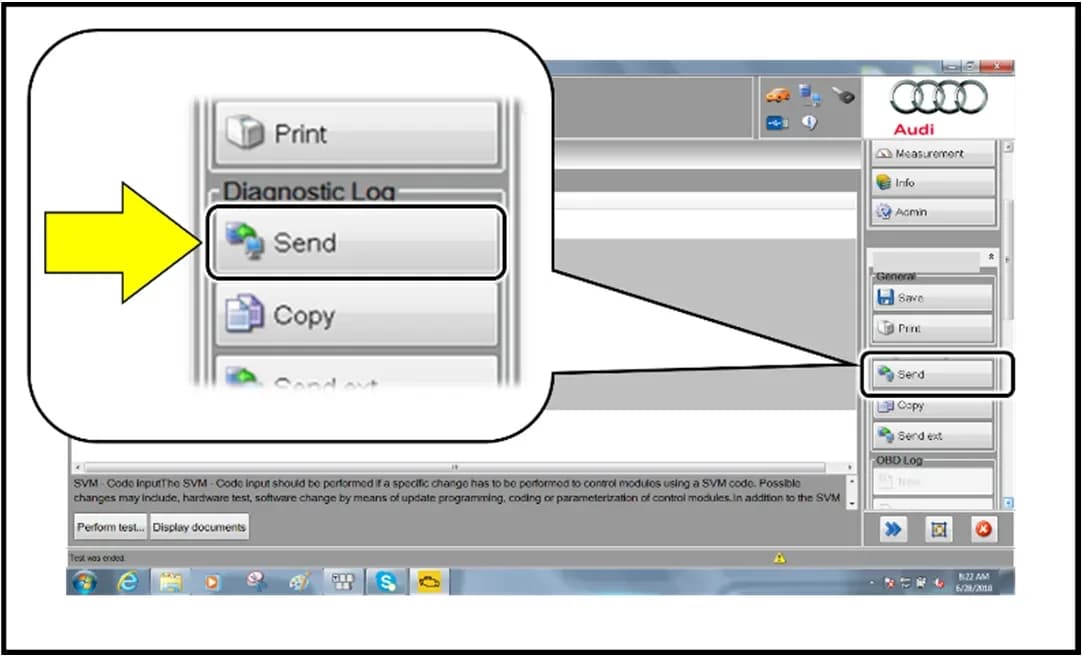
- Protocol Submission: The diagnostic protocol is then sent online by selecting "Send."
- Diagnostic Scan: The technician exits the flash session and performs a Guided Fault Finding (GFF) Diagnostic Scan of the vehicle. Under the "Test Plan" tab, the self-test "C6 – Reset charging timer and charging profiles to factory settings" is performed, followed by exiting GFF.
- Clearing Ghost Faults: "Certain 'ghost' faults may store in the '00C6 High-Voltage Battery Charger' control module after updating to software version 0079." For further information, technicians can reference TSB 2062631. To clear these, the vehicle is put into bus sleep mode by disconnecting the diagnostic tester, removing the key, and locking the vehicle with the remote for 5 minutes.
- Campaign Stamp: Finally, the repair order is stamped with either item# AUD4927ENG or AUD4927FRE to certify completion.
NHTSA ID: 10201553
Galerie
13 Bilder
Frequently Asked Questions
- What is the Audi e-tron charging fault addressed by Service Action 93L9?
- Service Action 93L9 addresses issues in the 2021 Audi e-tron where "high-performance charging procedure at public charging stations may sporadically be terminated," and the "charging flap can sometimes not be opened and/or the connector catch of the charging cable cannot be released."
- How is the 2021 Audi e-tron charging fault fixed?
- The Audi e-tron charging fault is fixed by updating the high-voltage charging unit software to version 00C6. This procedure is performed by an authorized Audi dealer using specialized diagnostic tools like the VAS6150X/VAS6160X and applying SVM code 93L9A291.
- Will this repair for the Audi e-tron charging fault cost me money?
- No, this service action is free of charge for owners until September 01, 2026. After this date, any repairs related to this issue will be at the owner's expense.
- What is SVM code 93L9A291?
- SVM code 93L9A291 is the specific corrective action code used by Audi technicians to perform the software update on the high-voltage charging unit for the 2021 Audi e-tron as part of Service Action 93L9. This code ensures the correct software is installed.
- What should I do if my 2021 Audi e-tron has charging issues?
- If your 2021 Audi e-tron is experiencing a charging fault, you should contact your authorized Audi dealer to schedule an appointment for Service Action 93L9. Remember to document your charging settings beforehand, as they may be reset during the software update.
What Audi e-tron owners report
Counted from the records in our database across 5 model years.
- 158
- Owner complaints
- 14
- Recalls
- 1,706
- Service bulletins
- 7
- Crashes reported
- 6
- Fires reported
- 3
- Injuries reported
The 2021 model year
36 complaints, the 2nd most of 5 model years on file. Owners reported 0 crashes, 1 fire and 0 injuries for this year, which also has 10 recalls on file.
Electrical System and Equipment, the system this article covers, accounts for 81 of 158 complaints (51%), including 24 for 2021.
Complaints by model year
| 2019 | 84 | |
|---|---|---|
| 2020 | 1 | |
| 2021 | 36 | |
| 2022 | 31 | |
| 2023 | 6 |
Most-reported systems
- Electrical System — 81
- Power Train — 24
- Engine — 23
- Fuel/Propulsion System — 18
- Service Brakes — 18
Latest recalls for the 2021 model year
- 26V240000 — Service Brakes, Hydraulic (Apr 2026)
- 25V900000 — Back Over Prevention (Dec 2025)
- 23V867000 — Electrical System (Dec 2023)
Recent owner reports about electrical system and equipment
I own a 2021 Audi e-tron with approximately 58000 miles. Beginning in March 2026, the vehicle developed intermittent Virtual Cockpit/instrument-cluster problems with blank display. I reported the condition to Audi dealer of Princeton NJ.
Read owner complaints →What component or system failed or malfunctioned, and is it available for inspection upon request? - While on highway the vehicle loosed all Power indicating Electrical Malfunction How was your safety or the safety of others put at risk?
Complaints are owner reports filed with NHTSA. They are unverified, and counts depend on how many vehicles were sold, so they are not a failure rate.
Related Articles
2021 Audi e-tron Electrical Malfunction and Power Loss
A 2021 Audi e-tron owner reported a severe 'Electrical Malfunction' resulting in complete loss of power on the highway. The issue has persisted despite dealer attempts to fix it over five months, posing significant safety risks.
2021-2026 Audi UTR Troubleshooting & FAQs TSB 2081409/1
This Audi Technical Service Bulletin (TSB 2081409/1) provides comprehensive answers to frequently asked questions and troubleshooting steps for the Audi Universal Traffic Recorder (UTR) accessory, covering topics like SD card compatibility, video playback, Wi-Fi issues, and more.
2021-2025 Audi Emergency Call System Fault TSB
Audi has released Technical Service Bulletin 2059528/18 to address an "Emergency call function: malfunction! Function unavailable. Please contact service" warning, often accompanied by a red SOS LED and DTC B200000. This issue affects various 2021-2025 Audi models and is due to a software problem…
2021-2026 Audi Adaptive Light System Fault C12B3FA TSB
Audi has released Technical Service Bulletin 2054202/7 to address an intermittent 'Audi adaptive light: system fault' message and DTC C12B3FA in various 2021-2026 models. This TSB outlines diagnosis and resolution for driver assistance system malfunctions.
2021-2026 Audi Parking Aid False Warnings TSB 2024323/12
This Technical Service Bulletin (TSB 2024323/12) details diagnostic and repair procedures for 2021-2026 Audi vehicles experiencing false parking aid warnings. Learn about environmental factors, sensor checks, and proper installation to resolve issues like 'Parking aid does not work / warning is…
Leave a comment
Comments are moderated and may take a moment to appear. Only your first name and the initial of your last name are shown publicly.
Comments
Be the first to comment.