2024-2025 Audi MMI Emergency Call Fault Software Update TSB
Audi Technical Service Bulletin 2079904/1 details a software update for MIB3 infotainment systems in certain 2024-2025 Audi A4, A5, S4, S5, RS5, and Q5 models. This update resolves issues with various MMI functions and the 'Emergency call fault' message.
 David Chen2024 Audi A5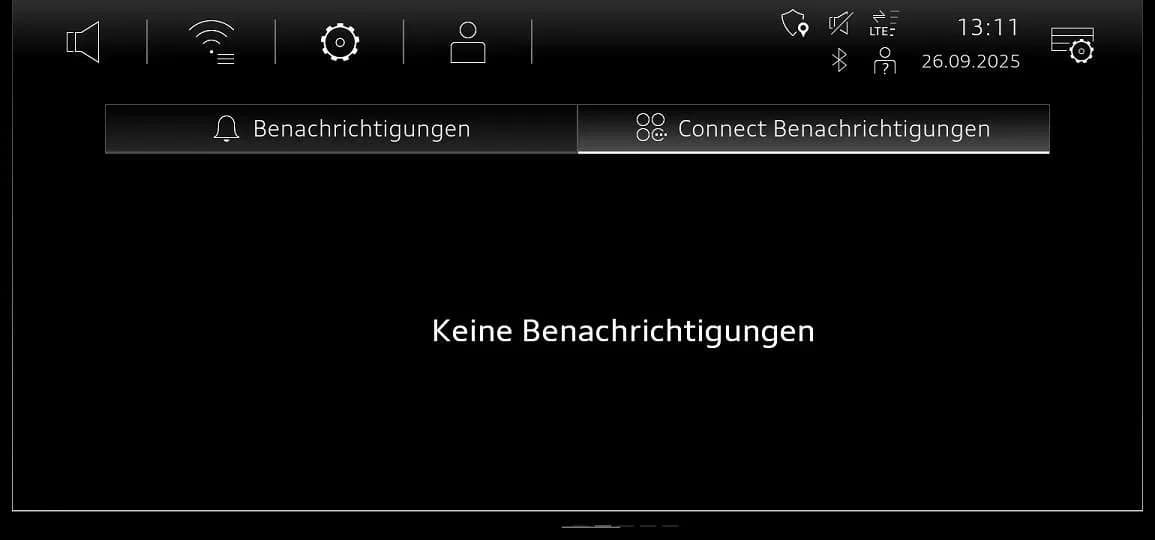
Also applies to
- Audi A4
- 2024–2025
- Audi A4 allroad
- 2024–2025
- Audi RS 5
- 2024
- Audi S4
- 2024–2025
- Audi S5
- 2024
Audi Technical Service Bulletin (TSB) 2079904/1, released on November 11, 2025, outlines a critical software update designed to resolve various issues affecting the MMI (Multi Media Interface) functions and the appearance of an "Emergency call fault" message in the instrument cluster of certain 2024-2025 Audi vehicles. This update targets the MIB3 infotainment system, specifically for vehicles with the MLB G1 ST3BP version without GW + AED.
This bulletin provides detailed instructions for technicians to perform the necessary software update, ensuring proper functionality of the MMI system and the emergency call feature. Owners experiencing an Audi MMI emergency call fault should be aware of this bulletin.
Symptoms
Owners of affected Audi vehicles may notice problems with various MMI functions, such as navigation, media playback, or connectivity. A primary indicator of this issue is the display of an "Emergency call fault" message directly in the instrument cluster. These symptoms are typically linked to underlying software issues within the MIB3 infotainment system.
Diagnosis and Trigger Conditions
Technicians can identify affected vehicles by checking the software version in diagnostic address 5F. Vehicles still exhibiting the issue will have one of the following software versions: 4014, 4026, 4318, or 4404. The presence of these older software versions confirms the need for the update described in TSB 2079904/1. The underlying cause is identified as general software issues affecting the MIB3 system.
Important Warnings and Owner Information
Audi has provided several crucial warnings and pieces of information for both technicians and owners regarding this software update:
- Do not replace components unnecessarily: Diagnostic entries logged in diagnostic address 0075 will be resolved by this software update. Technicians should not carry out Guided Fault Finding test plans for these entries, and such tests cannot be invoiced under warranty, as the software update will rectify them.
- Warranty Billing: When performing this TSB, time stamps are not required for billing under warranty. This allows technicians to work on other vehicles during the software update's inactive periods, and the update can even be performed by non-productive personnel.
- USB Media Restrictions: It is critical to not use an SD card with an adapter USB stick for the update. Additionally, do not use a USB-C stick with a larger storage capacity than 32 GB, as this can lead to formatting issues and prevent the update from proceeding correctly.
- USB Stick Handling: Technicians are explicitly instructed to "Please make certain to leave the USB stick inserted." during the initial update phase; the correct time to remove it will be indicated later. The procedure will "only work if the USB stick is still inserted" during the download phase.
- No Consumer Notification: The document does not state that Audi is notifying consumers directly about this TSB. Owners experiencing an Audi MMI emergency call fault should proactively contact their dealership.
Repair Procedure Summary
The repair involves a multi-step software update process for the AED (Android Emergency Device) control unit and the MIB3 infotainment system. This procedure requires specific USB-C update media and the use of the ODIS diagnostic system with the latest updates.
1. Preparation and Initial Update
Before starting, technicians must prepare the required USB-C sticks. A second USB-C stick is needed for the Android control unit (078E) if its software version is below 0621. Useful information for MIB3 software updates can be found in TSB 2060523 91 MIB3: Software Update Instructions.
If the Android control unit (078E) does not have software version 0621, a manual update is performed via the MMI's red menu. This involves inserting the USB update medium into the USB connection. The red menu is accessed by simultaneously pressing the RADIO, MEDIA, NAVI, TEL, CAR, MENU, BACK, and STAR buttons on the MMI control panel, as depicted in the TSB's visual guide. From there, select "Update" and the USB source using the volume control. All control units to be updated (AED) will be displayed; scroll down and start the update.
2. System Restart and Verification
Once the manual update is successfully completed, the technician should leave the red menu entirely before starting a diagnostic session. It is crucial to keep the USB stick inserted during this phase. The MMI will then restart. Technicians must wait until the MMI has fully initialized, and the home screen displays all apps. The system is then restarted by pressing and holding the volume control for 10 seconds.
To verify the update, open the notification center and switch to the "Audi connect notifications" tab. The MMI screen will initially show "Benachrichtigungen," "Connect Benachrichtigungen," and "Keine Benachrichtigungen." After several minutes, the screen will display "OTA Updater Service Software Update Software Update 0621 (814MB) wird heruntergeladen." This download typically takes approximately 5 minutes. Once the download is complete, the screen will change to "Download des Software Update beendet. Ein Neustart ist erforderlich." At this point, the technician is instructed to "Now please remove the USB stick."
Finally, restart the system again by pressing and holding the volume control. Check the notification center for the message "Gratulation! Software 0621 wurde erfolgreich installiert Vielen Dank!" to confirm successful installation.
3. SVM Code Entry
For the AED control unit, emergency call module (0075), and information electronics (005F), a specific SVM (Software Version Management) code must be entered. This is done using the "SVM - Authorized Multiple Code Entry" function in ODIS's "Flash" mode. The TSB explicitly states that the SVM code must be entered exactly, including commas and without spaces. A QR code is provided for easy scanning or the code can be copied and pasted: 078EA001,DUCDTCPR0075MLB,FLIGHTON0075MLB,ZGDOIP,CL3BPA001US,TGU1MDMVB,CL3BPA002US,FLIGHTOFF0075MLB. If the procedure is interrupted, step 2 should be repeated, and the test program will automatically perform the missing part of the update.
4. Bus Sleep Mode and Emergency Call LED Check
After the software update, the vehicle must be put into bus sleep mode. Then, switch the ignition back on and start the MMI. Technicians must check if the emergency call LED in the roof module lights up green. If it does not, further diagnosis is required by referring to TSB 2079652, titled "Emergency call LED in roof module not lit up in green."
5. Finalization
The diagnostic session is concluded, and the diagnostic log is sent online.
Required Tools and Parts
Performing this software update requires specific media and adherence to certain guidelines:
- USB-C Sticks: Technicians must prepare the necessary USB-C sticks for the update. These are crucial for transferring the software to the vehicle's systems. The TSB explicitly states that the USB-C stick and the process of downloading the software via the SD creator cannot be invoiced.
- AED Control Unit Update Media: The part number for the AED control unit update media for all models is 8W0906961DQ.
- MIB3 Update Media: The MIB3 software must be downloaded onto a USB-C stick with a minimum capacity of 32 GB. Specific part numbers for the MIB3 software versions are:
- For software versions 4014, 4026, 4404 (for Audi A4, A5, Q5): 8W0906961GC
- For software version 4318 (for Audi A4, A5, Q5): 8W0906961GG
- ODIS System: The diagnostic tester used must have the latest ODIS update to utilize the new test program for SVM code input.
Warranty Information
This Technical Service Bulletin is informational only if the vehicle is outside of any warranty. For in-warranty repairs, specific service numbers and a damage code are used for billing:
- Damage Code: 0041
- Service Number for Complaints about emergency call function or online services: 9145 (applicable to A4, A5, and Q5 models).
- Service Number for Complaints about MMI functions: 9196.
Labor operations include "Prepare repair, Vehicle parked, Charge 12 V battery" (labor operation 0151 0010, 20 TU) and "AED update (manual)" (labor operation 0151 0040, 100 TU). All warranty claims must be submitted in accordance with the Audi Warranty Policies and Procedures Manual and are subject to review or audit by Audi Warranty. It is important to note that Guided Fault Finding test plans for diagnostic entries resolved by this TSB should not be carried out and cannot be invoiced.
Owner Action
If you own a 2024-2025 Audi A4, A5, S4, S5, RS5, or Q5 and are experiencing issues with your MMI functions or seeing an "Emergency call fault" message, you should contact your authorized Audi dealership. Inform them about the symptoms and inquire about Technical Service Bulletin 2079904/1. The dealership will be able to diagnose the issue and perform the necessary software update to resolve the Audi MMI emergency call fault and restore full MMI functionality.
Source: NHTSA ID: 11026242
Gallery
5 images
Frequently Asked Questions
- What is Audi TSB 2079904/1 about?
- Audi TSB 2079904/1 addresses software issues in the MIB3 infotainment system of certain 2024-2025 Audi A4, A5, S4, S5, RS5, and Q5 models. It provides a software update to resolve problems with MMI functions and the display of an "Emergency call fault" message.
- What are the common symptoms of the Audi MMI emergency call fault?
- Owners may experience various MMI function problems, such as issues with navigation or media, and will see an "Emergency call fault" message displayed in the instrument cluster. This indicates a software-related problem with the MIB3 system.
- How is the Audi MMI emergency call fault repaired?
- The repair involves a software update performed by an authorized Audi dealership. This procedure updates the AED control unit and the MIB3 infotainment system using specific USB-C media and the ODIS diagnostic system, including entering a unique SVM code like `078EA001,DUCDTCPR0075MLB,...`.
- Will I be charged for the software update for the Audi MMI emergency call fault?
- If your vehicle is still under warranty, the software update described in TSB 2079904/1 should be covered. Audi's warranty instructions specify how dealerships should process these claims, and certain diagnostic steps that are resolved by the update cannot be invoiced.
- What software versions are affected by the Audi MMI emergency call fault?
- Vehicles exhibiting the "Emergency call fault" and other MMI issues typically have one of the following software versions in diagnostic address 5F: 4014, 4026, 4318, or 4404. The update aims to bring these systems to a newer, stable version like 0621 for the Android control unit.
Related Articles
2024-2025 Audi MMI & Emergency Call Software Update TSB
Audi Technical Service Bulletin 2079904/2 details a software update for MMI and emergency call system issues in 2024-2025 Audi A4, A5, S4, S5, RS 5, and A4 allroad models. Owners may experience MMI malfunctions or an 'Emergency call fault' message. The update requires specific USB-C media and ODIS…
2024-2025 Audi MMI and Emergency Call System Software Update
Audi Technical Service Bulletin 2079813/3 provides a software update for MIB3 vehicles to resolve MMI connectivity problems and the 'Emergency call fault' message in 2024-2025 Audi A4, A5, Q5, and other models. This update addresses software issues in the emergency call module and infotainment…
2024-2025 Audi MMI Emergency Call Fault TSB 2079671/4
Audi Technical Service Bulletin (TSB) 2079671/4 addresses issues with MMI functions and the "Emergency call fault" message in 2024-2025 Audi A4, A5, S4, S5, RS 5, Q5, and SQ5 models. A software update for the MMI and connectivity box is required to resolve these concerns.
2021-2026 Audi Cracking/Creaking Noises TSB 2062633/7
Audi Technical Service Bulletin 2062633/7 addresses cracking and creaking noises in 2021-2026 A4, A5, S4, S5, RS 5, Q5, and SQ5 models. These noises can occur during load changes or severe vehicle body torsion due to a loose bonded joint in the subframe area.
2021-2025 Audi Driver Assist Fault TSB 2061932/11
Audi Technical Service Bulletin 2061932/11 addresses issues where 2021-2025 Audi vehicles display 'Traffic Jam Assist: unavailable' or 'Active Lane Assist: fault' messages. This is often accompanied by DTC U112300, indicating a data bus error related to the adaptive cruise control or front camera.
Leave a comment
Comments are moderated and may take a moment to appear. Only your first name and the initial of your last name are shown publicly.
Comments
Be the first to comment.