2021-2022 Audi MIB3 Infotainment Favorites Lost TSB
Audi has released Technical Service Bulletin 91 24 74 2069112/4 to address MIB3 infotainment system issues such as lost favorites, home addresses, blue screens, and the MMI getting stuck on the welcome screen in 2021-2022 Audi models. A software update resolves these problems.
 Ahmet Topcu2021 Audi e-tron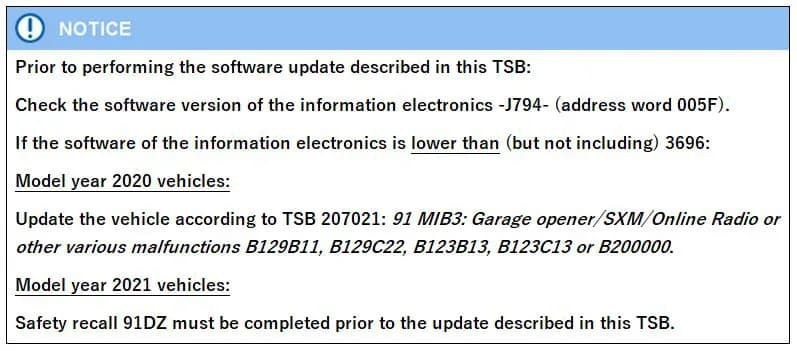
Şu araçlar için de geçerli
- Audi A3
- 2022
- Audi A4
- 2021–2022
- Audi A4 allroad
- 2021–2022
- Audi A5
- 2021–2022
- Audi A6
- 2021–2022
- Audi A6 allroad
- 2021–2022
- Audi A7
- 2021–2022
- Audi A7 e
- 2021–2022
- Audi A8 L e
- 2021
- Audi e-tron
- 2022
- Audi e-tron GT
- 2022
- Audi e-tron Sportback
- 2022
- Audi Q3
- 2022
- Audi Q5
- 2021–2022
- Audi Q7
- 2021–2022
- Audi Q8
- 2021–2022
- Audi RS 3
- 2022
- Audi RS 5
- 2021–2022
- Audi RS 6 Avant
- 2021–2022
- Audi RS 7
- 2021–2022
- Audi RS e-tron GT
- 2022
- Audi RS Q8
- 2021–2022
- Audi S3
- 2022
- Audi S4
- 2021–2022
- Audi S5
- 2021–2022
- Audi S6
- 2021–2022
- Audi S7
- 2021–2022
- Audi S8
- 2021–2022
- Audi SQ5
- 2021–2022
- Audi SQ7
- 2021–2022
- Audi SQ8
- 2021–2022
▸ 25 tane daha göster▾ Daha az göster
Symptoms of MIB3 Infotainment System Issues
Owners of 2021-2022 Audi vehicles may experience various issues with their MIB3 infotainment system, including the Audi MIB3 lost favorites problem. These symptoms are often sporadic and indicate a software-related fault.
Reported symptoms include:
- "Saved addresses (including the home address), favorites, last destinations, and/or icon and shortcut order are lost sporadically."
- The infotainment screen may "turn completely blue until a bus sleep, or an MMI reboot is performed."
- For MY22 Q3 models, the "MMI gets stuck on the welcome screen while loading user information from the backend on startup."
Other related issues that may point to the need for this update include:
- "Radio favorites lost / shortcuts grayed out on lower screen." (Addressed by PSS 2073135)
- "Air conditioning function favorite on the lower display is lost." (Addressed by PSS 2072285)
- "Function assignment to the star button is lost." (Addressed by TSB 2064429)
Fault Codes / DTCs
This specific TSB, 91 24 74 2069112/4, indicates that "No relevant DTCs are stored" for the primary symptoms it addresses. However, prior to this update, if the software version of the J794 information electronics control unit is below 3696, other related malfunctions might trigger the following DTCs:
- B129B11
- B129C22
- B123B13
- B123C13
- B200000
Important Warnings and Prerequisites
Before performing the software update described in TSB 91 24 74 2069112/4, Audi specifies several crucial steps and conditions:
- Software Version Check: If the software version of the information electronics -J794- (address word 005F) is lower than (but not including) 3696, specific prerequisite updates are required.
- 2020 Model Year Vehicles: If your 2020 Audi falls into this category, it must first be updated according to TSB 207021: "91 MIB3: Garage opener/SXM/Online Radio or other various malfunctions B129B11, B129C22, B123B13, B123C13 or B200000."
- 2021 Model Year Vehicles: For 2021 Audi vehicles, Safety Recall 91DZ must be completed prior to the update described in this TSB.
- Out-of-Warranty Vehicles: "If the vehicle is outside of any warranty, this Technical Service Bulletin is informational only." This means the repair may not be covered by Audi.
Diagnosis and Technical Background
The issues, including the Audi MIB3 lost favorites problem, are attributed to a software-related fault within the MIB3 infotainment system. This TSB supersedes previous bulletins, including Group 91 number 23-98 dated June 5, 2023, and consolidates fixes for several related problems.
The bulletin replaces several Pending Service Solutions (PSS) and TSBs that addressed specific aspects of these MIB3 malfunctions:
- TSB 2062266: "PSS 91 MIB3: favorites, home address, stored destinations, tile arrangement, and user-defined HVAC buttons are lost."
- TSB 2063702: "PSS 91 MIB3: MMI display turns blue."
- TSB 2067569: "PSS 91 MIB3: System gets stuck on the welcome screen at startup."
- TSB 2064429: "PSS 91 MIB3: Function assignment to the star button is lost."
Repair Procedure Summary
The repair involves updating the MIB3 infotainment system software. This can be done using one of two methods:
- Automated Update using ODIS: This is the primary method, utilizing the ODIS diagnostic system.
- Manual Update due to SVM code or Server issues: This method involves using a USB Flash Drive. The software for the USB drive is downloaded from MirrorServer using the SD Creator Program. If not available for download, an update medium can be ordered from parts using specific part numbers.
The total time to complete the update is approximately 30-60 minutes. This includes 20-50 minutes for the software update itself and 10 minutes for the SVM work. Technicians will need to refer to TSB 2060523 for detailed "91 MIB3 Software Update Instructions."
Required Tools and Parts
Performing the software update requires specific equipment and, for manual updates, a USB Flash Drive with the correct software.
- Required Equipment:
- ODIS Tester
- SVM code
- USB Flash Drive Part Numbers (Shop Tool):
- For A3/A4/A5/Q3/Q5 models: 8W0906961BB (Quantity: 01)
- For A6/A7/A8/Q7/Q8/e-tron/e-tron GT models: 8W0906961AT (Quantity: 01)
Additional technical service bulletins are necessary for completing this procedure, providing instructions for Software Version Management (SVM) and using the SD Creator:
- TSB 2011732: "00 Software Version Management (SVM), operating instructions."
- TSB 2047812: "00 SD Creator: how to set up and use the SD Creator for obtaining vehicle software updates via the MirrorServer."
Warranty Information
This repair, identified by Damage Code A839 and Service Number 9196, is typically covered under warranty.
- Claim Type 110: Covers up to 48 months or 50,000 miles.
- Claim Type G10: Applies to CPO (Certified Pre-Owned) covered vehicles, requiring owner verification.
The labor operations for this service are:
- Software Update: 0151 0010
- Diagnostic Time (includes checking for DTCs): 0151 0060
Warranty claims are subject to review by Audi Warranty and must adhere to the Audi Warranty Policies and Procedures Manual.
Source: NHTSA ID 10250807
Galeri
2 görsel
Frequently Asked Questions
- What is TSB 91 24 74 2069112/4 about?
- This TSB addresses various software-related issues with the MIB3 infotainment system in 2021-2022 Audi vehicles, including lost favorites, blue screens, and the MMI getting stuck on the welcome screen.
- What are the common symptoms of the Audi MIB3 lost favorites issue?
- Common symptoms include the sporadic loss of saved addresses, favorites, and last destinations, the infotainment screen turning completely blue, or the MMI getting stuck on the welcome screen during startup.
- Are there any specific fault codes associated with this MIB3 problem?
- While the primary issues addressed by TSB 91 24 74 2069112/4 typically do not store DTCs, related malfunctions in earlier software versions might trigger codes such as B129B11, B129C22, B123B13, B123C13, or B200000.
- Is this MIB3 software update covered under warranty?
- Yes, the repair is generally covered under Audi's warranty, specifically Claim Type 110 for vehicles up to 48 months or 50,000 miles, and Claim Type G10 for CPO vehicles.
- What should I do if my Audi MIB3 infotainment system is experiencing these issues?
- You should contact your authorized Audi dealership to schedule an appointment. Inform them about the symptoms you are experiencing and mention Technical Service Bulletin 91 24 74 2069112/4 for the MIB3 software update.
Bu TSB'nin diğer revizyonları
- 2021-2025 Audi Emergency Call System Fault TSBB200000
- 2022-2025 Audi e-tron Emergency Call System Fault TSBB129B11, B200000
- 2023-2026 Audi Emergency Call System Fault B200000 TSBB129B11, B129C22, B123B13
- 2022-2026 Audi Emergency Call System Fault TSBB129B11, B200000
- 2020-2026 Audi Emergency Call Fault B200000B129B11, B129C22, B200000
- 2021-2026 Audi Emergency Call System Fault TSB 2059528/14B200000
- 2021-2026 Audi Emergency Call System Fault B200000B200000
- 2024-2025 Audi A5 Steering Warning Lamp TSBB200000
Related Articles
2021 Audi e-tron Electrical Malfunction and Power Loss
A 2021 Audi e-tron owner reported a severe 'Electrical Malfunction' resulting in complete loss of power on the highway. The issue has persisted despite dealer attempts to fix it over five months, posing significant safety risks.
2021-2026 Audi UTR Troubleshooting & FAQs TSB 2081409/1
This Audi Technical Service Bulletin (TSB 2081409/1) provides comprehensive answers to frequently asked questions and troubleshooting steps for the Audi Universal Traffic Recorder (UTR) accessory, covering topics like SD card compatibility, video playback, Wi-Fi issues, and more.
2021-2025 Audi Emergency Call System Fault TSB
Audi has released Technical Service Bulletin 2059528/18 to address an "Emergency call function: malfunction! Function unavailable. Please contact service" warning, often accompanied by a red SOS LED and DTC B200000. This issue affects various 2021-2025 Audi models and is due to a software problem…
2021-2026 Audi Adaptive Light System Fault C12B3FA TSB
Audi has released Technical Service Bulletin 2054202/7 to address an intermittent 'Audi adaptive light: system fault' message and DTC C12B3FA in various 2021-2026 models. This TSB outlines diagnosis and resolution for driver assistance system malfunctions.
2021-2026 Audi Parking Aid False Warnings TSB 2024323/12
This Technical Service Bulletin (TSB 2024323/12) details diagnostic and repair procedures for 2021-2026 Audi vehicles experiencing false parking aid warnings. Learn about environmental factors, sensor checks, and proper installation to resolve issues like 'Parking aid does not work / warning is…
Yorum bırakın
Yorumlar moderasyondan geçer ve görünmesi biraz zaman alabilir. Sadece adınız ve soyadınızın baş harfi herkese açık olarak gösterilir.
Yorumlar
İlk yorum sizden olsun.