2024 Audi Wireless CarPlay/Android Auto Inop Fix TSB
Audi has released Technical Service Bulletin 91 24 95 2073333/3 to address issues where the wireless Audi Smartphone Interface (Apple CarPlay / AndroidAuto) cannot be paired or its menu tiles are grayed out in 2024 Audi models. This bulletin outlines a diagnostic and repair procedure for the…

Si applica anche a
- Audi A4
- 2024
- Audi A4 allroad
- 2024
- Audi A5
- 2024
- Audi A6
- 2024
- Audi A6 allroad
- 2024
- Audi A7
- 2024
- Audi e-tron GT
- 2024
- Audi Q7
- 2024
- Audi RS 5
- 2024
- Audi RS 6 Avant
- 2024
- Audi RS 7
- 2024
- Audi RS e-tron GT
- 2024
- Audi RS Q8
- 2024
- Audi S4
- 2024
- Audi S5
- 2024
- Audi S6
- 2024
- Audi S7
- 2024
- Audi S8
- 2024
- Audi SQ7
- 2024
- Audi SQ8
- 2024
▸ Mostra altri 14▾ Mostra meno
Audi has issued Technical Service Bulletin (TSB) 91 24 95 2073333/3 to address concerns regarding the wireless Audi Smartphone Interface (ASI), which includes Apple CarPlay (ACP) and Android Auto (AA), in various 2024 Audi models. This bulletin, dated April 4, 2024, supersedes previous TSB 24-88 from March 22, 2024, and provides updated service and warranty information.
This TSB specifically targets situations where the wireless smartphone interface is inoperative, preventing owners from connecting their phones wirelessly. If you own a 2024 Audi Q8 wireless CarPlay system that isn't working, this information is highly relevant.
Symptoms
Owners of affected 2024 Audi vehicles may experience the following issues with their smartphone interface:
- "The Audi Smartphone Interface [ASI] (Apple CarPlay [ACP] / AndroidAuto [AA]) cannot be paired to the phone wirelessly."
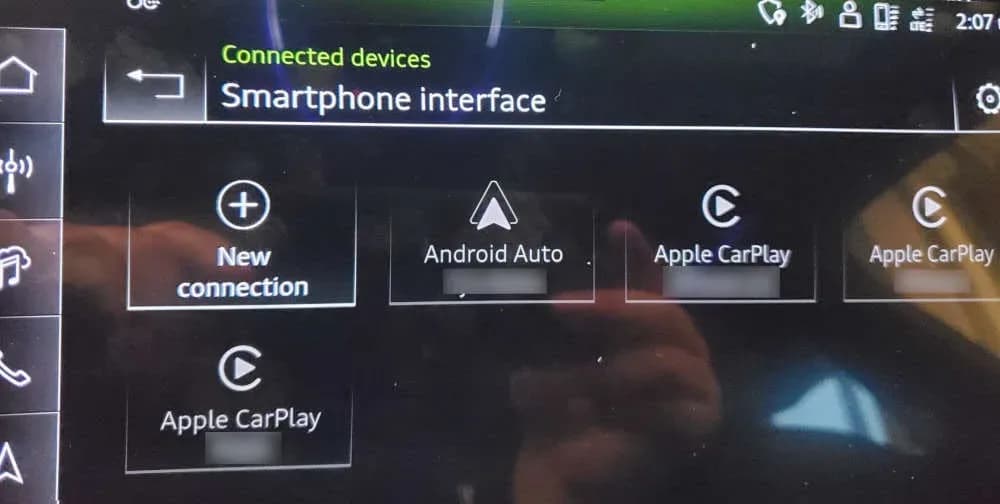
- "The phone tiles under the ASI menu are grayed out" in the infotainment system display.
It's important to note that if a wired ASI connection is used, the system typically functions as expected. Additionally, workshop diagnostics will often show no relevant Diagnostic Trouble Codes (DTCs) stored, and the vehicle's 5GHz Wi-Fi network may not be broadcasting.
Important Warnings
Audi explicitly states in this TSB:
"Parts replacement does not solve this issue. Claims for replaced parts will be subject to review."
This means that attempting to replace components to resolve the inoperative wireless smartphone interface will not fix the problem and may lead to warranty claims being denied. The issue is a configuration problem, not a hardware failure.
Technical Background
The wireless Audi Smartphone Interface relies on the vehicle's 5GHz Wi-Fi network to establish communication and stream content from a smartphone to the Multi Media Interface (MMI). The root cause of the problem is a configuration issue that can prevent this crucial 5GHz Wi-Fi network from being available in certain vehicles. This directly impacts the functionality of the wireless ASI, including the Audi Q8 wireless CarPlay feature.
Repair Procedure Summary
To resolve the inoperative wireless Audi Smartphone Interface, technicians should follow these steps outlined in TSB 91 24 95 2073333/3:
- Execute Diagnostic Test Plan: Access the Guided Functions and run the "Check control module configuration" test plan for the Emergency Call Module and Communication Unit (ConBox) -J949- (address word 0075).
- Delete Existing Connections: Remove all previously paired Audi Smartphone Interface (ASI) connections from the vehicle's system.
- Re-establish Functionality: Allow the vehicle to complete a bus sleep cycle. After this cycle, the correct functionality of the wireless smartphone interface should be re-established.
Warranty Information
This repair is covered under Audi's warranty program. The claim type is 110 for vehicles up to 48 months or 50,000 miles. For Certified Pre-Owned (CPO) vehicles, the claim type is G10, requiring owner verification. If the vehicle is outside of these warranty parameters, the TSB serves as informational guidance only.
- Service Number: 9145
- Damage Code: AC39
- Diagnostic Time (GFF): 0150 0010 (associated operations) or 0150 0060 (time stated on diagnostic protocol, max 75 TU).
- Road Test Allowance: No allowance for pre- or post-service road tests.
- Claim Comment: As per TSB 2073333/3
All warranty claims must adhere to the Audi Warranty Policies and Procedures Manual and are subject to review or audit by Audi Warranty.
Source: NHTSA ID 10253284
Frequently Asked Questions
- Why is my 2024 Audi wireless CarPlay/Android Auto not working?
- The issue stems from a configuration problem with the vehicle's 5GHz Wi-Fi network, which is essential for the wireless Audi Smartphone Interface. This prevents your phone from pairing wirelessly, as detailed in Audi TSB 91 24 95 2073333/3.
- What does Audi TSB 91 24 95 2073333/3 address?
- This Technical Service Bulletin addresses the inoperative wireless Audi Smartphone Interface (Apple CarPlay / AndroidAuto) and situations where "the phone tiles under the ASI menu are grayed out" in 2024 Audi models. It provides a diagnostic and repair procedure focusing on the ConBox -J949- module.
- Can I fix the 'phone tiles under the ASI menu are grayed out' issue myself?
- The repair procedure involves executing a specific test plan using specialized diagnostic equipment for the Emergency Call Module and Communication Unit (ConBox -J949-). It is recommended to have this procedure performed by an authorized Audi service center.
- Is this repair covered under warranty?
- Yes, for most vehicles, this repair is covered under Audi's new vehicle limited warranty (up to 48 months/50,000 miles) or for Certified Pre-Owned vehicles, provided the owner is verified. If your vehicle is outside of these warranty periods, the TSB serves as informational guidance.
- Will replacing parts fix the Audi Q8 wireless CarPlay problem?
- No, Audi explicitly states that "Parts replacement does not solve this issue." The problem is a software or configuration fault, not a hardware failure. Attempting to replace parts will not resolve the issue and may lead to warranty claim rejections.
What Audi Q8 owners report
Counted from the records in our database across 7 model years.
- 206
- Owner complaints
- 18
- Recalls
- 2,216
- Service bulletins
- 6
- Crashes reported
- 1
- Fires reported
- 4
- Injuries reported
The 2024 model year
25 complaints, the 4th most of 7 model years on file. Owners reported 1 crash, 1 fire and 1 injury for this year, which also has 5 recalls on file.
Complaints by model year
| 2019 | 110 | |
|---|---|---|
| 2020 | 28 | |
| 2021 | 30 | |
| 2022 | 2 | |
| 2023 | 7 | |
| 2024 | 25 | |
| 2025 | 4 |
Most-reported systems
- Electrical System — 80
- Engine — 51
- Power Train — 50
- Steering — 17
- Forward Collision Avoidance — 16
Latest recalls for the 2024 model year
- 26V240000 — Service Brakes, Hydraulic (Apr 2026)
- 25V900000 — Back Over Prevention (Dec 2025)
- 24V428000 — Service Brakes, Air (Jun 2024)
Recent owner reports
The brake rotors are inproperly engineered and developed warping at brand new thickness, causing dangerous driving condition. The Audi North Austin and Audi South Austin dealer is refusing to replace as they are stating it is normal wear and tear.
Read owner complaints →Electrical vehicle started displaying electrical malfunction issue since December 2025, at the time Audi San Juan said there was not fix available at the time.
Complaints are owner reports filed with NHTSA. They are unverified, and counts depend on how many vehicles were sold, so they are not a failure rate.
Related Articles
2023-2025 Audi MMI Emergency Call Fault Software Update
Audi has released Technical Service Bulletin 2079680/3 to address MMI function problems and 'Emergency call fault' messages in 2023-2025 Audi Q7, Q8, A6, A7, A8, and other models. A software update is available.
2024-2025 Audi Bluetooth / Smartphone Interface Connection Issue
Audi has identified a software issue causing slow Bluetooth and smartphone interface connections in certain 2024-2025 models. A solution is expected by Q2 2026, and component replacement is not recommended as it will not resolve the problem.
2024-2025 Audi MIB3: No Tiles in Main Menu, Phone Controls Not Working
This Technical Service Bulletin (TSB 2080958/2) addresses an issue in 2024-2025 Audi vehicles equipped with the MIB3 infotainment system where owners may find 'no tiles in main menu' or encounter a phone menu with 'controls are not working'. A software update is available.
2024-2025 Audi MMI Connectivity and Infotainment TSB
Audi Technical Service Bulletin 2079416/4 provides an overview of customer service packages for MLB and MQB vehicles with MIB3 systems, addressing common infotainment and connectivity complaints in 2024-2025 Audi models. Learn about diagnostic steps and related software updates.
2021-2025 Audi Q8/SQ8/RS Q8 Window Reversal TSB
If your 2021-2025 Audi Q8, SQ8, or RS Q8 window opens again after attempting to close it, Technical Service Bulletin 2080696/1 details a software issue. This TSB addresses the diagnostic trouble code B148754 related to the window regulator and provides a software update.
Leave a comment
Comments are moderated and may take a moment to appear. Only your first name and the initial of your last name are shown publicly.
Comments
Be the first to comment.