2020-2024 Audi MIB3 Configuration Wizard Issue
Owners of 2020-2024 Audi vehicles with MIB3 may see the configuration wizard at every startup. This TSB explains why and how to disable it without a dealer visit.
 David Chen2023 Audi e-tron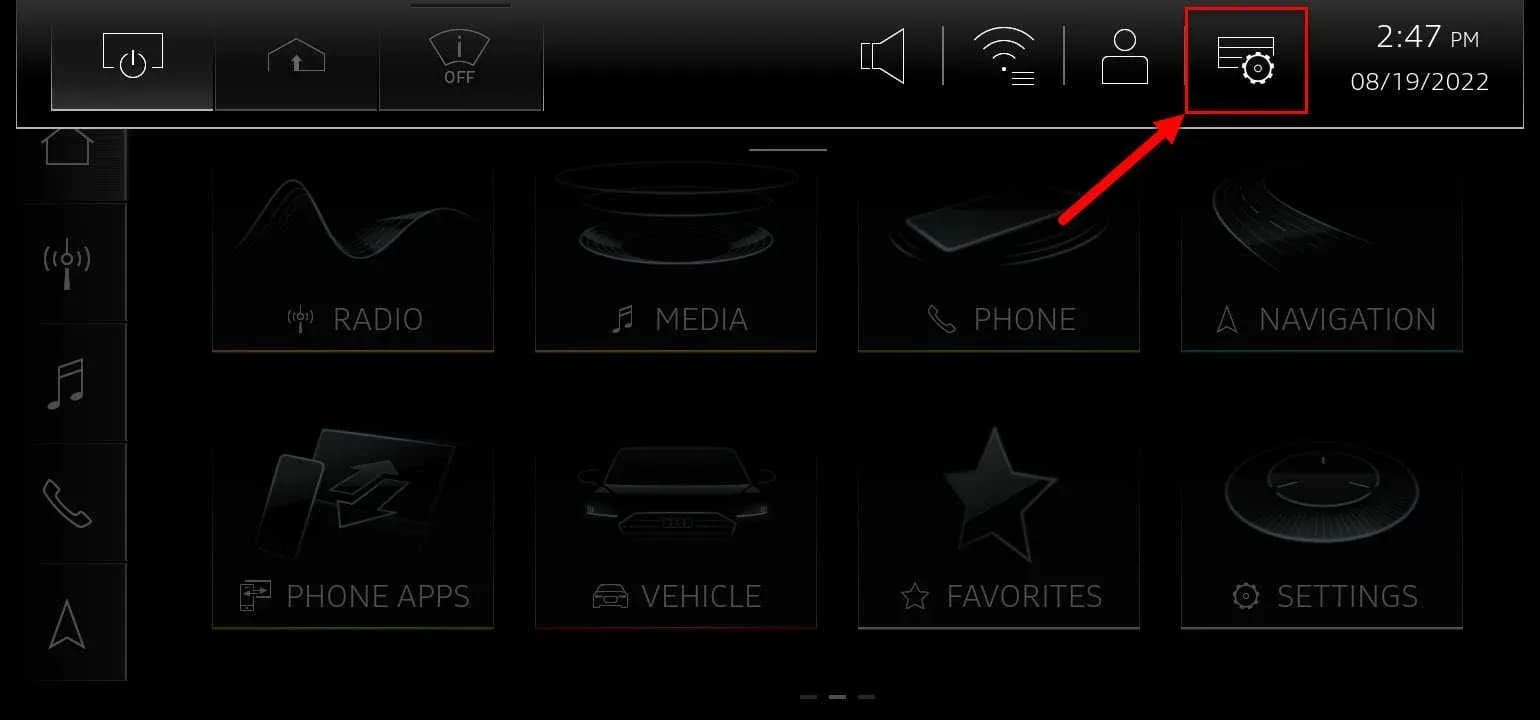
Si applica anche a
- Audi A3
- 2022–2023
- Audi A4
- 2021–2023
- Audi A4 allroad
- 2021–2022
- Audi A5
- 2021–2023
- Audi A6
- 2021–2023
- Audi A6 allroad
- 2021–2023
- Audi A7
- 2021–2023
- Audi A7 e
- 2021–2022
- Audi A8 L e
- 2021
- Audi e-tron
- 2021–2022
- Audi e-tron GT
- 2022–2023
- Audi e-tron Sportback
- 2022
- Audi Q3
- 2022–2023
- Audi Q5
- 2021–2023
- Audi Q7
- 2021–2023
- Audi Q8
- 2021–2023
- Audi RS 3
- 2022–2023
- Audi RS 5
- 2021–2023
- Audi RS 6 Avant
- 2021–2023
- Audi RS 7
- 2021–2023
- Audi RS e-tron GT
- 2022–2023
- Audi RS Q8
- 2021–2023
- Audi S3
- 2022–2023
- Audi S4
- 2021–2023
- Audi S5
- 2021–2023
- Audi S6
- 2021–2023
- Audi S7
- 2021–2023
- Audi S8
- 2021–2023
- Audi SQ5
- 2021–2023
- Audi SQ7
- 2021–2023
- Audi SQ8
- 2021–2023
▸ Mostra altri 25▾ Mostra meno
Owners of various 2020-2024 Audi models equipped with the MIB3 infotainment system, including the Audi e-tron, may encounter an issue where the configuration wizard repeatedly displays upon vehicle startup. This behavior, often perceived as a fault, is addressed in Audi Technical Service Bulletin (TSB) 2067843/2, issued on May 9, 2023.
This TSB, titled "91 MIB3: configuration wizard appears without apparent reason," clarifies that the recurring Audi e-tron configuration wizard is not a defect but rather a normal function when the initial setup process remains incomplete.
Revision History
This document, TSB 2067843/2, is Revision 2 of the bulletin. It supersedes Technical Service Bulletin Group 91 number 22-23, which was dated August 23, 2022. The primary purpose of Revision 2 was to add new model years to the list of affected vehicles, ensuring comprehensive coverage for Audi owners.
Symptoms
The primary symptom described in the TSB is that "The setup wizard is displayed every time the vehicle is started." This means that each time you start your Audi, the MIB3 infotainment system will present the initial setup wizard, prompting you to configure various settings.
Technical Background
According to Audi, the technical background for this condition is straightforward. The setup wizard appears repeatedly because it has not been fully completed by the user. The system is designed to continue displaying the wizard on every startup as designed until all necessary steps have been finalized.
Important Warnings
Audi explicitly states, "Do not perform any repairs. Any repairs for this concern may be denied." This means that the recurring configuration wizard is considered normal operation under these circumstances, and attempting to diagnose or repair it as a fault is unnecessary and will not be covered under warranty.
Owner Action and Remedy
If you are experiencing the persistent Audi e-tron configuration wizard, there are two simple ways to resolve this without requiring a dealer visit:
- Complete the Setup Wizard: The most direct solution is to fully complete all steps in the setup wizard. This allows you to personalize your vehicle's settings and will prevent the wizard from reappearing on subsequent startups.
- Deactivate the Wizard: If you prefer not to complete the wizard, or wish to disable its notifications, you can do so through the MIB3 system settings. Navigate to "Settings >> Notifications" and locate the "Configuration wizard" option. You can then "Toggle off" this setting to prevent it from appearing. Alternatively, you can access the notification shortcut directly from the dropdown menu on the infotainment screen, as illustrated in Figure 1.
Visual Aids
- Figure 1: Notification shortcut button in the dropdown menu: This image shows the MIB3 infotainment screen with the dropdown menu active, highlighting the notification shortcut button that can be used to access settings related to the configuration wizard.
- Figure 2: Setup wizard deactivation setting: This image displays the "Settings >> Notifications" menu, specifically showing the "Configuration wizard" option with a toggle switch, allowing users to turn off the recurring wizard.
Warranty Information
Audi specifies that this Technical Service Bulletin is for informational purposes only. The condition described is not considered a warranty concern, and therefore, it is not applicable to any Audi warranty coverage. Owners should not expect warranty claims for this particular issue.
Source: NHTSA ID 10237002
Galleria
1 immagine
Frequently Asked Questions
- Why does the configuration wizard keep popping up in my 2020-2024 Audi MIB3 system?
- The configuration wizard appears repeatedly because the initial setup process has not been fully completed. The MIB3 system is designed to display it at every startup until all steps are finalized.
- Can I stop the Audi e-tron configuration wizard from appearing every time I start my car?
- Yes, you can stop the Audi e-tron configuration wizard from appearing. You can either complete all the steps in the wizard, or you can deactivate it through the MIB3 infotainment system's 'Settings >> Notifications' menu by toggling off the 'Configuration wizard' option.
- Is the recurring Audi e-tron configuration wizard a defect that requires repair?
- No, according to Audi Technical Service Bulletin 2067843/2, the recurring configuration wizard is not considered a defect. It is normal behavior when the setup process is incomplete, and no repairs should be performed for this condition.
- Will my Audi dealer charge me to fix the configuration wizard issue?
- Since this condition is considered normal operation and not a defect, Audi states that any repairs for this concern may be denied and are not covered under warranty. You can resolve it yourself by completing or deactivating the wizard through the infotainment system.
- What does TSB 2067843/2 address regarding the MIB3 system?
- TSB 2067843/2 addresses the issue where the 'configuration wizard appears without apparent reason' on MIB3-equipped Audi vehicles. It clarifies that this is due to an incomplete setup and provides instructions for owners to either complete or deactivate the wizard.
Related Articles
2023 Audi e-tron Problems: Recalls, Complaints & TSBs
The 2023 Audi e-tron has faced several significant safety concerns, including recalls for potential charging cable overheating and brake pedal detachment. Owners have also reported serious issues like sudden unintended acceleration and electrical system malfunctions. This profile details these…
2023 Audi e-tron Brake Pedal Recall
Audi has issued a recall (NHTSA ID: 26V240000, Audi Recall 46P7) for certain 2019-2024 E-Tron and 2020-2024 E-Tron Sportback vehicles, including the 2023 Audi e-tron. The recall addresses a potential issue where the brake pedal may detach from the brake booster, leading to a loss of brake function.
2015-2027 Audi Noise Diagnosis with Frequency Analysis App TSB
Audi has released Technical Service Bulletin 2051095/11 detailing the Audi Frequency Analysis app. This app helps technicians diagnose noise complaints more precisely across 2015-2027 Audi models. Learn how the app works, where to download it, and its features for effective vehicle noise analysis.
2023 Audi e-tron AC/DC Charging Not Possible TSB
This manufacturer communication (NHTSA ID 11031035) provides critical information for 2023 Audi e-tron owners facing issues with AC/DC charging. It specifically highlights problems linked to software version 00C6: 0093/3119, which can prevent the vehicle from charging.
2023-2025 Audi Rear Seat Reminder Message TSB 2074943/2
Audi Technical Service Bulletin 2074943/2 explains the instrument cluster message 'Please check rear seats and be aware of door safelock' in various 2023-2025 Audi models. This informational TSB details the rear occupant detection system designed to prevent children and pets from being left in…
Leave a comment
Comments are moderated and may take a moment to appear. Only your first name and the initial of your last name are shown publicly.
Comments
Be the first to comment.