2021 Nissan Kicks / Sentra Infotainment Software Update
This Nissan Technical Service Bulletin (NTB22-028A) provides a software update to resolve infotainment system issues, including stability problems and high frequency audio noise, for certain 2021 Nissan Kicks and Sentra vehicles.
 Sarah Mitchell2021 Nissan Sentra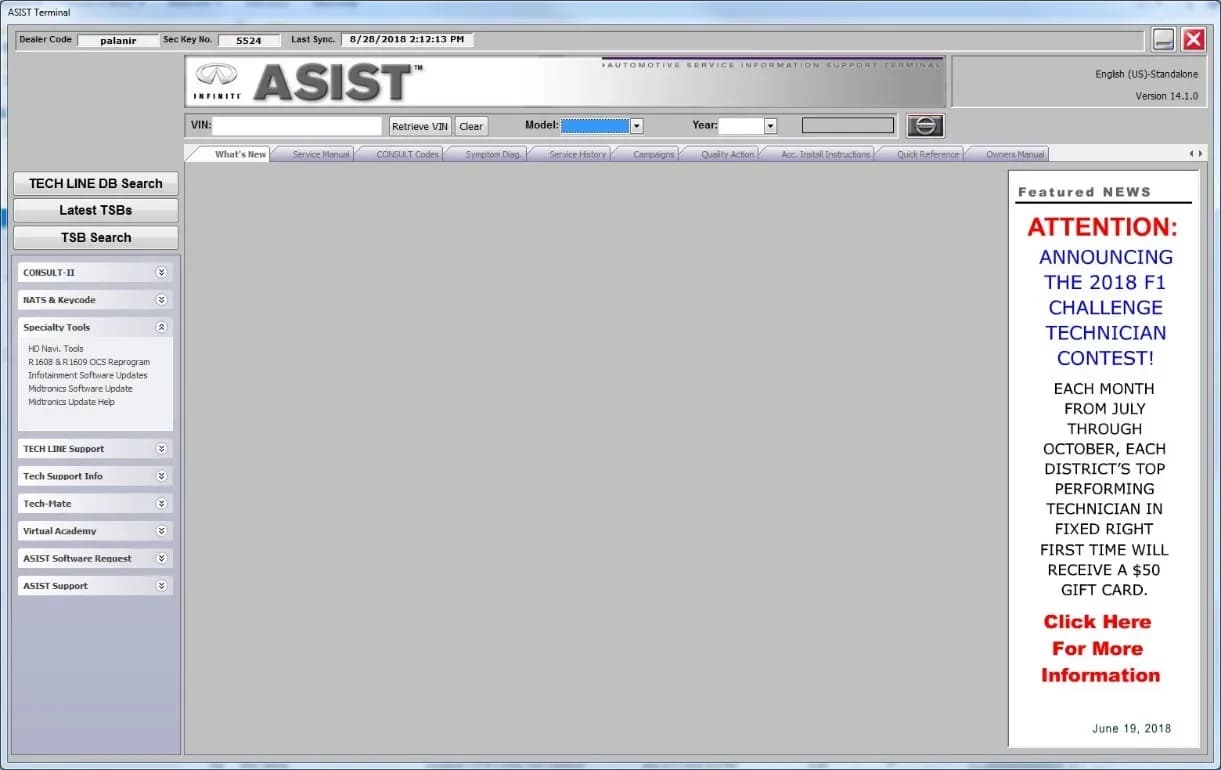
También aplica a
- Nissan Kicks
- 2021
Nissan Technical Service Bulletin (TSB) NTB22-028A addresses software-related infotainment system issues in certain 2021 Nissan Kicks and Sentra vehicles. This bulletin, classified as AN22-001A, outlines a software update designed to improve system stability and resolve specific audio problems.
This TSB is an amendment to the original bulletin NTB22-028, published on April 13, 2022, with the latest revision dated September 6, 2022, updating page 2 and the claims information.
Symptoms
Owners of affected 2021 Nissan Kicks and Sentra vehicles may experience the following infotainment system issues:
- General stability problems and software "bug" fixes.
- "High Frequency noise with audio system display ON".
Diagnosis / Trigger Conditions
To determine if this software update applies to your vehicle, a technician will check the current infotainment system's software version. If the "Software Version" is numerically below "423", the update is applicable. For Sentra models, technicians must first confirm that Service Comm does not indicate PM991 applies to the vehicle; if it does, this bulletin should not be applied.
Additionally, it's crucial to differentiate between hardware and software issues. Technicians are instructed to refer to TSB NTB21-038 to verify the root cause of the customer's concern, as this bulletin specifically targets software-related problems.
Important Warnings
Owners and technicians should be aware of several critical warnings associated with this update:
- "For Sentra, if Service Comm shows that PM991 applies to the vehicle you are working on, perform PM991 and do not apply this bulletin."
- "Refer to NTB21-038 to verify if the customer concern is a Hardware or Software related issue. This bulletin does not apply to hardware issues."
- "Do not use any other USB drive to perform the procedure in this bulletin." Only the specified special tool USB drive is approved.
- When preparing the USB drive with the update software, "The update-software must be the only file on the USB drive."
- "Do not apply this software update to models outside of the APPLIED DATES range. If applied outside of the APPLIED DATES range, the Audio Control Unit may be damaged."
- "Damaged Audio Control Units, due to improperly following the SERVICE PROCEDURE in this bulletin or the software update being applied outside of the APPLIED DATES range, will not be eligible for warranty claims."
- "Follow the steps to safely remove the USB drive. If not followed, the USB drive may corrupt the infotainment update-software."
- During the in-vehicle update, "Do not remove the USB drive during the update to the vehicle until instructed to do so." Premature removal can damage the Audio Control Unit.
- "The engine needs to idle for the duration of the update to retain battery charge and ensure software update completes properly."
Required Tools or Parts
Performing this Nissan Kicks infotainment update requires specific tools and software:
- Special tool USB drive J-52727: This USB drive is specifically designed for the update. A new part number, NI-52727, is also available. Additional USB drives can be purchased from Tech-Mate online or by phone.
- CONSULT PC: A computer connected to the internet and running the ASIST software, which must be synchronized to the current date.
Repair Procedure Summary
The repair involves a two-part process: preparing a USB drive with the software update and then applying the update to the vehicle's infotainment system. This process ensures the proper functioning of your Nissan Kicks infotainment update.
1. Prepare USB Drive:
- Insert the special tool USB drive (J-52727 or NI-52727) into a CONSULT PC.
- Open the ASIST software on the PC. Ensure the ASIST system is updated and the PC is connected to the internet.
- Navigate within ASIST to "Specialty Tools" and then select "Infotainment Software Updates".
- Choose the correct model-specific software update: "IVI0423" for Sentra or "KICKS (P15) IVI423" for Kicks.
- Select the USB drive location from the drop-down menu and click "Download". The download process is estimated to take 10-15 minutes.
- Once the download is complete, safely remove the USB drive from the CONSULT PC following the proper ejection procedure.
2. Update Vehicle Infotainment System:
- In a well-ventilated area, set the parking brake and start the vehicle's engine, allowing it to idle for at least 60 seconds to ensure the system loads properly.
- Insert the prepared USB drive into the vehicle's USB media port.
- Wait approximately 10-30 seconds for the message "There is a new software update available." to appear on the screen, then select "OK".
- If a prompt appears asking "New USB music device detected. Create/Replace USB voice recognition data?", select "No".
- Review the software update requirements displayed on the screen and select "Accept" to initiate the reprogramming.
- Once the message "The software update is completed." appears, remove the USB drive from the USB media port.
- Turn the vehicle's ignition OFF, open and close the driver's door, then restart the engine.
- Allow the infotainment system to fully boot up, which takes approximately 30 seconds. The Nissan logo will be displayed during this reboot.
3. Verify Update:
- Access the infotainment system's menu by selecting "Settings" > "Info" > "System Information" > "Version Information".
- Confirm that the "Software Version" displayed is now "423", indicating a successful update.
Claims Information
For technicians and service centers, claims for this procedure should be submitted as a Primary Operation (PO) type line claim using the following coding:
- For a software check only:
- DESCRIPTION: Perform Software Check
- OP CODE: RX9ZAA
- SYM: ZE
- DIA: 32
- FRT: 0.2
- For a software check and update:
- DESCRIPTION: Perform Software Check & Update
- OP CODE: RX4SAA
- SYM: ZE
- DIA: 32
- FRT: 0.3
Source: NHTSA ID 10220250
Galería
16 imágenes
Frequently Asked Questions
- What are the symptoms addressed by Nissan TSB NTB22-028A?
- Nissan TSB NTB22-028A addresses infotainment system stability improvements, general bug fixes, and specifically resolves the issue of "High Frequency noise with audio system display ON" in affected vehicles.
- Which Nissan vehicles are affected by this infotainment software update?
- This software update applies to certain 2021 Nissan Kicks (P15) models built before October 5, 2021, and 2021 Nissan Sentra (B18) models built on or between March 18 and September 23, 2021, specifically SR and SV grades.
- What special tool is required for this Nissan Kicks infotainment update?
- The update requires a special tool USB drive, identified as J-52727, or its new part number NI-52727. This USB drive is used to transfer the software update from a CONSULT PC to the vehicle's infotainment system.
- Can I perform the Nissan Kicks infotainment update myself?
- Nissan Bulletins are intended for use by qualified technicians, not 'do-it-yourselfers'. Attempting the update without proper training, tools, and adherence to the procedure can damage the Audio Control Unit and void warranty claims. It is recommended to visit a Nissan dealer.
- What happens if the software update is applied to the wrong vehicle or incorrectly?
- Applying the software update to models outside the specified applied dates range or failing to follow the service procedure correctly can damage the Audio Control Unit. Such damage will not be eligible for warranty claims.
Related Articles
2021-2024 Nissan Sentra CVT Removal Tool TSB
Nissan Technical Service Bulletin NTB24-045 introduces new engine support tools and a revised procedure for 2021-2024 Sentra models. This update allows technicians to remove the Continuously Variable Transmission (CVT) without also needing to remove the engine, streamlining complex transmission…
2020-2024 Nissan B2E01-96 Internal Battery DTC TSB
Nissan Technical Service Bulletin NTB22-027B provides a procedure to clear DTC B2E01-96, related to the internal battery of the Telematics Communication Unit (TCU), affecting various 2020-2024 Nissan models.
2021-2024 Nissan Sentra Front Rattle or Knock Noise TSB
Nissan has issued Technical Service Bulletin NTB22-045B for 2021-2024 Sentra models experiencing a rattle or knock noise from the front, especially when driving over bumps or turning. This bulletin identifies the passenger (RH) side Engine Mounting Insulator as the likely cause.
2021-2022 Nissan Sentra Inner Tie Rod Recall R23B3
Nissan is conducting a voluntary safety recall, R23B3, for certain 2021-2022 Sentra vehicles to replace both inner tie rods. This essential steering component replacement will be performed at no charge to the customer.
2021 Nissan Sentra False AEB/FCW Activation TSB
Owners of 2021 Nissan Sentra vehicles may experience false activation or unexpected braking from the Automatic Emergency Braking (AEB) or Forward Collision Warning (FCW) systems. Nissan Technical Service Bulletin NTB21-115A provides a software update to the ICC/ADAS 2 module to resolve this issue.
Leave a comment
Comments are moderated and may take a moment to appear. Only your first name and the initial of your last name are shown publicly.
Comments
Be the first to comment.