2023-2024 Audi Q8 Control Module Coding Failure TSB
This Technical Service Bulletin (TSB) 2071338/2 from Audi addresses a specific issue where a replacement control module cannot be successfully coded in certain 2023-2024 Audi Q8 and other models. The problem manifests as a 'Coding not successful' message.
 Marcus Weber2024 Audi Q8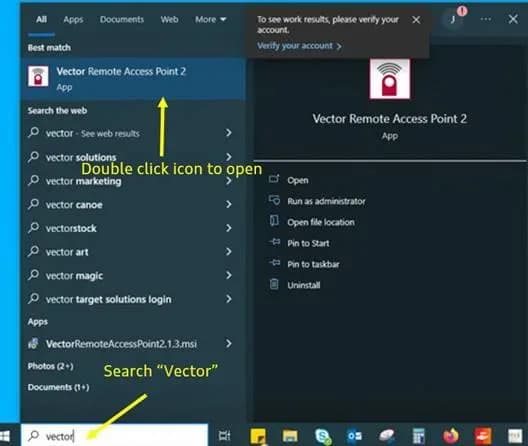
También aplica a
- Audi A4
- 2024
- Audi A4 allroad
- 2024
- Audi A5
- 2024
- Audi A6
- 2024
- Audi A6 allroad
- 2024
- Audi A7
- 2024
- Audi e-tron GT
- 2024
- Audi Q5
- 2024
- Audi Q5 e
- 2024
- Audi Q7
- 2023–2024
- Audi Q8
- 2023
- Audi RS 5
- 2024
- Audi RS 6 Avant
- 2024
- Audi RS 7
- 2024
- Audi RS e-tron GT
- 2024
- Audi RS Q8
- 2023–2024
- Audi S4
- 2024
- Audi S5
- 2024
- Audi S6
- 2024
- Audi S7
- 2024
- Audi S8
- 2024
- Audi SQ5
- 2024
- Audi SQ7
- 2023–2024
- Audi SQ8
- 2023–2024
▸ Mostrar 18 más▾ Mostrar menos
Introduction to Audi Control Module Coding Failure
Audi has released Technical Service Bulletin (TSB) 2071338/2, superseding TSB 23-72, to address a specific issue where a replacement control module cannot be successfully coded. This problem affects various 2023-2024 Audi models, including the 2024 Audi Q8. The TSB details a temporary remote coding solution required due to ongoing backend system updates.
This bulletin is crucial for technicians and owners alike, as it outlines the necessary steps to resolve the "Coding not successful" message that appears after a control unit has been replaced. The temporary nature of this solution means that once backend updates are complete, the normal replacement process will resume, and this TSB will be retired.
Symptoms of Coding Failure
The primary symptom of this issue is the inability to complete the replacement test plan after a new control unit has been installed. Technicians will observe an error message during the module programming process.
The specific error message displayed is:
- "Coding not successful"
- "The coding of the following control module could not be performed: 005F Information electronics 1"
This indicates that the ODIS diagnostic system cannot finalize the coding for the newly installed module, preventing the vehicle from operating correctly. This is the core of the 2024 Audi Q8 control module coding issue.
Affected Control Units
This TSB applies to a wide range of control units across different Audi platforms, specifically MLBevo gen 1 and MLBevo gen 2. If a control module not listed below fails to code, this TSB does not apply, and normal diagnostic procedures should be followed.
MLBevo Gen 1 (A4, A5, Q5)
| Diagnostic Address | Module | Designation |
|---|---|---|
| 0001 | Engine | Engine control unit |
| 0002 | Gearbox | Gearbox control unit - AL |
MLBevo Gen 2 (A6, A7, A8, Q7, Q8, Q8 e-tron, e-tron GT)
| Diagnostic Address | Module | Designation |
|---|---|---|
| 0001 | Engine | Engine control unit or drive system control unit |
| 0002 | Gearbox | Gearbox control unit - DL |
| 0003 | ESC | Brake control system |
| 0013 | ACC LRR | Adaptive cruise control (long-range radar master) |
| 0015 | SC | Safety computer 1b |
| 0015 | SC2 | Safety computer 2 |
| 0019 | GW3 Mid 3.1 UNECE | GW Mid-G2-S-9-8A-4B, GW Mid-G2-S-4-8A-4B, GW Mid-G2-S-4-8A, GW Mid-G1-S-4-8A, GW Mid-G1-S-4-4A |
| 0023 | EBKV (EBS) | Electromechanical brake servo (iBooster) |
| 002B | ELV (ESCL) | Steering column lock |
| 0044 | EPS (APA) | Electronic power steering |
| 0046 | BCM2 | Body Control Module 2 (convenience system central module) |
| 0051 | LE | Power electronics PWR 560A |
| 005F | ZR | MIB3 (ORU-enabled) |
| 0069 | AAG | Trailer hitch module |
| 0075 | ConBox | Connectivity box |
| 008B | ACC2 LRR | Adaptive cruise control (long-range radar slave) |
| 008C | BMC | Battery Management Controller |
| 00A5 | BVS | Image processing control unit, MLBevo gen. 1 |
| 00AE | TBox | Telemetry diagnostic control unit |
| 00C0 | aSound | Active exterior sound |
| 00C5 | TME | Thermal Management for electric vehicles |
| 00C6 | OBC | Charging electronics (on-board charger) 7.2kW |
| 00C6, 8113 | OBC | Charging electronics (on-board charger) 11kW C-BEV |
| 00CB | HAL | Rear wheel steering |
| 0616 | INRUE_NGS / IRUE | Interior monitoring/tilt sensor |
| 06EB | NFC_TGS | NFC reader for driver door handle |
| 070B | NFC_MiKo | NFC reader for phone box/centre console |
| 8107 | DDA | Digital roof aerial Aerial module |
Important Warnings for Owners and Technicians
Audi emphasizes several critical points to ensure the successful resolution of this 2024 Audi Q8 control module coding issue:
- Module Applicability: If a module not listed in the above tables is failing to code, this TSB does not apply. Technicians should proceed with standard diagnostic procedures.
- ODIS Status: Technicians are explicitly instructed: "DO NOT have ODIS started at this point" before the remote coding session begins. Starting ODIS prematurely can cause delays.
- Preparation is Key: Lack of proper preparation for the remote coding session will result in delays and potential rescheduling. This includes having all required software installed and hardware connected.
Diagnosis and Trigger Conditions
The condition is triggered when a replacement control unit is installed, and the subsequent attempt to complete the replacement test plan fails. This results in the "Coding not successful" message, specifically referencing "005F Information electronics 1" as the module that could not be coded. This indicates a communication or compatibility issue during the coding process that requires manufacturer intervention.
Repair Procedure Summary: Remote Coding Session
To resolve the 2024 Audi Q8 control module coding problem, a remote coding session with Audi manufacturer assistance is required. This process involves several preparatory steps and a collaborative session between the technician and an Audi representative.
Preparation Steps
- Install Vector Remote Access Point: Technicians must install the Vector Remote Access Point software. The installation file,
VectorRemoteAccessPoint2.1.3.msi, is downloaded fromhttps://portal.vector.com/shared/55185888-4f70-4b99-beef-0cb2aff8e127. If the file downloads with a ".txt" extension, it must be renamed by deleting the ".txt" extension. - Install Microsoft Teams: The Microsoft Teams application must be installed on the scan tool. It can be downloaded from
https://www.microsoft.com/en-us/microsoft-teams/group-chat-software. - Schedule Coding Session: An email must be sent to
[email protected]with the subject "USA - Remote coding Support – VIN" and a body containing the VIN, affected module address, whether the module is on hand or on order (with expected arrival date if applicable), the technician's name and phone number, and the dealer code. It is recommended to order the module ahead of the session if possible. - Pre-session Checklist: Before the scheduled session, ensure:
- A battery maintainer is connected to the vehicle.
- The ODIS tester is running the latest software level.
- The new module is already installed in the vehicle.
- The diagnostic head is hardwired between the vehicle and the ODIS tester.
- The ODIS tester is hardwired to an internet access point.
- A wired headset with a microphone is connected to the scan tool.
- Crucially, ODIS must not be started at this point.
Remote Coding Session Steps
- Connect to Teams: The technician connects to the Microsoft Teams session using the link provided by Audi.
- Start Vector Access Point: The Vector Remote Access Point software is started on the ODIS tester.
- Share Session Details: The Session ID and Password from the Vector Access Point are copied and pasted into the Teams chat window.
- Audi Remote Coding: An Audi representative will perform the initial coding of the module remotely using the Vector Remote Access Point.
- Start ODIS Diagnosis: Once instructed by the Audi representative, the technician starts a new ODIS "Diagnosis" Session.
- Collaborate: The technician works with the Audi representative throughout the remainder of the coding process.
- Post-Coding Work: After the remote coding session is complete, any other necessary subsequent work can be carried out.
Required Tools and Software
Successful resolution of this TSB 2071338/2 issue requires specific tools and software:
- Microsoft Teams: Software for remote communication.
- Vector Remote Access Point: Software for remote access to the vehicle's diagnostic interface.
- Wired headset with microphone: For clear communication during the remote session.
- VAS 6160/VAS 6150: An ODIS tester running the current version of ODIS (Windows 10).
Warranty Information
Warranty claims for this procedure, identified by TSB 2071338/2, are subject to the Audi Warranty Policies and Procedures Manual.
- Claim Type: 110 (Up to 48 Months/50,000 Miles) or G10 (for CPO Covered Vehicles, requiring owner verification).
- Service Number: Use the service number that matches the module replaced.
- Damage Code: 00XX.
- If the vehicle is outside of any warranty, this Technical Service Bulletin is for informational purposes only.
Source: NHTSA ID: 10244324, TSB 2071338/2
Galería
4 imágenes
Frequently Asked Questions
- What is Audi TSB 2071338/2 about?
- Audi TSB 2071338/2 addresses a problem where a replacement control module cannot be successfully coded in certain 2023-2024 Audi models, including the 2024 Audi Q8. It outlines a temporary remote coding procedure to resolve the issue.
- Which Audi models are affected by the control module coding issue?
- This issue affects various 2023-2024 Audi models across MLBevo gen 1 (A4, A5, Q5) and MLBevo gen 2 platforms (A6, A7, A8, Q7, Q8, Q8 e-tron, e-tron GT), as detailed in the TSB.
- What does the error message "Coding not successful: 005F Information electronics 1" mean?
- This specific error message indicates that the ODIS diagnostic system was unable to finalize the coding for the '005F Information electronics 1' control module after it was replaced, requiring a special remote coding procedure outlined in TSB 2071338/2.
- Can I fix the 2024 Audi Q8 control module coding issue myself?
- No, this issue requires a specialized remote coding session performed by an authorized Audi technician with direct assistance from an Audi manufacturer representative. It involves specific software, tools, and a collaborative process.
- Is the remote coding session covered under warranty?
- Warranty coverage for this procedure, as per TSB 2071338/2, is subject to the Audi Warranty Policies and Procedures Manual. It typically falls under Claim Type 110 (up to 48 months/50,000 miles) or G10 for CPO vehicles. If your vehicle is outside of warranty, the bulletin serves as informational guidance.
Related Articles
2023-2025 Audi MMI Emergency Call Fault Software Update
Audi has released Technical Service Bulletin 2079680/3 to address MMI function problems and 'Emergency call fault' messages in 2023-2025 Audi Q7, Q8, A6, A7, A8, and other models. A software update is available.
2024-2025 Audi Bluetooth / Smartphone Interface Connection Issue
Audi has identified a software issue causing slow Bluetooth and smartphone interface connections in certain 2024-2025 models. A solution is expected by Q2 2026, and component replacement is not recommended as it will not resolve the problem.
2024-2025 Audi MIB3: No Tiles in Main Menu, Phone Controls Not Working
This Technical Service Bulletin (TSB 2080958/2) addresses an issue in 2024-2025 Audi vehicles equipped with the MIB3 infotainment system where owners may find 'no tiles in main menu' or encounter a phone menu with 'controls are not working'. A software update is available.
2024-2025 Audi MMI Connectivity and Infotainment TSB
Audi Technical Service Bulletin 2079416/4 provides an overview of customer service packages for MLB and MQB vehicles with MIB3 systems, addressing common infotainment and connectivity complaints in 2024-2025 Audi models. Learn about diagnostic steps and related software updates.
2021-2025 Audi Q8/SQ8/RS Q8 Window Reversal TSB
If your 2021-2025 Audi Q8, SQ8, or RS Q8 window opens again after attempting to close it, Technical Service Bulletin 2080696/1 details a software issue. This TSB addresses the diagnostic trouble code B148754 related to the window regulator and provides a software update.
Leave a comment
Comments are moderated and may take a moment to appear. Only your first name and the initial of your last name are shown publicly.
Comments
Be the first to comment.