2021-2022 Audi MMI Sidebar Missing TSB
Audi has released Technical Service Bulletin (TSB) 2071928/2 to address a software-related issue causing the MMI sidebar to be permanently missing in certain 2021-2022 models. This can prevent proper infotainment system use.
 Marcus Weber2022 Audi e-tron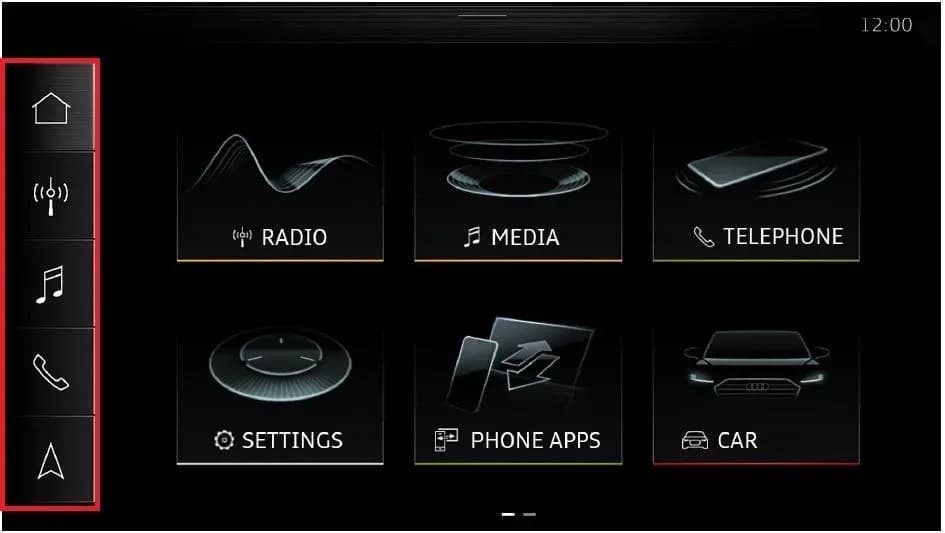
También aplica a
- Audi A3
- 2022
- Audi A4
- 2021–2022
- Audi A4 allroad
- 2021–2022
- Audi A5
- 2021–2022
- Audi A6
- 2021–2022
- Audi A6 allroad
- 2021–2022
- Audi A7
- 2021–2022
- Audi A7 e
- 2021–2022
- Audi A8 L e
- 2021
- Audi e-tron
- 2021
- Audi e-tron GT
- 2022
- Audi e-tron Sportback
- 2021–2022
- Audi Q3
- 2022
- Audi Q5
- 2021–2022
- Audi Q5 e
- 2021
- Audi Q7
- 2021–2022
- Audi Q8
- 2021–2022
- Audi RS 3
- 2022
- Audi RS 5
- 2021–2022
- Audi RS 6 Avant
- 2021–2022
- Audi RS 7
- 2021–2022
- Audi RS e-tron GT
- 2022
- Audi RS Q8
- 2021–2022
- Audi S3
- 2022
- Audi S4
- 2021–2022
- Audi S5
- 2021–2022
- Audi S6
- 2021–2022
- Audi S7
- 2021–2022
- Audi S8
- 2021–2022
- Audi SQ5
- 2021–2022
- Audi SQ7
- 2021–2022
- Audi SQ8
- 2021–2022
▸ Mostrar 26 más▾ Mostrar menos
Symptoms
Owners of affected 2021-2022 Audi vehicles may experience the following issues related to the Audi MMI sidebar missing:
- The MMI sidebar is permanently missing from the display.
- The MMI system starts directly into the settings menu, making it difficult or impossible to use the infotainment system as intended.
Technical Background
Audi has identified that a software-related issue within the MIB3 infotainment system is responsible for the missing MMI sidebar. This prevents the normal operation and navigation of the system. For Model Year 2023 vehicles, new information electronics software was implemented as a production solution.
Repair Procedure Summary
To address the Audi MMI sidebar missing issue, technicians will perform a software update using a USB flash drive. The process involves several steps:
- Turn on the vehicle's ignition.
- Wait approximately 5 minutes for the MIB3 system to fully start.
- Insert the USB stick containing the MIB3 script into the vehicle's USB port.
- Wait for the message "Failure detected. Fix successful. Please remove USB-stick and restart the Infotainment System." to display.
- Turn off the ignition and lock the doors.
- Wait approximately 5 minutes to ensure the vehicle enters sleep mode.
- Unlock the vehicle doors.
- Remove the USB stick from the USB port.
- Turn on the ignition.
- Wait approximately 5 minutes for the MIB3 system to fully start again.
- Re-insert the USB stick into the USB port.
- Verify that the message "Check result: OK No issue identified. Please remove USB-stick and restart the Infotainment System." is displayed, confirming no software issues are detected.
- Remove the USB stick.
Required Tools or Parts
Technicians will need a specific USB flash drive for this procedure. The required part is:
- USB Flash Drive: 8WD906961 (Quantity: 01, designated as a shop tool).
Additionally, technicians may need to refer to TSB 2047812 for instructions on setting up and using the SD Creator program to obtain vehicle software updates from MirrorServer.
Important Warnings
- Warranty Information: If your vehicle is outside of its warranty period, this Technical Service Bulletin is for informational purposes only, and any repairs may not be covered free of charge.
- Diagnosis Scope: If the green message "Check result: OK No issue identified. Please remove USB-stick and restart the Infotainment System." appears immediately at step 4 of the repair procedure, it indicates that the information electronics control unit (J794) is not affected by the specific software issue described in this TSB. In such cases, further diagnosis of the problem falls outside the scope of this bulletin.
Owner Action
If you are experiencing the Audi MMI sidebar missing issue, it is recommended to schedule an appointment with an authorized Audi service center. They will be able to perform the necessary software update using the procedure outlined in TSB 2071928/2. This service is typically covered under warranty if your vehicle qualifies.
Source: NHTSA ID: 11017637
Frequently Asked Questions
- What does the 'Audi MMI sidebar missing' mean?
- The 'Audi MMI sidebar missing' refers to a software glitch in the MIB3 infotainment system where the navigation sidebar on the screen disappears, and the system may boot directly into the settings menu, making it difficult to use.
- Which Audi models are affected by the MMI sidebar missing issue?
- This issue primarily affects various 2021-2022 Audi models, including the A3, A4, A5, A6, A7, A8, Q3, Q5, Q7, Q8, e-tron, and their performance variants, equipped with the MIB3 infotainment system.
- How is the Audi MMI sidebar missing problem fixed?
- The problem is resolved by a software update performed by an authorized Audi technician. This involves using a special USB flash drive (part number 8WD906961) to upload new software to the MIB3 system, as detailed in TSB 2071928/2.
- Will I be charged for the repair if my Audi MMI sidebar is missing?
- If your vehicle is still under warranty, the software update to fix the 'Audi MMI sidebar missing' issue should be covered free of charge. If your vehicle is outside of warranty, this TSB is informational only, and charges may apply.
Related Articles
2022 Audi e-tron Electrical System Problems: Complaints & TSBs
Owners of the 2022 Audi e-tron frequently report significant electrical system malfunctions, ranging from sudden power loss and charging hazards to software crashes. Braking issues and unexpected automatic emergency braking are also common concerns, alongside numerous technical service bulletins…
2022-2026 Audi Guided Fault Finding Reporting Obligation
Audi has issued Technical Service Bulletin TPI 2033392, also known as Transaction No. 2081531/1, regarding a reporting obligation for technicians when Guided Fault Finding produces an unexpected result. This TSB outlines the process for contacting Audi Product Support for diagnostic assistance.
2022-2026 Audi Infotainment System Complaints
Audi has released Technical Service Bulletin (TSB) 2081405/1 to address various customer complaints regarding infotainment systems in 2022-2026 Audi vehicles. This TSB helps technicians diagnose issues often caused by external media or mobile devices, rather than vehicle technology.
2018-2026 Audi Models Cracking Noise TSB 2061464/11
Audi Technical Service Bulletin 2061464/11 describes a cracking noise from the front or rear axle when changing direction in various 2018-2026 Audi models. The issue is due to stub axle movement and is resolved by bonding the stub axle to the wheel bearing with locking fluid.
2022-2026 Audi Parking Aid False Warnings TSB 2024323/13
Audi has released Technical Service Bulletin 2024323/13 to address customer complaints of false parking aid warnings. This bulletin details various environmental and vehicle-specific conditions that can cause the parking aid system to issue alerts even when no obstacles are present. It provides…
Leave a comment
Comments are moderated and may take a moment to appear. Only your first name and the initial of your last name are shown publicly.
Comments
Be the first to comment.