2022-2026 Audi MIB3 Navigation Database Reinstallation TSB
This Audi Technical Service Bulletin (TSB 2062115/13) addresses issues with the MIB3 navigation database in 2022-2026 Audi vehicles. It provides detailed instructions for technicians to reinstall the navigation data using a USB-C drive, resolving 'error message' or 'no function' symptoms.
 Sarah Mitchell2022 Audi e-tron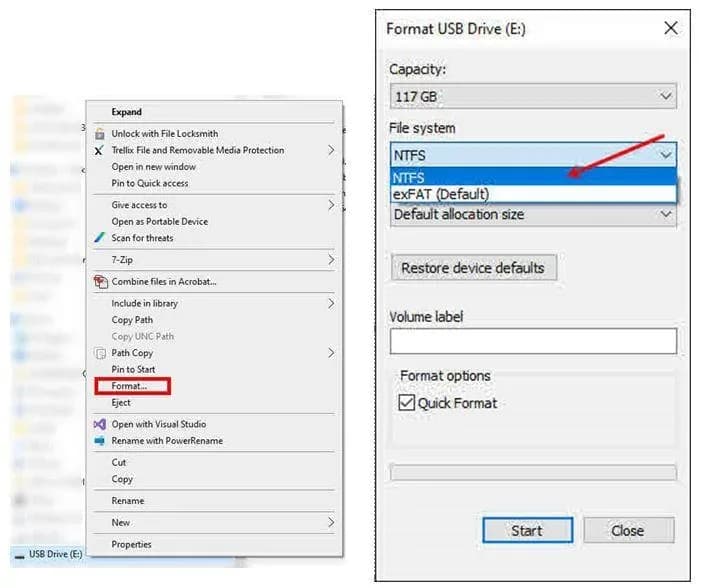
También aplica a
- Audi A3
- 2022–2025
- Audi A4
- 2021–2025
- Audi A4 allroad
- 2021–2025
- Audi A5
- 2021–2024
- Audi A6
- 2021–2025
- Audi A6 allroad
- 2021–2025
- Audi A7
- 2021–2025
- Audi A7 e
- 2021–2022
- Audi A8 L e
- 2021
- Audi e-tron
- 2021, 2023
- Audi e-tron GT
- 2022–2025
- Audi e-tron Sportback
- 2021–2022
- Audi Q3
- 2022–2025
- Audi Q5
- 2021–2025
- Audi Q5 e
- 2021, 2023, 2024, 2025
- Audi Q7
- 2021–2025
- Audi Q8
- 2021–2025
- Audi RS 3
- 2022–2024
- Audi RS 5
- 2021–2024
- Audi RS 6 Avant
- 2021–2025
- Audi RS 7
- 2021–2025
- Audi RS e-tron GT
- 2022–2024
- Audi RS Q8
- 2021–2025
- Audi S e-tron GT
- 2026
- Audi S3
- 2022–2025
- Audi S4
- 2021, 2022, 2024, 2025
- Audi S5
- 2021–2024
- Audi S6
- 2022, 2025
- Audi S7
- 2021–2025
- Audi S8
- 2021–2025
- Audi SQ5
- 2021–2025
- Audi SQ7
- 2021–2025
- Audi SQ8
- 2021–2025
▸ Mostrar 27 más▾ Mostrar menos
Owners of 2022-2026 Audi vehicles equipped with the MIB3 infotainment system may encounter problems with their navigation database, leading to error messages or a complete loss of navigation functionality. This Technical Service Bulletin (TSB) 2062115/13 outlines the procedure for technicians to reinstall the navigation database, ensuring proper operation of the MMI system.
Symptoms
Owners might notice the following issues with their MIB3 navigation system:
- An "error message" displayed related to navigation, communication, or entertainment functions.
- The navigation system showing "functionality -> no function" when attempting to "select navigation mode (NAV)".
- General issues with the navigation unit or trip recorder.
These symptoms are typically indicative of a software issue within the MIB3 MMI system's navigation database.
Important Warnings
Audi has issued specific warnings for technicians and owners regarding this procedure:
- Do not use Internet Explorer to download the necessary files for this TSB. Only Edge, Firefox, Chrome, or Safari should be used.
- If this TSB is performed in conjunction with recall 91DZ, the standard warranty instructions for this TSB do not apply, as reimbursement will be handled under the scope of that recall.
- Technicians should only delete the navigation database if explicitly instructed by another TSB or by Technical Assistance Center (TAC).
- The USB-C flash drive containing the navigation data should be kept as a workshop tool. It is not required to call into TAC or re-download the data if the drive has already been prepared. If an updated navigation database becomes available, it will automatically install via an online update after the initial database installation.
Repair Procedure Summary
The repair involves downloading the latest navigation database, preparing a USB-C drive, and then using the ODIS diagnostic system to erase the old database and install the new one. This process ensures the Audi e-tron navigation database and other affected models are correctly updated.
- Download Navigation Data: Obtain the current MIB3 Navigation database files from the official Audi download link provided in the TSB. Download both files to the PC's C drive.
- Prepare USB-C Drive: Acquire a 64GB or larger USB-C drive. Right-click the USB-C icon, select format, and choose "NTFS" as the file system. Formatting will erase all existing files on the drive. Note that if the drive is formatted in FAT32, it might not be possible to update the vehicle.
- Extract and Copy Files: Use a file extraction tool like 7-zip to extract the downloaded NAV files. Copy the extracted folders, including "Data" and "Meta," directly to the root directory of the NTFS-formatted USB-C drive. Files must not be placed in a subfolder.
- Eject USB-C Drive: Safely eject the USB-C drive from the computer.
- Delete Existing Database (ODIS): In ODIS, navigate to Guided Fault Finding/Guided Functions. Execute the test plan: Self test >> Diagnostic capable system >> 005F - Information Electronics Control Module 1 -J794- (MIB2+ or MIB3) >> 005F - Information Electronics 1, functions / 005F - Basic Setting. Within the basic settings program, select the function "Erase navigation databank or Partitions of internal memory" and choose the "Navigation data bank value." This process usually takes less than 3 seconds.
- Vehicle Sleep Cycle: End the diagnostic session and allow the vehicle to enter a sleep cycle.
- Install New Database: Turn the ignition back on and wait a few minutes for all MMI functions to initialize. Insert the prepared USB-C drive into the vehicle. The MMI should automatically detect the new navigation database and prompt the user to install it. Alternatively, navigate to MMI Settings >> system maintenance >> software update to initiate the installation.
- MMI Reset: Once the update is complete, perform an MMI reset by pressing and holding the on/off button for approximately 10 seconds.
- Final Steps: Unplug the USB-C drive. The navigation map should now be displayed, and the navigation feature will be fully functional.
If the MMI does not detect the USB-C drive, re-insert it several times or try using a different USB-C drive.
Required Tools or Parts
To perform this service, technicians will need:
- A USB-C Flash Drive, 64GB or larger (locally sourced).
Warranty Information
Warranty claims for this procedure must adhere to the Audi Warranty Policies and Procedures Manual. Claims are subject to review and audit by Audi Warranty. If the vehicle is outside of its warranty period, this TSB serves as informational guidance only.
- Service Number: 9196
- Damage Code: 0039
- Labor Operations:
- Program display and operating control unit: 9196 2599 (20 TU)
- Check and adjust display and operating control unit: 9196 0599 (10 TU)
This TSB (2062115/13) supersedes or relates to previous revisions, including those from January 13, 2025 (Revision 12) and September 20, 2023 (Revision 11), which updated details such as USB-C drive size requirements. It also references TSB 2037809, "91 MIB: MMI navigation map update 'How-to guide'."
Source: NHTSA ID: 11015735
Frequently Asked Questions
- What is Audi TSB 2062115/13 about?
- Audi TSB 2062115/13 provides instructions for reinstalling the navigation database in MIB3 MMI systems found in 2022-2026 Audi vehicles. This procedure aims to resolve issues such as "error message" or "functionality -> no function" related to the navigation system.
- What symptoms indicate a problem with the Audi e-tron navigation database?
- Symptoms include an "error message" appearing on the MMI screen, or the navigation system displaying "functionality -> no function" when trying to select navigation mode. These issues suggest the navigation database may be corrupted or outdated.
- What tools are needed to reinstall the MIB3 navigation database?
- Technicians will need a USB-C flash drive that is 64GB or larger, formatted to NTFS. The process also requires access to the ODIS diagnostic system and a computer to download and extract the navigation database files using a modern web browser and a tool like 7-zip.
- Can I perform this navigation database reinstallation myself?
- This procedure is intended for trained technicians using specialized diagnostic equipment (ODIS). It involves specific steps for formatting a USB drive, extracting files, and interacting with the vehicle's MMI system. It's recommended to visit an authorized Audi service center for this repair.
Related Articles
2022 Audi e-tron Electrical System Problems: Complaints & TSBs
Owners of the 2022 Audi e-tron frequently report significant electrical system malfunctions, ranging from sudden power loss and charging hazards to software crashes. Braking issues and unexpected automatic emergency braking are also common concerns, alongside numerous technical service bulletins…
2022-2026 Audi Guided Fault Finding Reporting Obligation
Audi has issued Technical Service Bulletin TPI 2033392, also known as Transaction No. 2081531/1, regarding a reporting obligation for technicians when Guided Fault Finding produces an unexpected result. This TSB outlines the process for contacting Audi Product Support for diagnostic assistance.
2022-2026 Audi Infotainment System Complaints
Audi has released Technical Service Bulletin (TSB) 2081405/1 to address various customer complaints regarding infotainment systems in 2022-2026 Audi vehicles. This TSB helps technicians diagnose issues often caused by external media or mobile devices, rather than vehicle technology.
2018-2026 Audi Models Cracking Noise TSB 2061464/11
Audi Technical Service Bulletin 2061464/11 describes a cracking noise from the front or rear axle when changing direction in various 2018-2026 Audi models. The issue is due to stub axle movement and is resolved by bonding the stub axle to the wheel bearing with locking fluid.
2022-2026 Audi Parking Aid False Warnings TSB 2024323/13
Audi has released Technical Service Bulletin 2024323/13 to address customer complaints of false parking aid warnings. This bulletin details various environmental and vehicle-specific conditions that can cause the parking aid system to issue alerts even when no obstacles are present. It provides…
Leave a comment
Comments are moderated and may take a moment to appear. Only your first name and the initial of your last name are shown publicly.
Comments
Be the first to comment.