2023-2026 Audi Apple CarPlay Connection Issues TSB
Audi has released Technical Service Bulletin 2073582/1 to address common Apple CarPlay connection complaints in 2023-2026 models. Owners may experience issues with reliable connections, automatic re-pairing, or sporadic manual connections. This TSB provides detailed troubleshooting steps.

También aplica a
- Audi A3
- 2022–2025
- Audi A4
- 2021–2025
- Audi A4 allroad
- 2021–2025
- Audi A5
- 2021–2025
- Audi A6
- 2021–2025
- Audi A6 allroad
- 2021–2025
- Audi A7
- 2021–2025
- Audi A7 e
- 2021–2022
- Audi A8 L e
- 2021
- Audi e-tron
- 2021–2022
- Audi e-tron Sportback
- 2021–2022
- Audi Q3
- 2021–2025
- Audi Q5
- 2021–2025
- Audi Q5 e
- 2024–2025
- Audi Q7
- 2021–2025
- Audi Q8
- 2021–2025
- Audi R8
- 2021–2023
- Audi RS 3
- 2022–2025
- Audi RS 5
- 2021–2025
- Audi RS 6 Avant
- 2021–2025
- Audi RS 7
- 2021–2025
- Audi RS e-tron GT
- 2022–2024
- Audi RS Q8
- 2021–2025
- Audi S e-tron GT
- 2026
- Audi S3
- 2022–2025
- Audi S4
- 2021–2025
- Audi S5
- 2021–2025
- Audi S6
- 2021–2025
- Audi S7
- 2021–2025
- Audi S8
- 2021–2025
- Audi SQ5
- 2021–2025
- Audi SQ7
- 2021–2025
- Audi SQ8
- 2021–2025
- Audi TT
- 2021–2023
- Audi TT RS
- 2021–2022
- Audi TTS
- 2021–2023
▸ Mostrar 30 más▾ Mostrar menos
If you own a 2023-2026 Audi and are experiencing frustrating issues with your Apple CarPlay connection, Audi has released Technical Service Bulletin (TSB) 2073582/1 to provide comprehensive troubleshooting steps. This TSB, issued on April 4, 2024, aims to resolve common complaints regarding unreliable connections and pairing difficulties. The focus keyword for this issue is Audi e-tron Apple CarPlay connection.
Symptoms of Apple CarPlay Connection Issues
Owners of affected Audi vehicles may notice several problems with their Apple CarPlay system. These include:
- The customer can no longer reliably connect their iPhone to Apple CarPlay™.
- Automatic (re)connection of Apple CarPlay™ does not work.
- Connecting Apple CarPlay™ manually only works sporadically.
- Connecting via USB cable works as expected, indicating the issue is specific to wireless connectivity.
Workshop technicians have confirmed that the customer complaint, specifically the Audi e-tron Apple CarPlay connection problem, can be reproduced using the customer's phone. Furthermore, the customer's phone can often pair successfully with other comparable vehicles, suggesting the issue lies within the Audi's system or its interaction with the phone.
Diagnosis and Technical Background
Complaints regarding Apple CarPlay pairing can stem from various MMI (Multi Media Interface) or phone settings, as well as limitations with the phone's software. Audi recommends always checking the complaint using the newest phone software to ensure compatibility and rule out phone-side issues. This TSB, 91 24 94 2073582/1, provides a structured approach to diagnosing and resolving these connectivity problems.
Important Warnings for Owners and Technicians
Audi provides specific guidance to ensure proper troubleshooting and warranty claims:
- "If you cannot find a specific TSB regarding Apple CarPlay™ connectivity, please check the following steps/settings first before doing further diagnosis. This may resolve the customer complaint."
- "The screenshots were taken with an iPhone SE Gen2 with iOS 17.2 in English. The settings may vary slightly depending on the iOS version, model, and language."
- "If you would like to submit a technical repair query about Apple CarPlay™, please fill out the attached form completely and attach it to the technical inquiry."
Repair Procedure Summary
The repair procedure for the Audi e-tron Apple CarPlay connection issue involves a series of steps to be performed on both the Audi's MMI system and the customer's iPhone.
On the Audi MMI System:
- Delete all phone pairings: Navigate to the Audi smartphone interface. Press and hold on the affected phone entry until a window appears, then select the option to "Delete" the connection. Figure 1 in the TSB illustrates this process.
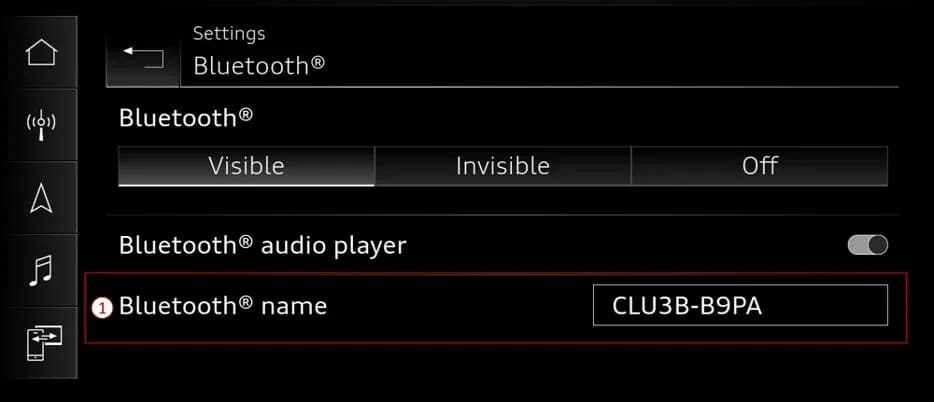
- Verify Wi-Fi and Bluetooth settings: In the MMI's connection manager, check that the Wi-Fi hotspot name precisely matches the Bluetooth name of the MMI. Figure 2 shows the Bluetooth name setting, and Figure 3 displays the Wi-Fi settings.
- Ensure unique and secure settings: If the Bluetooth name and SSID do not match, adjust them to be identical. Make sure the name is unique (e.g., avoid generic names like 'AUDI'). A password must also be set for the Wi-Fi hotspot.
On the iPhone:
- Delete vehicle Wi-Fi hotspots: On the iPhone, go to Settings > Wi-Fi > Edit (top right). Remove BOTH the 2.4GHz and 5GHz vehicle Wi-Fi hotspots from the list of known networks. Figure 4 demonstrates this step.
- Delete vehicle Bluetooth pairing: Navigate to Settings > Bluetooth. Tap the blue "i" icon next to the vehicle's device entry, then select "Forget this device." Figure 5 provides a visual guide.
- Delete vehicle CarPlay settings: Go to Settings > General > CarPlay. Select the vehicle from the list and then choose "Forget this Car." Figure 6 illustrates this action.
After carefully performing all these steps on both the MMI and the iPhone, re-pair the phone to the vehicle using the ASI tile in the MMI. This comprehensive reset and re-pairing process should resolve the Audi e-tron Apple CarPlay connection problem.
Warranty Information
This Technical Service Bulletin 2073582/1 outlines specific warranty claim procedures. For vehicles within the warranty period (up to 48 months or 50,000 miles), the claim type is 110. For Certified Pre-Owned (CPO) vehicles, use claim type G10, verifying owner eligibility. If the vehicle is outside of any warranty, this TSB serves as informational guidance only.
The Service Number for this procedure is 9109, and the Damage Code is AD39. Labor operations include "Check display and operating unit" (code 9196 0199) with an allowance of 20 TU (Technical Units). Diagnostic time and road tests are listed as "No allowance" (0 TU). All warranty claims must adhere to the Audi Warranty Policies and Procedures Manual.
NHTSA ID: 10253283
Galería
1 imagen
Frequently Asked Questions
- What are the common symptoms of Apple CarPlay connection issues in Audi vehicles?
- Owners may experience their iPhone no longer reliably connecting to Apple CarPlay, automatic reconnection failing, or manual connections working only sporadically. Connecting via a USB cable typically works as expected.
- How does Audi Technical Service Bulletin 2073582/1 address these problems?
- TSB 2073582/1 provides a detailed troubleshooting guide that involves resetting and reconfiguring settings on both the Audi's MMI system and the owner's iPhone, including deleting existing pairings and hotspots before re-pairing.
- What should I do on my iPhone to fix the Audi e-tron Apple CarPlay connection?
- You should delete all vehicle Wi-Fi hotspots, delete the vehicle's Bluetooth pairing, and delete the vehicle's CarPlay settings from your iPhone's settings menus. After these steps, you can attempt to re-pair your phone to the Audi MMI.
- Is this repair covered under warranty?
- For vehicles within 48 months or 50,000 miles, the repair is generally covered under warranty (Claim Type 110). For Certified Pre-Owned vehicles, Claim Type G10 applies. If your vehicle is outside of warranty, this TSB is for informational purposes only.
What Audi e-tron owners report
Counted from the records in our database across 5 model years.
- 158
- Owner complaints
- 14
- Recalls
- 1,706
- Service bulletins
- 7
- Crashes reported
- 6
- Fires reported
- 3
- Injuries reported
The 2023 model year
6 complaints, the 4th most of 5 model years on file. Owners reported 2 crashes, 0 fires and 0 injuries for this year, which also has 3 recalls on file.
Complaints by model year
| 2019 | 84 | |
|---|---|---|
| 2020 | 1 | |
| 2021 | 36 | |
| 2022 | 31 | |
| 2023 | 6 |
Most-reported systems
- Electrical System — 81
- Power Train — 24
- Engine — 23
- Fuel/Propulsion System — 18
- Service Brakes — 18
Latest recalls for the 2023 model year
- 26V240000 — Service Brakes, Hydraulic (Apr 2026)
- 25V900000 — Back Over Prevention (Dec 2025)
- 23V842000 — Electrical System (Dec 2023)
Recent owner reports
I was entering the freeway at a metered on-ramp. During my wait, the vehicle warned of objects that were close even though none were close to the vehicle.
Read owner complaints →When driving, my vehicle recieved multple warning messages at the same time. The first message was that my brake was malfunctioning, and when I went to brake, the brakes did not work.
Complaints are owner reports filed with NHTSA. They are unverified, and counts depend on how many vehicles were sold, so they are not a failure rate.
Related Articles
2023 Audi e-tron Problems: Recalls, Complaints & TSBs
The 2023 Audi e-tron has faced several significant safety concerns, including recalls for potential charging cable overheating and brake pedal detachment. Owners have also reported serious issues like sudden unintended acceleration and electrical system malfunctions. This profile details these…
2023 Audi e-tron Brake Pedal Recall
Audi has issued a recall (NHTSA ID: 26V240000, Audi Recall 46P7) for certain 2019-2024 E-Tron and 2020-2024 E-Tron Sportback vehicles, including the 2023 Audi e-tron. The recall addresses a potential issue where the brake pedal may detach from the brake booster, leading to a loss of brake function.
2015-2027 Audi Noise Diagnosis with Frequency Analysis App TSB
Audi has released Technical Service Bulletin 2051095/11 detailing the Audi Frequency Analysis app. This app helps technicians diagnose noise complaints more precisely across 2015-2027 Audi models. Learn how the app works, where to download it, and its features for effective vehicle noise analysis.
2023 Audi e-tron AC/DC Charging Not Possible TSB
This manufacturer communication (NHTSA ID 11031035) provides critical information for 2023 Audi e-tron owners facing issues with AC/DC charging. It specifically highlights problems linked to software version 00C6: 0093/3119, which can prevent the vehicle from charging.
2023-2025 Audi Rear Seat Reminder Message TSB 2074943/2
Audi Technical Service Bulletin 2074943/2 explains the instrument cluster message 'Please check rear seats and be aware of door safelock' in various 2023-2025 Audi models. This informational TSB details the rear occupant detection system designed to prevent children and pets from being left in…
Leave a comment
Comments are moderated and may take a moment to appear. Only your first name and the initial of your last name are shown publicly.
Comments
Be the first to comment.