2021 Audi e-tron PDI Settings Update
This document details the 2021 Audi e-tron PDI settings update, providing technicians with revised instructions for infotainment, Audi connect features, and tire pressure monitoring during pre-delivery inspection.

También aplica a
- Audi A4
- 2021
- Audi A5
- 2021
- Audi A6
- 2021
- Audi A6 allroad
- 2021
- Audi A7
- 2021
- Audi A7 e
- 2021
- Audi A8 L e
- 2021
- Audi Q3
- 2021
- Audi Q5
- 2021
- Audi Q7
- 2021
- Audi Q8
- 2021
- Audi R8
- 2021
- Audi RS 5
- 2021
- Audi RS 7
- 2021
- Audi RS Q8
- 2021
- Audi S4
- 2021
- Audi S5
- 2021
- Audi S6
- 2021
- Audi S7
- 2021
- Audi S8
- 2021
- Audi SQ5
- 2021
- Audi SQ7
- 2021
- Audi SQ8
- 2021
- Audi TT
- 2021
- Audi TT RS
- 2021
- Audi TTS
- 2021
▸ Mostrar 20 más▾ Mostrar menos
The 2021 Audi e-tron PDI settings update is outlined in a comprehensive Technician Reference Document issued by Audi Service. This document, identified by NHTSA ID 10194516, serves as a crucial resource for dealership technicians performing Pre-Delivery Inspections (PDI) on new 2021 Audi vehicles. Its primary purpose is to supplement the standard PDI Checklist, offering detailed guidance and updated procedures for specific items marked with an asterisk (*).
Understanding the 2021 Audi Pre-Delivery Inspection (PDI)
The Pre-Delivery Inspection is a critical step before a new Audi vehicle is handed over to a customer. It ensures that the vehicle meets Audi's quality standards and is fully functional and correctly configured. The Technician Reference Document covers a wide array of checks across multiple vehicle systems, ensuring a consistent and high-quality delivery experience. This document is essential for technicians to correctly prepare vehicles like the 2021 Audi e-tron for their new owners.
Detailed PDI Procedures and Updates
The PDI process involves a series of thorough checks and configurations. The Technician Reference Document provides detailed steps for each area:
Vehicle Preparation Steps
Initial preparation involves several key actions to ensure the vehicle is ready for diagnostic work and physical inspection:
- Perform any open campaigns: Technicians must follow instructions listed in relevant campaign documentation.
- Perform diagnostic work: This includes connecting a vehicle diagnostic tester, selecting "Diagnosis" mode, starting diagnosis, performing vehicle identification, unticking "Working with Guided Fault Finding," and switching to the "Special functions" tab. Technicians then select the "Delivery Inspection total" program, start it by selecting "Carry out check," and follow on-screen instructions. Afterward, they switch to the "Control units" tab, press the "Guided Fault Finding" button, launch Guided Fault Finding, evaluate static event memory entries, and exit diagnosis, ensuring the diagnostic log for delivery inspection is sent automatically.
- Install front license plate carrier (if necessary): Any removed trim required for carrier installation must be retained and given to the customer. If no front license plate carrier is necessary, it must remain in the trunk for the customer.
Exterior Checks
Exterior components are thoroughly inspected for functionality and proper setup:
- Check all key buttons and features: Verify the functionality of all keys, ensuring the vehicle starts and runs with all keys and the start/stop button. All doors and the trunk should remotely lock/unlock with all keys, including all door handle sensors with Advanced Key (if equipped).
- Check all doors for proper power closing (if equipped): For vehicles equipped with this feature, all doors must be checked for proper closing.
- Test front washers (and headlight washers if equipped): Headlights must be on to test the functionality and correct aim of the headlight washers.
Trunk Inspection Details
The trunk area requires specific checks and component installations:
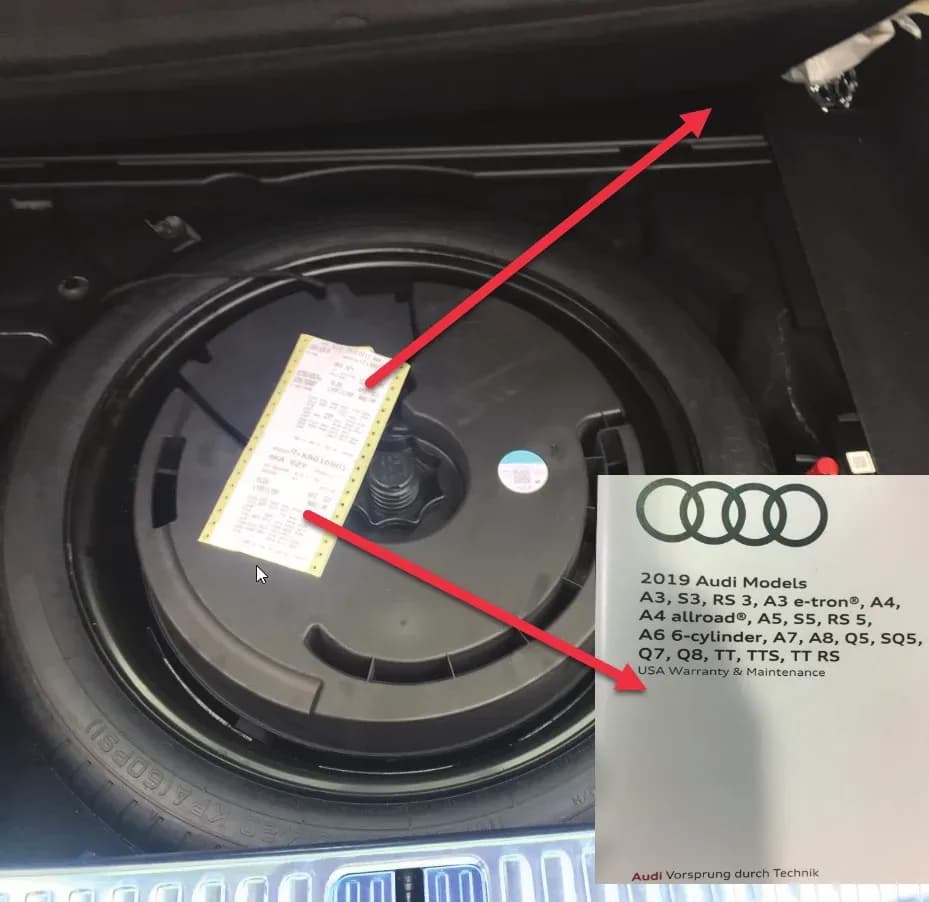
- Install wheel bolt cover removal tool: This tool, along with the wheel lock key (if applicable), must be installed from the PDI kit into the trunk tool kit.
- Set spare tire pressure: Refer to the separate "Audi Normal Load Condition Tire Pressure Table" posted on ServiceNet for correct pressure settings.
- Check battery clamps for proper torque: Refer to Elsa Pro for specification for the correct torque values.
- PR Number Label (A6/A7/A8 models): For vehicles produced prior to September 12, 2018, one PR Number Label must be placed in the Warranty and Maintenance Book inside the front cover and another on the Rear Panel Sill Frame under the luggage compartment floor.
Interior System Verification
All interior functions and settings are verified for correct operation:
- Check operation of window, lock, and seat controls: Verify all switches, locks, window, seat adjustment, heated seats (if equipped), and child safety features.
- Inspect mirrors for proper operation: Check folding, adjustments, right side tilt in reverse, and heating (if equipped).
- Check rear view mirror operation: Verify self-dimming function and lighting (if equipped).
- Verify operation of heated/ventilated and massaging seats (if equipped): Check both front and rear seats. Massaging features are typically only in the front seats.
- Verify proper operation of climate control: Ensure proper heating and A/C cooling, and that all panel vents are open for all zones.
- Inspect operation of all power outlets: Check the front outlet, auxiliary outlet under the armrest, and rear outlets.
- Check panoramic sunroof and sunshade operation: Verify open/close/vent/deflector at the edge and sunshade operation.
- Manual folding 2nd row and power folding 3rd row seats (Q7/SQ7): Verify the operation of these seats, with controls for the 3rd row located in the trunk.
Updated Settings Configuration
The 2021 Audi e-tron PDI settings update includes several important revisions to ensure consistency and clarity for technicians. These changes are crucial for the proper setup of the vehicle's user interface and connected services.
- Set Time source setting to "GPS" and set Auto daylight savings time to "on": Change the time zone appropriate to the dealer location.
- Verify and set language: This instruction has been clarified and is now separate from measurement units. It can be changed in the Settings menu by going to "Home > Settings > Language & Keyboard."
- Verify and set measurement units: This instruction is also now separate from language. It can be changed in the Settings menu by going to "Home > Settings > General > Measurement Units."
- Verify Speech Dialog System is operating: Press the "Talk" button and verify several commands.
- Set "Entertain. Fad." in Parking aid to an audible level: The instructions for this setting have been clarified. It is accessed via "Home > Vehicle > Parking Aid."
- Set "Music volume while parking" to medium: Guidance for this setting has been updated. It is accessed via the MMI rear-view camera display, under "Home > Vehicle > Parking Aid" (applicable to vehicles with park assist or rear-view camera).
- Set dealership location in navigation (if equipped): Set the dealership location for following back to the dealership during a road test.
- Turn off Manual Speed Warning: The procedure for turning off the "Manual Speed Warning" has been revised. This setting is found in the Driver Assistance settings by navigating to "Home > Vehicle > Driver Assistance > Speed Warning > Manual Warning Threshold = 'off'."
- Disable climate control via door unlock (e-tron only): Access this via the main screen, then "Vehicle > Climate control > small temperature gauge symbol (upper right) > settings (wheel upper right) > unselect (disable) 'Start A/C after unlocking'." Check and adjust as needed, ensuring the button position is "off" in the left position.
Media / Radio / SAT System Updates
The 2021 Audi e-tron PDI settings update also includes a specific change for the media and radio systems.
- Verify HD Radio is turned "off": The instructions for verifying this setting have been updated. Technicians will now find this setting in "Home > Radio > Gear icon" (top right corner).
On-Hoist Inspection (Continued) and Tire Pressure Update
This section covers final checks and an important tire pressure management update:
- Install wheel bolt covers and center caps as supplied: These components are found in the PDI kit.
- Inspect wheel bolts for proper torque: Use a torque wrench to verify.
- Set and store tire pressures: The instructions for this have been revised. Technicians are now directed to store tire pressure values in "Home > Vehicle > Settings & Service > Tire pressure monitoring." This ensures the vehicle's system accurately reflects the correct tire pressures for either sold or stock inventory vehicles.
Driving Performance Checks
Driving performance aspects are verified to ensure optimal operation:
- Verify engine Start-Stop System functionality: Verify the velum sticker is on the start/stop button. Remove the start/stop information card from the car kit and place it in the glove box with the owner's manuals. Additional supply can be ordered via the Brand Store on AccessAudi.
- Verify engine performance and acceleration: Listen for abnormal noise/vibrations.
- Test drive vehicle applying brakes several times: Apply brakes at least 4 times at 20 mph (35 km/h) to clean brake rotors. Check for abnormal noise/vibration/pulsation.
- Calibrate rear view mirror: Calibrate the rear-view mirror compass to the proper zone and check self-dimming function/lighting (if equipped).
Driver Assistance System Checks
Driver assistance systems are crucial for safety and convenience:
- Verify operation of parking system: Verify the operation of Audi parking system sensors with the rear-view camera (if equipped).
- Verify all vehicle Head-up display functionality (if equipped): Verify the image can be adjusted properly in the viewing area of the windshield. NAV directions, speed, cruise control, and lane assist should all be visible in the Head-up Display (as equipped).
Convertible Functionality (if equipped)
For convertible models, the power folding top operation is tested with the engine running to conserve battery power.
Post-Road Test Inspection
After the road test, a final check is performed:
- Check engine oil level: Fill oil to the maximum level when the vehicle is at operating temperature.
Audi connect® (USA ONLY) Updates
For vehicles equipped with Audi connect, the 2021 Audi e-tron PDI settings update provides updated guidance for activating and verifying key features.
- Turn on the Wi-Fi® hotspot: Ensure the wireless network is turned on via "Home > Settings > Connection Settings > Wi-Fi > Wi-Fi hotspot settings."
- Check Wi-Fi® hotspot visibility: Verify the Wi-Fi® hotspot functionality is enabled and that the SSID is set to "AUDI_MMI_XXXX," where "XXXX" represents the last four digits of the VIN, which are automatically preset in the system.
- Enable satellite map view for navigation: Enable satellite map view in "Home > Navigation > Gear Icon (top right corner) > Map Settings > Satellite map," and verify that the satellite imagery appears in the navigation map screen.
Important Notes for Owners
This Technician Reference Document is intended for Audi dealership personnel to ensure that all new 2021 Audi e-tron and other applicable models are correctly prepared and configured before delivery. While these are internal dealer instructions, understanding that such a detailed PDI process exists can provide owners with confidence in their new vehicle's readiness. If you notice any discrepancies with your vehicle's settings or functionality related to these items, it is advisable to contact your authorized Audi service center. This document highlights Audi's commitment to delivering vehicles with all systems properly configured and ready for the customer. The detailed instructions for the 2021 Audi e-tron PDI settings update help ensure a consistent and high-quality pre-delivery experience across all dealerships.
NHTSA ID: 10194516
Galería
2 imágenes
Frequently Asked Questions
- What is the purpose of the 2021 Audi e-tron PDI settings update?
- The 2021 Audi e-tron PDI settings update (NHTSA ID 10194516) is a Technician Reference Document that provides revised and detailed instructions for dealership technicians to perform Pre-Delivery Inspections, ensuring new 2021 Audi vehicles are correctly configured before customer delivery.
- Which specific settings were updated in the PDI document?
- The update includes revised instructions for splitting "Verify and set language" and "Verify and set measurement units" into separate checks, and clarified steps for "Set Entertain. Fad. in Parking aid," "Set Music volume while parking" to medium, and turning off the "Manual Warning Threshold = 'off'."
- How does this update affect Audi connect® features?
- The 2021 Audi e-tron PDI settings update provides new guidance for activating the Wi-Fi® hotspot, checking its visibility (ensuring the SSID is "AUDI_MMI_XXXX" with the last four VIN digits), and enabling satellite map view for navigation.
- Where are the updated tire pressure instructions found?
- Technicians are now directed to store tire pressure values in the vehicle's system under "Home > Vehicle > Settings & Service > Tire pressure monitoring" as part of the On-Hoist Inspection.
- What does the update say about HD Radio?
- The document provides updated instructions for verifying that "HD Radio is turned 'off'," which can be found in the MMI system via "Home > Radio > Gear icon" (top right corner).
What Audi e-tron owners report
Counted from the records in our database across 5 model years.
- 158
- Owner complaints
- 14
- Recalls
- 1,706
- Service bulletins
- 7
- Crashes reported
- 6
- Fires reported
- 3
- Injuries reported
The 2021 model year
36 complaints, the 2nd most of 5 model years on file. Owners reported 0 crashes, 1 fire and 0 injuries for this year, which also has 10 recalls on file.
Tires and Back Over Prevention and Equipment, the system this article covers, accounts for 5 of 158 complaints (3%).
Complaints by model year
| 2019 | 84 | |
|---|---|---|
| 2020 | 1 | |
| 2021 | 36 | |
| 2022 | 31 | |
| 2023 | 6 |
Most-reported systems
- Electrical System — 81
- Power Train — 24
- Engine — 23
- Fuel/Propulsion System — 18
- Service Brakes — 18
Latest recalls for the 2021 model year
- 26V240000 — Service Brakes, Hydraulic (Apr 2026)
- 25V900000 — Back Over Prevention (Dec 2025)
- 23V867000 — Electrical System (Dec 2023)
Complaints are owner reports filed with NHTSA. They are unverified, and counts depend on how many vehicles were sold, so they are not a failure rate.
Related Articles
2021 Audi e-tron Electrical Malfunction and Power Loss
A 2021 Audi e-tron owner reported a severe 'Electrical Malfunction' resulting in complete loss of power on the highway. The issue has persisted despite dealer attempts to fix it over five months, posing significant safety risks.
2021-2026 Audi UTR Troubleshooting & FAQs TSB 2081409/1
This Audi Technical Service Bulletin (TSB 2081409/1) provides comprehensive answers to frequently asked questions and troubleshooting steps for the Audi Universal Traffic Recorder (UTR) accessory, covering topics like SD card compatibility, video playback, Wi-Fi issues, and more.
2021-2025 Audi Emergency Call System Fault TSB
Audi has released Technical Service Bulletin 2059528/18 to address an "Emergency call function: malfunction! Function unavailable. Please contact service" warning, often accompanied by a red SOS LED and DTC B200000. This issue affects various 2021-2025 Audi models and is due to a software problem…
2021-2026 Audi Adaptive Light System Fault C12B3FA TSB
Audi has released Technical Service Bulletin 2054202/7 to address an intermittent 'Audi adaptive light: system fault' message and DTC C12B3FA in various 2021-2026 models. This TSB outlines diagnosis and resolution for driver assistance system malfunctions.
2021-2026 Audi Parking Aid False Warnings TSB 2024323/12
This Technical Service Bulletin (TSB 2024323/12) details diagnostic and repair procedures for 2021-2026 Audi vehicles experiencing false parking aid warnings. Learn about environmental factors, sensor checks, and proper installation to resolve issues like 'Parking aid does not work / warning is…
Leave a comment
Comments are moderated and may take a moment to appear. Only your first name and the initial of your last name are shown publicly.
Comments
Be the first to comment.