2021-2024 Nissan B00A0-00 OCS Reset Failure TSB
Nissan has issued TSB NTB19-071D for various 2021-2024 models experiencing DTC B00A0-00 related to the Occupant Detection Sensor Unit (OCS) and inability to perform an OCS zero point reset. This bulletin outlines the diagnostic and repair procedure using specialized tools.

Şu araçlar için de geçerli
- Nissan Altima
- 2021–2024
- Nissan Armada
- 2021–2024
- Nissan Frontier
- 2022–2024
- Nissan Kicks
- 2021–2024
- Nissan Leaf
- 2021–2024
- Nissan Maxima
- 2021–2023
- Nissan Murano
- 2021–2024
- Nissan NV200
- 2021
- Nissan Pathfinder
- 2022–2024
- Nissan Rogue
- 2021–2024
- Nissan Rogue Sport
- 2021–2022
- Nissan Sentra
- 2021–2023
- Nissan Titan
- 2021–2024
- Nissan Versa
- 2021–2024
▸ 8 tane daha göster▾ Daha az göster
Nissan Technical Service Bulletin (TSB) NTB19-071D, revised on September 19, 2024, addresses a specific issue affecting various 2021-2024 Nissan models. This bulletin details the diagnostic and repair process for vehicles that store Diagnostic Trouble Code (DTC) B00A0-00, indicating a problem with the Occupant Detection Sensor Unit (OCS), and are unable to complete an OCS zero point reset.
Symptoms
Owners of affected Nissan vehicles may experience the following:
- The Diagnostic Trouble Code (DTC) B00A0-00, related to the "OCCUPANT DETECTION SENSOR UNIT", is stored in the vehicle's system.
- An OCS zero point reset cannot be performed by a technician.
- During diagnostic attempts, the tool may display a message: "Operation has been stopped due to following reasons. 1. Vehicle condition is out of test condition. 2. No response from Vehicle ECU. Refer to Service Manual, confirm test condition and vehicle condition. Touch 'Retry' to try again."
Fault Codes / DTCs
The primary fault code addressed by this TSB is:
| Code | Description |
|---|---|
| B00A0-00 | OCCUPANT DETECTION SENSOR UNIT |
Important Warnings for Technicians and Owners
Nissan emphasizes several critical precautions for this repair:
- "Nissan Bulletins are intended for use by qualified technicians, not 'do-it-yourselfers'." This procedure requires specialized training and equipment.
- During reprogramming, a battery maintainer or smart charger must be connected. "If the vehicle's battery voltage drops below 12.0V or rises above 13.5V during reprogramming, the OCS control unit may be damaged."
- All vehicle electrical loads must be turned OFF. "If a vehicle electrical load remains ON, the OCS control unit may be damaged."
- The CONSULT PC's AC Adapter must be connected. "If the CONSULT PC battery voltage drops during reprogramming, the process will be interrupted and the OCS control unit may be damaged."
- All external Bluetooth® devices (e.g., cell phones, printers) within range of the CONSULT PC and tool J-51594 must be turned OFF. "If Bluetooth® signal waves are within range of the CONSULT PC and/or tool J-51594 during reprogramming, reprogramming may be interrupted and the OCS control unit may be damaged."
- The CONSULT PC should be placed outside the vehicle on a suitable table or support. "Do not set the CONSULT PC on the vehicle."
- "Do not touch the vehicle during OCS Reprogramming."
- "Minimize vehicle vibrations" during the procedure.
- If the diagnostic tool does not show code "75h" under CURRENT FAILURE CODE during the initial check, "STOP HERE. This bulletin does not apply. Refer to ASIST and the ESM for further diagnostic assistance."
Required Tools or Parts
This repair requires specific tools and software:
- OCS Reprogramming Cable (USB Cable, VAG) - J-51594 (New part number: CO-J-51594). This essential tool is typically pre-sent to dealers.
- A CONSULT PC with synchronized ASIST and updated CONSULT-III plus (C-III plus) software, connected to the internet.
Repair Procedure Summary
The repair for the Nissan Sentra B00A0-00 and related models involves a precise sequence of steps performed by a qualified technician:
- Preparation: Ensure the CONSULT PC has the latest ASIST and CONSULT-III plus software updates and is connected to the internet. For Nissan LEAF vehicles, confirm charging and climate control timers are off.
- Initial Setup: Turn on the ignition (engine OFF / not Ready) and hazard warning lamps. Connect the Vehicle Interface (VI) to the vehicle.
- DTC Check: Start CONSULT PC and ASIST to check for air bag related DTCs. If any DTCs other than B00A0-00 are present, they must be diagnosed and repaired first.
- Tool Connection: Connect the OCS Reprogramming Cable (J-51594) between the vehicle's DLC connector and the CONSULT PC's USB connector.
- Vehicle Environment: Prepare the vehicle by parking it on a level surface, ensuring the front passenger seat is empty, and no occupants are inside. Place the CONSULT PC outside the vehicle.
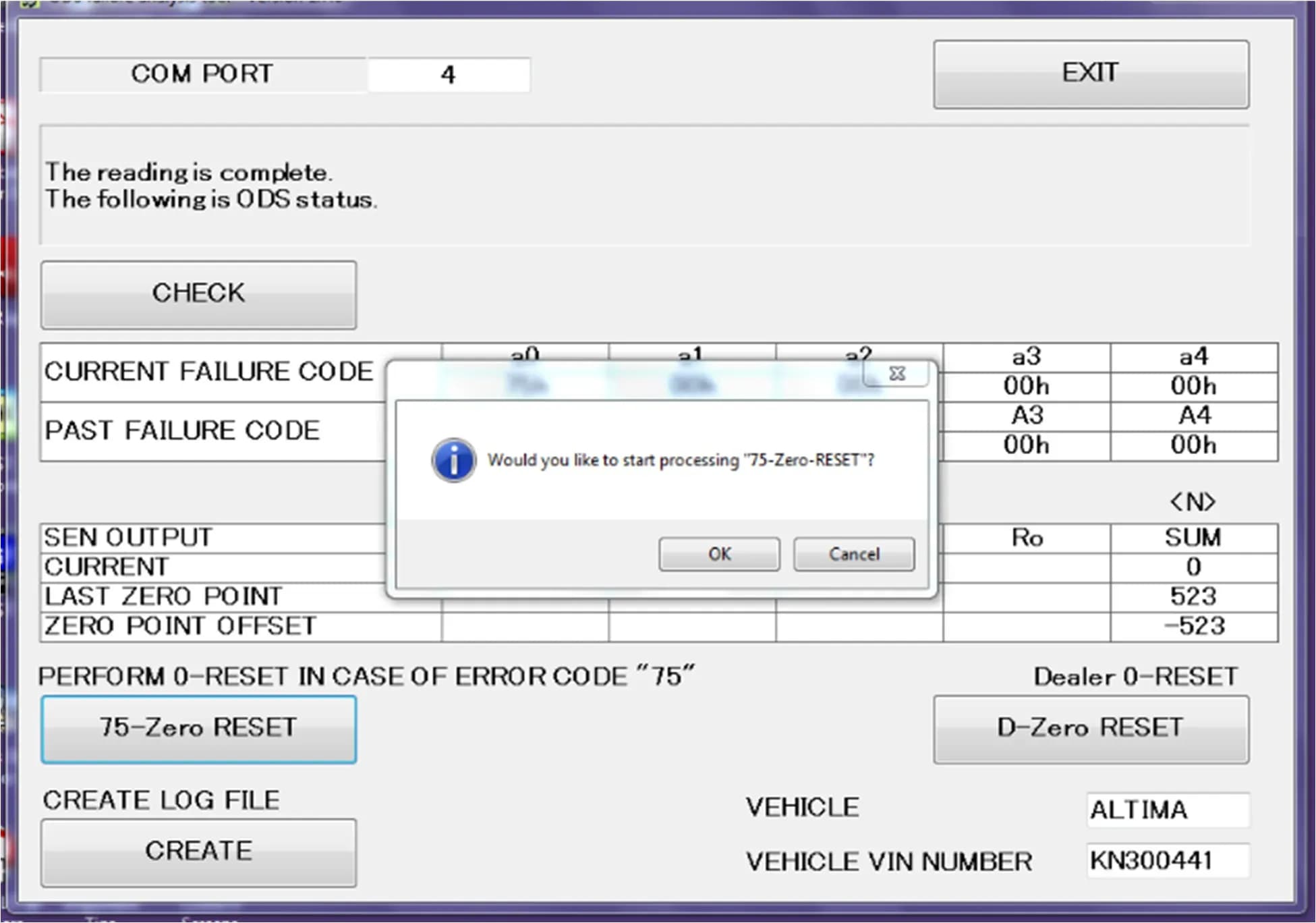
- ODS Analysis Tool: On the CONSULT PC, navigate to ASIST's main menu, select "Specialty Tools", and then "ODS Analysis Tool".
- Vehicle Information Entry: Enter the vehicle model and the last eight characters of the VIN, then select "CHECK". The system may prompt "Would you like to start processing 'CHECK'?" - select OK.
- Verify Failure Code: Confirm that code "75h" is displayed under "CURRENT FAILURE CODE". If not, this bulletin does not apply.
- Perform Zero Reset: Select "75-Zero RESET". The system will ask "Would you like to start processing '75-Zero-RESET'?" - select OK. The process runs for about 7 seconds. When prompted, turn the ignition OFF, then ON again, and select OK.
- Verify Reset Completion: Ensure that "75h" is no longer displayed under "CURRENT FAILURE CODE".
- Disconnect and Reconnect: Select EXIT or the 'X' to close the ODS Analysis tool. Turn OFF the ignition, then ON. Disconnect the J-51594 tool and reconnect the VI to the vehicle and CONSULT PC.
- Clear DTC: Once the VI is recognized, select "Diagnosis (All Systems)" and then "AIR BAG". Verify B00A0-00 is the only DTC displayed. Select "ERASE" and then "Execute" to clear the DTC. The system will confirm "Erasing completed. Touch the 'Close' button, and then check sure that 'SELF-DIAG RESULTS' are deleted."
- Final Steps: Turn OFF the ignition, disconnect the battery maintainer/smart charger, turn OFF hazard lights, and disconnect the VI. For LEAF vehicles, re-enable charging/climate control timers if applicable.
Owner Action
If your 2021-2024 Nissan vehicle is experiencing the Nissan Sentra B00A0-00 fault, or if you are unable to perform an OCS zero point reset, it is crucial to contact your authorized Nissan dealer. This repair requires specialized diagnostic tools and software that are only available to qualified technicians. Do not attempt to perform this repair yourself, as it could lead to further damage to the Occupant Detection Sensor Unit.
Amendment History
This bulletin has undergone several revisions:
- September 12, 2019: Original bulletin published (NTB19-071)
- March 5, 2021: Applied vehicles revised (NTB19-071A)
- April 26, 2022: Applied vehicles revised (NTB19-071B)
- March 9, 2023: Applied vehicles and pages 3, 5, and 10 revised (NTB19-071C)
- September 19, 2024: 2024 Model Year added to various models (L34, Y62, D41, P15, ZE1, Z52, R53, T33, B18, A61, N18); battery voltage range on page 5 revised (NTB19-071D)
Source: NHTSA ID: 11009068
Galeri
17 görsel
Frequently Asked Questions
- What does DTC B00A0-00 mean in my Nissan?
- DTC B00A0-00 indicates a fault with the Occupant Detection Sensor Unit (OCS) in your Nissan. This issue often prevents the OCS zero point reset from being performed, which is necessary for proper airbag system function.
- How is the Nissan B00A0-00 OCS reset failure fixed?
- The repair for the Nissan B00A0-00 OCS reset failure involves using a specialized OCS Reprogramming Cable (J-51594) and Nissan's CONSULT PC diagnostic software. A qualified technician performs a specific "75-Zero RESET" procedure to recalibrate the OCS and clear the fault code.
- Is this repair covered by a recall?
- This is a Technical Service Bulletin (TSB) (NTB19-071D), not a recall. While TSBs address known issues and provide repair procedures, they are typically performed during a service visit if the customer reports the specific symptom. You should check with your Nissan dealer regarding warranty coverage for this specific repair.
- Can I perform the OCS zero point reset myself for the Nissan Sentra B00A0-00 issue?
- No, Nissan explicitly states that these bulletins are intended for qualified technicians. The procedure requires specialized tools like the J-51594 cable and specific diagnostic software (CONSULT PC with ASIST). Attempting to perform this repair yourself could lead to damage to the OCS control unit and compromise vehicle safety.
What Nissan Sentra owners report
Counted from the records in our database across 45 model years.
- 5,975
- Owner complaints
- 62
- Recalls
- 710
- Service bulletins
- 600
- Crashes reported
- 123
- Fires reported
- 523
- Injuries reported
The 2024 model year
41 complaints, the 33rd most of 45 model years on file. Owners reported 6 crashes, 0 fires and 4 injuries for this year, which also has 3 recalls on file.
Air Bags, the system this article covers, accounts for 779 of 5,975 complaints (13%), including 2 for 2024.
Complaints by model year
| 2001 | 236 | |
|---|---|---|
| 2002 | 318 | |
| 2013 | 638 | |
| 2014 | 380 | |
| 2015 | 352 | |
| 2016 | 270 | |
| 2017 | 231 | |
| 2019 | 223 | |
| 2020 | 207 | |
| 2024 | 41 |
Most-reported systems
- Power Train — 1,287
- Electrical System — 839
- Air Bags — 779
- Engine — 679
- Engine And Engine Cooling — 650
Latest recalls for the 2024 model year
- 24V498000 — Visibility (Jul 2024)
- 24V304000 — Power Train (Apr 2024)
- 24V154000 — Air Bags (Feb 2024)
Recent owner reports about air bags
My wife who was driving had stopped at a pedestrian crosswalk behind another car that had stopped to allow people to cross. While we were stopped a GMC truck plowed into the rear of our car at a high rate of speed.
Read owner complaints →I had this car for seven months and in June 13,2024 car failed and caused accident.Prior to the accident the car was shutting off in traffic .Then June 13,2024 caused accident when going to work Car lost control due to computer issues.My vehicle camera and…
Complaints are owner reports filed with NHTSA. They are unverified, and counts depend on how many vehicles were sold, so they are not a failure rate.
Related Articles
2015-2024 Nissan AEB Warning Light Blinking TSB
A blinking Automatic Emergency Braking (AEB) warning light in your 2015-2024 Nissan, like the Nissan Sentra AEB blinking issue, is often caused by environmental factors or a dirty windshield, not a system malfunction. Nissan TSB NTB19-042F provides diagnostic steps.
2024 Nissan Sentra Windshield Air Bubble Recall
Nissan has issued a recall (PMA38) for certain 2024 Sentra vehicles due to a supplier production issue that may result in air bubbles and delamination in the lower driver's side windshield. This condition can affect VIN visibility and glazing material standards, requiring a free windshield…
2024 Nissan Sentra Windshield Delamination Recall
Nissan is recalling certain 2024 Sentra vehicles for windshield inspection due to potential bubble-type delamination. This voluntary safety recall, campaign PMA38, ensures affected windshields are replaced at no charge to the owner.
2024 Nissan Sentra Left Front Drive Shaft Issue
Nissan's Quality Action PMA35 addresses a potential issue with the left front drive shaft in some 2024 Sentra vehicles, requiring inspection and possible repair to ensure proper seating in the transaxle.
2025 Nissan Sentra Driver Seat Bracket Stop Sale
Nissan has placed a temporary Quality Assurance Hold and stop sale on certain 2025 Nissan Sentra vehicles due to an ongoing investigation into a potential driver seat bracket concern. Affected vehicles cannot be retailed or test-driven.
Yorum bırakın
Yorumlar moderasyondan geçer ve görünmesi biraz zaman alabilir. Sadece adınız ve soyadınızın baş harfi herkese açık olarak gösterilir.
Yorumlar
İlk yorum sizden olsun.