2014-2023 Nissan Infotainment Software Update TSB
Nissan Technical Service Bulletin NTB23-018 provides critical software updates for the infotainment system (AV Control Unit) across a wide range of 2014-2023 Nissan models, including the Sentra. These updates aim to improve system stability and resolve various software bugs.
 Ahmet Topcu2023 Nissan Sentra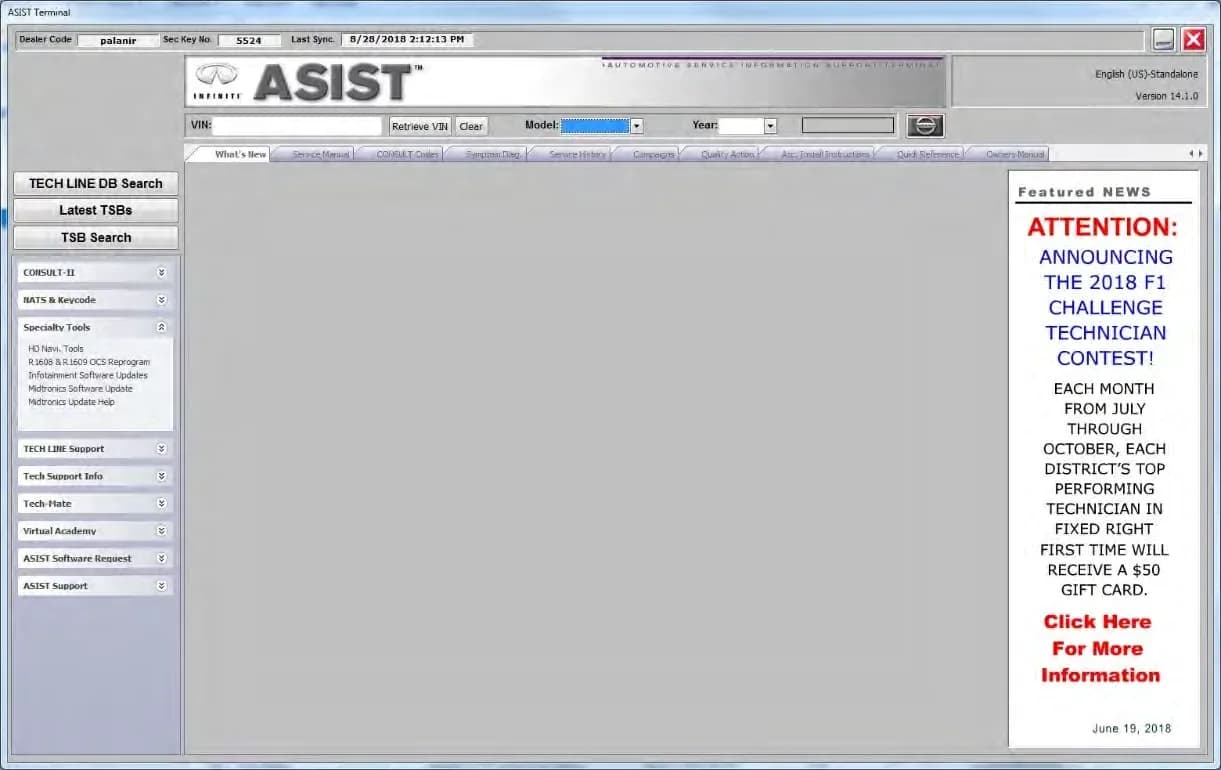
Also applies to
- Nissan Altima
- 2021–2023
- Nissan Armada
- 2021–2023
- Nissan Frontier
- 2021–2023
- Nissan Kicks
- 2021–2023
- Nissan Leaf
- 2021–2023
- Nissan Maxima
- 2021–2023
- Nissan Murano
- 2021–2023
- Nissan NV
- 2021
- Nissan NV200
- 2021
- Nissan Pathfinder
- 2022–2023
- Nissan Rogue
- 2021–2023
- Nissan Rogue Sport
- 2021–2022
- Nissan Sentra
- 2021–2022
- Nissan Titan
- 2021–2023
- Nissan Versa
- 2021–2023
▸ Show 9 more▾ Show fewer
Nissan has released Technical Service Bulletin (TSB) NTB23-018 to provide essential software updates for the Audio/Visual (AV) Control Unit in a broad spectrum of its vehicles. This bulletin, issued on March 8, 2023, is crucial for resolving various Nissan Sentra infotainment issues, as well as problems in many other Nissan models from 2014 through 2023. The primary goal of these updates is to enhance system stability and rectify existing software bugs.
Technicians are instructed to verify the current software version of the AV Control Unit whenever diagnosing an infotainment problem or after replacing the unit. This ensures that the correct software update procedure is followed. The TSB also references NTB21-038 for guidance on distinguishing between hardware and software-related concerns. The software updates in this bulletin are specifically designed to address stability improvements and "bug" fixes.
Important Warnings and What Owners Should Know
Nissan has issued several critical warnings within TSB NTB23-018 that owners and technicians must heed to prevent damage and ensure proper functionality of the infotainment system. These warnings are crucial for anyone dealing with Nissan Sentra infotainment issues or similar problems in other models.
- Software Version Discrepancies: "Due to differences in software versions, the figures throughout this bulletin may not match exactly to the images on the AV Control Unit." This means the on-screen visuals during the update process might vary slightly from the bulletin's images.
- USB Drive Usage: "Do not use any other USB drive to perform the procedure in this bulletin." Only special tool USB drive J-52727-1 (new tool number NI-52727-1) is approved. "The update-software must be the only file on the USB drive." Furthermore, "Do not insert the USB drive into a charging port. If used, the update-software and/or USB drive may become damaged. Only insert the USB drive in a USB media port." Charging ports are typically marked with a "lightning bolt" symbol.
- Software Package Selection: "To avoid damage to the vehicle, ensure the correct infotainment update-software package is selected. Failure to select the correct infotainment update-software package may result in needing to replace the AV Control Unit."
- Update Process Integrity: "The hazard warning lamps must remain ON until the software update has been completed." Also, "Do not remove the USB drive during the update to the vehicle until instructed to." Removing it prematurely can damage the AV Control Unit. If the system displays "Update Failed!" or continuously reboots, reinsert the USB drive and follow specific instructions.
- Ignition Status: "Do not turn the ignition OFF" when the system displays "Please remove USB Stick System is shutting down" as it completes the update.
- Infotainment Reboot: "Steps 55-62 must be completed. If they are not completed, the update may become corrupted." This refers to a full reboot sequence that must be performed twice. During this process, "Ensure that all doors remain closed during the 5 minute wait period. If a door is opened during the 5 minute wait period, the update may not complete and the AV Control Unit may become inoperable." The engine does not need to be running for these steps.
- Two-File Updates (Install 3): For certain models, two update files are required. "If steps 71-76 are not completed, to perform the second software update, the AV Control Unit will not operate correctly." This procedure involves updating with the first file, then downloading the second file to the USB drive, and repeating the installation steps.
- AV Control Unit Reinitialization: "Steps 92 - 97 must be completed to reinitialize the AV Control Unit. If they are not completed, the update may become corrupt."
- Bluetooth Re-pairing: After the software update and initialization, owners must re-pair their Bluetooth devices. "If step 98 is not completed, the phone may no longer connect with the vehicle." The same warning applies to step 105 in the Confirmation procedure.
- Specific Model Requirements: For 2021 and 2022 Armada (Y62) models, a specific software version (283C3 1570B or 283C3 1580B) must be present before updating to 283C3 1890B. If not, an intermediate update to 283C3 1570B (PVI_1570) is required first.
Symptoms
Owners might notice general infotainment system instability or various software bugs. While the TSB doesn't list specific DTCs, it aims to resolve underlying software issues that can manifest as:
- Unresponsive touchscreens.
- System freezing or crashing.
- Bluetooth connectivity problems.
- Navigation glitches.
- Audio playback issues.
- General sluggishness of the infotainment interface.
These are the kinds of Nissan Sentra infotainment issues that this software update is designed to address, improving the overall user experience.
Repair Procedure Summary
The repair procedure involves several stages: checking the current software version, installing the update, and then confirming its successful application. Different procedures (SW Check 1-6, Install 1-5, Confirmation 1-2) are outlined based on the vehicle's specific infotainment system configuration. This ensures that the correct software is applied to address any Nissan Sentra infotainment issues.
1. Software Version Check (SW Check 1-6): Before any update, technicians must determine the current software version of the AV Control Unit. This involves accessing a hidden "SERVICE MENU" or "System Diagnostic Menu" through specific button presses and knob turns. Once the current software version is identified, it's compared against the latest version specified in the vehicle-specific tables within the TSB. If an update is needed, the technician proceeds to download the necessary software.
- SW Check 1 (Older Systems): Turn the audio system OFF. Access the "SERVICE MENU" by pushing and holding the APPS button, then turning the TUNE-SCROLL knob counterclockwise three or more clicks, then clockwise three or more clicks, repeating this pattern until the menu appears. Select "Version" and confirm the current software version.
- SW Check 2 (Newer Systems): Push the MENU button. Select the "Info" icon. If the "Info" icon does not appear, this bulletin does not apply to the vehicle. Then select "System Information" and "Software Version" to confirm the current software version.
- SW Check 3 (Older Systems with Diagnostic Menu): Turn the ignition ON and audio system OFF. Access the "System Diagnostic Menu" by pressing and holding the MENU button, then turning the VOLUME knob forty (40) or more clicks in either direction. Select "Confirmation / Adjustment" and then "Version Information" to confirm the "SYS Software Ver."
- SW Check 4 (Newer Systems with Settings Menu): Select "Settings" from the lower right corner of the AV Control Unit display. Then select "Info" and "System Information," followed by "Version Information" to confirm the current software version.
- SW Check 5 (Newer Systems with Tune Knob Access): While holding the MENU button down, turn the tune knob left-right-left. Select "Confirmation/Adjustment" and then "Version Information" to confirm the "Overall SW version."
- SW Check 6 (Newer Systems from Home Screen): From the HOME screen, select "Info." Then navigate to "System Information" and "Version Information" to confirm the current software version.
2. Infotainment Software Installation (Install 1-5): The installation process varies slightly depending on the system, but generally follows these steps:
- Preparation: Connect a battery maintainer or smart charger set to reflash mode. Set the parking brake. Cycle the ignition to ON (engine OFF). Turn ON hazard warning lamps to prevent the Body Control Module (BCM) from entering battery saver mode. Technicians are also instructed to record current radio settings (AM/FM/SAT presets, BASS, TREBLE, BALANCE, FADE, SPEED SEN. VOL.) to restore them later.
- Accessing Service Menu: Access the hidden service menu (similar to the check procedure).
- USB Drive Insertion: Insert the special tool USB drive, containing the update software, into the vehicle's USB media port. It's critical to use the correct port and not a charging port. The system may display "Insert USB stick and press OK to start software download." (Figure 28, page 55).
- Update Process: Select the update option from the menu. The system will then proceed with the software download and installation. This process can take 15-35 minutes. During this time, the system may display messages like "Update Failed!" or "Download successful. System will reboot now." (Figure 36, page 58). A progress bar may also be shown (Figure 30, page 56). "Do not remove the USB drive during this process." If "New USB music device detected." appears, select "No."
- Post-Installation: Once the update is complete, remove the USB drive. The system will reboot. For some installations (Install 2), a full reboot sequence must be performed twice, involving opening/closing the driver's door and waiting 5 minutes with all doors closed. The Nissan logo will be displayed during the reboot.
- Initialization (Install 3 & 5): For certain systems, an AV Control Unit initialization is required. This involves accessing the "System Diagnostic Menu," selecting "Confirmation / Adjustment," then "Initialize Settings," and finally "User Data Initialization" (Figure 64, page 69). The system will ask for confirmation: "Do you want to delete all data and settings saved in the system?" and "Restore to factory settings. Are you sure?" (Figures 65, 66, page 70). After initialization, restore radio presets and clock settings.
3. Software Version Update Confirmation (Confirmation 1-2): After the installation, the technician must confirm that the new software version has been successfully applied. This involves re-accessing the service menu and verifying the "Software Version" displayed matches the latest version specified in the TSB. If the version is incorrect, the installation procedure must be re-performed. Reset radio settings and turn off hazard warning lamps.
4. Bluetooth Re-pairing: Crucially, after any update and initialization, owners must delete the vehicle from their phone's Bluetooth menu and then re-pair their phone. Failure to do so will result in the phone not connecting with the vehicle, which can be a common Nissan Sentra infotainment issue.
Required Tools or Parts
To perform the software update, specific tools are necessary:
- Special Tool USB Drive: J-52727-1 (new tool number NI-52727-1). This is the only approved USB drive for the procedure. Additional USB drives can be purchased from Tech-Mate (www.techmatetools.com or 1-833-397-3493).
- ASIST (Aftersales Service Information System): Nissan's proprietary system used to download the correct infotainment update software packages (e.g., LD001, LD005, IVI003, PIVI31 1890, AIVI31_5256, PIVI21_550_D41, IVI4620, IVI354, PIVI21_550_ZE1, IVI3387, AIVI20_845, IVI001, IVI830, IVI3128, PIVI21_550_B18, IVI5328).
- CONSULT PC: A computer connected to ASIST and the internet, used to transfer the software to the USB drive. The CONSULT PC must be connected to the internet and ASIST must be synchronized to the current date.
Software Versions and Update Methods
The TSB details numerous software versions for various models and years, indicating whether the update is performed via USB, Over-The-Air (OTA), or both. Examples of software versions mentioned include F220, 825, 912, IVI003, 5256, AIVI31_5256, 283C3 1890B, PIVI31 1890, 550, PIVI21_550_D41, 4620, IVI4620, 80856135, LD001, LD005, F221, J-52812-11, 0912, IVI003, 830, IVI830, 354, IVI354, PIVI21_550_ZE1, 3387, IVI3387, 845, AIVI20_845, 80856235, LD004, 810, IVI001, 3128, IVI3128, PIVI21_550_B18, 5328, 5338, and IVI5328. The specific update method (USB or OTA) is listed for each applicable model and software version.
Claims Information
For warranty claims related to this TSB, technicians use specific identifiers and labor operation codes. This table helps ensure proper billing and tracking of the repair:
| CLAIM IDENTIFIER | DESCRIPTION | OP CODE | SYM | DIA | FRT |
|---|---|---|---|---|---|
| CL1 | Perform Software Check and Update the AV Control Unit | QX42AA | 0.4 | ||
| CL2 | Perform Software Check and Update the AV Control Unit | RX4SAA | 0.3 | ||
| CL3 | Perform Software Check and Update the AV Control Unit | RX8MAA | 0.3 | ||
| CL4 | Perform Software Check and Update the AV Control Unit | RX05AA | ZE | 32 | 0.5 |
| CL5 | Perform Software Check and Update the AV Control Unit | RXB7AA | 0.3 | ||
| CL6 | Perform Software Check and Update the AV Control Unit | RX5AAA | 0.3 | ||
| CL7 | Perform Software Check and Update the AV Control Unit | RX0LAA | 0.3 |
Amendment History
This bulletin, NTB23-018, was originally published on March 8, 2023.
Source: NHTSA ID: 10234078
Gallery
69 images
Frequently Asked Questions
- What is Nissan TSB NTB23-018 about?
- Nissan TSB NTB23-018 provides software updates for the Audio/Visual (AV) Control Unit in many 2014-2023 Nissan models, including the Sentra, to improve infotainment system stability and fix various software bugs.
- What are the common Nissan Sentra infotainment issues addressed by this TSB?
- This TSB addresses general infotainment system instability, unresponsiveness, freezing, Bluetooth connectivity problems, navigation glitches, audio issues, and overall sluggishness. The updates aim to resolve these common Nissan Sentra infotainment issues and enhance user experience.
- How is the Nissan AV Control Unit software updated according to NTB23-018?
- The update involves checking the current software version, downloading the correct update files using ASIST to a special tool USB drive (J-52727-1 or NI-52727-1), inserting the USB into the vehicle's media port, and following on-screen instructions for installation. A full system reboot and Bluetooth re-pairing are typically required afterward.
- What should I do if my Nissan infotainment system displays "Update Failed!" during the process?
- If your system displays "Update Failed!" or continuously reboots, the TSB instructs to reinsert the USB drive and proceed with the update from step 47 on page 56. It's crucial not to remove the USB drive or turn off the ignition during the update process to prevent damage to the AV Control Unit.
- Do I need to re-pair my phone's Bluetooth after the software update?
- Yes, Nissan TSB NTB23-018 explicitly states that after the software update and AV Control Unit initialization, you must delete the vehicle from your phone's Bluetooth menu and then re-pair your phone. Failure to do so may prevent your phone from connecting to the vehicle.
Related Articles
2021-2024 Nissan ICC Inoperative with DTC C1A16 or C2582
Nissan has issued TSB NTB19-033G for 2021-2024 models experiencing Intelligent Cruise Control (ICC) malfunctions, AEB/FEB warning lights, or radar obstruction messages with DTCs C1A16 or C2582. The bulletin outlines diagnostic steps and potential ICC distance sensor replacement.
2020-2025 Nissan Sentra Loss of Power DTC P2100 P2101
Nissan has released TSB NTB25-005 for 2020-2025 Sentra models experiencing a loss of power. This issue is often accompanied by diagnostic trouble codes P2100 ('ETC MOT PWR-B1') or P2101 ('ETC FNCTN/CIRC-B1') stored in the Engine Control Module (ECM). The bulletin provides a revised diagnostic…
2020-2023 Nissan Models: DTC B2E1B-06 (Automatic eCall) Bulletin Inactive
Nissan Technical Service Bulletin NTB23-031A, concerning DTC B2E1B-06 (Automatic eCall) in various 2020-2023 models, has been declared inactive. Owners who previously encountered this diagnostic trouble code should note that this specific bulletin is no longer applicable.
2021-2024 Nissan Remote Command DTCs B2E4B-06, B2E60-06
Nissan has issued TSB NTB21-037D for 2021-2024 Sentra, Pathfinder, and Rogue models experiencing NissanConnect remote command issues with DTCs B2E4B-06, B2E60-06, B2E61-06. The problem is linked to a cloud-server, and replacing the TCU is not the solution. Learn what steps to take.
2021-2024 Nissan BCM Replacement Service Bulletin
Nissan TSB NTB20-074B provides crucial service information for replacing the Body Control Module (BCM) in 2021-2024 ARIYA, Pathfinder, Rogue, and Sentra vehicles. It outlines essential steps for module configuration and intelligent key pairing to prevent damage and ensure proper function.
Leave a comment
Comments are moderated and may take a moment to appear. Only your first name and the initial of your last name are shown publicly.
Comments
Be the first to comment.