2022-2023 Kia Infotainment Software Update for CarPlay Android Auto
Kia has released Technical Service Bulletin SA569 to address Apple CarPlay and Android Auto connectivity problems in various 2022-2023 models. This software update for Display Audio 2.0 and AVN5W head units aims to improve infotainment system performance.

También aplica a
- Kia Carnival
- 2022–2023
- Kia Forte
- 2022–2023
- Kia K5
- 2022–2023
- Kia Niro
- 2022
- Kia Rio
- 2022–2023
- Kia Seltos
- 2022–2023
- Kia Sorento
- 2022
- Kia Soul
- 2022–2023
- Kia Telluride
- 2022
▸ Mostrar 3 más▾ Mostrar menos
Kia has issued Technical Service Bulletin (TSB) SA569, revision 1 (338 Rev 1) dated April 2024, to resolve issues with Apple CarPlay® and Android Auto™ phone projection connectivity in certain 2022-2023 Kia vehicles. This service action involves a software update for the Display Audio 2.0 (D2V) and AVN 5.0 Wide (AVN5W) head units to improve overall infotainment system performance. Owners experiencing problems with their Kia CarPlay Android Auto connectivity should be aware of this bulletin.
What's the Issue?
Owners of affected 2022-2023 Kia vehicles may experience various concerns related to the functionality and stability of their Apple CarPlay® and Android Auto™ phone projection systems. These issues can manifest as intermittent connections, difficulty pairing, or other performance problems that hinder the seamless integration of smartphones with the vehicle's infotainment system. This TSB provides a solution to enhance Kia CarPlay Android Auto connectivity.
Important Warnings for Owners
- No Customer Notification: This is a Service Action, which is a repair program performed during the warranty period without customer notification. You will not receive a letter or direct communication from Kia regarding this update. Dealers performing this repair outside the warranty period will require DPSM approval.
- Update Process Precautions: During the software update, it is critical to DO NOT turn the ignition switch 'OFF', DO NOT start the engine, and DO NOT remove the USB drive from the vehicle. Interrupting the power supply during the update can lead to data loss or system malfunction.
- Battery Condition: Ensure a fully charged battery (12.3 volts or higher) is used before and during the update process.
- Normal Behavior During Update: There will be multiple occurrences where the Kia logo will appear, the display will be black, or the display shows "Preparing System Update" or "Updating..." for an extended period. This is normal.
- USB Formatting: If using a USB drive to prepare the AVN5W update, be aware that the drive will be formatted, and all data on it will be deleted. Check stored data beforehand.
Software Update Details
The software update targets specific head unit types and models. For Display Audio 2.0 (D2V) units, the new software version is D2V.003.200.240318, applicable to models like Forte (BDm PE), Sorento (MQ4a), K5 (DL3a), Rio (SC), Carnival (KA4), Niro HEV (DE HEV), Niro PHEV (DE PHEV), Sportage (NQ5), and Sportage HEV (NQ5 HEV). The associated ECU Part Numbers include 96160 M7230, 96160 M7270, 96160 R5HFO, 96160 R5HAO, 96160 L3750, 96160 L3760, 96160 H9570, 96160 H9580, 96160 R0700, 96160 R0710, 96160 G5UBO, 96160 G5UDO, 96160 G5UEO, 96160 G5XBO, 96160 G5XD0, 96160 P1150, and 96160 CH020.
For AVN 5.0 Wide (AVN5W) units, the new software versions are D2V.001.001.230414 for Soul (SK3, VDS 4 Type) with ECU P/N 96160 K0810, and D2V.001.001.230417 for Seltos (SP2, VDS 5 Type) with ECU P/N 96160 Q5660. Telluride models (ON) will be updated to software version 240822 or newer from previous versions (240822 or older).
Repair Procedure Summary
The software update involves using a USB flash drive to load new software onto the infotainment head unit. The process varies slightly between Display Audio 2.0 (D2V) and AVN5W units.
For Display Audio 2.0 (D2V) Units:
- Turn the ignition switch to the 'ON' position.
- On the infotainment screen, select 'Setup', then 'General', and finally 'SW Info/Update'.
- Insert the prepared USB Flash Drive into the USB slot (A) located underneath the AVN unit.
- Select 'Update' and confirm with 'Yes' when prompted. The system may display a message like "Update to the next version now?" with a software version such as "SK3_PE.USA.0000.141.000.230414".
- The update process can take 15 to 20 minutes. The system will then display "The system will restart." and reboot.
- After the update, verify the software version has been correctly updated.
For AVN5W Units:
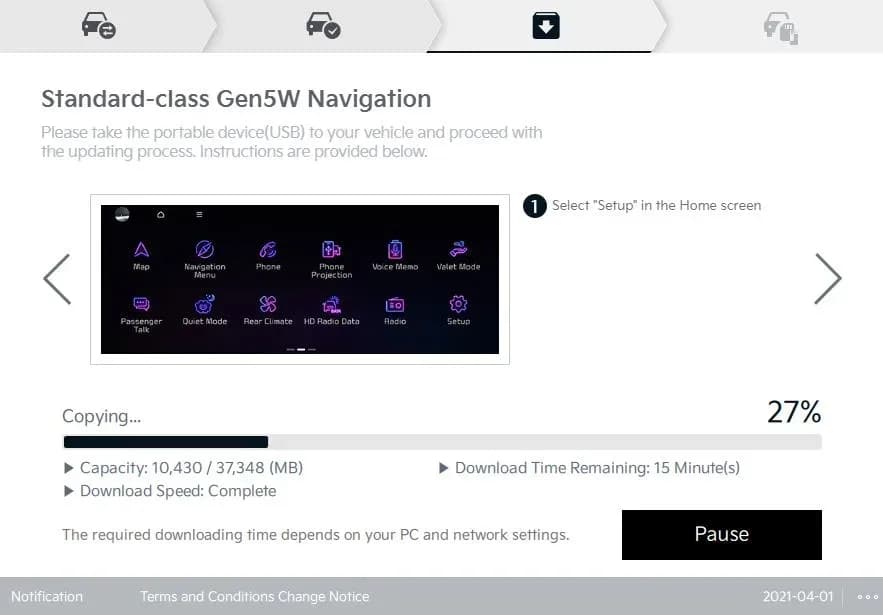
- USB Preparation (Technician/Dealer Step): Download the update files from the Kia Navigation Updater website (https://update.kia.com/US/EN/Main) using a computer. Select 'Navigation Updater Download', choose 'For Windows' or 'For Mac', then 'United States' and 'Kia'. Agree to the terms and conditions. Copy the downloaded files to a new or formatted 64 GB USB flash drive. Confirm the formatting process by selecting 'Yes' when prompted.
- Turn the vehicle ignition to the 'ON' position. If the vehicle has a 'Vehicle Auto-Shut Off' feature, turn it 'OFF'.
- On the AVN screen, select 'Confirm' and then press the 'Power' button (A) to turn Radio/Media 'OFF'.
- Select 'Setup', then 'General', and finally 'SW Info/Update'.
- Insert the prepared USB Flash Drive into the USB slot (B) underneath the AVN unit.
- Select 'Update Now' and confirm with 'OK'. It is recommended to leave the engine running during this update, which can take up to 1 hour and 25 minutes. The system may display "Preparing System Update" or "Updating...".
- After the update, confirm the software version has been correctly updated.
Phone Pairing Procedure
If Kia CarPlay Android Auto connectivity issues persist after the software update, or if the phone cannot pair, perform the following steps:
On the Mobile Device (iPhone or Android):
- Ensure the latest operating system (iOS or Android) is installed.
- Go to 'Settings' > 'General' > 'CarPlay®' (for iPhone) or 'Settings' > 'Connected Devices' > 'Android Auto™' (for Android) and delete all previously added vehicles.
- Go to 'Settings' > 'Bluetooth®' or 'Settings' > 'Connections' > 'Bluetooth®' and delete all previously added vehicles.
On the Head Unit:
- Go to 'SETUP' > 'Device Connection' > 'Bluetooth® Connection' and delete all paired devices.
- Go to 'SETUP' > 'Device Connection' > 'Phone Projection' > 'Apple CarPlay®' or 'Android Auto™' and delete all paired devices.
- Press the infotainment system reset button (using a paperclip or pen, consult the owner's manual for location).
- Re-pair the Bluetooth® and Phone Projection connections. Ensure Bluetooth® and Wi-Fi™ are enabled on the mobile device.
Required Tools or Parts
- USB Flash Drives (VDS 1, 4, 5 Type): These were auto-shipped to dealers with the release of TSB ELE338/SA569. If a USB Flash Drive is broken or lost, dealers can purchase replacements from Snap-On by calling 1-888-542-1011.
- 64 GB USB Flash Drive (for Telluride ON models): This must be locally sourced by the dealer. The software update file is available for download from https://update.kia.com/US/EN/Main. USB Flash Drives are not distributed to dealers for Telluride models.
Warranty Information
This service action is covered under warranty using the following codes:
- N Code: N99
- C Code: C99
- Repair Description: (SA569) Display Audio 2.0/AVN Software Update
- Replacement P/N: N/A (no parts are replaced)
Causal Part Numbers and Labor Operation Codes:
| Model Grouping | Causal P/N | Labor Op Code | Op Time |
|---|---|---|---|
| DE HEV, DE PHEV, KA4, NQ5, NQ5 HEV, SK3, SP2 | 96560 R0260WK | 240062RO | 0.3 M/H |
| DL3a, MQ4a, ON | 96560 L3700FHL | 240A24RO | 0.3 M/H |
| BDm, SC | 96560 M7220WK | 240M02RO | 0.3 M/H |
VIN inquiry data for this repair is for tracking purposes only. Kia retailers should reference SA569 when accessing the KDealer+ system.
Owner Action
If you are experiencing issues with Kia CarPlay Android Auto connectivity in your 2022-2023 Kia vehicle, contact your authorized Kia dealer. While Kia is not directly notifying consumers about this Service Action, your dealer can check your VIN on KDealer+ (Service → Warranty Coverage → Warranty Coverage Inquiry → Campaign Information) to determine if your vehicle requires this software update. The update is performed free of charge during the warranty period and takes approximately 0.3 hours of labor time.
Source: NHTSA ID 10252516
Galería
36 imágenes
Frequently Asked Questions
- What kind of issues does Kia TSB SA569 address?
- TSB SA569 addresses various phone projection connectivity concerns related to Apple CarPlay® and Android Auto™ in certain 2022-2023 Kia vehicles, aiming to improve overall infotainment system performance.
- Will I receive a notification from Kia about this service action?
- No, this is a Service Action, which is a repair program performed during the warranty period without customer notification. You will not receive a letter or direct communication from Kia regarding this update.
- How can I check if my Kia vehicle needs this software update?
- You can check the repair status for your vehicle's VIN on KDealer+ under 'Service → Warranty Coverage → Warranty Coverage Inquiry → Campaign Information'. Alternatively, you can contact your local Kia dealer to inquire about TSB SA569 and its applicability to your 2022-2023 Kia model for **Kia CarPlay Android Auto connectivity** issues.
- What are the key precautions during the software update process?
- It is crucial not to turn the ignition switch 'OFF', start the engine, or remove the USB drive during the update. The vehicle's battery should be fully charged (12.3 volts or higher), and it is recommended to leave the engine running for AVN5W updates. The process can take up to 1 hour and 25 minutes, and the display may go black or show 'Preparing System Update' which is normal.
What Kia Sportage owners report
Counted from the records in our database across 32 model years.
- 4,907
- Owner complaints
- 38
- Recalls
- 679
- Service bulletins
- 322
- Crashes reported
- 208
- Fires reported
- 274
- Injuries reported
The 2023 model year
310 complaints, the 4th most of 32 model years on file. Owners reported 28 crashes, 1 fire and 18 injuries for this year, which also has 7 recalls on file.
Electrical System, the system this article covers, accounts for 687 of 4,907 complaints (14%), including 86 for 2023.
Complaints by model year
| 1998 | 303 | |
|---|---|---|
| 1999 | 284 | |
| 2000 | 304 | |
| 2001 | 228 | |
| 2002 | 234 | |
| 2011 | 181 | |
| 2012 | 392 | |
| 2013 | 381 | |
| 2017 | 404 | |
| 2023 | 310 |
Most-reported systems
- Engine — 1,558
- Electrical System — 687
- Service Brakes — 613
- Power Train — 481
- Engine And Engine Cooling — 477
Latest recalls for the 2023 model year
- 25V874000 — Trailer Hitches (Dec 2025)
- 24V025000 — Structure (Jan 2024)
- 23V531000 — Power Train (Jul 2023) — Park outside
Recent owner reports about electrical system
I was driving on the highway going about 70mph and the car completely shut off. When off I couldn’t accelerate or brake. I put my hazards on and pulled over. The car continued to turn off and on. It couldn’t stay on.
Read owner complaints →Was driving my child to school when the Hybrid System alert came on, I only had a few seconds to try and pull over before the car completely shut down, we lost all motive power.
Complaints are owner reports filed with NHTSA. They are unverified, and counts depend on how many vehicles were sold, so they are not a failure rate.
Related Articles
2023 Kia Sportage Health Check: Common TSBs and Known Issues
The 2023 Kia Sportage has no recalls or owner complaints registered with NHTSA, but several manufacturer service bulletins address issues like cooling system performance, engine misfires, AVNT screen flickering, and infotainment connectivity problems.
2023 Kia Sportage Cooling System Performance TSB
Kia has issued Technical Service Bulletin ENG259 (Rev 1) for 2023 Sportage models experiencing a Multifunction Indicator Lamp (MIL) illumination with specific cooling system performance DTCs. The bulletin outlines the procedure to replace the Integrated Thermal Management Module (ITM) and update…
2021-2023 Kia Sorento Sportage GDI Misfire DTC TSB
Kia has issued Technical Service Bulletin FUE068 (CA2505) for 2021-2023 Sorento and Sportage models with the Theta III 2.5L GDI engine. This bulletin addresses cylinder misfire DTCs (P030000-P030400) that can lead to no-start, misfire, or reduced power due to GDI fuel injector damage.
2023 Kia Sportage Cooling System Performance TSB
This Kia Technical Service Bulletin (TSB ENG259) addresses Malfunction Indicator Lamp (MIL) illumination with DTCs P218100, P2181F0, or P2181F1 in 2023 Kia Sportage vehicles. The issue stems from Integrated Thermal Management Module (ITM) degradation, leading to cooling system performance issues…
2023 Kia Sportage AVNT Screen Flickering TSB
A Technical Service Bulletin (TSB ELE355) has been issued for the 2023 Kia Sportage (NQ5a) regarding the Audio Video Navigation Telematics (AVNT) head unit. Owners may experience the AVNT screen flickering 'ON/OFF' due to an intermittent coaxial cable connection.
Leave a comment
Comments are moderated and may take a moment to appear. Only your first name and the initial of your last name are shown publicly.
Comments
Be the first to comment.