2024-2025 Audi e-tron GT MMI Software Update TSB 2079980/3
Audi has released Technical Service Bulletin (TSB) 2079980/3 for 2024-2025 e-tron GT and RS e-tron GT models to resolve issues with MMI functions and 'Emergency call fault' messages. This bulletin details a software update procedure for the MIB3 system.

También aplica a
- Audi e-tron GT
- 2024–2025
- Audi RS e-tron GT
- 2024
Audi has issued Technical Service Bulletin (TSB) 2079980/3 to address various MMI function problems and an "Emergency call fault" message that may appear in the instrument cluster of certain 2024-2025 Audi e-tron GT and RS e-tron GT vehicles. This TSB outlines a comprehensive software update procedure for the MIB3 infotainment system and related control units.
This TSB, identified as 2079980/3, was most recently revised on March 27, 2026. Previous revisions include Revision 2 on December 4, 2025, which updated the service and SVM code, and Revision 1 on November 17, 2025, for initial publication.
Symptoms
Owners may experience general problems with various MMI functions. Additionally, the instrument cluster might display an explicit "Emergency call fault" message, indicating an issue with the vehicle's emergency call system.
Affected Software Versions
This Audi e-tron GT MMI software update is applicable to vehicles that currently have one of the following software versions in diagnostic address 5F (MMI control unit): 4014, 4026, 4318, or 4404. The new software for the affected control units was implemented in production for model year 2025, meaning later models should not exhibit these issues.
Important Warnings for Owners
- Do not replace parts unnecessarily: Diagnostic entries logged in diagnostic address 0075 will be resolved by the software update. Guided Fault Finding test plans for these entries should not be carried out and cannot be invoiced.
- Prepare for downtime: A lengthy period of inactive time is expected during the software update. While technicians can work on other vehicles during this time, your vehicle will be unavailable.
- Specific software version check: The update for the Android control unit (diagnostic address 078E) must only be performed if its software version is below 0621.
- USB stick handling: You must prepare two specific USB-C sticks before starting the repair. It is crucial to "Please be certain to leave the USB stick inserted" during the update process until instructed otherwise. The procedure will only work if the USB stick remains inserted. Do not use an SD card with an adapter USB stick, and avoid USB-C sticks with larger storage capacities as they may have different formatting processes.
- No consumer notification: Audi is not notifying consumers directly about this TSB. Owners must proactively address the Audi e-tron GT MMI software update.
- Warranty considerations: If your vehicle is outside of its warranty period, this Technical Service Bulletin is for informational purposes only, and repair costs may apply.
Repair Procedure Summary
The repair involves a manual software update for the AED control unit (078E) and the MIB3 infotainment system. This process requires specific USB-C media and the use of the ODIS diagnostic system.
- Prepare Update Media: Two USB-C sticks are required. Download the appropriate software onto these sticks. General information on MIB3 software updates can be found in TSB 2060523, titled "91 MIB3: Software Update Instructions."
- Manual AED Control Unit Update: If the Android control unit (078E) software version is below 0621, insert the USB update medium into the USB connection. Access the red menu in the MMI by pressing specific buttons, then select "Update" and the correct source. All control units to be updated (AED) will be displayed. Start the update.
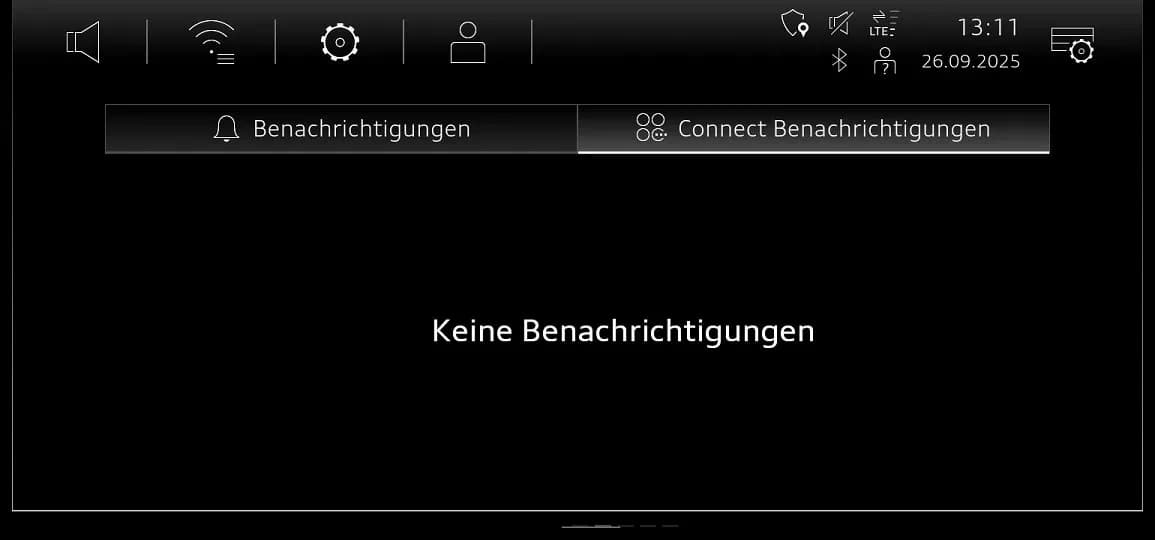
- System Restart and Verification: After the manual update, exit the red menu. The MMI will restart. Wait for full initialization and for the home screen to display all apps. Restart the system again by pressing and holding the volume control for 10 seconds. Check the notification center under "Audi connect notifications" for messages like "OTA Updater Service" or "Software Update". Wait for messages such as "Download des Software Update beendet" and "Gratulation! Software 0621 wurde erfolgreich installiert."
- Remove USB Stick: Once the download is complete and the system confirms successful installation, you can remove the USB stick.
- SVM Code Entry: For the AED control unit, emergency call module (0075), gateway (0019), and information electronics (005F), an SVM (Software Version Management) code must be entered using the "SVM - Authorized Multiple Code Entry" function in ODIS "Flash" mode. The SVM code chain, such as DUCDTCPR0075MLB and FLIGHTON0075MLB, must be entered exactly as provided, often via QR code scan.
- For gateway software version 0019 = 0042, use SVM code chain: 078EA001,DUCDTCPR0075MLB, FLIGHTON0075MLB, ZGDOIP, CL3BPA001US, 19A027, 19B027,TGU1MDMVB,CL3BPA002US, FLIGHTOFF0075MLB.
- For all other software versions in diagnostic address 0019, use SVM code chain: 078EA001,DUCDTCPR0075MLB, FLIGHTON0075MLB, ZGDOIP, CL3BPA001US, TGU1MDMVB, CL3BPA002US, FLIGHTOFF0075MLB.
- Bus Sleep Mode: After the software update, put the vehicle into bus sleep mode. Then, switch the ignition back on and start the MMI.
- Emergency Call LED Check: Verify that the emergency call LED in the roof module illuminates green again. If it does not, refer to TSB 2079652, "Emergency call LED in roof module not lit up in green."
- End Diagnostic Session: Conclude the diagnostic session and send the diagnostic log online.
Required Tools and Parts
Performing this Audi e-tron GT MMI software update requires specific media and diagnostic equipment:
- USB-C Sticks: Two USB-C sticks (USB 2.0, 32 GB) are needed for the update media. Ensure they are not larger capacity sticks, which may have different formatting.
- ODIS System: The tester used must have the latest ODIS update.
- Hand-held Scanner: Recommended for accurately inputting SVM code chains via QR code.
Part Numbers for Update Media:
| Vehicle type | Part number |
|---|---|
| All models | 8W0906961DQ |
MIB3 Software Versions and Corresponding Part Numbers:
| Vehicle type | MIB3 SW version | Part number |
|---|---|---|
| Audi e-tron GT | 4014 | 8W0906961GB |
| 4026 | ||
| 4404 | ||
| Audi e-tron GT | 4318 | 8W0906961GF |
Owner Action
If your 2024-2025 Audi e-tron GT or RS e-tron GT is experiencing MMI function issues or displaying an "Emergency call fault," you should contact an authorized Audi dealership. They will be able to perform the necessary software update outlined in TSB 2079980/3. This update is typically covered under warranty if your vehicle qualifies.
Source: NHTSA ID: 11031024
Galería
6 imágenes
Frequently Asked Questions
- What is Audi TSB 2079980/3 about?
- Audi TSB 2079980/3 addresses issues with various MMI functions and an "Emergency call fault" message appearing in the instrument cluster of 2024-2025 Audi e-tron GT and RS e-tron GT vehicles. It provides a software update for the MIB3 system and associated control units.
- How do I know if my Audi e-tron GT needs this software update?
- Your vehicle may need this update if you experience problems with MMI functions or if the instrument cluster displays an "Emergency call fault." Additionally, if your vehicle's MMI control unit (diagnostic address 5F) has software versions 4014, 4026, 4318, or 4404, it is likely affected.
- Can I perform the Audi e-tron GT MMI software update myself?
- No, the software update described in TSB 2079980/3 requires specialized tools like the ODIS diagnostic system and specific SVM code entry. It should only be performed by an authorized Audi service technician to ensure proper installation and functionality.
- What parts or tools are needed for this update?
- The update requires two specific USB-C sticks (USB 2.0, 32 GB) loaded with the appropriate software, along with the latest ODIS diagnostic system. Specific part numbers for the update media include 8W0906961DQ, 8W0906961GB, and 8W0906961GF, depending on the MIB3 software version.
- Will I be charged for this MMI software update?
- If your vehicle is still under warranty, the Audi e-tron GT MMI software update is typically covered. However, if your vehicle is outside of its warranty period, this Technical Service Bulletin is informational only, and you may be responsible for the repair costs.
What Audi RS e-tron GT owners report
Counted from the records in our database across 3 model years.
- 7
- Owner complaints
- 8
- Recalls
- 1,057
- Service bulletins
- 1
- Crashes reported
- 0
- Fires reported
- 0
- Injuries reported
Electrical System, the system this article covers, accounts for 1 of 7 complaints (14%).
Complaints by model year
| 2022 | 4 | |
|---|---|---|
| 2023 | 2 | |
| 2024 | 1 |
Most-reported systems
- Back Over Prevention — 2
- Power Train — 2
- Electrical System — 1
- Forward Collision Avoidance — 1
- Fuel/Propulsion System — 1
Latest recalls for the 2025 model year
- 25V900000 — Back Over Prevention (Dec 2025)
Complaints are owner reports filed with NHTSA. They are unverified, and counts depend on how many vehicles were sold, so they are not a failure rate.
Related Articles
2024-2025 Audi e-tron GT MMI Software Update for Connectivity Issues
Audi has released Technical Service Bulletin 2079979/3 for 2024-2025 e-tron GT and RS e-tron GT models to address various MMI functions problems and 'Emergency call fault' messages. This TSB provides a software update for the MIB3 connectivity box.
2022-2025 Audi e-tron GT On-Board Power System Fault TSB
Audi has issued Technical Service Bulletin (TSB) 2080377/2 for 2022-2025 e-tron GT and RS e-tron GT models concerning an 'on-board power system fault' and DTC P000000. Owners may see a yellow or red warning fault in the instrument cluster. This TSB outlines a reporting obligation for technicians.
2024-2025 Audi e-tron GT MMI Software Update for Emergency Call Fault
This Technical Service Bulletin (TSB 2079980/2) addresses MMI function problems and the 'Emergency call fault' message in 2024-2025 Audi e-tron GT and RS e-tron GT vehicles. A software update for the MIB3 infotainment and AED control units is required to resolve these issues.
2024-2025 Audi e-tron GT MMI Software Update TSB 2079979
This Technical Service Bulletin (TSB 2079979) addresses MMI function problems and the 'Emergency call fault' message in 2024-2025 Audi e-tron GT and RS e-tron GT vehicles. A software update for the MIB3 system and connectivity box is available.
2025 Audi A5 Health Check: Software Issues and Service Bulletins
The 2025 Audi A5 has no reported recalls or owner complaints, but several manufacturer service bulletins address software-related issues. These TSBs cover problems with the MMI system, rear lid operation, parking systems, and drivetrain, often resolved with software updates.
Leave a comment
Comments are moderated and may take a moment to appear. Only your first name and the initial of your last name are shown publicly.
Comments
Be the first to comment.