2026 Audi iPhone 17 Wireless CarPlay / Wi-Fi Hotspot Issue
Owners of certain 2026 Audi models with MIB3 infotainment may find their iPhone 17 or newer unable to connect to wireless Apple CarPlay or the vehicle's Wi-Fi hotspot. Audi Technical Service Bulletin 2080171/1 details a WPA3 compatibility issue and offers a straightforward solution by adjusting…

Şu araçlar için de geçerli
- Audi A3
- 2026
- Audi e-tron GT
- 2026
- Audi Q7
- 2026
- Audi RS 3
- 2026
- Audi RS 6 Avant
- 2026
- Audi RS 7
- 2026
- Audi RS e-tron GT
- 2026
- Audi RS Q8
- 2026
- Audi S3
- 2026
- Audi S8
- 2026
- Audi SQ7
- 2026
- Audi SQ8
- 2026
▸ 6 tane daha göster▾ Daha az göster
Owners of certain 2026 Audi models equipped with the MIB3 infotainment system may encounter difficulties connecting their new Apple iPhone 17 (or any newer iPhone model) to the vehicle's wireless Apple CarPlay or its integrated Wi-Fi hotspot. This issue, identified by Audi Technical Service Bulletin (TSB) 2080171/1, prevents seamless wireless integration, though a wired connection typically functions without problems. This TSB addresses the specific problem of the 2026 Audi iPhone 17 CarPlay issue.
Symptoms
If you own a 2026 Audi and an iPhone 17 or newer, you might experience specific connectivity failures. The primary symptoms reported by customers include the inability to "Cannot connect to the vehicle's Wi-Fi hotspot" and the inability to "Cannot connect to Apple CarPlay wirelessly." This means that while your iPhone might charge via a USB cable, the convenience of wireless features like navigation, music streaming, and hands-free communication through CarPlay will be unavailable.
Diagnosis / Trigger Conditions
Audi's workshop findings confirm that this connectivity problem is highly specific to the Apple iPhone 17 and subsequent models. The issue "cannot be reproduced with earlier iPhone models or other smartphones," indicating a direct correlation with the newer iPhone hardware, specifically the N1 network chip. Workshops have successfully reproduced the complaint using multiple iPhone 17 or newer devices, solidifying the diagnostic conclusion that the problem lies with the interaction between these specific phones and the vehicle's MIB3 system. The issue manifests when the customer complains that their iPhone 17 (or newer) "Cannot connect to the vehicle's Wi-Fi hotspot" and/or "Cannot connect to Apple CarPlay wirelessly," while the connection works via cable.
Technical Background
The root cause of this wireless connectivity issue is a WPA3 compatibility problem. WPA3 is the latest encryption standard for Wi-Fi networks, offering enhanced security over its predecessor, WPA2. Newer iPhone models, specifically those featuring the N1 network chip, utilize this advanced encryption. However, in certain 2026 Audi vehicle models equipped with the MIB3 infotainment system, there are compatibility issues when attempting to establish a wireless connection using the WPA3 standard. This incompatibility prevents the necessary handshake between the iPhone and the vehicle's Wi-Fi module, leading to connection failures for both the Wi-Fi hotspot and wireless CarPlay.
Important Warnings for Owners
Audi Technical Service Bulletin 2080171/1 includes a critical warning for owners and service technicians: "Replacing parts or attempting repairs will not fix the problem. Unjustified work/replacement parts will be charged back. Invoicing under warranty is not permitted." This explicitly states that the issue is not a hardware defect requiring replacement of vehicle components. Attempting to replace parts will be ineffective and will not be covered under warranty, potentially leading to unexpected charges for the owner. The solution is entirely software-based, involving a change to the Wi-Fi encryption settings.
Repair Procedure Summary
The resolution for the 2026 Audi iPhone 17 CarPlay issue is straightforward and involves adjusting the Wi-Fi encryption settings within the vehicle's MIB3 infotainment system. This procedure does not require any special tools or parts, and it can be performed by the owner.
Here are the steps to resolve the issue:
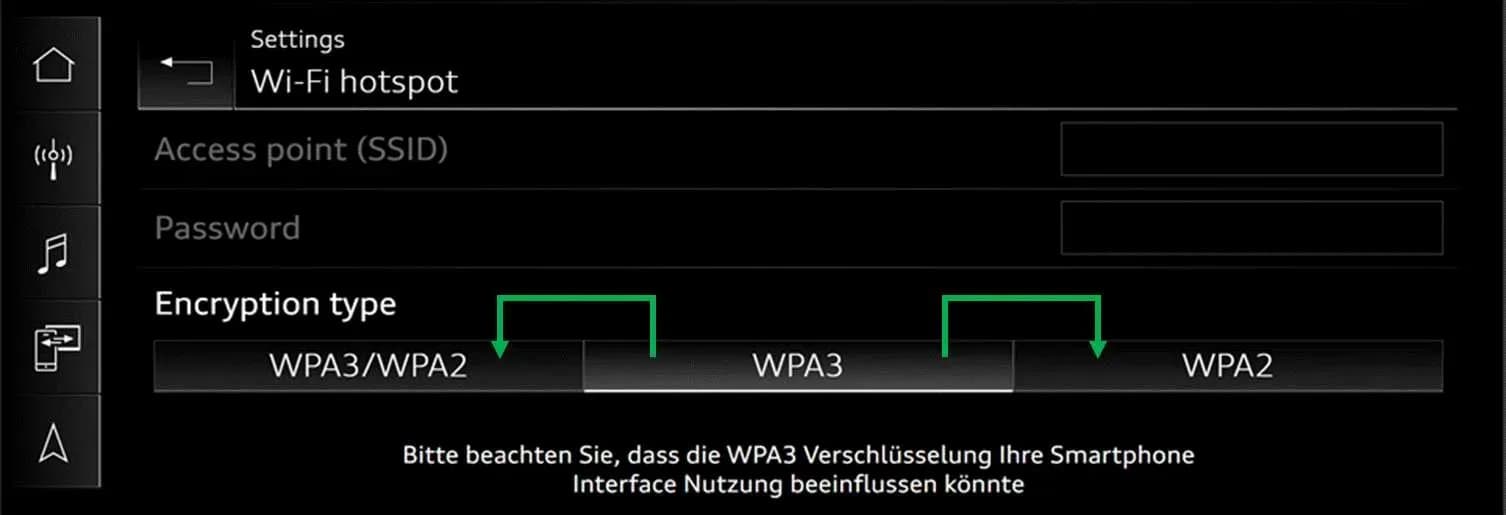
- Access Vehicle Wi-Fi Settings: Navigate to the Wi-Fi settings menu within your Audi's infotainment system. The system provides options for 'Encryption type'.
- Select Encryption Method: Within these settings, you will find options such as 'automatic selection of WPA2/WPA3', 'WPA3', and 'WPA2'.
- Choose Recommended Setting: Explain the compatibility issues to the customer and recommend that they select either 'automatic selection' (which includes WPA2/WPA3) or specifically 'WPA2' as the encryption method. The TSB indicates that selecting 'WPA2' will then make it possible to connect to the Wi-Fi.
- Bus Sleep Cycle: After making the change, a bus sleep cycle may be necessary for the new settings to take full effect. This typically involves turning off the vehicle, locking it, and waiting for a few minutes before restarting.
The TSB includes an image illustrating these Wi-Fi settings, showing the options for 'Encryption type' as 'WPA3/WPA2', 'WPA3', and 'WPA2', with a note in German: "Bitte beachten Sie, dass die WPA3 Verschlüsselung Ihre Smartphone Interface Nutzung beeinflussen könnte" (Please note that WPA3 encryption could affect your smartphone interface usage).
Owner Action
If you are experiencing the 2026 Audi iPhone 17 CarPlay issue or Wi-Fi hotspot connectivity problems with your newer iPhone, you can perform the recommended adjustment yourself by following the steps outlined above. There is no need to visit a dealership for this specific issue, as it is a configuration adjustment rather than a repair. As stated in TSB 2080171/1, "Replacing parts or attempting repairs will not fix the problem. Unjustified work/replacement parts will be charged back. Invoicing under warranty is not permitted." This means that any attempt to have a dealership perform a hardware repair for this software compatibility issue will not be covered under warranty and will result in charges to the owner.
Additional Information
Audi Technical Service Bulletin 2080171/1, released on November 26, 2025, provides comprehensive guidance for this specific connectivity issue. All part and service references in this TSB are subject to change. Owners and technicians should always consult the latest information from Audi's Parts Department and/or ETKA for updates. It is also recommended to check the Repair Manual for any fasteners, bolts, nuts, and screws that may require replacement during other repair procedures, though none are needed for this particular issue.
NHTSA Source: TSB 2080171/1
Frequently Asked Questions
- What is the issue described in Audi TSB 2080171/1?
- Audi TSB 2080171/1 addresses a specific problem where Apple iPhone 17 (or newer) devices cannot connect wirelessly to the vehicle's Wi-Fi hotspot or Apple CarPlay in certain 2026 Audi models due to WPA3 compatibility issues.
- Which Audi models and iPhone versions are affected by the wireless CarPlay / Wi-Fi hotspot problem?
- This issue affects 2026 Audi models including the A3, S3, RS 3, RS 6 Avant, RS 7, A8, S8, e-tron GT, RS e-tron GT, Q7, SQ7, Q8, SQ8, and RS Q8, specifically when attempting to connect an Apple iPhone 17 or any newer iPhone model.
- What is the recommended fix for the 2026 Audi iPhone 17 CarPlay issue?
- The recommended fix involves adjusting the Wi-Fi settings in your vehicle's MIB3 infotainment system. You should select either 'automatic selection of WPA2/WPA3' or specifically 'WPA2' as the encryption method. A bus sleep cycle, which involves turning off the vehicle and waiting a few minutes, may be necessary for the changes to take effect.
- Will replacing parts fix the iPhone 17 connectivity problem in my Audi?
- No, Audi TSB 2080171/1 explicitly states that replacing parts or attempting repairs will not resolve this issue. It is a software compatibility problem, not a hardware defect, and any unjustified work will not be covered under warranty.
What Audi Q8 owners report
Counted from the records in our database across 7 model years.
- 206
- Owner complaints
- 18
- Recalls
- 2,216
- Service bulletins
- 6
- Crashes reported
- 1
- Fires reported
- 4
- Injuries reported
Electrical System, the system this article covers, accounts for 80 of 206 complaints (39%).
Complaints by model year
| 2019 | 110 | |
|---|---|---|
| 2020 | 28 | |
| 2021 | 30 | |
| 2022 | 2 | |
| 2023 | 7 | |
| 2024 | 25 | |
| 2025 | 4 |
Most-reported systems
- Electrical System — 80
- Engine — 51
- Power Train — 50
- Steering — 17
- Forward Collision Avoidance — 16
Latest recalls for the 2026 model year
- 25V900000 — Back Over Prevention (Dec 2025)
Complaints are owner reports filed with NHTSA. They are unverified, and counts depend on how many vehicles were sold, so they are not a failure rate.
Related Articles
2026 Audi Q8 MMI and Emergency Call Fault TSB 2081197/1
Audi has released Technical Service Bulletin (TSB) 2081197/1 to address various MMI functions and "Emergency call fault" messages in 2026 Audi models. This TSB provides a software update for the MIB3 infotainment system and connectivity box.
2026 Audi MMI and Emergency Call Software Update TSB
Audi has released Technical Service Bulletin (TSB) 2081193/1 to address various MMI functions issues and an "Emergency call fault" message in 2026 Audi A6, RS 6, RS 7, A8, S8, Q7, SQ7, Q8, SQ8, and RS Q8 models. The fix involves a software update for the MMI, AED2, and connectivity box control…
2024-2026 Audi 48V Starter Generator DTCs P0A1A00 P19F800
Audi has released Technical Service Bulletin 2076994/6 for 2024-2026 A6, A7, A8, Q7, and Q8 models equipped with the 48V belt starter generator. This TSB addresses various Diagnostic Trouble Codes (DTCs) such as P0A1A00 and P19F800, often indicated by an illuminated engine warning lamp (MIL). The…
2026 Audi Q8 Rear Seat Backrest Heating Not Working TSB
Audi has released Technical Service Bulletin (TSB) 2079319/1 for 2026 Audi Q8, SQ8, and RS Q8 models. This TSB addresses a software issue where the rear seat heating only warms the seat surface, not the backrest, requiring a control unit update.
2025-2026 Audi SVM Update Instructions TSB 2078548/1
Audi Technical Service Bulletin 2078548/1 provides comprehensive instructions for combined baseline updates and software version management (SVM) for 2025-2026 Audi vehicles. This TSB addresses common issues like SVM code failures, lost vehicle functions, and specific diagnostic trouble codes…
Yorum bırakın
Yorumlar moderasyondan geçer ve görünmesi biraz zaman alabilir. Sadece adınız ve soyadınızın baş harfi herkese açık olarak gösterilir.
Yorumlar
İlk yorum sizden olsun.