2021-2026 Audi Universal Traffic Recorder Issues TSB
This Audi Technical Service Bulletin (TSB 2081409/1) addresses frequently asked questions and common issues related to the Audi Universal Traffic Recorder (UTR) accessory, covering topics from SD card use to video playback and network connectivity.

Şu araçlar için de geçerli
- Audi A3
- 2022–2026
- Audi A4
- 2021–2025
- Audi A4 allroad
- 2021–2025
- Audi A5
- 2021–2026
- Audi A6
- 2021–2026
- Audi A6 allroad
- 2021–2026
- Audi A7
- 2021–2025
- Audi A7 e
- 2021–2022
- Audi A8 L e
- 2021
- Audi e-tron
- 2022–2023
- Audi e-tron GT
- 2022–2025
- Audi e-tron Sportback
- 2021–2022
- Audi Q3
- 2021–2026
- Audi Q5
- 2021–2026
- Audi Q5 e
- 2021, 2023, 2024, 2025
- Audi Q7
- 2021–2026
- Audi Q8
- 2021–2026
- Audi RS 3
- 2022–2026
- Audi RS 5
- 2021–2024
- Audi RS 6 Avant
- 2021–2026
- Audi RS 7
- 2021–2026
- Audi RS e-tron GT
- 2022–2026
- Audi RS Q8
- 2021–2026
- Audi S e-tron GT
- 2026
- Audi S3
- 2022–2026
- Audi S4
- 2021–2025
- Audi S5
- 2021–2026
- Audi S6
- 2021–2025
- Audi S7
- 2021–2025
- Audi S8
- 2021–2026
- Audi SQ5
- 2021–2026
- Audi SQ7
- 2021–2026
- Audi SQ8
- 2021–2026
- Audi TT
- 2021–2023
- Audi TT RS
- 2021–2022
- Audi TTS
- 2021–2023
▸ 30 tane daha göster▾ Daha az göster
This Technical Service Bulletin (TSB 2081409/1), released on March 27, 2026, provides comprehensive information regarding the Audi Universal Traffic Recorder (UTR), a genuine Audi accessory. It serves as a valuable resource for addressing common customer complaints and questions related to the UTR's functionality, from installation to daily use. This document aims to clarify various aspects of the UTR to help resolve typical Audi Universal Traffic Recorder issues.
Important Information for Owners
Owners should be aware of several key points regarding the Audi Universal Traffic Recorder:
- Third-Party SD Card Compatibility: "SD cards from independent retailers generally do not meet automotive standards and it cannot be guaranteed that they will always function perfectly. The large amounts of data generated by the UTR and the frequent write cycles can often lead to failures of SD cards from independent retailers." Audi recommends using the specially designed 64 GB SD card (part number 4G0.063.511.AC) for optimal performance.
- Vehicle Battery Impact: "No. The UTR is equipped with a complex battery management system that ensures there are no negative effects on the vehicle battery and that the vehicle can always be started when the UTR is installed correctly." However, if the UTR is wired incorrectly and doesn't switch to "parking mode" after 60 seconds, it indicates a missing ignition signal.
- Data Privacy: "No, AUDI AG does not receive positioning data or videos from the UTR. The owner of the UTR therefore always has full control and sole responsibility for all files generated by the UTR."
Universal Traffic Recorder (UTR) Overview
The Audi Universal Traffic Recorder is a dashcam system designed to record driving events. It offers features like parking surveillance, high-resolution recording, and smartphone connectivity for settings and video management. Understanding its capabilities and limitations is key to resolving any Audi Universal Traffic Recorder issues.
Common UTR Questions and Solutions
This section addresses frequently asked questions about the UTR's operation and troubleshooting.
SD Card Management
- Replacing the Micro SD Card: You can replace the UTR micro SD card with a larger one. Audi offers a 64 GB SD card (part number 4G0.063.511.AC). If using standard SD cards, ensure they are Type MLC and Class 10 or higher.
- SD Card Formatting: Generally, the SD card does not need frequent formatting. Audi will notify you via the UTR if formatting is necessary.
- Recording Time: A standard 32 GB SD card provides approximately 2 hours of recording time for a 2-channel video, with parking processes and events taking about 20 seconds (70 MB for a 2-channel video).
Video Recording and Playback
- Temperature Effects: If the parked vehicle's temperature exceeds 85°C, the UTR will automatically switch off and restart once the temperature drops below 65°C.
- Frame Rate and Resolution: For 1-channel cameras, the standard frame rate is 60 fps. For 2-channel cameras, it's 30 fps. In "Race" mode, the front camera records at 60 fps. The resolution for both front and rear cameras is QHD (2560 x 1440).
- "No parking position is displayed": This can occur if there's no connection between the UTR and your smartphone during the journey, or if there's no GPS connection (e.g., due to protective glass, windscreen heating, or parking in an underground garage). Connecting to the vehicle's Wi-Fi hotspot can help.
- Reading Number Plates: While usually possible, reading number plates cannot be guaranteed in all situations, especially with low ambient light, high speed differences, or fog/dust.
- Rear Camera Video Issues: If "The UTR does not save/display video from the rear camera," check if "Race" driving mode or "Front camera only" channel is selected in the UTR app. If "The image from the UTR rear camera is rotated 180°," you can correct this in the UTR app settings.
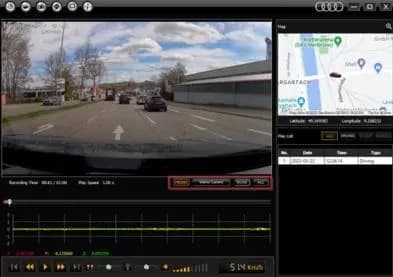
- Viewing Video Files: If you can only see front camera videos, but rear camera recordings are missing, consider using VLC player for Apple MacBooks or the "UTR Viewer" software for PC, available at
http://www.econes.de/AUDI/UTR/Viewer/. - Interrupted Video Downloads: If downloading a UTR video is interrupted and it no longer appears in the UTR app, the file is still copied and can be backed up by connecting the SD card to a PC.
- "A speed signal (5 km/h) in the UTR app blocks the view": This is a design feature to reduce driver distraction, not an error. It displays when connected to the UTR and driving faster than 5 km/h.
- Full Screen Mode: To watch a UTR video in full screen mode, simply tap the video twice in the app.
Connectivity and Settings
- Incorrect Time and Date: The UTR adopts time from GPS or the connected smartphone. Correcting the smartphone's time or allowing the UTR to acquire a new GPS position will resolve this.
- Forgot Wi-Fi Password: Press and hold the on/off button for 20-30 seconds to reset the Wi-Fi password to "1234567890" and the Wi-Fi name to "AUDI UTR". No videos are deleted during this reset.
- Initial Network Login Problems: If you're experiencing "I'm having problems with the initial network login" or "UTR LTE router initial network login not working," a quick start guide is available in ETKA. For the LTE router, press the power button for 20-30 seconds to restart and log into the mobile network.
- Language Settings: UTR language settings depend on your smartphone's language settings. Change your smartphone's language to change the UTR language.
- Apple CarPlay Connection: To connect the UTR while using Apple CarPlay wirelessly, deactivate Bluetooth for initial configuration, then select "Vehicle Wi-Fi hotspot" in your settings to add the UTR. Bluetooth can be reactivated afterward.
Technician Resources
Audi partners can find background information and training videos on the UTR in the Audi Knowledge Tank. These resources include:
- STV_0671 - Audi Dashcam Universal Traffic Recorder 2.0 - Installation
- STV_0672 - Audi Universal Traffic Recorder app
- STV_0691 - LTE router for the UTR 2.0 - initial setup
- STV_0689 - Installing Audi fatigue detection (camera-based system) for Universal Traffic Recorder 2.0
- STV_0692 - LTE router for the UTR 2.0 - initial setup
If problems persist, technicians should complete the "UTR questionnaire" and attach it to a Technical Assistance Center (TAC) ticket.
NHTSA ID: 11031053
Frequently Asked Questions
- What should I do if my Audi Universal Traffic Recorder (UTR) Wi-Fi password is forgotten?
- If you forgot your UTR Wi-Fi password, press and hold the on/off button for 20-30 seconds. This will reset the password to "1234567890" and the Wi-Fi name to "AUDI UTR". Your recorded videos will not be deleted.
- Can I use any micro SD card with my Audi UTR, or is there a specific type recommended?
- While standard SD cards can be used if they are Type MLC and Class 10 or higher, Audi recommends using the specially designed 64 GB SD card (part number 4G0.063.511.AC). Independent retailer SD cards may not meet automotive standards and can lead to failures due to the large data volume and frequent write cycles.
- My UTR video shows the wrong time and date. How can I fix this?
- The UTR sets its time based on GPS position or the connected smartphone. To correct an incorrect time and date, ensure your smartphone's time settings are accurate or allow the UTR to acquire a new GPS position, especially if you've moved to a different time zone.
- What if my UTR rear camera video is rotated 180 degrees or not recording?
- If the rear camera image is rotated 180°, you can adjust this in the UTR app settings. If the UTR does not save or display video from the rear camera, check if the "Race" driving mode or "Front camera only" channel is selected in the UTR app, as these modes may prevent rear camera recording.
- Does the Audi UTR negatively affect my vehicle's battery?
- No, the UTR is designed with a battery management system to prevent negative effects on the vehicle battery. It ensures the vehicle can always be started. If the UTR doesn't switch to "parking mode" after 60 seconds, it may indicate incorrect wiring or a missing ignition signal.
What Audi e-tron owners report
Counted from the records in our database across 5 model years.
- 158
- Owner complaints
- 14
- Recalls
- 1,706
- Service bulletins
- 7
- Crashes reported
- 6
- Fires reported
- 3
- Injuries reported
The 2021 model year
36 complaints, the 2nd most of 5 model years on file. Owners reported 0 crashes, 1 fire and 0 injuries for this year, which also has 10 recalls on file.
Electrical System, the system this article covers, accounts for 81 of 158 complaints (51%), including 24 for 2021.
Complaints by model year
| 2019 | 84 | |
|---|---|---|
| 2020 | 1 | |
| 2021 | 36 | |
| 2022 | 31 | |
| 2023 | 6 |
Most-reported systems
- Electrical System — 81
- Power Train — 24
- Engine — 23
- Fuel/Propulsion System — 18
- Service Brakes — 18
Latest recalls for the 2021 model year
- 26V240000 — Service Brakes, Hydraulic (Apr 2026)
- 25V900000 — Back Over Prevention (Dec 2025)
- 23V867000 — Electrical System (Dec 2023)
Recent owner reports about electrical system
I own a 2021 Audi e-tron with approximately 58000 miles. Beginning in March 2026, the vehicle developed intermittent Virtual Cockpit/instrument-cluster problems with blank display. I reported the condition to Audi dealer of Princeton NJ.
Read owner complaints →What component or system failed or malfunctioned, and is it available for inspection upon request? - While on highway the vehicle loosed all Power indicating Electrical Malfunction How was your safety or the safety of others put at risk?
Complaints are owner reports filed with NHTSA. They are unverified, and counts depend on how many vehicles were sold, so they are not a failure rate.
Related Articles
2021 Audi e-tron Electrical Malfunction and Power Loss
A 2021 Audi e-tron owner reported a severe 'Electrical Malfunction' resulting in complete loss of power on the highway. The issue has persisted despite dealer attempts to fix it over five months, posing significant safety risks.
2021-2026 Audi UTR Troubleshooting & FAQs TSB 2081409/1
This Audi Technical Service Bulletin (TSB 2081409/1) provides comprehensive answers to frequently asked questions and troubleshooting steps for the Audi Universal Traffic Recorder (UTR) accessory, covering topics like SD card compatibility, video playback, Wi-Fi issues, and more.
2021-2025 Audi Emergency Call System Fault TSB
Audi has released Technical Service Bulletin 2059528/18 to address an "Emergency call function: malfunction! Function unavailable. Please contact service" warning, often accompanied by a red SOS LED and DTC B200000. This issue affects various 2021-2025 Audi models and is due to a software problem…
2021-2026 Audi Adaptive Light System Fault C12B3FA TSB
Audi has released Technical Service Bulletin 2054202/7 to address an intermittent 'Audi adaptive light: system fault' message and DTC C12B3FA in various 2021-2026 models. This TSB outlines diagnosis and resolution for driver assistance system malfunctions.
2021-2026 Audi Parking Aid False Warnings TSB 2024323/12
This Technical Service Bulletin (TSB 2024323/12) details diagnostic and repair procedures for 2021-2026 Audi vehicles experiencing false parking aid warnings. Learn about environmental factors, sensor checks, and proper installation to resolve issues like 'Parking aid does not work / warning is…
Yorum bırakın
Yorumlar moderasyondan geçer ve görünmesi biraz zaman alabilir. Sadece adınız ve soyadınızın baş harfi herkese açık olarak gösterilir.
Yorumlar
İlk yorum sizden olsun.