2018-2026 Audi e-tron Apple CarPlay Connection Issues
An Audi Technical Service Bulletin (TSB 2073582/2) addresses common complaints about the Audi e-tron CarPlay connection, providing detailed troubleshooting steps for MMI and iPhone settings to resolve connectivity issues in various 2018-2026 Audi models.

También aplica a
- Audi A3
- 2022–2026
- Audi A4
- 2021–2025
- Audi A4 allroad
- 2021–2025
- Audi A5
- 2021, 2022, 2023, 2024, 2026
- Audi A6
- 2021–2025
- Audi A6 allroad
- 2021–2026
- Audi A7
- 2021–2025
- Audi A7 e
- 2021–2022
- Audi A8 L e
- 2021
- Audi e-tron
- 2022–2023
- Audi e-tron GT
- 2022–2026
- Audi e-tron Sportback
- 2021–2022
- Audi Q3
- 2021–2026
- Audi Q5
- 2021–2026
- Audi Q5 e
- 2021, 2023, 2024, 2025
- Audi Q7
- 2021–2026
- Audi Q8
- 2021–2026
- Audi R8
- 2021–2023
- Audi RS 3
- 2022–2024
- Audi RS 5
- 2021–2024
- Audi RS 6 Avant
- 2021–2026
- Audi RS 7
- 2021–2026
- Audi RS e-tron GT
- 2022, 2023, 2024, 2026
- Audi RS Q8
- 2021–2026
- Audi S e-tron GT
- 2026
- Audi S3
- 2022–2026
- Audi S4
- 2021–2025
- Audi S5
- 2021, 2022, 2023, 2024, 2026
- Audi S6
- 2021–2025
- Audi S7
- 2021–2025
- Audi S8
- 2021–2026
- Audi SQ5
- 2021–2026
- Audi SQ7
- 2021–2026
- Audi SQ8
- 2021–2026
- Audi TT
- 2021–2023
- Audi TT RS
- 2021–2022
- Audi TTS
- 2021–2023
▸ Mostrar 31 más▾ Mostrar menos
Symptoms
Owners of affected Audi vehicles, including the e-tron, may experience several issues with their Apple CarPlay connection. The primary complaint is an unreliable connection to Apple CarPlay™.
Specific symptoms reported include:
- "Automatic (re)connection of Apple CarPlay™ does not work."
- "Connecting Apple CarPlay™ manually only works sporadically."
- "Connecting via USB cable works as expected."
Additional related complaints cover various aspects of functionality and control modules, such as: "functionality -> no function", "functionality -> operation sequence incorrect", "functionality -> cannot be switched off/deactivated", "functionality -> operation complicated", "control modules, services -> communication interrupted", "control modules, services -> error message", "control modules, services -> no access", "control modules, services -> no data transfer", and "control modules, services -> service unavailable."
Diagnosis / Trigger Conditions
This Technical Service Bulletin (TSB) indicates that the Audi e-tron CarPlay connection issues can often be reproduced using the customer's own phone. However, when tested with different Apple devices, the connection typically functions reliably. Similarly, the customer's phone may successfully pair with other comparable vehicles.
This suggests that the problem often stems from specific MMI (Multi Media Interface) or phone settings, or potential limitations within the phone's software. Audi recommends that technicians always verify the complaint using the newest available phone software to rule out software-related causes.
Important Warnings
Repair Procedure Summary
This TSB outlines a series of troubleshooting steps for resolving issues with the Audi e-tron CarPlay connection. The procedure involves making adjustments within both the vehicle's MMI system and the owner's iPhone.
In the MMI (Audi Multi Media Interface)
- Delete Existing Pairings: Access the Audi smartphone interface in the MMI. Press and hold on the affected phone's entry to open a window with further information and the option to delete the connection. (Refer to Figure 1 in the original TSB for visual guidance).
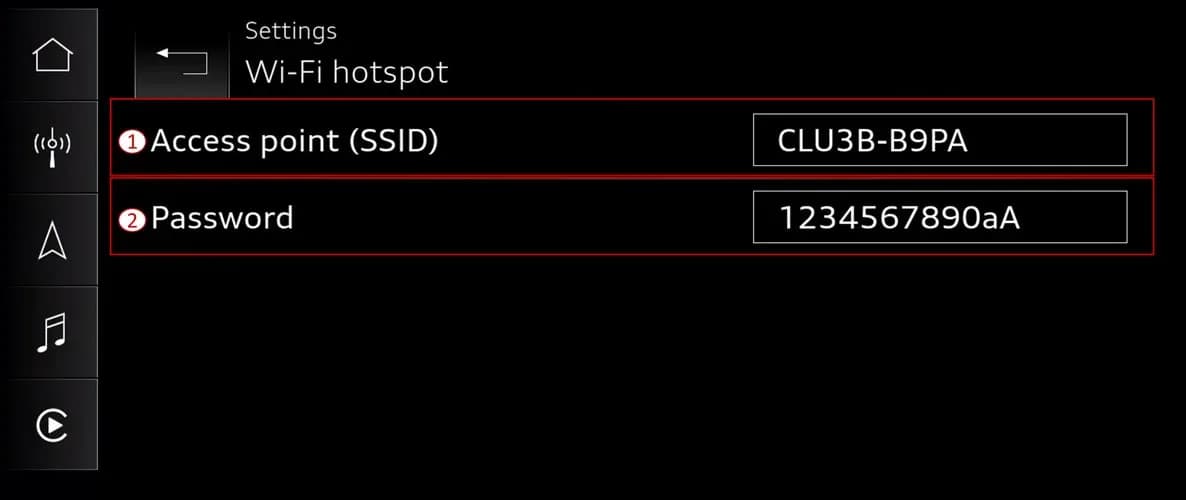
- Verify Wi-Fi and Bluetooth Names: Navigate to the connection manager in the MMI. Confirm that the Wi-Fi hotspot name matches the Bluetooth name of the MMI. (Figures 2 and 3 illustrate these settings).
- Set Wi-Fi Password: Ensure that a password is set for the Wi-Fi hotspot.
On the iPhone
- Delete Vehicle Wi-Fi Hotspots: Go to Settings > Wi-Fi > Edit (top right) on your iPhone. Remove both the 2.4GHz and 5GHz vehicle Wi-Fi hotspots from the list of known networks. (Figure 4 provides a visual example).
- Delete Vehicle Bluetooth Pairing: In your iPhone's Settings, go to Bluetooth. Tap the blue "i" icon next to the vehicle's device entry and select "Forget this device". (Figure 5 shows this step).
- Delete Vehicle CarPlay Settings: Access Settings > General > CarPlay on your iPhone. Select the vehicle and then choose "Forget this car". (Figure 6 demonstrates this process).
- Re-pair and Setup: After performing all the above steps, re-pair your phone to the vehicle via the Audi Smartphone Interface (ASI) tile in the MMI. Then, set up CarPlay again for the iPhone in the vehicle.
- Reset Network Settings (Optional): If issues persist, especially after an iOS update or when switching to a new iPhone, consider resetting your iPhone's network settings. This is done via Settings > General > Transfer or Reset iPhone > Reset > Reset Network Settings. Be aware this will remove all saved Wi-Fi connections.
Warranty Information
This Technical Service Bulletin (TSB 2073582/2) is primarily informational if the vehicle is outside of its warranty period. For warranty claims, the following codes apply:
- Service Number: 9109
- Damage Code: AD39
- Labor Operations:
- Check display and operating unit: 9196 0199 (20 Time Units)
- GFF: No allowance (0 Time Units)
- Claim Comment: "As per TSB 2073582/2"
All warranty claims must adhere to the Audi Warranty Policies and Procedures Manual and are subject to review or audit.
Source
NHTSA ID: 11017638
Galería
5 imágenes
Frequently Asked Questions
- What are the common symptoms of Apple CarPlay connection issues in my Audi?
- Owners often report that their iPhone can no longer reliably connect to Apple CarPlay, with automatic reconnection failing and manual connection working only sporadically. USB cable connections typically function as expected.
- What is Audi TSB 2073582/2 about?
- Audi TSB 2073582/2 provides general troubleshooting steps for connection complaints related to Apple CarPlay in various Audi models from 2018-2026, including the Audi e-tron. It details procedures for adjusting MMI and iPhone settings to resolve connectivity problems.
- How can I troubleshoot my Audi e-tron CarPlay connection if it's not working?
- You should delete all existing phone pairings and vehicle Wi-Fi/Bluetooth settings from both your Audi's MMI and your iPhone. After ensuring Wi-Fi hotspot names match and a password is set, re-pair your phone and set up CarPlay again.
- Will this Apple CarPlay connection repair be covered under warranty?
- If your vehicle is still under warranty, the labor operations (9196 0199 for checking display/operating unit and GFF) may be covered. If the vehicle is outside of warranty, this Technical Service Bulletin is for informational purposes only.
What Audi e-tron owners report
Counted from the records in our database across 5 model years.
- 158
- Owner complaints
- 14
- Recalls
- 1,706
- Service bulletins
- 7
- Crashes reported
- 6
- Fires reported
- 3
- Injuries reported
The 2021 model year
36 complaints, the 2nd most of 5 model years on file. Owners reported 0 crashes, 1 fire and 0 injuries for this year, which also has 10 recalls on file.
Complaints by model year
| 2019 | 84 | |
|---|---|---|
| 2020 | 1 | |
| 2021 | 36 | |
| 2022 | 31 | |
| 2023 | 6 |
Most-reported systems
- Electrical System — 81
- Power Train — 24
- Engine — 23
- Fuel/Propulsion System — 18
- Service Brakes — 18
Latest recalls for the 2021 model year
- 26V240000 — Service Brakes, Hydraulic (Apr 2026)
- 25V900000 — Back Over Prevention (Dec 2025)
- 23V867000 — Electrical System (Dec 2023)
Recent owner reports
I own a 2021 Audi e-tron with approximately 58000 miles. Beginning in March 2026, the vehicle developed intermittent Virtual Cockpit/instrument-cluster problems with blank display. I reported the condition to Audi dealer of Princeton NJ.
Read owner complaints →Moisture build-up in the high-voltage electrical system through a faulty seal on the charging socket, which can cause a short circuit and significantly increase the risk of a vehicle fire.
Complaints are owner reports filed with NHTSA. They are unverified, and counts depend on how many vehicles were sold, so they are not a failure rate.
Related Articles
2021 Audi e-tron Electrical Malfunction and Power Loss
A 2021 Audi e-tron owner reported a severe 'Electrical Malfunction' resulting in complete loss of power on the highway. The issue has persisted despite dealer attempts to fix it over five months, posing significant safety risks.
2021-2026 Audi UTR Troubleshooting & FAQs TSB 2081409/1
This Audi Technical Service Bulletin (TSB 2081409/1) provides comprehensive answers to frequently asked questions and troubleshooting steps for the Audi Universal Traffic Recorder (UTR) accessory, covering topics like SD card compatibility, video playback, Wi-Fi issues, and more.
2021-2025 Audi Emergency Call System Fault TSB
Audi has released Technical Service Bulletin 2059528/18 to address an "Emergency call function: malfunction! Function unavailable. Please contact service" warning, often accompanied by a red SOS LED and DTC B200000. This issue affects various 2021-2025 Audi models and is due to a software problem…
2021-2026 Audi Adaptive Light System Fault C12B3FA TSB
Audi has released Technical Service Bulletin 2054202/7 to address an intermittent 'Audi adaptive light: system fault' message and DTC C12B3FA in various 2021-2026 models. This TSB outlines diagnosis and resolution for driver assistance system malfunctions.
2021-2026 Audi Parking Aid False Warnings TSB 2024323/12
This Technical Service Bulletin (TSB 2024323/12) details diagnostic and repair procedures for 2021-2026 Audi vehicles experiencing false parking aid warnings. Learn about environmental factors, sensor checks, and proper installation to resolve issues like 'Parking aid does not work / warning is…
Leave a comment
Comments are moderated and may take a moment to appear. Only your first name and the initial of your last name are shown publicly.
Comments
Be the first to comment.