2019-2024 Audi Wireless CarPlay Connection Issues
Experiencing issues with your Audi's Wireless CarPlay connection? This Technical Service Bulletin (TSB 91 22 47 2062466/3) details common problems and troubleshooting steps for 2019-2024 Audi models with MIB2+ and MIB3 MMI systems.

También aplica a
- Audi A3
- 2022–2024
- Audi A4
- 2021–2024
- Audi A4 allroad
- 2021–2022
- Audi A5
- 2021–2024
- Audi A6
- 2021–2024
- Audi A6 allroad
- 2021–2022
- Audi A7
- 2021–2024
- Audi A7 e
- 2021–2022
- Audi A8 L e
- 2021
- Audi e-tron
- 2022–2023
- Audi e-tron GT
- 2022–2024
- Audi Q3
- 2021–2024
- Audi Q5
- 2021, 2024
- Audi Q5 e
- 2024
- Audi Q7
- 2021–2024
- Audi Q8
- 2021–2024
- Audi R8
- 2021–2023
- Audi RS 3
- 2023–2024
- Audi RS 5
- 2021–2024
- Audi RS 6 Avant
- 2021–2024
- Audi RS 7
- 2021–2024
- Audi RS e-tron GT
- 2022–2024
- Audi RS Q8
- 2021–2024
- Audi S3
- 2022–2024
- Audi S4
- 2021–2024
- Audi S5
- 2021–2024
- Audi S6
- 2021–2024
- Audi S7
- 2021–2024
- Audi S8
- 2021, 2023, 2024
- Audi SQ5
- 2021–2024
- Audi SQ7
- 2021–2024
- Audi SQ8
- 2021–2022
- Audi TT
- 2021–2023
- Audi TT RS
- 2021–2022
- Audi TTS
- 2021–2023
▸ Mostrar 29 más▾ Mostrar menos
Symptoms of Audi Wireless CarPlay Connection Issues
Owners of 2019-2024 Audi vehicles may experience several issues with their Audi Wireless CarPlay connection. These include:
- The customer cannot connect their device to the MMI using Wireless Apple CarPlay.
- The Wireless CarPlay connection does not automatically start after starting the vehicle.
- Intermittently, after starting the vehicle, Wireless CarPlay cannot be started. Upon touching the tile in the MMI, the tile turns green, but CarPlay does not start.
- Wireless CarPlay works intermittently, leading to frequent disconnections.
- Wireless CarPlay not connecting at times, especially after recent iOS updates.
Technical Background
Wireless CarPlay utilizes your vehicle's Wi-Fi to provide the same functionality as wired Apple CarPlay, eliminating the need for a tethered USB connection. Initial pairing to the vehicle's infotainment system (MMI) is performed using Bluetooth.
Audi MMI systems that support Wireless CarPlay include MIB2+ with ConBox Low (found in some 2019-2021 models like the e-tron quattro, A6, A7, A8, Q3, Q7, Q8, and e-tron Sportback) and MIB3 with ConBox High (found in some 2021-2022 models like the A4, A5, A6, A7, A8, Q5, Q7, Q8, e-tron quattro, e-tron Sportback, A3, Q3, Q5, Q7, Q8, Q4 e-tron, e-tron GT, and RS e-tron GT).
The type of ConBox system is important because Wi-Fi and Bluetooth are controlled differently. For MIB2+ MMI, the Wi-Fi hotspot is controlled by the ConBox Low module, while the MMI controls the Bluetooth system. For MIB3 MMI systems, both Wi-Fi and Bluetooth are controlled by the ConBox High module.
Wireless CarPlay sessions can be initiated via two methods: a Bluetooth connection to the vehicle or a Wi-Fi connection to the vehicle. It's crucial to understand the differences in how the vehicle recognizes the iPhone and how the iPhone uses data during a CarPlay session.
Diagnosis and Trigger Conditions
Several conditions can lead to issues with your Audi Wireless CarPlay connection:
- Incorrect Pairing Method: If the iPhone is manually paired to the 2.4Ghz band of the car's Wi-Fi hotspot instead of the 5Ghz band (which Apple CarPlay uses), it can cause the iPhone to constantly switch between bands, disrupting Wireless CarPlay.
- iPhone Connected to Other Hotspots: The MMI may fail to find the iPhone for CarPlay if the iPhone is already connected to a different Wi-Fi hotspot (e.g., home or work network) when attempting to start CarPlay.
- Expired Audi Connect PLUS Plan: If your Audi Connect PLUS plan has expired and the iPhone is configured to use the MMI's Wi-Fi hotspot for data, Wireless CarPlay may not function because internet data is required and no longer provided.
- iOS Security Features: Starting with iOS 12, Apple introduced security features that can lock out connected USB accessories, including the MMI, if the iPhone has not been unlocked within the last hour before connecting.
Repair Procedure Summary
Addressing the Audi Wireless CarPlay connection issues typically involves adjusting iPhone settings and re-establishing the connection. No production solution is applicable, as this is a user-configuration and troubleshooting guide.
Initial Pairing for Wireless CarPlay:
- Ensure Siri is enabled and configured on your iPhone (Check
Settings >> General). - Bluetooth must be turned on in both your iPhone and the MMI (only used for setup).
- Wi-Fi must be turned on in your iPhone. If it's not, iOS software should prompt you to turn it on.
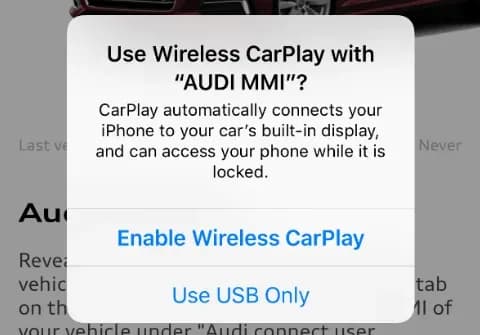
- Establish a Bluetooth pairing with the MMI and accept the prompt to enable Wireless CarPlay. The MMI shares Wi-Fi security credentials to the iPhone over Bluetooth.
- Once Apple CarPlay is active in the MMI, you can turn Bluetooth off and back on if the session is not active. The MMI will connect to Wireless CarPlay over Wi-Fi, and Bluetooth will then be disabled in the MMI.
Troubleshooting Specific Concerns:
- CarPlay not starting (tile turns green but no launch): Cycle the CarPlay Toggle in the Bluetooth Settings for the vehicle in your iPhone's
Settingsmenu (Figure 3 in the original TSB shows this process). This often resolves issues when the MMI cannot find the iPhone on its Wi-Fi network. - iPhone manually paired to 2.4Ghz band: In your iPhone settings, go to Bluetooth settings for the MMI, select the little "(i)" next to the MMI's name, and then cycle the "CarPlay" option off and back on. If CarPlay doesn't automatically start, reselect it in the MMI. This step may need to be repeated if the issue recurs.
- Expired Audi Connect PLUS plan: Either turn on Wi-Fi Assist on your iPhone or delete existing Wi-Fi and Bluetooth pairings and perform a new Bluetooth-only pairing. If the iPhone was manually connected to the MMI's hotspot, it will disconnect if no internet data is provided by an expired plan. Wi-Fi Assist forces the iPhone to use LTE for internet data while staying connected to the vehicle's Wi-Fi for CarPlay.
- CarPlay not turning on automatically: Check that your iPhone is not connected to a different Wi-Fi hotspot (home or work). Wireless CarPlay requires connection to the vehicle's Wi-Fi hotspot, either directly or via a private channel.
- Intermittent CarPlay operation: Unlock your iPhone or turn off the USB accessories security feature. This iOS feature can prevent connected devices, including the MMI, from working if the iPhone hasn't been unlocked recently.
Important Warnings
- DO NOT manually connect the iPhone to the Wi-Fi hotspot in the car after the initial Bluetooth pairing. Doing so can cause conflicts and prevent the Audi Wireless CarPlay connection from working correctly, especially if your Audi Connect PLUS plan is expired.
- If you connect a phone to the Wi-Fi hotspot in the vehicle, the iPhone will try to use the MMI for data consumption. If no data can be obtained (e.g., with an expired Plus subscription), Wireless CarPlay will not work.
- The solution involving Wi-Fi Assist only works with some iOS versions and can break during an iOS update.
Owner Action
If you are experiencing issues with your Audi Wireless CarPlay connection, first try the troubleshooting steps outlined above, focusing on your iPhone's Bluetooth and Wi-Fi settings. Ensure Siri is enabled and that your iPhone is not connected to other Wi-Fi networks. If problems persist, and you have an active Audi Connect PLUS plan, ensure it's functioning correctly. For persistent issues, contact your Audi dealer or Apple customer support if the problem relates to iOS features.
Warranty
This Technical Service Bulletin is for informational purposes only and is not applicable to any Audi warranty claims. It provides guidance for diagnosing and resolving common customer concerns.
Additional Information
This TSB, 91 22 47 2062466/3, dated November 8, 2022, supersedes Technical Service Bulletin Group 91 number 22-70, dated January 25, 2022. Another related bulletin, TSB 2068435/1, 91 MIB3: "Failure to establish a Bluetooth connection with iOS 16.0.x (iPhone)", may also be helpful.
Source: NHTSA ID: 10227162
Galería
3 imágenes
Frequently Asked Questions
- What should I do if my Audi Wireless CarPlay connection doesn't start automatically?
- If your Wireless CarPlay doesn't start automatically, try cycling the CarPlay toggle in your iPhone's Bluetooth settings menu. This often resolves issues where the MMI cannot find your iPhone on its Wi-Fi network.
- Why is my Audi Wireless CarPlay connection intermittent?
- Intermittent Wireless CarPlay connections can be caused by your iPhone connecting to other Wi-Fi hotspots, or by iOS security features that lock out connected accessories if your iPhone hasn't been unlocked recently. Ensure your iPhone is unlocked and not connected to other Wi-Fi networks.
- Can an expired Audi Connect PLUS plan affect my Wireless CarPlay?
- Yes, if your iPhone is configured to use the MMI's Wi-Fi hotspot for data and your Audi Connect PLUS plan has expired, Wireless CarPlay may not work because it requires internet data. You can try enabling Wi-Fi Assist on your iPhone or deleting and re-pairing with Bluetooth only.
- What is TSB 91 22 47 2062466/3 about?
- TSB 91 22 47 2062466/3 is a Technical Service Bulletin from Audi that provides detailed information and troubleshooting steps for common Wireless CarPlay connection issues experienced by owners of 2019-2024 Audi vehicles with MIB2+ and MIB3 MMI systems.
- Should I manually connect my iPhone to my Audi's Wi-Fi hotspot for CarPlay?
- No, after the initial Bluetooth pairing, you should NOT manually connect your iPhone to the Audi's Wi-Fi hotspot. Doing so can create conflicts, especially if your Audi Connect PLUS plan is expired, and prevent the Wireless CarPlay connection from working correctly.
What Audi e-tron owners report
Counted from the records in our database across 5 model years.
- 158
- Owner complaints
- 14
- Recalls
- 1,706
- Service bulletins
- 7
- Crashes reported
- 6
- Fires reported
- 3
- Injuries reported
The 2021 model year
36 complaints, the 2nd most of 5 model years on file. Owners reported 0 crashes, 1 fire and 0 injuries for this year, which also has 10 recalls on file.
Electrical System and Equipment, the system this article covers, accounts for 81 of 158 complaints (51%), including 24 for 2021.
Complaints by model year
| 2019 | 84 | |
|---|---|---|
| 2020 | 1 | |
| 2021 | 36 | |
| 2022 | 31 | |
| 2023 | 6 |
Most-reported systems
- Electrical System — 81
- Power Train — 24
- Engine — 23
- Fuel/Propulsion System — 18
- Service Brakes — 18
Latest recalls for the 2021 model year
- 26V240000 — Service Brakes, Hydraulic (Apr 2026)
- 25V900000 — Back Over Prevention (Dec 2025)
- 23V867000 — Electrical System (Dec 2023)
Recent owner reports about electrical system and equipment
I own a 2021 Audi e-tron with approximately 58000 miles. Beginning in March 2026, the vehicle developed intermittent Virtual Cockpit/instrument-cluster problems with blank display. I reported the condition to Audi dealer of Princeton NJ.
Read owner complaints →What component or system failed or malfunctioned, and is it available for inspection upon request? - While on highway the vehicle loosed all Power indicating Electrical Malfunction How was your safety or the safety of others put at risk?
Complaints are owner reports filed with NHTSA. They are unverified, and counts depend on how many vehicles were sold, so they are not a failure rate.
Related Articles
2021 Audi e-tron Electrical Malfunction and Power Loss
A 2021 Audi e-tron owner reported a severe 'Electrical Malfunction' resulting in complete loss of power on the highway. The issue has persisted despite dealer attempts to fix it over five months, posing significant safety risks.
2021-2026 Audi UTR Troubleshooting & FAQs TSB 2081409/1
This Audi Technical Service Bulletin (TSB 2081409/1) provides comprehensive answers to frequently asked questions and troubleshooting steps for the Audi Universal Traffic Recorder (UTR) accessory, covering topics like SD card compatibility, video playback, Wi-Fi issues, and more.
2021-2025 Audi Emergency Call System Fault TSB
Audi has released Technical Service Bulletin 2059528/18 to address an "Emergency call function: malfunction! Function unavailable. Please contact service" warning, often accompanied by a red SOS LED and DTC B200000. This issue affects various 2021-2025 Audi models and is due to a software problem…
2021-2026 Audi Adaptive Light System Fault C12B3FA TSB
Audi has released Technical Service Bulletin 2054202/7 to address an intermittent 'Audi adaptive light: system fault' message and DTC C12B3FA in various 2021-2026 models. This TSB outlines diagnosis and resolution for driver assistance system malfunctions.
2021-2026 Audi Parking Aid False Warnings TSB 2024323/12
This Technical Service Bulletin (TSB 2024323/12) details diagnostic and repair procedures for 2021-2026 Audi vehicles experiencing false parking aid warnings. Learn about environmental factors, sensor checks, and proper installation to resolve issues like 'Parking aid does not work / warning is…
Leave a comment
Comments are moderated and may take a moment to appear. Only your first name and the initial of your last name are shown publicly.
Comments
Be the first to comment.