2019-2022 Audi Apple CarPlay Screen Blank TSB
Audi has released Technical Service Bulletin (TSB) 91 22 92 2065728/2 regarding a blank Apple CarPlay screen and audio dropouts in various 2019-2022 models. This issue is primarily attributed to Apple iOS software bugs or hardware limitations in older iPhone models, not a vehicle fault.

Şu araçlar için de geçerli
- Audi A3
- 2022
- Audi A4
- 2021–2022
- Audi A4 allroad
- 2021
- Audi A5
- 2021–2022
- Audi A6
- 2021–2022
- Audi A6 allroad
- 2021
- Audi A7
- 2021–2022
- Audi A7 e
- 2021–2022
- Audi A8 L e
- 2021
- Audi e-tron
- 2022
- Audi e-tron GT
- 2022
- Audi Q3
- 2021–2022
- Audi Q5
- 2021
- Audi Q7
- 2021–2022
- Audi Q8
- 2021–2022
- Audi RS 5
- 2021–2022
- Audi RS 6 Avant
- 2021–2022
- Audi RS 7
- 2022
- Audi RS e-tron GT
- 2022
- Audi RS Q8
- 2021–2022
- Audi S3
- 2022
- Audi S4
- 2021–2022
- Audi S5
- 2021–2022
- Audi S6
- 2021–2022
- Audi S7
- 2021–2022
- Audi S8
- 2021
- Audi SQ5
- 2021–2022
- Audi SQ7
- 2021–2022
- Audi SQ8
- 2021–2022
▸ 23 tane daha göster▾ Daha az göster
About This Bulletin
This Technical Service Bulletin (TSB) 91 22 92 2065728/2, issued on March 29, 2022, addresses concerns with the Apple CarPlay display. This revision 2 supersedes the previous TSB Group 91 number 22-66, dated January 14, 2022.
Key updates in this revision include a revised title to clarify applicability to MIB2+ and MIB3 infotainment systems, an expanded header to include all models with MIB2+, an updated technical background with Apple's analysis results, and a new section in the service procedure detailing a hardware bug.
This bulletin applies to various 2019-2022 Audi models. A complete list of affected vehicles can be found in the NHTSA document linked below.
Symptoms
Owners of affected 2019-2022 Audi vehicles may experience the following issues when using wireless Apple CarPlay (wACP) via the MMI system:
- An iPhone is connected to the vehicle's MMI system via wireless Apple CarPlay.
- The Audi Smartphone Integration (ASI) feature is selected in the vehicle.
- "Audi dropouts can be heard."
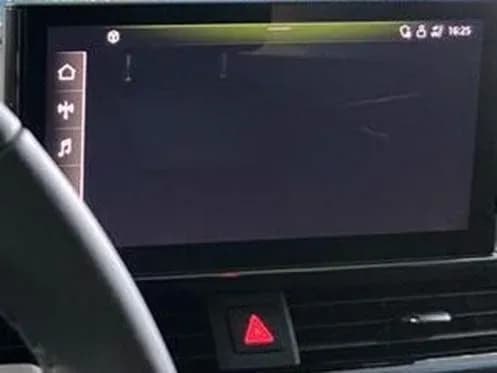
- The ASI display goes blank. The shortcut bar on the left side of the screen, as well as the top dropdown menu anchor, can still be seen on the screen, as depicted in Figure 1 of the original document.
Technical Explanation
Workshop findings indicate that no relevant Diagnostic Trouble Codes (DTCs) are stored in the vehicle's system related to this issue. The 2019-2022 Audi Apple CarPlay screen blank problem is not a fault within the Audi vehicle itself.
The technical background reveals two primary causes:
- Apple iOS Software Bug: A non-standard behavior in current Apple iOS versions (including all 14.x and 15.x versions) prevents the iPhone from successfully sending screen data to the vehicle's MMI system.
- iPhone Hardware Issue: A specific hardware problem within the WiFi chipset of certain iPhone models, namely iPhone 8, iPhone X, and iPhone XR, can also cause the display to go blank.
Important Warnings and Owner Actions
Audi advises that no repair is currently available for this concern, as it originates from the connected iPhone's software or hardware. Dealers are instructed: "Do not perform any repairs. Any repairs for this concern may be denied."
- For iPhone 8, iPhone X, and iPhone XR owners: The blank display is due to a hardware issue in the WiFi chipset of these older phone models. Since these models are no longer in production, no repair will be available. Owners are advised to use a wired connection to utilize Apple CarPlay functionality.
- For all other iPhone models: The issue is attributed to a bug in the iPhone's operating system (iOS). Apple is actively investigating the root cause and is working on a software solution, which will be distributed in a future iOS update.
Workarounds and Recommendations
While a permanent fix for the iOS software bug is pending, some temporary workarounds may help:
- In some cases, navigating to the home menu by clicking the home shortcut on the left side of the screen and then re-entering Audi Smartphone Integration (ASI) can resolve the concern.
- Disconnecting and then reconnecting the iPhone might also alleviate the issue.
- Audi strongly recommends that customers "always use the most current iOS software for iPhone to ensure the most up-to-date user experience."
Warranty Information
This Technical Service Bulletin is informational only and is not applicable to any Audi Warranty. The issues described are related to external devices (iPhones) and their operating systems or hardware, not a defect covered under Audi's vehicle warranty.
NHTSA ID: 10220603
Frequently Asked Questions
- Why is my Audi Apple CarPlay screen blank?
- The 2019-2022 Audi Apple CarPlay screen blank issue is often caused by a bug in the Apple iOS operating system (versions 14.x and 15.x) which prevents the phone from sending screen data to the vehicle. In some specific iPhone models (8, X, XR), it can also be due to a hardware issue with the WiFi chipset.
- Is there a permanent fix for the Audi Apple CarPlay screen blank issue?
- For most iPhone users, Apple is actively working on a software solution for the iOS bug, which will be distributed in a future iOS update. For owners of iPhone 8, iPhone X, or iPhone XR, the issue is hardware-related with no repair available; a wired connection for Apple CarPlay is recommended.
- What should I do if my iPhone 8, X, or XR causes the Audi Apple CarPlay screen to be blank?
- If you have an iPhone 8, iPhone X, or iPhone XR and experience the Audi Apple CarPlay screen blank issue, it is due to a hardware limitation in those phone models. Audi advises using a wired connection to utilize Apple CarPlay functionality, as no repair is available for this hardware-related problem.
- Will Audi cover the cost of repair for this Apple CarPlay issue?
- No, this Technical Service Bulletin (TSB 91 22 92 2065728/2) is informational only and not applicable to any Audi Warranty. The problems stem from external device software or hardware, not a defect in the Audi vehicle itself.
- Are there any temporary workarounds for the blank Apple CarPlay screen?
- Yes, some owners have found that navigating to the home menu via the shortcut on the left side of the screen and then re-entering Audi Smartphone Integration (ASI) can resolve the issue. Disconnecting and reconnecting your iPhone may also help. Audi also recommends keeping your iPhone's iOS software updated to the latest version.
What Audi e-tron owners report
Counted from the records in our database across 5 model years.
- 158
- Owner complaints
- 14
- Recalls
- 1,706
- Service bulletins
- 7
- Crashes reported
- 6
- Fires reported
- 3
- Injuries reported
The 2021 model year
36 complaints, the 2nd most of 5 model years on file. Owners reported 0 crashes, 1 fire and 0 injuries for this year, which also has 10 recalls on file.
Complaints by model year
| 2019 | 84 | |
|---|---|---|
| 2020 | 1 | |
| 2021 | 36 | |
| 2022 | 31 | |
| 2023 | 6 |
Most-reported systems
- Electrical System — 81
- Power Train — 24
- Engine — 23
- Fuel/Propulsion System — 18
- Service Brakes — 18
Latest recalls for the 2021 model year
- 26V240000 — Service Brakes, Hydraulic (Apr 2026)
- 25V900000 — Back Over Prevention (Dec 2025)
- 23V867000 — Electrical System (Dec 2023)
Complaints are owner reports filed with NHTSA. They are unverified, and counts depend on how many vehicles were sold, so they are not a failure rate.
Related Articles
2021 Audi e-tron Electrical Malfunction and Power Loss
A 2021 Audi e-tron owner reported a severe 'Electrical Malfunction' resulting in complete loss of power on the highway. The issue has persisted despite dealer attempts to fix it over five months, posing significant safety risks.
2021-2026 Audi UTR Troubleshooting & FAQs TSB 2081409/1
This Audi Technical Service Bulletin (TSB 2081409/1) provides comprehensive answers to frequently asked questions and troubleshooting steps for the Audi Universal Traffic Recorder (UTR) accessory, covering topics like SD card compatibility, video playback, Wi-Fi issues, and more.
2021-2025 Audi Emergency Call System Fault TSB
Audi has released Technical Service Bulletin 2059528/18 to address an "Emergency call function: malfunction! Function unavailable. Please contact service" warning, often accompanied by a red SOS LED and DTC B200000. This issue affects various 2021-2025 Audi models and is due to a software problem…
2021-2026 Audi Adaptive Light System Fault C12B3FA TSB
Audi has released Technical Service Bulletin 2054202/7 to address an intermittent 'Audi adaptive light: system fault' message and DTC C12B3FA in various 2021-2026 models. This TSB outlines diagnosis and resolution for driver assistance system malfunctions.
2021-2026 Audi Parking Aid False Warnings TSB 2024323/12
This Technical Service Bulletin (TSB 2024323/12) details diagnostic and repair procedures for 2021-2026 Audi vehicles experiencing false parking aid warnings. Learn about environmental factors, sensor checks, and proper installation to resolve issues like 'Parking aid does not work / warning is…
Yorum bırakın
Yorumlar moderasyondan geçer ve görünmesi biraz zaman alabilir. Sadece adınız ve soyadınızın baş harfi herkese açık olarak gösterilir.
Yorumlar
İlk yorum sizden olsun.