2021-2023 Nissan Telematics (IVC) Service Information TSB
This Nissan Technical Service Bulletin (NTB20-029F) provides essential procedures for setting up and maintaining the Telematics Communication Unit (TCU) and in-vehicle communications (IVC) system in 2021-2023 Nissan models after a TCU replacement.
 David Chen2022 Nissan Sentra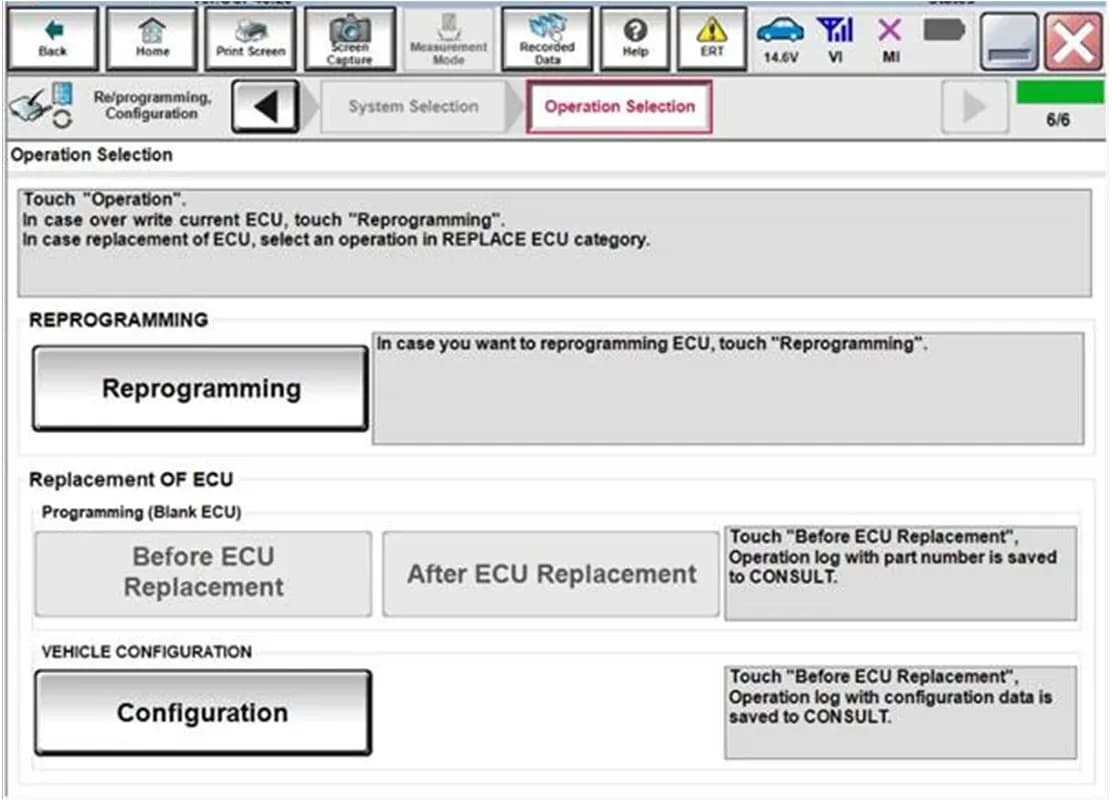
Şu araçlar için de geçerli
- Nissan Altima
- 2023
- Nissan Armada
- 2021–2022
- Nissan Frontier
- 2022–2023
- Nissan Kicks
- 2021–2023
- Nissan Maxima
- 2021–2023
- Nissan Pathfinder
- 2022–2023
- Nissan Rogue
- 2021–2023
- Nissan Sentra
- 2021
- Nissan Titan
- 2021–2023
▸ 3 tane daha göster▾ Daha az göster
This Technical Service Bulletin (TSB) NTB20-029F, issued by Nissan on November 1, 2022, provides comprehensive instructions for setting up and maintaining the telematics/in-vehicle communications (IVC) system in various 2021-2023 Nissan models. The bulletin is crucial for ensuring that the Telematics Communication Unit (TCU) functions correctly after it has been replaced, thereby restoring full Nissan telematics service.
Important Warnings for Owners and Technicians
Nissan has issued several critical warnings regarding the TCU replacement and setup process:
- "If the customer experiences Wi-Fi hotspot related concerns only, DO NOT replace the TCU. Have the customer contact the AT&T Support line at 1 (888) 719-7242."
- "If all of the steps in this bulletin are not completed, telematics services will not operate properly."
- "If the TCU is replaced and the steps are not followed, the warranty claim will be denied."
- "Each TCU is registered to a specific Vehicle Identification Number (VIN). TCUs cannot be 'swapped' between vehicles. Once a TCU is registered to a vehicle, the TCU cannot be used in another vehicle."
- "During this procedure, Intelligent Key registration must be performed. You MUST have ALL customer Intelligent Keys collected."
- "The new/replacement TCU must come from Nissan North America parts supply."
- "Configuration must be completed prior to performing the Write the VIN to the TCU procedure. If performed prior to configuration, the TCU may not function properly and might need replacement."
- "The warranty claim will be denied if this is not followed correctly." (This warning is repeated multiple times throughout the document).
- "If manually entering the VIN, double check that the VIN is correct before saving. Saving the incorrect VIN to the TCU can result in services not working and the TCU may need to be replaced, even after correcting the wrong VIN."
What is the Nissan Telematics Service?
The Nissan telematics service, also known as the in-vehicle communications (IVC) system, relies on a factory-installed SOS switch and a Telematics Communication Unit (TCU). With an active NissanConnect® Services subscription, the TCU communicates with the Nissan Data Center to provide various security and convenience services. This TSB addresses the proper setup of this system, particularly after a TCU replacement.
Required Tools and Software
Technicians will need the following to perform the procedures outlined in this bulletin:
- CONSULT PC with AC adapter.
- Internet connection (Wi-Fi or network cable) for the CONSULT PC.
- Updated ASIST and C-III plus software.
- Vehicle Interface (VI) to connect the CONSULT PC to the vehicle.
- Battery maintainer or smart charger, set to reflash mode, to ensure vehicle battery voltage stays between 12.0 V and 15.5 V during programming.
Detailed Repair Procedure for TCU Replacement
This bulletin outlines a detailed, multi-step process for technicians to follow when replacing and configuring a TCU. The procedure ensures the new unit is correctly integrated with the vehicle and the Nissan telematics service.
1. Saving VIN Data from the Original TCU
This initial phase involves preparing the vehicle and diagnostic tools. The parking brake must be set, the VI connected to the vehicle, and the ignition turned ON (engine OFF). The CONSULT PC must be connected to Wi-Fi, and the C-III plus software launched. Technicians will select "USA/CANADA Dealers" and log in with NNAnet credentials. After the VI is recognized, navigate to "Diagnosis (One System)" and then select "IVC". From the "Work Support" menu, technicians will select "SAVE VIN DATA" and then "Start" to save the existing VIN data. If the VIN data cannot be saved automatically, a manual entry process will be required later.
2. Removing and Installing the New TCU
After saving the VIN data, the original TCU is removed from the vehicle. Technicians must refer to the Electronic Service Manual (ESM) under DRIVER INFORMATION & MULTIMEDIA > AUDIO VISUAL & NAVIGATION SYSTEM > REMOVAL AND INSTALLATION > TCU for specific instructions. A new replacement TCU, which must be sourced from Nissan North America parts supply, is then installed. It is critical to write down the part number from the new TCU, such as 28275-5SN0B, 28275-5SN0F, or 28275-5SN4B, as this information will be needed later in the procedure.
3. Configuring the New TCU
With the new TCU installed, configuration begins by selecting "Re/programming, Configuration" in the C-III plus software. Technicians must read and acknowledge precautions, then select the vehicle's model and model year. After selecting "Select" and "Confirm", choose "IVC". For Rogue models, select "Configuration". For other models, proceed by selecting "After ECU Replacement" and then "Manual selection". A crucial step involves selecting the correct "Type ID" from a provided table, which varies by vehicle model and whether it has remote engine start (e.g., 28277-9HFOA for 2023 Altima, 28277-9BU0A for 2022-2023 Frontier with Remote Engine Start). Finally, select "OK" to complete the configuration.
4. Writing the VIN to the TCU
Once configured, the saved VIN data is written to the new TCU. This is done by navigating back to "IVC Work support" and selecting "WRITE VIN (SAVED DATA)", then "Start". If the VIN data was not saved successfully in the initial steps, technicians will need to proceed to the manual VIN entry procedure.
5. Confirming Network Initial Settings (if needed)
This step is conditional based on the TCU part number. If the new TCU part number is not 28275-5SN0B, 28275-5SN0F, or 28275-5SN4B, technicians must perform a network initial settings confirmation. This involves selecting "Diagnosis (One System)", then "IVC", and from "Work Support", choosing "Network initial settings" and "Start". The system will display a "Network initial setting state". If it shows "100%" and "Completed", the process is complete for this section. If it shows "0", the VIN may need to be re-checked. If it displays "a number between 1 and 5", the technician must wait 24 hours and repeat the steps. If the issue persists after a third attempt, Nissan Owner Services must be contacted.
6. Verifying Telematics Function (if needed)
To verify the telematics function, a series of ignition cycles and waiting periods are required. This includes turning the ignition OFF for 10 minutes, then ON (engine OFF), then hazard warning lights ON for 15 minutes, followed by another ignition OFF for 10 minutes, and finally ignition ON (engine OFF) for 15 minutes. From the vehicle's infotainment system, select "MENU", then "Info", and "System Information". Select "Software Update" and then "Start Software Update". The screen should display "Locating new software..." and then either "This software version is the latest version." or "There is a new software update available."
If the screen displays "There is no current WI-Fi connection", the verification steps (43-52) must be repeated. If this message appears after two attempts, a 24-hour waiting period is required before a third attempt. If the "There is no current WI-Fi connection" message still appears after the third attempt, Nissan Owner Services must be contacted.
7. Intelligent Key Registration and Confirmation
All customer Intelligent Keys must be registered. Technicians should refer to the C-III plus operations manual for detailed instructions on Intelligent Key registration. To confirm successful registration, select "Diagnosis (All Systems)", then "Automatic Selection(VIN)", and "Confirm". Then, select "BCM", followed by "IMMU", and finally "Data Monitor". Select "TCU ID" and "START". The "TCU ID status" should display "Done". If it shows "Yet", all DTCs must be cleared, and steps 53-54 repeated.
8. Manually Entering VIN Data (if automatic fails)
If the automatic VIN saving or writing process fails, the VIN can be entered manually. Navigate to "IVC Work support" and select "WRITE VIN (MANUAL INPUT)", then "Start". The technician will then input the VIN twice, once in the "VIN (1ST TIME)" field and again in the "VIN (2ND TIME)" field, before selecting "Start" and "End". Nissan emphasizes the importance of double-checking the VIN during manual entry, as an incorrect VIN can lead to services not working and potentially require TCU replacement.
Bulletin Revision History
This bulletin has undergone several revisions:
- April 6, 2020 (NTB20-029): Original bulletin published.
- July 6, 2020 (NTB20-029A): Changes made to page 1 and steps 34-42.
- January 27, 2021 (NTB20-029B): Updated "APPLIED VEHICLES" list and added part numbers to step 20.
- February 3, 2021 (NTB20-029C): Classification number updated.
- April 21, 2021 (NTB20-029D): General changes made throughout the document.
- March 3, 2022 (NTB20-029E): "APPLIED VEHICLES" revised, changes made on page 10, and the "Verify NissanConnect® Services Enrollment and Subscriptions (if needed)" section was removed.
- November 1, 2022 (NTB20-029F): Further changes to "APPLIED VEHICLES" and pages 3, 4, and 10; confirmation procedure added to "Intelligent Key Registration and Confirmation".
Source: NHTSA ID: 10226130
Galeri
37 görsel
Frequently Asked Questions
- What is Nissan telematics service?
- Nissan telematics service refers to the in-vehicle communications (IVC) system, which includes the Telematics Communication Unit (TCU). It enables features like SOS calls and other NissanConnect® Services, communicating with the Nissan Data Center.
- Why is the TCU replacement procedure so complex?
- The Telematics Communication Unit (TCU) is registered to a specific Vehicle Identification Number (VIN) and is integral to the Nissan telematics service. The complex procedure ensures the new TCU is correctly configured, linked to the vehicle's VIN, and its network settings are properly established for all services to function securely and reliably.
- What should I do if my Nissan's telematics system shows "There is no current WI-Fi connection"?
- According to TSB NTB20-029F, if your vehicle displays "There is no current WI-Fi connection" after a TCU replacement, the technician should re-attempt the verification steps. If the issue persists after multiple attempts, including a 24-hour wait, you should contact the Nissan Owner Services call center for assistance.
- What happens if the TCU replacement steps aren't followed correctly?
- Nissan explicitly states that if all steps in TSB NTB20-029F are not completed, the telematics services will not operate properly. Furthermore, if the TCU is replaced and the steps are not followed, any associated warranty claim will be denied.
- Can I use a used TCU from another vehicle?
- No, Nissan warns that "Each TCU is registered to a specific Vehicle Identification Number (VIN). TCUs cannot be 'swapped' between vehicles. Once a TCU is registered to a vehicle, the TCU cannot be used in another vehicle." A new/replacement TCU must come from Nissan North America parts supply.
Related Articles
2020-2023 Nissan Altima, Frontier, Sentra False AEB Activation TSB
Nissan Technical Service Bulletin NTB21-115B details a solution for 2020-2023 Nissan Altima, Frontier, and Sentra vehicles experiencing false activation or unexpected braking from their Automatic Emergency Braking (AEB) or Forward Collision Warning (FCW) systems. The repair involves reprogramming…
2021-2022 Nissan Sentra Tie Rod Recall: Steering Loss Risk
Nissan has issued a safety recall (R23B3) for certain 2021-2022 Sentra models due to potentially weak tie rods. This condition can lead to impaired steering, wheel vibration, or even loss of vehicle control. Dealers will replace both tie rods free of charge. A stop-sale is in effect.
2021-2024 Nissan Models: C1A17-49 / C2580-49 Laser/Radar DTC
Nissan Technical Service Bulletin NTB21-106B provides guidance for diagnosing and resolving Diagnostic Trouble Codes C1A17-49 and C2580-49 related to the Laser/Radar system in various 2021-2024 Nissan models. It clarifies when to simply erase the code versus seeking further repair.
2021-2024 Nissan Intelligent Key Unit Service TSB
Nissan TSB NTB20-073C provides critical service information for replacing the Intelligent Key unit in 2021-2024 Ariya, Pathfinder, Rogue, and Sentra vehicles. It emphasizes correct module configuration and NATS initialization steps.
2021-2024 Nissan Sentra Remote Engine Start Inoperative TSB
Owners of 2021-2024 Nissan Sentra vehicles may experience inoperative A/T Shift Lock and Remote Engine Start after a Body Control Module (BCM) replacement. Nissan Technical Service Bulletin NTB20-055A explains that pressing the Intelligent Key UNLOCK button prematurely can permanently disable…
Yorum bırakın
Yorumlar moderasyondan geçer ve görünmesi biraz zaman alabilir. Sadece adınız ve soyadınızın baş harfi herkese açık olarak gösterilir.
Yorumlar
İlk yorum sizden olsun.