2022-2023 Audi e-tron GT / RS e-tron GT Software Update and AC Sensor TSB
Audi Technical Service Bulletin 91VT UPDATE addresses potential issues in 2022-2023 e-tron GT and RS e-tron GT vehicles, including air conditioning sensor failures, "gearbox error" warnings, and high-voltage charging problems. This customer satisfaction package involves sensor…
 Sarah Mitchell2022 Audi RS e-tron GT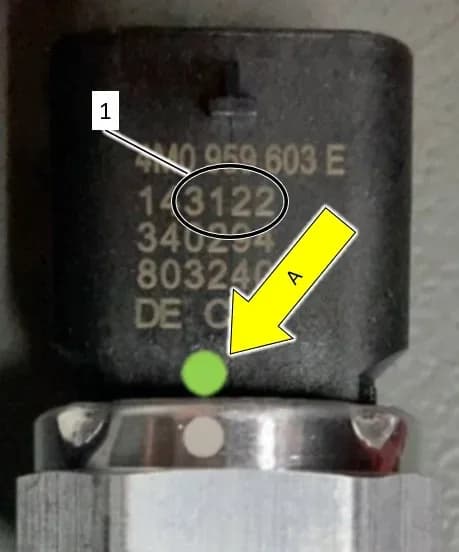
Şu araçlar için de geçerli
- Audi e-tron GT
- 2022–2023
- Audi RS e-tron GT
- 2023
Audi has issued Technical Service Bulletin 91VT UPDATE, a Customer Satisfaction Package (NVLW), to address several potential issues in certain 2022-2023 Audi e-tron GT and RS e-tron GT vehicles. This proactive update aims to prevent conditions related to air conditioning system performance, gearbox operation, and high-voltage battery charging.
This bulletin, identified as 91VT UPDATE, was originally published on September 4, 2024. Owners of affected vehicles, including the 2022 Audi RS e-tron GT, should be aware of these potential concerns and the recommended solutions.
Symptoms and Technical Background
This 91VT UPDATE addresses several distinct conditions that owners might experience or that could develop over time in their 2022-2023 Audi e-tron GT or RS e-tron GT. These issues are categorized by criteria K1, 01, 02, and 03.
Air Conditioning System Malfunction (Criteria K1)
For some Audi vehicles from a specific production period, the air conditioning pressure/temperature sensors (G395 sensor, G826 sensor, G827 sensor) may fail. When these sensors malfunction, the air conditioning system will not work, leading to a loss of cooling or heating capability.
Gearbox Lock and Warning Message (Criteria 01)
After turning off the engine by pushing the start/stop button, the gearbox lock might not reach its end position. This can prevent the lock from releasing, leading to a critical warning message on the instrument cluster: "gearbox error, max 120km/h, go to workshop". This condition indicates a potential issue with the vehicle's ability to operate safely or correctly engage the gearbox.
High-Voltage System and Charging Issues (Criteria 02)
This criterion covers several high-voltage system anomalies. Owners might observe an unauthorized display of the "Turtle LED" for a short period when the ignition is off, indicating the HV system is in a "not ready to drive" state. Other symptoms include the charging duration looping at less than 100% or a charging abort indicated by a red LED, which prevents fast charging.
Combined Issues (Criteria 03)
Criteria 03 applies to vehicles exhibiting a combination of the gearbox lock issue (Criteria 01) and the high-voltage system/charging problems (Criteria 02).
Important Warnings for Owners
Audi has provided several critical warnings within the 91VT UPDATE that owners and technicians must heed to ensure safety and proper repair:
- Radiator Fan Safety: "Radiator Fan(s) may cycle ON high speed during the Update Process! There is a serious risk that personal injury may result if contact is made with spinning fan blades. Keep hands and all objects away from Radiator Fan(s) during Update Process!"
- Battery Charger Settings: When performing software updates, it is crucial to "DO NOT change any settings that will damage the charger or the vehicle." Incorrect voltage settings can damage control units.
- Diagnostic Procedure: "DO NOT USE Guided Fault Finding (GFF) to perform this flash. Using GFF will cause the flash to take longer." Technicians are instructed to use "Audi Flashing" instead.
- TAC Case Creation: If the error message "Configuration on control unit 0046 – convenience system central module could not be performed" appears, technicians are advised to "DO NOT create a TAC case as this is not required."
- Warranty Claim Support: If a software update fails, "ODIS feedback must be sent prior to further diagnosis. This ensures the failure/error is reported. Failure to do so may result in non-payment of consequential requests for additional time or parts."
Diagnosis and Trigger Conditions
Diagnosis for these conditions involves specific checks based on the criteria:
- For AC Sensor Issues (K1): Technicians will inspect the G395 sensor, G826 sensor, and G827 sensor. This inspection involves checking for a green dot on all three sensors. If a green dot is present on all sensors, they do not require replacement. If a green dot is not present, the production date of the sensor is checked. Sensors produced on or before calendar week 31 of 2021 require replacement. The refrigerant charge should not be recovered during the inspection phase.
- For Gearbox and HV System Issues (01, 02, 03): These conditions are typically identified by the warning messages displayed in the instrument cluster, such as "gearbox error, max 120km/h, go to workshop," or by observed charging malfunctions. The repair for these issues primarily involves software updates.
Repair Procedure Summary
The repair for the 2022 Audi RS e-tron GT and other affected models under 91VT UPDATE involves either sensor replacement, software updates, or both, depending on the specific criteria.
Initial Preparation Steps for Software Update
Before any software update is performed, several critical preparatory steps must be followed:
- ODIS Software: Ensure the ODIS software is completely up to date. Technicians should refer to the "Current ODIS Service Version" circular in Elsa2Go Service References.
- Battery Charger Connection: A battery charger must be connected to the vehicle battery and remain connected throughout the software update. The battery voltage must stay above 12.5 volts to prevent update failure and potential damage to control modules. Control modules damaged due to insufficient voltage will not be covered under warranty.
- Screen Settings: The screen saver and power saving settings on the diagnostic tester must be turned off to prevent the tester from entering power save mode during the update.
- VAS Diagnostic Tester: The VAS Diagnostic Tester must be plugged in using its supplied power adapters. It should never be used on battery power alone during the software update.
- Flash Process: The flash process must be performed using "Audi Flashing," not Guided Fault Finding (GFF). Using GFF will prolong the process, and requests for additional time may be denied.
- USB Connection: The VAS Diagnostics Interface MUST ONLY be connected to the tester with a USB cable. Using Bluetooth or Wi-Fi increases the risk of connection loss and potential damage to control modules, and may lead to denial of additional time or parts requests.
- Customer Presets: As a best practice, customer presets should be documented before any update, as these settings might be lost.
Inspecting and Replacing AC Pressure/Temperature Sensors (Criteria K1)
This section of the repair addresses the K1 criteria. Technicians will:
- Access Sensors: Access the G395 sensor, G826 sensor, and G827 sensor without removing them or recovering the refrigerant charge.
- Check for Green Dot: Inspect each sensor for a green dot. If a green dot is present on all three sensors, they do not require replacement.
- Check Production Date: If a green dot is NOT present, check the sensor's production date. If the sensor was produced on or before calendar week 31 of 2021, it requires replacement.
- Replacement Procedure: If replacement is necessary, technicians must wear safety gloves and protective eyewear due to the danger of frostbite from refrigerant. The refrigerant must be evacuated or drained, and the refrigerant circuit opened immediately. If more than 10 minutes pass after draining without opening the circuit, the refrigerant must be drained again.
- Reassembly: After inspection or replacement, the vehicle is reassembled according to ELSA repair manual specifications, noting specific torque values for wheel bolts, luggage compartment light bracket, luggage compartment bolts, and wiper arm nuts. If sensors were replaced, the A/C system is recharged with the recovered amount of R1234yf refrigerant.
Combined Software Update (Criteria 01, 02, or 03)
This part of the repair addresses criteria 01, 02, and 03, which involve updating control module software.
- Pre-Update Diagnostic Scan: Perform a full diagnostic scan using GFF and send the diagnostic protocol online. The diagnostic session should be saved for potential later use.
- Bus Sleep: After the diagnostic scan, perform a bus sleep for at least five minutes with the 12V charger disconnected. This involves disconnecting the 12V charger, removing the diagnostic interface, closing all doors, hood, and rear lid, locking the vehicle, and waiting for all interior lighting to turn off.
- Disable Consumers: Switch off all electrical consumers, including air conditioning, heater blower motor, lights, and heated seats.
- Reconnect Charger: Reconnect the battery charger.
- ODIS and Diagnostic Head: Ensure the latest ODIS version is downloaded and the diagnostic head is connected to the ODIS tester via a USB cable.
- Selector Lever Position: Move the selector lever to the 'P' (Park) position.
- Voltage Check: Only begin the software update when the voltage displayed in ODIS is above 14V.
- Battery Charger Setting: Ensure the VAS5908 battery charger is set to a charging voltage of 14.8V (access code 6161 may be necessary). The voltage shown in ODIS must be over 14V. DO NOT change settings that could damage the charger or vehicle.
- SVM Code Entry: Enter the appropriate SVM code (SWVGTA001 or 91VTA396) and follow the on-screen prompts.
- Error Handling: If the error message "Configuration on control unit 0046 – convenience system central module could not be performed" appears, select option #1 to cancel configuration and continue with the update. If "High-voltage charging active - precondition not met" appears, the high-voltage system must be deactivated, the update performed, and then reactivated.
- Diagnostic Log: Ensure the diagnostic log is sent to GFF Paperless after completion.
- Restore Charger: After the software update, the battery charger must be restored to its original voltage value.
Post-Update Checks
After the software update, technicians must:
- Instrument Cluster Check: Verify that there are no fault messages or warning lamps displayed in the instrument cluster.
- Bus Sleep: Perform another bus sleep for at least five minutes with the 12V charger disconnected.
- Parking Brake Calibration: If any warnings or messages related to the parking brake position are present, perform a parking brake detection and calibration. This involves resuming the previous GFF session, opening guided functions for diagnostic address 0003, performing test plan "0003 – calibrate parking brake," and confirming the warning is no longer present.
Required Tools and Parts
To perform the 91VT UPDATE, specific tools and parts are required:
Parts
- AC Pressure Sensor: Part Number 4M0-959-603-E (up to 3 sensors may be needed)
- Oil Refrigerant: Part Number G-052-535-M2 (up to 1.6 ml)
- R1234yf Refrigerant: Locally sourced (up to 98g)
Special Tools
- Battery Tester/Charger: VAS5908 (or equivalent with at least 90A current rating)
- Diagnostic Tester: VAS6150X/VAS6160X (or equivalent)
- Socket: T40284 (24mm)
- Engine Bung Set: VAS6122
- R1234yf Air Conditioning Service Unit: ROB1234YFX or VAS581005
- Removal Wedge: T40233
- Scraper Set: VAS6845
- Omega Clip Tool: T40280
- Puller: T40394 (Windshield Wiper)
What Owners Should Do
If you own a 2022-2023 Audi e-tron GT or RS e-tron GT and experience any of the described symptoms—such as non-functional air conditioning, a "gearbox error, max 120km/h, go to workshop" message, or issues with high-voltage charging (like the "Turtle LED" or charging aborts)—you should contact an authorized Audi dealer. Reference Technical Service Bulletin 91VT UPDATE (Customer Satisfaction Package NVLW) when you schedule your service. The dealer will verify your vehicle's eligibility and perform the necessary inspections, sensor replacements, and software updates.
NHTSA ID: 11009283
Galeri
14 görsel
Frequently Asked Questions
- What issues does Audi TSB 91VT UPDATE address for the e-tron GT?
- Audi Technical Service Bulletin 91VT UPDATE addresses three main categories of issues for the 2022-2023 Audi e-tron GT and RS e-tron GT: air conditioning system malfunctions due to faulty pressure/temperature sensors, a "gearbox error, max 120km/h, go to workshop" warning after engine shut-off, and high-voltage charging problems including the "Turtle LED" display or charging aborts.
- Will I receive a warning message if my Audi e-tron GT has a gearbox issue?
- Yes, if your 2022 Audi RS e-tron GT experiences the gearbox lock issue described in TSB 91VT UPDATE, you may see a warning message on your instrument cluster stating: "gearbox error, max 120km/h, go to workshop." This indicates the gearbox lock may not be releasing properly.
- Are there any special tools required for the 91VT UPDATE repair?
- Yes, the repair procedure for the 91VT UPDATE requires several special tools. These include the VAS5908 Battery Tester/Charger, VAS6150X/VAS6160X Diagnostic Tester, T40284 Socket, VAS6122 Engine Bung Set, ROB1234YFX or VAS581005 R1234yf Air Conditioning Service Unit, T40233 Removal Wedge, VAS6845 Scraper Set, T40280 Omega Clip Tool, and T40394 Windshield Wiper Puller.
- What should I do if my Audi e-tron GT is experiencing charging problems?
- If your 2022-2023 Audi e-tron GT or RS e-tron GT is experiencing charging problems, such as the "Turtle LED" warning, charging duration looping below 100%, or charging aborts with a red LED, it may be related to the conditions covered by Audi TSB 91VT UPDATE. You should contact an authorized Audi dealer to have your vehicle inspected and the necessary software updates performed.
Related Articles
2022-2024 Audi e-tron GT High-Voltage Battery TSB
Audi TSB 2077772/2 addresses the replacement of the high-voltage battery assembly in 2022-2024 e-tron GT and RS e-tron GT vehicles, detailing required parts and procedures for technicians.
2022-2024 Audi e-tron GT Radiator Fan Stuck DTC P2B3000 P2B3200
Audi has issued Technical Service Bulletin 2073599/3 for 2022-2024 e-tron GT and RS e-tron GT models. This TSB addresses issues with the thermal management system, specifically radiator fan 1 and/or 2 getting stuck, which can lead to DTCs P2B3000 or P2B3200, reduced heating/cooling, and lower…
2022-2024 Audi e-tron GT Charging Issue TSB 2078782/3
Audi has released Technical Service Bulletin (TSB) 2078782/3 for 2022-2024 e-tron GT and RS e-tron GT models experiencing charging complaints or diagnostic trouble codes (DTCs). Due to a temporary shortage of 22 kW high-voltage battery chargers, this TSB outlines a procedure to replace it with an…
2022 Audi e-tron GT Charging Flap Status TSB 2079475/2
This Technical Service Bulletin (TSB) 2079475/2 addresses an issue in 2022 Audi e-tron GT and RS e-tron GT vehicles where the virtual cockpit incorrectly displays the charging flap as open, even when it is closed. This software update resolves the misleading warning messages.
2022 Audi e-tron GT Charging Flap Status Warning TSB
Audi Technical Service Bulletin 2079475/1 addresses an issue in 2022 Audi e-tron GT and RS e-tron GT vehicles where the virtual cockpit incorrectly displays the charging flap as open, even when it's closed. This software update resolves the misleading warning messages.
Yorum bırakın
Yorumlar moderasyondan geçer ve görünmesi biraz zaman alabilir. Sadece adınız ve soyadınızın baş harfi herkese açık olarak gösterilir.
Yorumlar
İlk yorum sizden olsun.