2023-2024 Audi Control Module Coding Not Successful TSB
Audi has issued TSB 00 23 80 2071338/3 for 2023-2024 models where replacement control modules cannot be coded. This bulletin outlines a manufacturer-assisted remote coding procedure to resolve the 'Coding not successful' error message.
 Sarah Mitchell2023 Audi Q8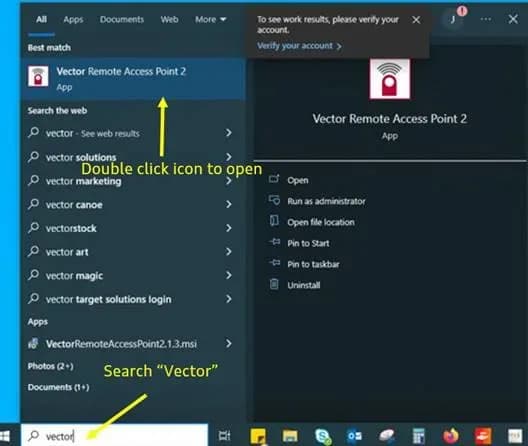
Şu araçlar için de geçerli
- Audi A4
- 2024
- Audi A4 allroad
- 2024
- Audi A5
- 2024
- Audi A6
- 2024
- Audi A6 allroad
- 2024
- Audi A7
- 2024
- Audi e-tron GT
- 2024
- Audi Q5
- 2024
- Audi Q5 e
- 2024
- Audi Q7
- 2023–2024
- Audi Q8
- 2024
- Audi RS 5
- 2024
- Audi RS 6 Avant
- 2024
- Audi RS 7
- 2024
- Audi RS e-tron GT
- 2024
- Audi RS Q8
- 2023–2024
- Audi S4
- 2024
- Audi S5
- 2024
- Audi S6
- 2024
- Audi S7
- 2024
- Audi S8
- 2024
- Audi SQ5
- 2024
- Audi SQ7
- 2023–2024
- Audi SQ8
- 2023–2024
▸ 18 tane daha göster▾ Daha az göster
Audi has released Technical Service Bulletin (TSB) 00 23 80 2071338/3 to address a specific issue where replacement control modules in certain 2023-2024 Audi vehicles cannot be properly coded. This TSB supersedes an earlier bulletin, 00 23 77, dated October 16, 2023. The problem arises during the replacement test plan after a new control unit has been installed, preventing the completion of the coding process. This document provides a detailed procedure for technicians to resolve the Audi control module coding not successful issue through remote assistance.
Symptoms
When a control module replacement is attempted, technicians may encounter an ODIS error message indicating that the coding process failed. The exact message displayed is "Coding not successful". This is often followed by a more specific detail: "The coding of the following control module could not be performed: 005F Information electronics 1". This error prevents the vehicle from recognizing and properly integrating the new module.
Important Warning
Audi emphasizes that during this period, the affected control units can only be coded with direct assistance from the manufacturer. If a module not explicitly listed in this TSB fails to code, this bulletin does not apply, and normal diagnostic procedures should be followed.
Affected Control Units
This TSB applies to a wide range of control units across various Audi models and platforms. The issue specifically affects the following modules when they are replaced and require coding:
| Diagnostic Address | Module | Designation |
|---|---|---|
| 0001 | Engine | Engine control unit (MLBevo gen 1) / Engine control unit or drive system control unit (MLBevo gen 2) |
| 0002 | Gearbox | Gearbox control unit - AL / Gearbox control unit - DL |
| 0003 | ESC | Brake control system |
| 0013 | ACC LRR | Adaptive cruise control (long-range radar master) |
| 0015 | SC | Safety computer 1b / Safety computer 2 |
| 0019 | GW3 Mid 3.1 UNECE | GW Mid-G2-S-4-8A-4B, GW Mid-G2-S-4-8A, GW Mid-G1-S-4-8A, GW Mid-G1-S-4-4A |
| 0023 | EBKV (EBS) | Electromechanical brake servo (iBooster) |
| 002B | ELV (ESCL) | Steering column lock |
| 0044 | EPS (RC/APA) | Electronic power steering |
| 0046 | BCM2 | Body Control Module 2 (convenience system central module) |
| 0051 | LE | Power electronics PWR 560A / Power electronics LE EPF2.8 (P-HEV) AU536x, AU65x / Power electronics LE FPE (P-HEV) AU426x, AU58x |
| 005F | ZR | MIB3 (ORU-enabled) / Information electronics 1 |
| 0069 | AAG | Trailer hitch module |
| 0075 | ConBox | Connectivity box |
| 008C | BMC | Battery Management Controller |
| 008B | ACC2 LRR | Adaptive cruise control (long-range radar slave) |
| 00A5 | BVS | Image processing control unit, MLBevo gen. 1 |
| 00AE | TBox | Telemetry diagnostic control unit |
| 00C0 | aSound | Active exterior sound |
| 00C5 | TME | Thermal Management / Thermal management for electric vehicles |
| 00C6 | OBC | Charging electronics (on-board charger) 7.2kW / Charging electronics (on-board charger) 11kW C-BEV |
| 00CB | HAL | Rear wheel steering |
| 0616 | INRUE_NGS / IRUE | Interior monitoring/tilt sensor |
| 06EB | NFC_TGS | NFC reader for driver door handle |
| 070B | NFC_MiKo | NFC reader for phone box/centre console |
| 8107 | DDA | Digital roof aerial Aerial module |
Diagnosis / Trigger Conditions
The Audi control module coding not successful condition is specifically observed after a control unit has been replaced and the technician attempts to complete the replacement test plan using the ODIS diagnostic system. This indicates a communication or authorization issue with Audi's backend systems during the coding procedure.
Repair Procedure Summary
To resolve the coding issue, a remote coding session with Audi support is required. This process involves several preparatory steps and a guided session with an Audi representative.
Prerequisites for Remote Coding
Before scheduling a remote coding session, ensure the following conditions are met:
- The vehicle is a Model Year 2024, and the control module matches those listed in the TSB.
- The ODIS tester has unrestricted internet access and is running the latest software level.
- Microsoft Teams is installed on the scan tool (a Teams icon should be visible on the desktop).
- The Vector Remote Access Point software is installed on the scan tool.
- The technician must have access to email on the scan tool, a wired headset with a microphone, and approximately two hours of availability for the session.
Preparing for the Remote Coding Session
- Install Vector Remote Access Point: Copy and paste the provided link (
https://portal.vector.com/shared/55185888-4f70-4b99-beef-0cb2aff8e127) into a web browser on the scan tool. Download and installVectorRemoteAccessPoint2.1.3.msi. If the file downloads with a.txtextension, delete the.txtextension before installation. - Install Microsoft Teams: Copy and paste the link (
https://www.microsoft.com/en-us/microsoft-teams/group-chat-software) into a web browser. Download and install Microsoft Teams. - Email Audi: Send an email to
[email protected]with the subject line "USA – Remote coding Support – [VIN]" (replace [VIN] with the vehicle's actual VIN). The email body must include:- The vehicle's VIN.
- The diagnostic address of the affected module (e.g., 5F for Information electronics 1).
- Whether the module is on hand or on order, and if on order, the expected arrival date.
- The technician's name, phone number, and dealer code.
An Audi representative will contact the technician to coordinate the session and send a Microsoft Teams meeting invite.
Conducting the Coding Session
Before starting the session, ensure a battery maintainer is connected, the new module is installed, the diagnostic head is hardwired between the vehicle and ODIS tester, and the ODIS tester is hardwired to an internet access point. DO NOT start ODIS before the session begins.
- Join the Microsoft Teams session via the provided link.
- Start the Vector Remote Access Point software.
- Copy the Vector session ID and password into the Teams chat window.
- The Audi representative will perform the initial coding of the module remotely.
- Once instructed, the technician will start a new ODIS "Diagnosis" session.
- Work collaboratively with the Audi representative to complete the coding process.
- Perform any additional necessary work after the remote coding is finished.
Required Tools or Parts
To successfully perform the remote coding procedure for the Audi control module coding not successful issue, the following tools and software are essential:
- Microsoft Teams: Software for communication and screen sharing.
- Vector Remote Access Point: Software (
VectorRemoteAccessPoint2.1.3.msi) for remote access to the diagnostic system. - Wired headset with microphone: For clear communication with the Audi representative.
- VAS 6160 / VAS 6150: An ODIS tester running the current version of ODIS (Windows 10).
Warranty Information
Warranty claims for this procedure are covered under the following conditions:
- Claim Type: 110 for vehicles up to 48 months or 50,000 miles.
- G10: For CPO (Certified Pre-Owned) covered vehicles, owner verification is required.
- If the vehicle is outside of any warranty, this Technical Service Bulletin serves as informational guidance only.
Labor Operations:
| Labor Operation | Description | Time Units (TU) |
|---|---|---|
| Module replacement | Use SRT for module replaced associated operations | Varies (SRT) |
| 9005 2599 | Coding session | Max 200 TU |
| GFF | Diagnostic Time | 0 TU (included above) |
| Road test prior to the service procedure | 0 TU | |
| 0121 0004 | Road test after the service procedure | 10 TU |
NHTSA ID: 10244587
Galeri
4 görsel
Frequently Asked Questions
- What does 'Coding not successful' mean on my Audi?
- The 'Coding not successful' message, often accompanied by 'The coding of the following control module could not be performed: 005F Information electronics 1', indicates that a newly replaced control module in your Audi could not be properly programmed or integrated into the vehicle's system during the diagnostic process.
- Which Audi models are affected by the control module coding issue?
- This issue primarily affects various 2023-2024 Audi models, including the Q7, SQ7, Q8, SQ8, RS Q8, A4, A5, A6, A7, A8, S4, S5, S6, S7, S8, RS 5, RS 6 Avant, RS 7, e-tron GT, and Q5, among others, when a replacement control module requires coding.
- Can my local mechanic fix the Audi control module coding not successful error?
- No, according to TSB 00 23 80 2071338/3, the affected control units can only be coded with direct assistance from the manufacturer. This requires a specialized remote coding session with an Audi representative using specific diagnostic tools and software.
- Is the remote coding procedure covered under warranty?
- Yes, the remote coding procedure is covered under Audi's warranty for vehicles up to 48 months or 50,000 miles. For Certified Pre-Owned (CPO) vehicles, coverage applies with owner verification. If your vehicle is outside of warranty, the bulletin serves as informational guidance.
- What tools are needed for the Audi control module coding not successful repair?
- The repair requires specific tools and software, including an ODIS tester (VAS 6160/6150) with the latest software, Microsoft Teams, the Vector Remote Access Point software, and a wired headset with a microphone for communication with Audi support.
Related Articles
2023-2026 Audi Frequency Analysis App TSB 2051095/11
Technical Service Bulletin 2051095/11 introduces the Audi Frequency Analysis app, a specialized diagnostic tool for technicians to accurately identify and address noise complaints in 2023-2026 Audi vehicles. This app helps pinpoint the source of various vehicle noises.
2021-2025 Audi Models Engine Control Module Software Update 53ZC
Audi has released Technical Service Bulletin 53ZC (WARR EXT – U82) to provide an Engine Control Module software update. This update optimizes engine oil pressure for various 2021-2025 Audi models, preventing potential issues.
2022-2025 Audi ECM Software Update 53ZC for Oil Pressure
Audi has issued Technical Service Bulletin 53ZC (WARR EXT – U82) for 2022-2025 Audi models, providing an Engine Control Module (ECM) software update. This proactive update optimizes engine oil pressure and is covered under a warranty extension.
2022-2025 Audi Models Engine Control Module Software Update
Audi has issued a dealer communication regarding a software update (UPDATE 53ZC / WARR EXT – U82) for the Engine Control Module in various 2022-2025 models. This update aims to optimize engine oil pressure and prevent potential piston wear. Owners should contact their dealer as no notification…
2022-2025 Audi Q8 Engine Control Module Update
Audi has released Technical Service Bulletin 53ZC, a proactive Engine Control Module (ECM) software update for 2022-2025 Audi Q8, Q7, A6, A7, S4, S5, SQ5, and A8 models. This update optimizes engine oil pressure to prevent potential piston wear and includes a U82 warranty extension.
Yorum bırakın
Yorumlar moderasyondan geçer ve görünmesi biraz zaman alabilir. Sadece adınız ve soyadınızın baş harfi herkese açık olarak gösterilir.
Yorumlar
İlk yorum sizden olsun.