2005-2025 Audi MMI Navigation Database Concerns
Audi TSB 2044694/3 addresses MMI navigation database concerns in 2005-2025 Audi vehicles, including missing traffic information, incorrect speed limits, and missing streets or POIs. Learn how to update your map data.
 Sarah Mitchell2022 Audi e-tron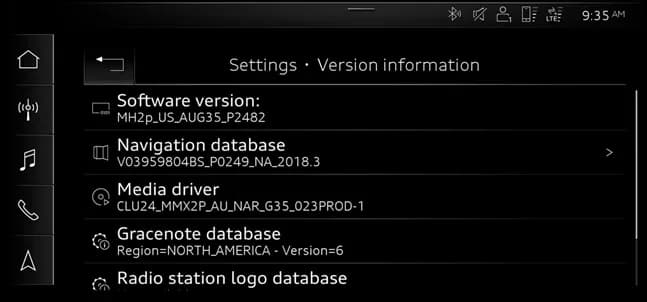
Şu araçlar için de geçerli
- Audi A3
- 2022–2025
- Audi A4
- 2021–2025
- Audi A4 allroad
- 2021–2025
- Audi A5
- 2021–2025
- Audi A6
- 2021–2025
- Audi A6 allroad
- 2021–2025
- Audi A7
- 2021–2025
- Audi A7 e
- 2021–2022
- Audi A8 L e
- 2021
- Audi e-tron
- 2021, 2023
- Audi e-tron GT
- 2022–2025
- Audi Q3
- 2021–2025
- Audi Q5
- 2021–2025
- Audi Q5 e
- 2024–2025
- Audi Q7
- 2021–2025
- Audi Q8
- 2021–2025
- Audi R8
- 2021–2023
- Audi RS 3
- 2022–2025
- Audi RS 5
- 2021–2025
- Audi RS 6 Avant
- 2021–2025
- Audi RS 7
- 2021–2025
- Audi RS e-tron GT
- 2022–2024
- Audi RS Q8
- 2021–2025
- Audi S e-tron GT
- 2026
- Audi S3
- 2022–2025
- Audi S4
- 2021–2025
- Audi S5
- 2021–2025
- Audi S6
- 2021–2025
- Audi S7
- 2021–2025
- Audi S8
- 2021–2025
- Audi SQ5
- 2021–2025
- Audi SQ7
- 2021–2025
- Audi SQ8
- 2021–2025
- Audi TT
- 2021–2023
- Audi TT RS
- 2021–2022
- Audi TTS
- 2021–2023
▸ 30 tane daha göster▾ Daha az göster
Owners of 2005-2025 Audi vehicles may encounter various issues with their MMI navigation system's map database. These Audi navigation database concerns can lead to inaccurate or incomplete information, affecting the driving experience. Technical Service Bulletin (TSB) 91 24 63 2044694/3 provides guidance on understanding and resolving these problems.
This TSB, identified as 91 24 63 2044694/3 and dated February 7, 2024, supersedes Technical Service Bulletin Group 91 number 20-70, which was issued on May 28, 2020. The current revision (Revision 3) includes updated model years and service information. Previous revisions addressed changes to the title, condition examples, technical background, and service tables.
Symptoms
If you own a 2005-2025 Audi, you might notice one or more of the following Audi navigation database concerns:
- "Only certain sections of the map do not show speed and flow traffic data."
- "A new street is not shown on the navigation map."
- "A specific POI is missing in the navigation database."
- "The speed limit shown on the map is missing or incorrect."
These issues indicate that the navigation map database may be outdated or contain errors, impacting the functionality of your vehicle's MMI system.
Technical Background
The navigation map database used in Audi vehicles is supplied by HERE maps (www.HERE.com), which was previously known as Navteq and Nokia Maps. This data is compiled quarterly throughout the year and undergoes validation testing by AUDI AG. However, the process from compilation to release can take several months, meaning the database installed in your vehicle might be nearly a year old at the time of purchase or update. If the map database is updated in the Service department six months to a year after its release, the information could be over a year old.
To address the delay in map data availability, Audi designed MIB (Modular Infotainment Baukasten) systems, starting with MIB2, to support over-the-air (OTA) updates. For MIB2 systems, customers can update three USA regions of the navigation map database directly through the MMI at no cost during the first three years or up to five consecutive releases. MIB2+ and MIB3 systems receive incremental updates to predefined regions based on driving habits, typically on a quarterly or monthly basis.
For MIB1 systems, customers must download the database from myAudi (which became available early Q2 2021) to an SD card and manually update the navigation map database via the MMI's SD card slot. Some map database releases are also available as shop tools and can be ordered using part numbers listed in ETKA. For more information on updating MMI MIB navigation maps, refer to TSB 2037809.
How to Check Your MMI Navigation Version
To determine your current navigation map database version, follow these steps in your MMI system:
- For MIB1 & MIB2 (C7 PI models): Navigate to "Menu >> Setup MMI >> Version Information". This screen (Figure 1 in the TSB) will display the Software version (e.g.,
MHIG_US_AU_P1053) and the Navigation database overall version (e.g.,V03959800SE 0024 NAR 2014). You can also select "Navigation database country versions" to see regional update levels. - For MIB2 (other models): Go to "Menu >> Settings >> Left Drawer >> System Maintenance >> Version Info". This view (Figure 2 in the TSB) shows the Software version (e.g.,
0377), Navigation database version (e.g.,V03959801GE 0048 NAR 2016), and Media driver information (e.g.,CLU4_MMX2_AU_NAR_G22_052PROD-1). - For MIB2+ & MIB3: Access "Menu >> Settings >> System Maintenance >> Version Information". This screen (Figure 2 on page 4 of the TSB) will show details such as Software version (e.g.,
MH2p_US_AUG35_P2482) and Navigation database (e.g.,V03959804BS_P0249_NA_2018.3).
The
Galeri
3 görsel
Frequently Asked Questions
- What are the common MMI navigation database concerns in Audi vehicles?
- Owners may notice "Missing traffic info," "Incorrect speed limits," "Missing streets," or "POI not listed" in their MMI navigation system, indicating issues with the navigation map database.
- How can I update my Audi's navigation map database?
- For MIB2, MIB2+, and MIB3 systems, you can typically perform over-the-air (OTA) updates. MIB1 systems require downloading data to an SD card for manual installation. For MMI 3G/3G+ systems, a prerequisite update to ZUG K0814 or higher is necessary before installing the latest map database.
- Are there any costs associated with updating the navigation map database?
- Yes, for MMI 3G/3G+, MIB1, and MIB2 systems, you may need to purchase additional map activation documentation. This is especially true if your vehicle is older or has already utilized all available free updates. MMI 2G and RNS-E systems do not require activation documentation.
- What is Technical Service Bulletin 2044694/3 about?
- Technical Service Bulletin 91 24 63 2044694/3 addresses various MMI navigation database concerns, providing background on why issues occur and outlining the service procedures for updating the map data across different Audi MMI systems to resolve problems like missing or incorrect map information.
Related Articles
2022 Audi e-tron Electrical System Problems: Complaints & TSBs
Owners of the 2022 Audi e-tron frequently report significant electrical system malfunctions, ranging from sudden power loss and charging hazards to software crashes. Braking issues and unexpected automatic emergency braking are also common concerns, alongside numerous technical service bulletins…
2022-2026 Audi Guided Fault Finding Reporting Obligation
Audi has issued Technical Service Bulletin TPI 2033392, also known as Transaction No. 2081531/1, regarding a reporting obligation for technicians when Guided Fault Finding produces an unexpected result. This TSB outlines the process for contacting Audi Product Support for diagnostic assistance.
2022-2026 Audi Infotainment System Complaints
Audi has released Technical Service Bulletin (TSB) 2081405/1 to address various customer complaints regarding infotainment systems in 2022-2026 Audi vehicles. This TSB helps technicians diagnose issues often caused by external media or mobile devices, rather than vehicle technology.
2018-2026 Audi Models Cracking Noise TSB 2061464/11
Audi Technical Service Bulletin 2061464/11 describes a cracking noise from the front or rear axle when changing direction in various 2018-2026 Audi models. The issue is due to stub axle movement and is resolved by bonding the stub axle to the wheel bearing with locking fluid.
2022-2026 Audi Parking Aid False Warnings TSB 2024323/13
Audi has released Technical Service Bulletin 2024323/13 to address customer complaints of false parking aid warnings. This bulletin details various environmental and vehicle-specific conditions that can cause the parking aid system to issue alerts even when no obstacles are present. It provides…
Yorum bırakın
Yorumlar moderasyondan geçer ve görünmesi biraz zaman alabilir. Sadece adınız ve soyadınızın baş harfi herkese açık olarak gösterilir.
Yorumlar
İlk yorum sizden olsun.