2014-2023 Audi MMI Navigation Map Update Guide
This guide provides comprehensive instructions for updating the MMI navigation maps in 2014-2023 Audi vehicles. It covers common concerns like outdated maps, download issues, and slow MMI response, detailing both Over-The-Air and SD card update methods.
 David Chen2023 Audi e-tron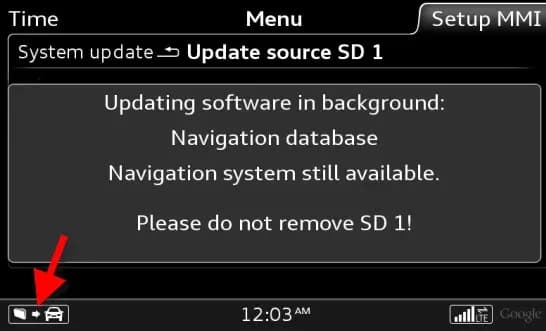
Şu araçlar için de geçerli
- Audi A3
- 2022–2023
- Audi A4
- 2021–2023
- Audi A4 allroad
- 2021
- Audi A5
- 2021–2023
- Audi A6
- 2021–2023
- Audi A7
- 2021–2023
- Audi A7 e
- 2021–2022
- Audi A8 L e
- 2021
- Audi e-tron
- 2021–2022
- Audi e-tron GT
- 2022–2023
- Audi Q3
- 2021–2023
- Audi Q5
- 2021
- Audi Q7
- 2021–2023
- Audi Q8
- 2021–2023
- Audi R8
- 2021–2023
- Audi RS 3
- 2022–2023
- Audi RS 5
- 2021–2023
- Audi RS 7
- 2021–2023
- Audi RS e-tron GT
- 2022–2023
- Audi RS Q8
- 2021–2023
- Audi S3
- 2022–2023
- Audi S4
- 2021–2023
- Audi S5
- 2021–2023
- Audi S6
- 2021–2023
- Audi S7
- 2021–2023
- Audi S8
- 2021–2023
- Audi SQ5
- 2021–2023
- Audi SQ7
- 2021–2023
- Audi SQ8
- 2021–2023
- Audi TT
- 2021–2023
- Audi TT RS
- 2021–2022
- Audi TTS
- 2021–2023
▸ 26 tane daha göster▾ Daha az göster
This Technical Service Bulletin (TSB) 91 22 89 2037809/9, issued on March 15, 2022, provides a comprehensive guide for updating the MMI navigation maps in various 2014-2023 Audi vehicles. It supersedes TSB 91 21-76 dated March 2, 2021, and addresses common customer concerns related to map data accuracy and the update process.
This document is crucial for owners experiencing issues with their navigation systems, offering solutions and clarifying the different methods available for map updates, including Over-The-Air (OTA) and SD card installations.
Symptoms
Owners of 2014-2023 Audi vehicles may experience one or more of the following concerns related to their MMI navigation system. If your Audi e-tron navigation map update is not working, these symptoms are common:
- The navigation map does not show the latest roads or points of interest.
- The map download provided by the myAudi website (www.audiusa.com/myAudi) cannot be performed.
- The customer does not know how to obtain the map update data or update the map database.
- The MMI is slow to respond or freezes during the map update.
- For vehicles with MIB2, the MMI over-the-air (OTA) map update does not allow for a full map update and shows greyed-out regions.
- The customer is concerned that the OTA map update will consume too much data from the Audi connect data subscription.
Important Warnings for Owners
This TSB contains several critical advisories for both owners and technicians to ensure proper map updates and avoid unnecessary charges or complications:
- myAudi Website Downloads: The full navigation map data was available on the myAudi website (www.audiusa.com/myAudi) for download before March 2020. The myAudi site was turned off in preparation for the myAudi 2.0 website. There is currently no timeline for the map download feature to be added back to the myAudi website. Until it is added back to the website, there will be no solution for the customer to download the data independently. The full navigation map data will only be available to the service department.
- MMI Red Engineering Menu: Map activations should always be performed before updating the map data. Doing so will ensure the navigation system is always available and the correct map data is installed. DO NOT install the map data via the red engineering menu of the MMI until AFTER the map activation is performed via ODIS >> Flash.
- SD Card Charges: The customer must NEVER be charged for the map data on the SD card. The dealer should consider this as a shop tool and purchase it for the service department to use.
- OTA Data Usage: The customer will not be billed for the data used when performing the OTA map update, but the customer must have an active Audi connect subscription to use the OTA map update feature in the MMI.
- Do Not Remove SD Card: During the update process, the SD card (or other update media) should never be removed from the MMI main unit. If the vehicle is turned off, the MMI will continue to update in the background for approximately 30 minutes and will automatically resume on the next ignition cycle. A message stating "Please do not remove SD 1!" will appear on the screen during the update.
Understanding Audi MMI Navigation Map Updates
Audi's MMI navigation systems (MIB1, MIB2, MIB2+, MIB3) offer different methods for map updates. This TSB, 91 22 89 2037809/9, serves as a comprehensive "How-to guide" for addressing potential customer concerns related to the Audi e-tron navigation map update.
- MIB1: OTA updates are not available for MIB1 systems. Map data can only be updated using the SD card method.
- MIB2: OTA updates are available on some vehicles starting with MY17 (excluding TT, R8, A6/A7 C7PI). These updates are pushed out in waves (around CW22 and CW45 annually). Customers can select regions for updates. An active Audi connect subscription is required for OTA updates.
- MIB2+ and MIB3: OTA updates are available with an active Audi connect subscription. Updates are rolled out four times a year for MIB2+ (CW12, CW24, CW36, CW48) and monthly for MIB3. These systems automatically update regions based on regular driving areas, and customers cannot manually choose regions. MIB3 updates are incremental, focusing on regions within which the vehicle is regularly driven.
For MIB1 and MIB2 vehicles, map updates are free for the first 2.5 years after the vehicle's production date, covering five releases. After this period, activations may need to be purchased.
Map Release Schedule
The following table outlines the current release schedule for navigation map updates:
| Release Schedule | Navigation Map Release Name |
|---|---|
| CW22/15 | NAR 2015/2016 |
| CW45/15 | NAR 2016 |
| CW22/16 | NAR 2016/2017 |
| CW45/16 | NAR 2017 |
| CW22/17 | NAR 2017/2018 |
| CW45/17 | NAR 2018 |
| CW22/18 | NAR 2018/2019 |
| CW45/18 | NAR 2019 |
| CW22/19 | NAR 2019/2020 |
| CW45/19 | NAR 2020 |
| CW22/20 | NAR 2020/2021 |
| CW45/20 | NAR 2021 |
| CW22/21 | NAR 2021/2022 |
| CW45/21 | NAR 2022 |
| CW22/22 | NAR 2022/2023 |
| CW45/22 | NAR 2023 |
SD Card Requirements for Updates
For SD card updates, specific formatting and size requirements must be met:
- The SD card must be formatted to FAT/FAT32/exFAT. Mac-formatted SD cards will not work in the MMI MIB main unit.
- SD card types:
- 4GB and less: SD (FAT/FAT32).
- 4GB/8GB/16GB: SDHC (FAT/FAT32).
- 16GB/32GB/64GB and higher: SDXC (exFAT only; will work with MIB but not with MMI3G+).
- A blank 16GB SD card may contain slightly less than 16GB of usable space, so a larger SD card may be needed for a full map update. For MIB3 map updates, a 32GB card may be required.
Repair Procedure Summary
The TSB outlines a detailed procedure for performing an Audi e-tron navigation map update using an SD card. This process involves several steps within the MMI system:
- Insert SD Card: Insert the downloaded map update on the SD card into the MMI main unit. If the map data was purchased from the parts department, it must be performed using the RED ENGINEERING MENU.
- Initiate Update: Once the SD card is inserted, the customer must initiate the MMI's download function. The MMI screen will show options like "System update" (Figure 3).
- For A3/A6/A7 models, navigate to
MENU >> Setup MMI >> System Update. - For TT3/R8NF/Q7NF/B9 A4 models, navigate to
MENU >> Settings >> Left Option >> System maintenance >> System update.
- For A3/A6/A7 models, navigate to
- Verify SD Card Detection: If the data is correctly downloaded to the SD card, the SD card will be highlighted in white on the MMI screen (Figure 4). If not, troubleshoot the issue by checking formatting and verifying data in the root directory.
- Start Update: The new version of the map data will be indicated on the MMI screen (e.g., "New: Version 2014/2015"). Select "Start update" to begin the process (Figure 5).
- Background Update: The MMI will automatically perform the update in the background, indicated by a file transfer icon on the lower left-hand side of the MMI screen (Figure 6). The MMI's performance may be slow, lag, or freeze during screen transitions during this time, but no repairs should be made to correct this. The complete process can take about 60-90 minutes with an SD card.
Verifying the Update
After the update is complete, the file transfer icon on the MMI screen will disappear. A confirmation message, such as "Component successfully updated: Navigation database," will appear (Figure 7).
To further verify the update, check the MMI Version Information screen (Figure 8):
- For A3/A6/A7 models:
MENU >> Setup MMI >> Version Information. - For TT3/R8NF/Q7NF/B9 A4 models:
MENU >> Settings >> Left Option >> System maintenance >> Version Information.
Review the "Version Information" data and verify that the latest calendar year listing is shown under each region. The MMI system allows the same map data to be overwritten at any time, so seeing an update available again does not necessarily mean the previous update was incomplete.
Warranty Information
This Technical Service Bulletin is informational only and is not applicable to any Audi Warranty claims.
Related Bulletins
To complete this procedure, technicians may also need to refer to TSB 2044694, titled "91 MMI navigation database concerns (Missing traffic info, Incorrect speed limits, Missing streets; POI not listed, etc.)."
Source: NHTSA ID: 10209266
Galeri
6 görsel
Frequently Asked Questions
- Why is my 2014-2023 Audi MMI navigation map not showing the latest roads?
- If your Audi MMI navigation map is outdated, it may be due to the map database not being updated to the latest version. This TSB (91 22 89 2037809/9) provides instructions on how to perform an update using either Over-The-Air (OTA) methods or an SD card.
- Can I update my Audi MMI navigation maps myself via the myAudi website?
- No, the full navigation map data download feature from the myAudi website (www.audiusa.com/myAudi) was turned off in March 2020 and is currently unavailable. Full map data is only available to the service department for SD card updates.
- What are the requirements for using an SD card to update my Audi MMI navigation maps?
- The SD card must be formatted to FAT/FAT32/exFAT. Mac-formatted SD cards will not work. Depending on the map size, you may need an SDHC (4GB/8GB/16GB) or SDXC (16GB/32GB/64GB and higher) card, with a minimum usable space of 16GB, or 32GB for MIB3 systems.
- Will I be charged for Over-The-Air (OTA) navigation map updates in my Audi?
- No, you will not be billed for the data used when performing an OTA map update, provided you have an active Audi connect subscription. However, the full navigation map data may not be available via OTA, and certain updates or activations might require a visit to the dealer.
Related Articles
2023 Audi e-tron Problems: Recalls, Complaints & TSBs
The 2023 Audi e-tron has faced several significant safety concerns, including recalls for potential charging cable overheating and brake pedal detachment. Owners have also reported serious issues like sudden unintended acceleration and electrical system malfunctions. This profile details these…
2023 Audi e-tron Brake Pedal Recall
Audi has issued a recall (NHTSA ID: 26V240000, Audi Recall 46P7) for certain 2019-2024 E-Tron and 2020-2024 E-Tron Sportback vehicles, including the 2023 Audi e-tron. The recall addresses a potential issue where the brake pedal may detach from the brake booster, leading to a loss of brake function.
2015-2027 Audi Noise Diagnosis with Frequency Analysis App TSB
Audi has released Technical Service Bulletin 2051095/11 detailing the Audi Frequency Analysis app. This app helps technicians diagnose noise complaints more precisely across 2015-2027 Audi models. Learn how the app works, where to download it, and its features for effective vehicle noise analysis.
2023 Audi e-tron AC/DC Charging Not Possible TSB
This manufacturer communication (NHTSA ID 11031035) provides critical information for 2023 Audi e-tron owners facing issues with AC/DC charging. It specifically highlights problems linked to software version 00C6: 0093/3119, which can prevent the vehicle from charging.
2023-2025 Audi Rear Seat Reminder Message TSB 2074943/2
Audi Technical Service Bulletin 2074943/2 explains the instrument cluster message 'Please check rear seats and be aware of door safelock' in various 2023-2025 Audi models. This informational TSB details the rear occupant detection system designed to prevent children and pets from being left in…
Yorum bırakın
Yorumlar moderasyondan geçer ve görünmesi biraz zaman alabilir. Sadece adınız ve soyadınızın baş harfi herkese açık olarak gösterilir.
Yorumlar
İlk yorum sizden olsun.