2022 Audi MMI Key User Pairing Failure TSB
This Technical Service Bulletin (TSB 2064385/1) addresses a common issue in 2022 Audi vehicles equipped with Audi connect GEN3 where Key User pairing fails in the MMI, displaying a 'please wait' message and eventually timing out. Learn about the technical background and the steps for resolution.
 Marcus Weber2022 Audi e-tron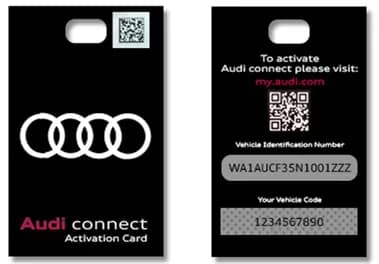
Şu araçlar için de geçerli
- Audi A3
- 2022
- Audi A4
- 2022
- Audi A5
- 2022
- Audi A6
- 2022
- Audi A7
- 2022
- Audi A7 e
- 2022
- Audi Q3
- 2022
- Audi Q7
- 2022
- Audi Q8
- 2022
- Audi R8
- 2022
- Audi RS 3
- 2022
- Audi RS 5
- 2022
- Audi RS 6 Avant
- 2022
- Audi RS 7
- 2022
- Audi RS e-tron GT
- 2022
- Audi RS Q8
- 2022
- Audi S3
- 2022
- Audi S4
- 2022
- Audi S5
- 2022
- Audi S6
- 2022
- Audi S7
- 2022
- Audi S8
- 2022
- Audi SQ5
- 2022
- Audi SQ7
- 2022
- Audi SQ8
- 2022
- Audi TT
- 2022
- Audi TT RS
- 2022
- Audi TTS
- 2022
▸ 22 tane daha göster▾ Daha az göster
Owners of certain 2022 Audi vehicles may encounter difficulties when attempting to set up the Key User in the MMI system. This issue, detailed in Technical Service Bulletin (TSB) 2064385/1, specifically affects vehicles equipped with Audi connect GEN3 and can prevent proper activation of connected services. If you are experiencing problems with MMI Key User pairing, this guide will help you understand the underlying cause and the recommended solutions.
Symptoms of MMI Key User Pairing Failure
The primary symptom of this issue is the inability to successfully set the key user within the vehicle's MMI system. When an owner attempts the MMI Key User pairing process, the system will display a message of "please wait" indefinitely. After a few minutes, the process will eventually time out without completing the pairing. This prevents the owner from fully utilizing Audi connect services.
Conditions for the MMI Key User Pairing Issue
This specific condition applies to 2022 Audi vehicles that meet certain criteria. The vehicle must be a Model Year 2022 with the MIB3 MMI system and have been built on or after calendar week 25 of 2021 (CW25/21). This TSB does not apply to earlier built MY22 vehicles with Cluster 33 MMI software, as those vehicles are capable of Key User pairing without issue.
Technical Background
The root cause of the MMI Key User pairing problem lies with the new Audi connect Cloud-based Backend Server. This server is utilized by MY22 vehicles equipped with MIB3 and Audi connect GEN3. However, at the time the TSB was issued, this new Backend Server was not yet configured to properly accept the key user pairing process for vehicles running the latest MIB3 system with Cluster 35 software. This incompatibility leads to the pairing failure.
Audi has also introduced a new "Audi connect Activation Card" which replaces the traditional plastic vehicle code key tag.
Important Warnings for Owners
Owners should be aware of a critical detail regarding the "Audi connect Activation Card". As of Q3 2021, there is no possible way to replace a missing Audi connect Activation Card. If your card is lost, you must open a web ticket with the Audi connect Technical Support Team to request the activation of a Preliminary Key User. You will need to provide your customer's email address. The Audi connect Technical Support (AcTS) team can be reached via their web portal at https://audi.zendesk.com.
Production Solution and Repair Procedure Summary
Audi has indicated that a new Audi connect backend deployment, which will resolve this issue, was scheduled for release in Q2 2022. In the meantime, a new concept called "Preliminary Key User" was introduced starting from calendar week 25 of 2021 to facilitate the pairing process.
There are two methods to set up a Preliminary Key User:
- Dealer Setup: Authorized Audi dealers can set the Preliminary Key User in the Audi connect backend using the AoA Customer Registration Application.
- Customer Self-Setup: Owners can set the Preliminary Key by entering their vehicle code directly into the myAudi app for their specific vehicle.
Once the Preliminary Key User is established, the final step to complete the MMI Key User pairing is to enter your myAudi login credentials into the vehicle's MMI system. This is done by navigating to "Users >> Add New User" within the MMI interface.
Owner Action
If you own a 2022 Audi vehicle and are experiencing the "please wait" message and timeout during MMI Key User pairing, you should contact your authorized Audi dealer. They can assist with setting up the Preliminary Key User or guide you through the process using the myAudi app. Ensure you have your "Audi connect Activation Card" available, or be prepared to contact Audi connect Technical Support if it is missing. This TSB is informational and not directly covered by Audi Warranty for repair, but the backend solution and setup process are designed to resolve the connectivity issue.
Source: NHTSA ID: 10201748
Frequently Asked Questions
- What is the MMI Key User pairing issue in 2022 Audi vehicles?
- The MMI Key User pairing issue in 2022 Audi vehicles, as described in TSB 2064385/1, occurs when the vehicle's MMI system displays a 'please wait' message indefinitely and then times out when attempting to set up the Key User for Audi connect GEN3 services.
- What should I do if my Audi connect Activation Card is missing?
- If your 'Audi connect Activation Card' is missing, you must open a web ticket with the Audi connect Technical Support Team via https://audi.zendesk.com to request the activation of a Preliminary Key User, as there is no way to replace the physical card.
- How is the Preliminary Key User set up for the MMI Key User pairing?
- The Preliminary Key User can be set up either by an authorized Audi dealer using their internal application or by the customer entering their vehicle code into the myAudi app. After this, the final MMI Key User pairing is completed by entering myAudi login credentials in the MMI under 'Users >> Add New User'.
- Does TSB 2064385/1 apply to all 2022 Audi models?
- TSB 2064385/1 applies to 2022 Audi vehicles with the MIB3 MMI system built on or after CW25/21. It does not apply to earlier built MY22 vehicles with Cluster 33 MMI software, as those vehicles are capable of Key User pairing without this issue.
Related Articles
2022 Audi e-tron Electrical System Problems: Complaints & TSBs
Owners of the 2022 Audi e-tron frequently report significant electrical system malfunctions, ranging from sudden power loss and charging hazards to software crashes. Braking issues and unexpected automatic emergency braking are also common concerns, alongside numerous technical service bulletins…
2022-2026 Audi Guided Fault Finding Reporting Obligation
Audi has issued Technical Service Bulletin TPI 2033392, also known as Transaction No. 2081531/1, regarding a reporting obligation for technicians when Guided Fault Finding produces an unexpected result. This TSB outlines the process for contacting Audi Product Support for diagnostic assistance.
2022-2026 Audi Infotainment System Complaints
Audi has released Technical Service Bulletin (TSB) 2081405/1 to address various customer complaints regarding infotainment systems in 2022-2026 Audi vehicles. This TSB helps technicians diagnose issues often caused by external media or mobile devices, rather than vehicle technology.
2018-2026 Audi Models Cracking Noise TSB 2061464/11
Audi Technical Service Bulletin 2061464/11 describes a cracking noise from the front or rear axle when changing direction in various 2018-2026 Audi models. The issue is due to stub axle movement and is resolved by bonding the stub axle to the wheel bearing with locking fluid.
2022-2026 Audi Parking Aid False Warnings TSB 2024323/13
Audi has released Technical Service Bulletin 2024323/13 to address customer complaints of false parking aid warnings. This bulletin details various environmental and vehicle-specific conditions that can cause the parking aid system to issue alerts even when no obstacles are present. It provides…
Yorum bırakın
Yorumlar moderasyondan geçer ve görünmesi biraz zaman alabilir. Sadece adınız ve soyadınızın baş harfi herkese açık olarak gösterilir.
Yorumlar
İlk yorum sizden olsun.