2024 Hyundai Ioniq 5 BlueLink Not Working TSB
Hyundai has issued Service Campaign 23-01-091H for certain 2024 Ioniq 5 vehicles experiencing problems with BlueLink activation and remote services. This bulletin outlines a dealer mode factory reset and head unit reset to resolve the issue.
 Sarah Mitchell2024 Hyundai Ioniq 5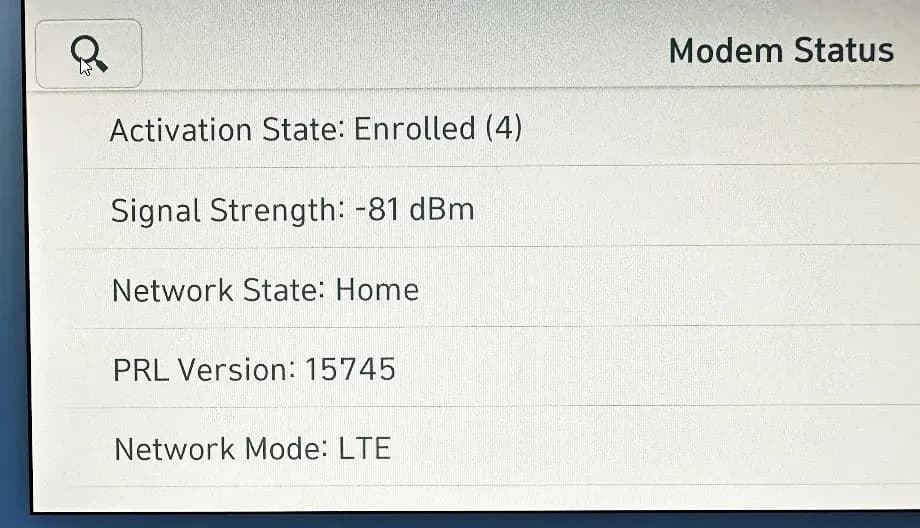
Owners of certain 2024 Hyundai Ioniq 5 vehicles may encounter problems with their BlueLink activation and remote services. This issue, identified by Hyundai as Service Campaign 23-01-091H, affects vehicles produced between August 9, 2023, and September 14, 2023. The problem prevents the proper functioning of the BlueLink system, impacting connectivity and remote features.
Important Warnings and Information
Hyundai has issued specific instructions regarding this service campaign:
- Dealers are required to perform this service campaign on all affected vehicles prior to customer retail delivery. The repair must also be completed whenever an affected vehicle is in the shop for any maintenance or repair.
- During the reset procedure, it is crucial "Do NOT turn OFF the ignition while resetting" to prevent any potential issues or damage.
- This service campaign can only be performed at IONIQ-certified dealers.
- Before inspecting the vehicle, technicians must confirm that the AVN system is genuine Hyundai parts.
- The vehicle's battery must be charged, and the ignition turned ON to avoid battery drain during the reset process.
Symptoms
Owners will notice that their Hyundai Ioniq 5 BlueLink not working, specifically with "BLUELINK ACTIVATION AND REMOTE SERVICES NOT WORKING" messages or a complete inability to use remote functions. This directly impacts the convenience and connectivity features offered by the BlueLink system.
Diagnosis / Trigger Conditions
The primary trigger for this service procedure is the owner experiencing difficulties with BlueLink activation or the functionality of remote services. If your 2024 Hyundai Ioniq 5 is exhibiting these symptoms, it indicates the need for the prescribed dealer mode factory reset and head unit reset. The affected vehicles are equipped with the AVN5W system, running software version NEEV23.USA.S5W_M.V010.001.230502.
Repair Procedure Summary
To address the Hyundai Ioniq 5 BlueLink not working issue, technicians follow a detailed procedure involving a dealer mode factory reset and a subsequent head unit reset, identified by Service Campaign 23-01-091H. This process aims to re-establish proper communication and activation for the BlueLink system.
- Preparation: Ensure the vehicle's battery is adequately charged, and the ignition is turned ON. This prevents battery drain during the reset process.
- Accessing Software Information: The technician begins by pressing the MEDIA button on the infotainment system and ensuring the radio is tuned to FM mode. They then navigate to the software information screen by pressing the "home" icon, selecting "Setup", and then selecting "General".
- Dealer Mode Entry: The technician manipulates the Volume knob by setting the volume level to 7, pressing inside a designated area on the screen, then lowering the volume to 3 and pressing again, and finally lowering it to 1 and pressing again. This sequence must be performed quickly. A 4-digit password, "2400", is then entered, followed by selecting "OK". Another "OK" is pressed to acknowledge the dealer mode warning: "Only authorized personnel are allowed to use dealer mode. The manufacturer is not responsible for any damage caused by changes not made through official service channels."
- System Reset: Once in the Dealer Mode menu, the technician swipes up to the bottom of the menu and selects "Reset". They then confirm the reset by pressing "OK" when prompted with the message: "Reset System settings to factory defaults? Caution! All stored data, paired devices, and settings will be deleted." The system will then reset, displaying a black screen, followed by the Hyundai logo, and finally rebooting to the user profile screen.
- Additional Head Unit Reset: After the system reboots, the technician selects "Confirm" from the home screen. An additional head unit reset is performed by using a pin to press into the pinhole located to the right of the HVAC controls. This triggers another system reset, black screen, Hyundai logo, and reboot.
- Verification: After the final reboot, the technician swipes to the third screen on the home page and selects "Bluelink". They then select "Modem Status" and confirm that the "Activation State = Enrolled (4)" is displayed, along with active signal strength bars. A photo of this "Activation State = Enrolled (4)" status is captured and uploaded to STUI for repair validation.
Required Parts and Software
This service campaign primarily involves a software reset procedure. The relevant AVN system is AVN5W, and the software version is NEEV23.USA.S5W_M.V010.001.230502. The casual part number referenced for warranty claims is 96560-G1730, related to the AVN system (part number 96560*).
Warranty Information
Warranty claims for this Service Campaign 23-01-091H should be submitted on the Claim Entry Screen as a "Campaign" type. The operation code for the Dealer Mode Factory Reset is TBGSVCR1, with an estimated operation time of 0.3 M/H. The Nature Code is M73, and the Cause Code is ZZ3. If a part replacement is deemed necessary during this campaign and the part is under warranty, a separate claim should be submitted. For out-of-warranty parts, a Prior Approval request for goodwill consideration is required before performing the work. This TSB requires repair validation photos, including VIN, mileage, and repair validation photos as outlined in the Digital Documentation Policy.
NHTSA ID: 10250645
Galeria
15 imagens
Frequently Asked Questions
- What is Service Campaign 23-01-091H for the Hyundai Ioniq 5?
- Service Campaign 23-01-091H addresses issues with BlueLink activation and remote services in certain 2024 Hyundai Ioniq 5 (NE1) vehicles. It involves a dealer mode factory reset and a head unit reset to restore full functionality.
- How do I know if my Hyundai Ioniq 5 is affected by the BlueLink issue?
- Your 2024 Hyundai Ioniq 5 may be affected if you experience difficulties with BlueLink activation or if remote services are not working. This campaign specifically targets vehicles produced between August 9, 2023, and September 14, 2023, and equipped with the AVN5W system.
- What is the repair process for the Hyundai Ioniq 5 BlueLink problem?
- The repair involves a dealer mode factory reset of the AVN system, followed by a physical head unit reset. This procedure requires specific steps, including entering a password (2400) and confirming the reset, to ensure the BlueLink system's 'Activation State = Enrolled (4)' is restored. Technicians must also ensure the ignition is not turned off during the reset.
- Can I perform the BlueLink repair myself?
- No, this service campaign can only be performed by IONIQ-certified Hyundai dealers. It involves specific diagnostic and reset procedures that require specialized tools and knowledge, and includes steps like entering a dealer mode password and capturing repair validation photos.
- What are the warranty details for this BlueLink repair?
- Warranty claims for Service Campaign 23-01-091H use operation code TBGSVCR1 with 0.3 M/H labor time, casual part 96560-G1730, Nature Code M73, and Cause Code ZZ3. Claims must be submitted as a 'Campaign' type, and prior approval is needed for out-of-warranty part replacements.
Related Articles
2024 Hyundai Ioniq 5 Health Check: TSBs and Known Issues
The 2024 Hyundai Ioniq 5 has no reported recalls, owner complaints, or federal investigations. However, Hyundai has issued several service bulletins addressing issues such as motor grinding noise, charging door gaps, and BlueLink activation problems. Owners should be aware of these potential…
2023-2024 Hyundai Ioniq 5, Kona Electric Motor Grinding Noise TSB
Hyundai has released Technical Service Bulletin 25-01-042H to address a grinding or whining noise originating from the Motor and Reduction Gear System (MGDU) in certain 2023-2024 Ioniq 5 and 2024 Kona Electric vehicles. The issue stems from an incorrect amount of oil/fluid during manufacturing…
2024 Hyundai Ioniq 5 Charging Door Gap TSB 24-BD-013H
Hyundai Technical Service Bulletin 24-BD-013H details the replacement of the charging door on certain 2024 Ioniq 5 (NE EV) vehicles experiencing excessive rear gap. This TSB outlines the repair process and warranty information.
2024 Hyundai Ioniq 5 BlueLink Activation Not Working TSB
Hyundai has issued Service Campaign 24-01-002H-1 to address issues with BlueLink activation and remote services not working in certain 2024 Ioniq 5 vehicles. The fix involves a dealer mode factory reset and a head unit reset.
2022-2024 Hyundai Ioniq 5 P0A2F EOP Inspection TSB
Hyundai Technical Service Bulletin 24-EV-003H details an inspection procedure for the Electric Oil Pump (EOP) in certain 2022-2024 Ioniq 5 and 2023 Ioniq 6 vehicles. This TSB addresses instances where owners may see a 'Power is limited' message and the power down warning light, potentially…
Leave a comment
Comments are moderated and may take a moment to appear. Only your first name and the initial of your last name are shown publicly.
Comments
Be the first to comment.