2019-2026 Audi Wireless CarPlay Connectivity Issues TSB
This Technical Service Bulletin (TSB) 91 24 02 2062466/5 details troubleshooting steps for 2019-2026 Audi vehicles experiencing problems with Apple CarPlay not connecting via Wi-Fi. Learn how to resolve "Apple CarPlay cannot be started using Wi-Fi connection (Wireless CarPlay)" and other related…
 Sarah Mitchell2023 Audi e-tron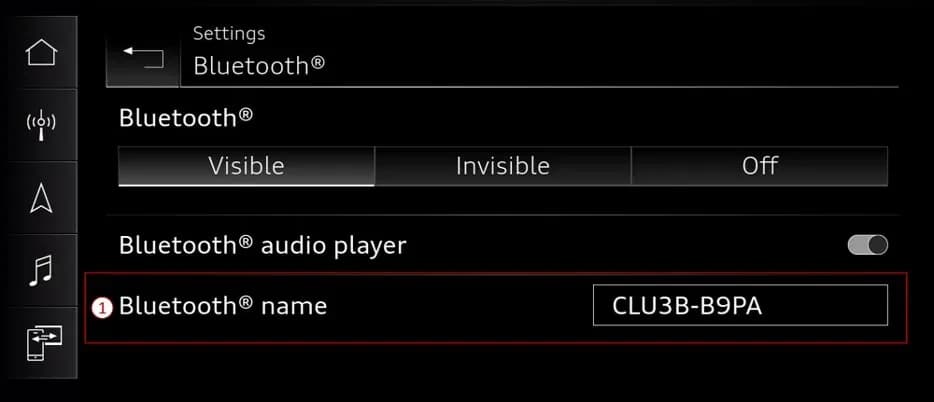
Também se aplica a
- Audi A3
- 2022–2024
- Audi A4
- 2022–2025
- Audi A4 allroad
- 2022–2025
- Audi A5
- 2021–2024
- Audi A6
- 2021–2025
- Audi A6 allroad
- 2021–2025
- Audi A7
- 2021–2025
- Audi A7 e
- 2021–2022
- Audi A8 L e
- 2021
- Audi e-tron
- 2021–2022
- Audi e-tron GT
- 2022–2025
- Audi e-tron Sportback
- 2021–2022
- Audi Q3
- 2021–2024
- Audi Q7
- 2021–2025
- Audi Q8
- 2021–2025
- Audi RS 3
- 2022–2024
- Audi RS 5
- 2021–2024
- Audi RS 6 Avant
- 2021–2025
- Audi RS 7
- 2021–2025
- Audi RS e-tron GT
- 2022–2024
- Audi RS Q8
- 2021–2025
- Audi S e-tron GT
- 2026
- Audi S3
- 2022–2024
- Audi S4
- 2022–2025
- Audi S5
- 2021–2024
- Audi S6
- 2021–2025
- Audi S7
- 2021–2025
- Audi S8
- 2021–2025
- Audi SQ7
- 2021–2025
- Audi SQ8
- 2021–2025
▸ Mostrar mais 24▾ Mostrar menos
Audi has released Technical Service Bulletin (TSB) 91 24 02 2062466/5 to address common connectivity problems experienced by owners of various 2019-2026 Audi models when attempting to use Apple CarPlay via a Wi-Fi connection. This bulletin, dated April 18, 2024, supersedes TSB Group 91 number 24-70 from February 15, 2024, and offers comprehensive guidance for diagnosing and resolving these issues.
The TSB focuses on scenarios where the Audi Wireless CarPlay system fails to establish or maintain a connection with an iPhone, despite wired connections working correctly. Understanding the underlying causes and following the recommended procedures can help restore seamless integration between your iPhone and your Audi's infotainment system.
Symptoms of Wireless CarPlay Connectivity Issues
Owners typically report the following symptoms related to the Audi Wireless CarPlay system:
- "The customer can't reliably connect their iPhone to the vehicle via Apple CarPlay."
- "Automatic and/or manual connection attempts fail."
- "Connection via USB cable works normally."
Workshop technicians have confirmed these complaints, noting that the issue is reproducible with the customer's iPhone. However, wireless Audi Smartphone Interface (ASI) connections are typically possible with other Apple or Android devices, and wired Apple CarPlay continues to function normally.
Diagnosis and Trigger Conditions
Wireless CarPlay relies on the vehicle's Wi-Fi for data transmission and Bluetooth for initial pairing. The type of Audi MMI system in your vehicle affects how these connections are managed:
- MIB2+ MMI systems with ConBox Low modules (found in 2019 Audi e-tron quattro, 2019 A6, A7, A8, Q3, Q8, 2020 A6, A7, A8, Q3, Q7, Q8, e-tron Sportback, and 2021 Q3 models) use the ConBox Low module for the Wi-Fi hotspot and the MMI for Bluetooth control.
- MIB3 MMI systems with ConBox High or OCU3/4 modules (found in 2021+ A4, A5, A6, A7, A8, Q5, Q7, Q8, 2021+ e-tron quattro, e-tron Sportback, 2022+ A3, A4, A5, A6, A7, A8, Q3, Q5, Q7, Q8, Q4 e-tron, e-tron GT, RS e-tron GT, and 2024+ Q8 e-tron models) control both Wi-Fi and Bluetooth through the ConBox High module.
Common triggers for connectivity problems include the iPhone being connected to a different Wi-Fi hotspot (such as home or work networks), manual pairing to the vehicle's 2.4Ghz Wi-Fi band instead of the 5Ghz band used by CarPlay, recent iOS updates, or an expired Audi Connect PLUS plan.
Important Warnings for Owners
Owners should be aware of specific conditions and limitations:
- ConBox High Systems: For MY24 (A4/A5/A6/A7/A8/Q5/Q7/Q8/Q8 e-tron/e-tron GT) and some MY23 (Q7/Q8) vehicles equipped with ConBox High, if "Wireless Apple CarPlay™™ or wireless AndroidAuto™™ doesn't work, but a wired connection does work," refer to TSB 2073333 for specific guidance.
- MY 2020 A4/A5 with MIB3: "The MY 2020 A4/A5 models with MIB3 do not support Wireless CarPlay." Owners of these specific models should note that wireless functionality is not available.
- Data Privacy: The MMI system does not store any personal or location data from your phone when using Wired or Wireless CarPlay. The MMI acts as a remote display, exchanging only video, audio, and vehicle GPS data. Only the phone's MAC ID is stored when the CarPlay session ends.
Repair Procedure Summary
Resolving Audi Wireless CarPlay connectivity issues often involves a series of troubleshooting steps, starting with ensuring proper initial setup and then addressing specific concerns. It's always recommended to use the newest available software on your mobile device.
Initial Setup and Prerequisites
Before attempting to pair, ensure the following conditions are met on your iPhone:
- SIRI Enabled: SIRI must be enabled and configured (Check Settings >> General).
- Bluetooth On: Bluetooth must be turned on in both your iPhone and the MMI (used only for initial setup).
- iPhone Discoverable: Your iPhone must be discoverable via Bluetooth. This is achieved by opening the Bluetooth pairing menu on the iPhone.
- Wi-Fi On: Wi-Fi must be turned on in the iPhone. If not, iOS software should prompt you to enable it.
- Matching Names: Ensure the Bluetooth name in your vehicle's Bluetooth settings matches the Wi-Fi SSID name in the vehicle's Wi-Fi settings.
- Wi-Fi Password: Verify that a Wi-Fi password is set in your vehicle's Wi-Fi settings.
To pair for wireless connection using the MMI system, establish an Audi Smartphone Interface (ASI) pairing using the MMI and accept the prompt to enable wireless CarPlay.
Troubleshooting Common Wireless CarPlay Issues
Concern 1: Intermittent CarPlay Start Failure
If "Intermittently after starting the vehicle, wireless CarPlay cannot be started," or the CarPlay tile turns green but doesn't launch, this often occurs when the iPhone is connected to a different Wi-Fi hotspot or was manually paired to the vehicle's 2.4Ghz Wi-Fi band. Apple CarPlay uses the 5Ghz band for optimal performance.
Solution: Cycle the CarPlay Toggle in the Bluetooth Settings for the vehicle within your iPhone's Settings menu. If CarPlay does not automatically start, reselect it in the MMI. This step may need to be repeated if the issue recurs.
Further Solution (Comprehensive Reset):
- Delete all phone pairings in the ASI and Bluetooth settings from the MMI by long-pressing the tile and selecting "delete."
- Delete BOTH vehicle Wi-Fi hotspots from your iPhone under Settings > Wi-Fi > Edit (top right) > remove known networks.
- Delete the vehicle's Bluetooth settings on your iPhone under Settings > Bluetooth > tap the blue "i" next to the device > select "Forget this device."
- Delete the vehicle's CarPlay settings on your iPhone under Settings > General > CarPlay > select the vehicle > select "Forget this car."
- Reset network settings on your iPhone: Go to Settings > General > Reset > Reset Network Settings. This action will reset all saved Wi-Fi networks, passwords, cellular settings, and VPN/APN settings.
- Re-pair your iPhone following the initial setup steps described above.
Concern 2: Wireless CarPlay Not Working After Audi Connect PLUS Expiration
If "Since the Audi Connect PLUS plan has expired, the customer can no longer use Wireless CarPlay,"
- Solution: Either turn on Wi-Fi Assist on your iPhone or delete all existing Wi-Fi and Bluetooth pairings and perform a new Bluetooth pairing only. It is crucial to DO NOT manually connect the iPhone to the Wi-Fi hotspot in the car in this scenario. If the iPhone connects to the vehicle's Wi-Fi hotspot with an expired Audi Connect PLUS plan, it will attempt to use the MMI for data, which will fail and prevent Wireless CarPlay from working.
Concern 3: CarPlay Not Starting Automatically
If "What if Apple CarPlay does not turn on automatically after turning on the car?"
- Solution: Check to ensure your iPhone is not connected to a different Wi-Fi hotspot (e.g., home or work network). Also, verify that the iPhone's settings for automatic CarPlay connection are active.
Concern 4: Intermittent Wireless CarPlay Operation
If "Wireless CarPlay works intermittently,"
- Solution: Unlock your iPhone or temporarily turn off the USB accessories security feature. iOS versions starting with iOS 12 include security features that can lock out USB accessories (including the MMI) if the iPhone has not been unlocked within the last hour before connecting.
Warranty Information
Warranty claims related to this TSB are applicable only if pairings were deleted and reestablished. The following details apply:
- Claim Type: 110 (Up to 48 Months/50,000 Miles) or G10 for CPO (Certified Pre-Owned) Covered Vehicles (owner verification required).
- Service Number: 9109
- Damage Code: AD39
- Labor Operations:
- Check display and operating unit control unit: 9196 0199 (20 Time Units)
- Road test prior to service procedure: No allowance (0 Time Units)
- Road test after service procedure: No allowance (0 Time Units)
- Claim Comment: "As per TSB 2062466/4"
If the vehicle is outside of any warranty, this Technical Service Bulletin is for informational purposes only. All warranty claims must adhere to the Audi Warranty Policies and Procedures Manual.
Related Bulletins
Another Technical Service Bulletin that may be helpful for related issues is TSB 2068435/1, titled "91 MIB3: Failure to establish a Bluetooth connection with iOS 16.0.x (iPhone)."
NHTSA ID: 10254054
Galeria
3 imagens
Frequently Asked Questions
- Why won't my Audi Wireless CarPlay connect to my iPhone?
- Your Audi Wireless CarPlay might not connect if your iPhone is linked to another Wi-Fi network, if there's a mismatch in Bluetooth/Wi-Fi settings, or due to an expired Audi Connect PLUS plan. TSB 91 24 02 2062466/5 outlines steps to troubleshoot these issues, including resetting network settings and re-pairing devices.
- What should I do if my Audi Wireless CarPlay works intermittently?
- If your Audi Wireless CarPlay connection is intermittent, ensure your iPhone is unlocked. Apple's iOS includes security features that can prevent connections to accessories like the MMI if the phone hasn't been unlocked recently. Refer to TSB 91 24 02 2062466/5 for more detailed troubleshooting steps.
- Does my Audi Connect PLUS subscription affect Wireless CarPlay?
- Yes, if your Audi Connect PLUS plan has expired, your iPhone should not be manually connected to the vehicle's Wi-Fi hotspot. Doing so will cause the iPhone to attempt to use the MMI for data, which will fail and prevent Wireless CarPlay from functioning. TSB 91 24 02 2062466/5 advises either enabling Wi-Fi Assist or deleting pairings and performing a new Bluetooth-only pairing.
- Are there specific Audi models that do not support Wireless CarPlay?
- Yes, according to TSB 91 24 02 2062466/5, "The MY 2020 A4/A5 models with MIB3 do not support Wireless CarPlay." Owners of these specific models should be aware that wireless functionality is not available for them.
Related Articles
2023 Audi e-tron Problems: Recalls, Complaints & TSBs
The 2023 Audi e-tron has faced several significant safety concerns, including recalls for potential charging cable overheating and brake pedal detachment. Owners have also reported serious issues like sudden unintended acceleration and electrical system malfunctions. This profile details these…
2023 Audi e-tron Brake Pedal Recall
Audi has issued a recall (NHTSA ID: 26V240000, Audi Recall 46P7) for certain 2019-2024 E-Tron and 2020-2024 E-Tron Sportback vehicles, including the 2023 Audi e-tron. The recall addresses a potential issue where the brake pedal may detach from the brake booster, leading to a loss of brake function.
2015-2027 Audi Noise Diagnosis with Frequency Analysis App TSB
Audi has released Technical Service Bulletin 2051095/11 detailing the Audi Frequency Analysis app. This app helps technicians diagnose noise complaints more precisely across 2015-2027 Audi models. Learn how the app works, where to download it, and its features for effective vehicle noise analysis.
2023 Audi e-tron AC/DC Charging Not Possible TSB
This manufacturer communication (NHTSA ID 11031035) provides critical information for 2023 Audi e-tron owners facing issues with AC/DC charging. It specifically highlights problems linked to software version 00C6: 0093/3119, which can prevent the vehicle from charging.
2023-2025 Audi Rear Seat Reminder Message TSB 2074943/2
Audi Technical Service Bulletin 2074943/2 explains the instrument cluster message 'Please check rear seats and be aware of door safelock' in various 2023-2025 Audi models. This informational TSB details the rear occupant detection system designed to prevent children and pets from being left in…
Leave a comment
Comments are moderated and may take a moment to appear. Only your first name and the initial of your last name are shown publicly.
Comments
Be the first to comment.