2021-2023 Hyundai Apple CarPlay Google Maps Delay TSB
Hyundai has issued TSB 23-BE-007H to address Google Maps delays when using Apple CarPlay. The fix involves a software update available via USB from Hyundai's Navigation Updates page. This update introduces frame skip logic to manage data congestion.
 Marcus Weber2022 Hyundai Elantra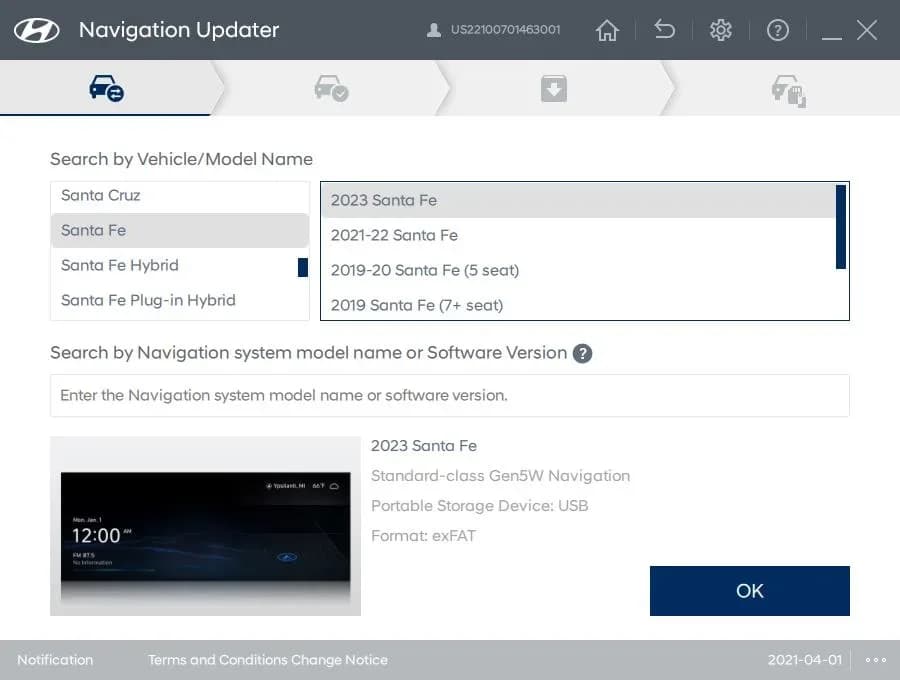
Si applica anche a
- Hyundai Elantra
- 2021, 2023
- Hyundai Kona
- 2021–2023
- Hyundai Palisade
- 2021–2022
- Hyundai Santa Fe
- 2021–2023
- Hyundai Sonata
- 2021–2023
- Hyundai Veloster
- 2021
- Hyundai Venue
- 2021–2022
▸ Mostra altri 1▾ Mostra meno
Owners of certain 2021-2023 Hyundai vehicles may notice a significant delay when using Google Maps through Apple CarPlay. This issue, identified in TSB 23-BE-007H, can lead to a frustrating navigation experience. Hyundai has released a software update designed to specifically address this problem, improving the performance of Google Maps within Apple CarPlay.
Symptoms
The primary symptom owners will experience is a noticeable delay in Google Maps functionality when utilizing the Apple CarPlay service. This can manifest as slow map rendering, delayed route updates, or a general unresponsiveness of the navigation interface. The Hyundai Apple CarPlay Google Maps delay can hinder effective navigation and user experience.
Diagnosis and Trigger Conditions
The root cause of the Hyundai Apple CarPlay Google Maps delay has been identified as data congestion. The current version of Google Maps transmits approximately ten times more data compared to its previous iteration. This increased data transmission overwhelms the system, leading to the observed delays. To counteract this, Hyundai's software update incorporates a "frame skip logic" designed to manage and resolve this data congestion.
Important Warnings for Owners
Hyundai has issued specific guidance regarding this issue:
- Warranty Coverage: This bulletin is informational and intended for dealers to assist customers upon request. The procedure outlined within this bulletin is explicitly stated as "not covered by Hyundai warranty and customer expense may apply." Owners should be aware that they might incur costs if they seek dealer assistance for this update.
- Warranty Claims: Hyundai advises, "Instead of submitting a Warranty claim, the update should resolve the issues with the Apple CarPlay app." This indicates that owners are encouraged to perform the update themselves or understand that a warranty claim for the delay itself may not be accepted if the update is the prescribed fix.
Repair Procedure Summary
The resolution for the Google Maps delay involves updating your vehicle's Apple CarPlay software. This is a self-service procedure that can be performed by the owner using a USB drive. The process is as follows:
- Access Hyundai's Navigation Updates Page: Begin by visiting the official Hyundai Navigation Updates page online. The specific link provided by Hyundai is
https://update.hyundai.com/US/EN/Main. - Download Update Software: On the website, follow the prompts to download the appropriate update software for your specific vehicle model. You will need to select your vehicle from the available options.
- Store on USB Drive: Once downloaded, save the update files onto a USB drive. Ensure the USB drive is formatted correctly and has sufficient space for the update files.
- Perform In-Vehicle Update: Insert the USB drive containing the software update into your vehicle's USB port. Follow the on-screen instructions in your vehicle's infotainment system to initiate and complete the software update process.
Owner Action
If you are experiencing a Hyundai Apple CarPlay Google Maps delay, the recommended action is to perform the software update yourself using the steps outlined above. This method is designed to be user-friendly and can save you potential costs associated with a dealer visit. Should you prefer professional assistance, be aware that the update may not be covered under warranty, and customer expense could apply. Always ensure your vehicle's software is up-to-date to maintain optimal performance and address known issues.
Source: NHTSA ID 10240087
Galleria
3 immagini
Frequently Asked Questions
- What causes the Hyundai Apple CarPlay Google Maps delay?
- The delay is caused by the current version of Google Maps having significantly higher data transmission rates, leading to data congestion when used with Apple CarPlay in affected Hyundai vehicles. TSB 23-BE-007H explains that a new frame skip logic is implemented to resolve this.
- How can I fix the Hyundai Apple CarPlay Google Maps delay?
- You can resolve the delay by updating your vehicle's Apple CarPlay software. This involves downloading the update from Hyundai's Navigation Updates page to a USB drive and then installing it in your vehicle.
- Is the Apple CarPlay software update covered under warranty?
- According to TSB 23-BE-007H, this update is informational and intended for customer request. It is not covered by Hyundai warranty, and customer expense may apply.
- Which Hyundai models are affected by the Google Maps delay with Apple CarPlay?
- This issue affects various 2017-2023 Hyundai models equipped with Apple CarPlay, including Ioniq, Kona, Sonata, Palisade, Veloster N, Elantra, Santa Fe, and Venue.
Related Articles
2021-2022 Hyundai Elantra DTC C1620 Front Radar Issue
Hyundai has issued Technical Service Bulletin 24-BE-005H for 2021-2022 Elantra vehicles. It addresses a warning light with DTC C1620, caused by a faulty front radar unit, which can affect Smart Cruise Control and Forward Collision-Avoidance Assist.
2021-2023 Hyundai Elantra Kona Warning Lamp TSB
Hyundai TSB 24-FL-003H addresses warning lamps and DTCs P250F, P011B, P050C, P00B7, P2B60 on 2021-2023 Hyundai Elantra and Kona vehicles with 1.6T-GDI engines through an ECU software update to improve logic.
2022 Hyundai HECU Module Dark Current Measurement TSB
A Technical Service Bulletin (TSB) has been released for certain 2022 Hyundai Elantra, Sonata, and Santa Fe vehicles concerning an Electronic Parking Brake (EPB) warning light and DTC C1501. The issue stems from brake fluid entering the HECU electrical connector, leading to excessive dark current…
2022 Hyundai Elantra / Sonata / Santa Fe EPB Warning Light TSB
Hyundai has issued Service Campaign 990 (TSB 23-01-036H-1) for certain 2022 Elantra, Sonata, and Santa Fe vehicles. Owners may experience an Electronic Parking Brake (EPB) warning light due to brake fluid entering the HECU electrical connector, potentially triggering DTC C1501.
2022 Hyundai Elantra / Sonata / Santa Fe EPB Warning Light TSB
Hyundai has issued Technical Service Bulletin 23-01-036H (Service Campaign 990) for certain 2022 Elantra, Sonata, and Santa Fe models. This bulletin addresses an illuminated Electronic Parking Brake (EPB) warning light and DTC C1501 due to brake fluid entering the HECU electrical connector…
Leave a comment
Comments are moderated and may take a moment to appear. Only your first name and the initial of your last name are shown publicly.
Comments
Be the first to comment.