2020-2026 Audi MIB3 Software Update Instructions TSB
Audi has released Technical Service Bulletin 2060523/4 detailing instructions for updating the MIB3 MMI system software across various 2020-2026 models. This TSB addresses potential error messages and ensures proper functionality of information, navigation, and entertainment systems.
 Sarah Mitchell2023 Audi e-tron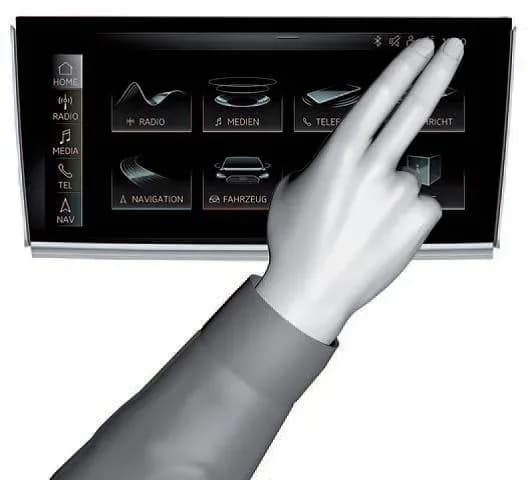
Si applica anche a
- Audi A3
- 2022–2025
- Audi A4
- 2021–2025
- Audi A4 allroad
- 2021–2025
- Audi A5
- 2021–2024
- Audi A6
- 2021–2025
- Audi A6 allroad
- 2021–2025
- Audi A7
- 2021–2025
- Audi A7 e
- 2021–2022
- Audi A8 L e
- 2021
- Audi e-tron
- 2021–2022
- Audi e-tron GT
- 2022–2025
- Audi e-tron Sportback
- 2021–2022
- Audi Q3
- 2021–2025
- Audi Q5
- 2021–2025
- Audi Q5 e
- 2021, 2023, 2024, 2025
- Audi Q7
- 2021–2025
- Audi Q8
- 2021–2025
- Audi RS 3
- 2022–2024
- Audi RS 5
- 2021–2024
- Audi RS 6 Avant
- 2021–2025
- Audi RS 7
- 2021–2025
- Audi RS e-tron GT
- 2022–2024
- Audi RS Q8
- 2021–2025
- Audi S e-tron GT
- 2026
- Audi S3
- 2022–2025
- Audi S4
- 2021–2025
- Audi S5
- 2021–2024
- Audi S6
- 2021–2025
- Audi S7
- 2021–2025
- Audi S8
- 2021–2025
- Audi SQ5
- 2021–2025
- Audi SQ7
- 2021–2025
- Audi SQ8
- 2021–2025
▸ Mostra altri 27▾ Mostra meno
Audi has issued Technical Service Bulletin (TSB) 2060523/4, titled "91 MIB3: Software Update Instructions," to guide technicians through the process of updating the MIB3 MMI system software. This TSB, released on April 22, 2025, is crucial for maintaining the optimal performance of your vehicle's information, navigation, communication, and entertainment functions.
This TSB specifically addresses issues related to software updates for the information electronics control module, which can manifest as general "control modules" or "error message" complaints within the MMI system.
Important Warnings for Owners
Audi provides specific instructions to ensure a successful software update and prevent potential issues:
- USB-C Stick vs. SD Card: "You must not use an SD card with an adapter USB stick." Instead, "Do not use a USB SD card reader and an SD card to attempt the update." A dedicated USB-C flash drive is required.
- USB-C Stick Formatting: The USB flash drive must be formatted as "NTFS." To achieve this, select "NTFS" from the "File Format" dropdown within the SD Creator program.
- USB-C Stick Capacity: For general updates, a 32GB USB-C stick is recommended. "USB-C sticks with a higher storage capacity should not be used as these types of USB sticks have a different formatting process." However, for navigation databases, a 64GB USB-C stick is necessary.
- Warranty Claims: "This TSB cannot be used for invoicing Method 1." Additionally, "The USB-C stick and downloading the software via the SD creator cannot be invoiced." If your vehicle is no longer under warranty, "If the vehicle is outside of any warranty, this Technical Service Bulletin is informational only."
Technical Background
The MIB3 MMI system was initially introduced in the 2020 model year for Audi A4/A5 models. By the 2021 model year, all Audi vehicles were equipped with the MIB3 system. This widespread adoption means that a consistent approach to software updates, such as the Audi MIB3 software update, is essential.
For more detailed information on preparing the necessary media, technicians are directed to TSB 2047812, which covers the "00 SD Creator: how to set up and use the SD Creator for obtaining vehicle software updates via the MirrorServer."
Software Update Procedure Overview
The TSB outlines two primary methods for performing an Audi MIB3 software update:
- General MMI Software Update Process (Method 1): This is the standard procedure utilizing the ODIS Tester and SVM codes.
- Manual Update Process (Method 2): This method is used if the initial update is cancelled and involves accessing the red engineering menu.
Preparing the USB-C Stick
Software updates for the MIB3 system require a USB-C stick as an external data storage device. This medium is used to apply new control unit software for various components, including information electronics, volume control, Android control unit, or navigation maps. It is critical to prepare the required USB-C sticks before starting the repair, as some repairs may require multiple sticks.
To prepare the USB-C stick:
- Ensure it is a 32GB USB-C stick that complies with USB 2.0 specifications (or 64GB for navigation databases).
- Download the software with the part number specified in the applicable TSB onto the USB-C stick using the SD Creator program.
- Format the USB-C stick to "NTFS" using the SD Creator program, as shown in Figure 1 of the TSB.
Required Tools and Equipment
To perform the Audi MIB3 software update, technicians will need the following:
- ODIS Tester: For diagnostic and programming functions.
- SVM Code: Specific codes are required for individual updates or SVM code chains.
- USB Flash Drive: A properly formatted USB-C stick (32GB or 64GB for navigation) containing the update software.
General MMI Software Update Process (Method 1)
This method is the primary way to perform the Audi MIB3 software update:
- Deactivate Bluetooth or Wi-Fi connections in ODIS.
- Connect the diagnostic head to the vehicle using a USB cable.
- Open the "Flash" feature in ODIS, select "SVM code input or SVM – Authorized multiple code entry," and click "Perform check."
- Enter the SVM code for the update. The system will verify its applicability for the vehicle and display the update medium's part number.
- Insert the Update USB flash drive into the USB port in the center console. The tester will guide you through the update, configure the new software, and report the build status to the server. Always follow the commands on the tester screen.
- After a successful update, remove the USB flash drive, which can be reused for other vehicles.
If the Update is Cancelled (Method 2)
If the update process is interrupted or cancelled, a manual method can be used:
- Enter the red engineering menu by touching the screen with two fingers in the top right corner (as illustrated in Figure 2 of the TSB).
- Use the volume control to navigate the red engineering menu, select "Update," and choose USB as the source. Scroll down to view all control units to be updated and start the process.
- After a successful manual update, re-run the SVM code with the ODIS tester to ensure proper configuration and reporting to the SVM server.
General Tips and Tricks for MIB3 Software Updates
- If the update aborts with an MMI display message, try to continue by unplugging and re-plugging the USB stick. Wait two minutes each time for the MMI to read the stick.
- If issues persist, reformat the USB stick to NTFS and re-download the software via the SD Creator, or try a different USB stick.
- If the vehicle has multiple USB connections, try switching ports.
- A terminal 30 reset of the infotainment control unit 5F for at least 30 minutes can help. Allow the system to fully start before attempting the update again.
- Repeat the update via the red engineering menu (REM) if necessary.
- After any successful update, use the SVM code for feedback documentation to fully complete the process.
Warranty Information
This TSB provides specific warranty claim details for the Audi MIB3 software update:
| Claim Type | Description |
|---|---|
| Service Number | 9196 |
| Damage Code | 00XX |
| Labor Operations | Update software Method 2 only. Only to be billed if Method 1 is unable to be completed. |
| Claim Comment | As per TSB 2060523/4 |
All warranty claims must adhere to the Audi Warranty Policies and Procedures Manual and are subject to audit by Audi Warranty.
Related Technical Service Bulletins
To complete this procedure, technicians may also need to refer to:
- TSB 2047812: "00 SD Creator: how to set up and use the SD Creator for obtaining vehicle software updates via the MirrorServer."
Source: NHTSA ID: 11017666
Galleria
1 immagine
Frequently Asked Questions
- What is the Audi MIB3 software update TSB 2060523/4 about?
- TSB 2060523/4 provides detailed instructions for technicians to update the MIB3 MMI system software in various 2020-2026 Audi models. This update addresses potential error messages and ensures the proper functioning of the vehicle's information, navigation, and entertainment systems.
- What kind of USB stick do I need for an Audi MIB3 software update?
- You need a 32GB USB-C stick that complies with USB 2.0 specifications. It must be formatted to "NTFS" using the SD Creator program. For navigation database updates, a 64GB USB-C stick is required. Do not use SD cards or USB-C sticks with higher storage capacity for general updates.
- What should I do if my Audi MIB3 software update fails or is cancelled?
- If the update fails, try unplugging and re-plugging the USB stick, waiting two minutes each time. You can also reformat the USB stick to NTFS and re-download the software, or try a different USB stick. If the update is cancelled, you can perform a manual update by accessing the red engineering menu on the MMI display.
- Is the Audi MIB3 software update covered under warranty?
- The TSB states that Method 1 (the standard ODIS Tester update) cannot be invoiced under warranty. Method 2 (manual update) can be billed if Method 1 is unsuccessful. If your vehicle is outside of warranty, this Technical Service Bulletin is for informational purposes only, implying potential costs for the owner.
Related Articles
2023 Audi e-tron Problems: Recalls, Complaints & TSBs
The 2023 Audi e-tron has faced several significant safety concerns, including recalls for potential charging cable overheating and brake pedal detachment. Owners have also reported serious issues like sudden unintended acceleration and electrical system malfunctions. This profile details these…
2023 Audi e-tron Brake Pedal Recall
Audi has issued a recall (NHTSA ID: 26V240000, Audi Recall 46P7) for certain 2019-2024 E-Tron and 2020-2024 E-Tron Sportback vehicles, including the 2023 Audi e-tron. The recall addresses a potential issue where the brake pedal may detach from the brake booster, leading to a loss of brake function.
2015-2027 Audi Noise Diagnosis with Frequency Analysis App TSB
Audi has released Technical Service Bulletin 2051095/11 detailing the Audi Frequency Analysis app. This app helps technicians diagnose noise complaints more precisely across 2015-2027 Audi models. Learn how the app works, where to download it, and its features for effective vehicle noise analysis.
2023 Audi e-tron AC/DC Charging Not Possible TSB
This manufacturer communication (NHTSA ID 11031035) provides critical information for 2023 Audi e-tron owners facing issues with AC/DC charging. It specifically highlights problems linked to software version 00C6: 0093/3119, which can prevent the vehicle from charging.
2023-2025 Audi Rear Seat Reminder Message TSB 2074943/2
Audi Technical Service Bulletin 2074943/2 explains the instrument cluster message 'Please check rear seats and be aware of door safelock' in various 2023-2025 Audi models. This informational TSB details the rear occupant detection system designed to prevent children and pets from being left in…
Leave a comment
Comments are moderated and may take a moment to appear. Only your first name and the initial of your last name are shown publicly.
Comments
Be the first to comment.