2022-2026 Audi CarPlay Takes Over Audio TSB
Audi Technical Service Bulletin 91 24 34 2072959/2 addresses instances where Apple CarPlay unexpectedly takes over your vehicle's audio or screen. This bulletin provides troubleshooting steps focusing on iPhone settings, app notifications, and connection management to resolve the issue.
 David Chen2022 Audi e-tron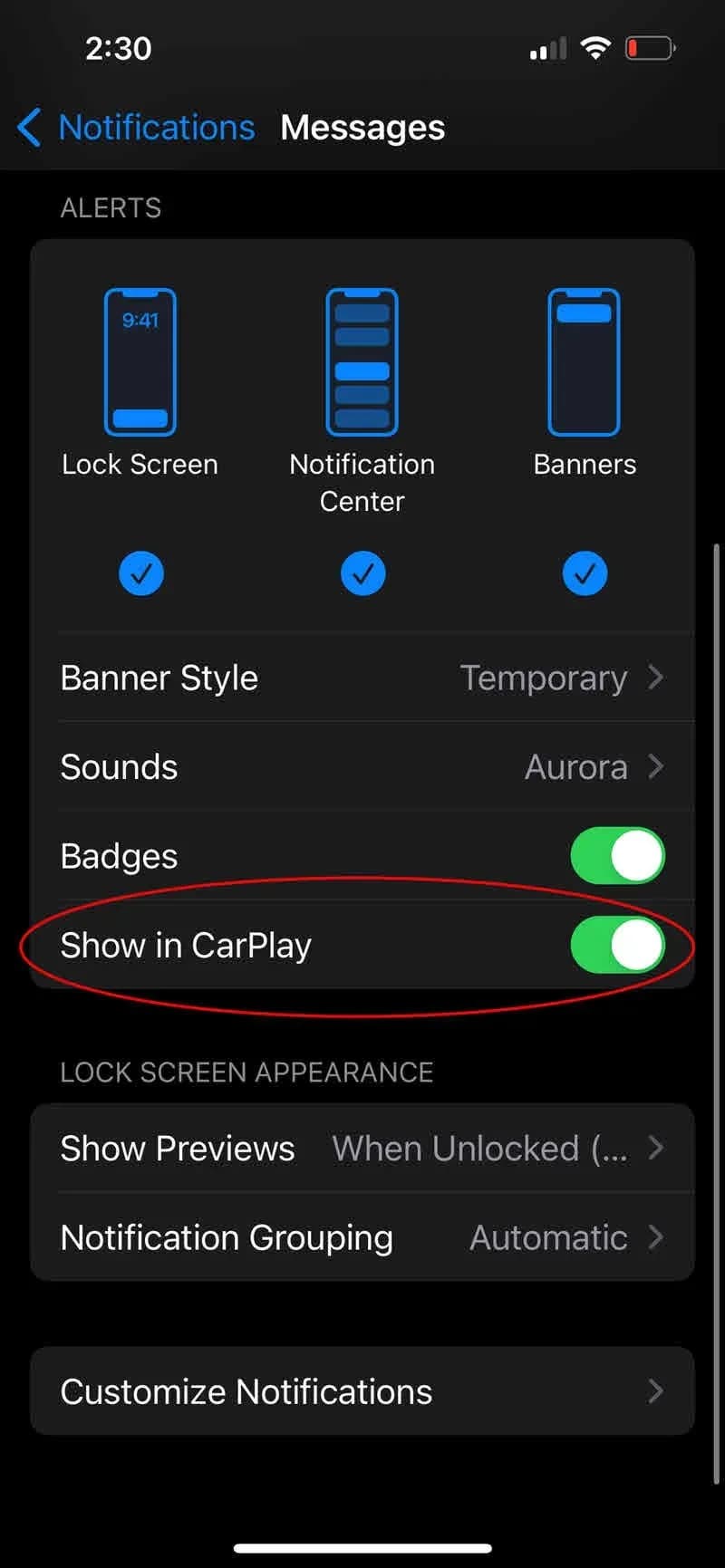
Si applica anche a
- Audi A3
- 2022–2025
- Audi A4
- 2021–2025
- Audi A4 allroad
- 2021–2025
- Audi A5
- 2021–2025
- Audi A6
- 2021–2025
- Audi A6 allroad
- 2021–2025
- Audi A7
- 2021–2025
- Audi A7 e
- 2021–2022
- Audi A8 L e
- 2021
- Audi e-tron
- 2021, 2023
- Audi e-tron GT
- 2022–2025
- Audi e-tron Sportback
- 2021–2022
- Audi Q3
- 2021–2025
- Audi Q5
- 2021–2025
- Audi Q5 e
- 2021, 2023, 2024, 2025
- Audi Q7
- 2021–2025
- Audi Q8
- 2021–2025
- Audi R8
- 2021–2023
- Audi RS 3
- 2022–2025
- Audi RS 5
- 2021–2025
- Audi RS 6 Avant
- 2021–2025
- Audi RS 7
- 2021–2025
- Audi RS e-tron GT
- 2022–2024
- Audi RS Q8
- 2021–2025
- Audi S e-tron GT
- 2026
- Audi S3
- 2022–2025
- Audi S4
- 2021–2025
- Audi S5
- 2021–2025
- Audi S6
- 2021–2025
- Audi S7
- 2021–2025
- Audi S8
- 2021–2025
- Audi SQ5
- 2021–2025
- Audi SQ7
- 2021–2025
- Audi SQ8
- 2021–2025
- Audi TT
- 2021–2023
- Audi TT RS
- 2021–2022
- Audi TTS
- 2021–2023
▸ Mostra altri 31▾ Mostra meno
Audi Technical Service Bulletin (TSB) 91 24 34 2072959/2, released on July 27, 2024, addresses a common concern for owners of various Audi models from 2022 to 2026. This bulletin supersedes an earlier version, TSB 24-68 dated February 9, 2024, and provides updated guidance for situations where Audi Apple CarPlay takes over audio or displays on the screen without explicit user input.
This TSB is particularly relevant for vehicles equipped with the Audi Smartphone Interface. It aims to help technicians and owners understand why Apple CarPlay might unexpectedly activate and how to manage these occurrences.
Symptoms
Owners may notice that while using other functions like the radio, media player, or navigation, Apple CarPlay suddenly displays in the foreground. The system may also "take over the vehicle's audio without user intervention", interrupting the current sound source. This can be a frustrating experience, especially if it happens frequently.
Important Warnings
Audi advises that if other TSBs regarding the customer's complaint are published, those TSBs would take precedence over the troubleshooting guide provided in this document. Additionally, owners should be aware of the following:
- Notification Display: The notification that triggers CarPlay may not necessarily be displayed on the CarPlay screen. Depending on the app, the notification may only be displayed on the iPhone's screen. However, the iPhone may still "take over" the MMI screen. In such cases, the MMI screen should return to its previous context within a few seconds, which is considered expected behavior.
- myAudi App Wi-Fi: The Wi-Fi connection in the myAudi app is required for online radio or Amazon Music on older infotainment system generations. Switching it off therefore has no effect on newer infotainment system generations.
Understanding the Issue
The technical background provided in TSB 91 24 34 2072959/2 indicates that the Apple device itself largely controls when CarPlay displays or takes over the vehicle's audio. There are various reasons why this might happen, often related to how the iPhone interacts with the vehicle's infotainment system. The TSB outlines various scenarios and corresponding troubleshooting steps.
Common Causes and Solutions
If your Audi Apple CarPlay takes over audio or the screen unexpectedly, consider these potential causes and their respective solutions:
1. iPhone Notifications
When a notification is displayed on your iPhone, it can sometimes cause CarPlay to activate. While the notification might not always appear on the CarPlay screen, the iPhone can still "take over the MMI screen." This is considered expected behavior. To prevent this, you can disable notifications for specific apps directly on your iPhone. CarPlay notifications for certain apps may also need to be deactivated separately within your phone's notification settings.
- Action: To deactivate notifications, locate the corresponding app within your iPhone's notification settings. Figure 1 in the TSB illustrates this process, showing an iPhone's notification settings screen with options for Lock Screen, Notification Center, and Banners, along with Banner Style and Sounds settings. A specific example given is
Settings > WhatsApp > Notifications.
2. iPhone Connection Loss and Reconnection
If your iPhone temporarily loses its connection to the vehicle and then reconnects, you might see a "Smartphone interface deactivated" message on the MMI. Once the connection is re-established, CarPlay will typically reappear after a few seconds. This is also expected behavior.
- Diagnosis: Dropped connections can occur for various reasons, both inside and outside the vehicle. Analyzing the cause of these dropped connections is recommended.
- Related TSBs: For further information on connection issues, Audi refers to TSB 2068838 and TSB 2073582. Always consult the TSBs applicable to your vehicle's VIN.
- Preventing Auto-Start: If you do not want CarPlay to automatically start (either after a connection loss or after starting the vehicle), you can turn this feature off in your iPhone settings. Navigate to
Settings > General > CarPlay > Select vehicle > Switch off radio button "CarPlay". After this, you must manually select the telephone in the MMI to use Apple CarPlay.
3. The myAudi App Pops Up in the Foreground
When your vehicle connects to your phone, the myAudi app may pop up in the foreground to establish a connection, depending on your settings. This behavior is generally not relevant when using Apple CarPlay and can be deactivated.
- Action: Figure 2 in the TSB shows how to deactivate this. This involves navigating through the myAudi app settings, specifically looking at
Galleria
2 immagini
Frequently Asked Questions
- Why does Apple CarPlay keep taking over my Audi's audio or screen?
- Audi Technical Service Bulletin 91 24 34 2072959/2 explains that this often happens due to iPhone notifications, temporary connection losses, or background activity from certain apps like myAudi or Amazon Music. The iPhone itself dictates when CarPlay takes over the display or audio.
- What should I do if I see a 'Smartphone interface deactivated' message?
- This message indicates a temporary loss of connection between your iPhone and the vehicle. CarPlay is designed to reappear after a few seconds once the connection is re-established. If you don't want CarPlay to auto-start, you can disable this feature in your iPhone settings under `Settings > General > CarPlay > Select vehicle > Switch off radio button "CarPlay"`.
- Can background apps on my iPhone cause the Audi Apple CarPlay takes over audio issue?
- Yes, third-party apps running in the background, especially those with features like 'Alexa hands-free control' from Amazon Music, can trigger your iPhone to require the MMI to display CarPlay. Reviewing and managing app permissions and background activity on your iPhone can help mitigate this.
- Does this TSB cover warranty for repairs?
- Audi TSB 91 24 34 2072959/2 is informational only and is not applicable to any Audi Warranty. If parts are changed or replaced without good reason, labor and parts may be debited, meaning you might be responsible for costs if a dealer performs unnecessary work.
Related Articles
2022 Audi e-tron Problems: Electrical System & Braking Concerns
The 2022 Audi e-tron has faced significant owner complaints regarding its electrical system, including sudden power loss and charging hazards, as well as various braking malfunctions. This profile details these issues and relevant service bulletins.
2022-2026 Audi Guided Fault Finding Reporting Obligation
Audi has issued Technical Service Bulletin TPI 2033392, also known as Transaction No. 2081531/1, regarding a reporting obligation for technicians when Guided Fault Finding produces an unexpected result. This TSB outlines the process for contacting Audi Product Support for diagnostic assistance.
2022-2026 Audi Infotainment System Complaints
Audi has released Technical Service Bulletin (TSB) 2081405/1 to address various customer complaints regarding infotainment systems in 2022-2026 Audi vehicles. This TSB helps technicians diagnose issues often caused by external media or mobile devices, rather than vehicle technology.
2018-2026 Audi Models Cracking Noise TSB 2061464/11
Audi Technical Service Bulletin 2061464/11 describes a cracking noise from the front or rear axle when changing direction in various 2018-2026 Audi models. The issue is due to stub axle movement and is resolved by bonding the stub axle to the wheel bearing with locking fluid.
2022-2026 Audi Parking Aid False Warnings TSB 2024323/13
Audi has released Technical Service Bulletin 2024323/13 to address customer complaints of false parking aid warnings. This bulletin details various environmental and vehicle-specific conditions that can cause the parking aid system to issue alerts even when no obstacles are present. It provides…
Leave a comment
Comments are moderated and may take a moment to appear. Only your first name and the initial of your last name are shown publicly.
Comments
Be the first to comment.