2021-2022 Audi MMI Sidebar Missing TSB
A software glitch can cause the MMI sidebar to disappear or the infotainment system to get stuck in the settings menu in various 2021-2022 Audi models. Technical Service Bulletin 2071928/1 provides a software update via USB to resolve this issue.

Si applica anche a
- Audi A3
- 2022
- Audi A4
- 2021–2022
- Audi A4 allroad
- 2021–2022
- Audi A5
- 2021–2022
- Audi A6
- 2021–2022
- Audi A6 allroad
- 2021–2022
- Audi A7
- 2021–2022
- Audi A7 e
- 2021–2022
- Audi A8 L e
- 2021
- Audi e-tron
- 2022
- Audi e-tron GT
- 2022
- Audi e-tron Sportback
- 2022
- Audi Q3
- 2022
- Audi Q5
- 2021–2022
- Audi Q7
- 2021–2022
- Audi Q8
- 2021–2022
- Audi RS 3
- 2022
- Audi RS 5
- 2021–2022
- Audi RS 6 Avant
- 2021–2022
- Audi RS 7
- 2021–2022
- Audi RS e-tron GT
- 2022
- Audi RS Q8
- 2021–2022
- Audi S3
- 2022
- Audi S4
- 2021–2022
- Audi S5
- 2021–2022
- Audi S6
- 2021–2022
- Audi S7
- 2021–2022
- Audi S8
- 2021–2022
- Audi SQ5
- 2021–2022
- Audi SQ7
- 2021–2022
- Audi SQ8
- 2021–2022
▸ Mostra altri 25▾ Mostra meno
Symptoms
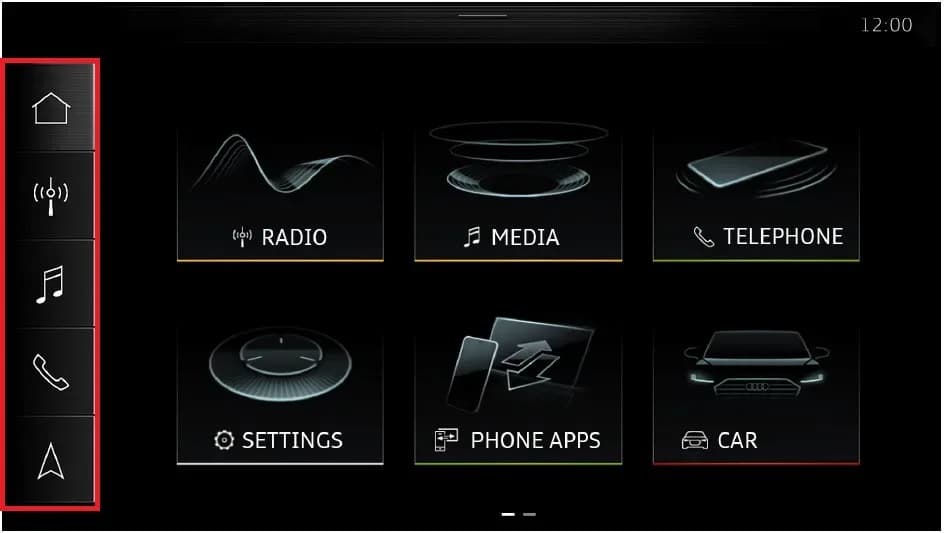
Owners of affected 2021-2022 Audi vehicles may notice specific issues with their Multi Media Interface (MMI) system. The primary symptom is that "The sidebar in the MMI is permanently missing." This means the navigation and quick-access icons on the side of the MMI display are no longer visible.
Additionally, the infotainment system may not function as expected, as "The MMI starts directly into the settings menu, making it impossible to use the infotainment system as intended." This prevents access to features like radio, media, telephone, and car settings from the main screen. This is the Audi e-tron MMI sidebar missing issue.
Technical Background
Audi has identified that a software-related issue is the root cause for the MMI sidebar disappearing. This problem specifically affects the MIB3 (Modular Infotainment Toolkit, 3rd generation) system. A new information electronics software for Model Year 2023 vehicles has been released as a production solution.
Important Warnings
If, during the diagnostic process, the message "Check result: OK No issue identified." (from step 12 of the repair procedure) appears immediately at step 4, it indicates that the control unit for information electronics (J794) is not affected by the specific software issue described in this TSB. In such cases, the underlying problem is outside the scope of this Technical Service Bulletin and requires further diagnosis.
Repair Procedure Summary
The repair involves updating the MIB3 software using a script loaded onto a USB flash drive. The process requires careful adherence to a sequence of steps to ensure the software update is applied correctly.
- Turn on the vehicle's ignition.
- Wait approximately 5 minutes to ensure the MIB3 system has fully started.
- Insert the prepared USB stick into the USB port of the affected vehicle.
- Wait for the system to display the message: "Failure detected. Fix successful. Please remove USB-stick and restart the Infotainment System."
- Turn off the ignition and lock the vehicle doors.
- Wait approximately 5 minutes to allow the vehicle to enter sleep mode.
- Unlock the vehicle doors.
- Remove the USB stick from the USB port.
- Turn on the ignition again.
- Wait approximately 5 minutes for the MIB3 to fully start.
- Re-insert the USB stick into the USB port.
- Confirm the message displayed is: "Check result: OK No issue identified. Please remove USB-stick and restart the Infotainment System." This confirms no software issues are detected.
- Remove the USB stick from the USB port.
This procedure effectively resolves the Audi e-tron MMI sidebar missing problem by updating the MIB3 software.
Required Parts and Tools
To perform this software update, technicians will need a USB Flash Drive. The specific shop tool part number required is 8WD906961 (01). The MIB3 script must be obtained from MirrorServer using the SD Creator Program, as detailed in TSB 2047812: 00 SD Creator: how to set up and use the SD Creator for obtaining vehicle software updates via the MirrorServer.
Warranty Information
This repair is covered under warranty for vehicles up to 48 months or 50,000 miles. For Certified Pre-Owned (CPO) vehicles, G10 coverage applies, requiring owner verification. If the vehicle falls outside of any warranty, this Technical Service Bulletin serves as informational guidance only.
- Service Number: 9196
- Damage Code: 0039
- Labor Operations:
- Program display and operating unit: 9196 2599 (30 TU)
- Check vehicle (bus sleep mode): 0689 0199 (10 TU)
- Diagnostic Time: GFF (No allowance)
- Road Test: No allowance for pre or post-service road tests.
- Claim Comment: As per TSB 2071928/1
All warranty claims must comply with the Audi Warranty Policies and Procedures Manual and are subject to audit.
NHTSA ID: 10244590
Frequently Asked Questions
- What does the 'MMI sidebar missing' mean for my Audi?
- If your Audi's MMI sidebar is missing, it means the navigation and quick-access icons on the side of your infotainment display are gone. The system might also boot directly into the settings menu, preventing you from using other functions like radio or media.
- Which Audi models are affected by the MMI sidebar missing issue?
- This issue primarily affects various 2021-2022 Audi models, including the A3, A4, A5, A6, A7, A8, Q3, Q4, Q5, Q7, Q8, e-tron, and their S and RS variants. A full list of affected vehicles can be found in the official NHTSA document.
- How is the Audi e-tron MMI sidebar missing problem resolved?
- The problem is resolved by performing a software update on the MIB3 infotainment system using a special script loaded onto a USB flash drive. This process involves specific steps to ensure the software is correctly installed and the system is reset.
- What if my Audi's MMI sidebar is missing, but the TSB doesn't apply?
- If, during the diagnostic process, the system indicates 'Check result: OK No issue identified,' it means the specific software issue addressed by TSB 2071928/1 is not the cause. In this situation, the problem is outside the scope of this bulletin and requires further, more in-depth diagnosis by a qualified technician.
What Audi e-tron owners report
Counted from the records in our database across 5 model years.
- 158
- Owner complaints
- 14
- Recalls
- 1,706
- Service bulletins
- 7
- Crashes reported
- 6
- Fires reported
- 3
- Injuries reported
The 2021 model year
36 complaints, the 2nd most of 5 model years on file. Owners reported 0 crashes, 1 fire and 0 injuries for this year, which also has 10 recalls on file.
Equipment and Back Over Prevention, the system this article covers, accounts for 4 of 158 complaints (3%).
Complaints by model year
| 2019 | 84 | |
|---|---|---|
| 2020 | 1 | |
| 2021 | 36 | |
| 2022 | 31 | |
| 2023 | 6 |
Most-reported systems
- Electrical System — 81
- Power Train — 24
- Engine — 23
- Fuel/Propulsion System — 18
- Service Brakes — 18
Latest recalls for the 2021 model year
- 26V240000 — Service Brakes, Hydraulic (Apr 2026)
- 25V900000 — Back Over Prevention (Dec 2025)
- 23V867000 — Electrical System (Dec 2023)
Complaints are owner reports filed with NHTSA. They are unverified, and counts depend on how many vehicles were sold, so they are not a failure rate.
Related Articles
2021 Audi e-tron Electrical Malfunction and Power Loss
A 2021 Audi e-tron owner reported a severe 'Electrical Malfunction' resulting in complete loss of power on the highway. The issue has persisted despite dealer attempts to fix it over five months, posing significant safety risks.
2021-2026 Audi UTR Troubleshooting & FAQs TSB 2081409/1
This Audi Technical Service Bulletin (TSB 2081409/1) provides comprehensive answers to frequently asked questions and troubleshooting steps for the Audi Universal Traffic Recorder (UTR) accessory, covering topics like SD card compatibility, video playback, Wi-Fi issues, and more.
2021-2025 Audi Emergency Call System Fault TSB
Audi has released Technical Service Bulletin 2059528/18 to address an "Emergency call function: malfunction! Function unavailable. Please contact service" warning, often accompanied by a red SOS LED and DTC B200000. This issue affects various 2021-2025 Audi models and is due to a software problem…
2021-2026 Audi Adaptive Light System Fault C12B3FA TSB
Audi has released Technical Service Bulletin 2054202/7 to address an intermittent 'Audi adaptive light: system fault' message and DTC C12B3FA in various 2021-2026 models. This TSB outlines diagnosis and resolution for driver assistance system malfunctions.
2021-2026 Audi Parking Aid False Warnings TSB 2024323/12
This Technical Service Bulletin (TSB 2024323/12) details diagnostic and repair procedures for 2021-2026 Audi vehicles experiencing false parking aid warnings. Learn about environmental factors, sensor checks, and proper installation to resolve issues like 'Parking aid does not work / warning is…
Leave a comment
Comments are moderated and may take a moment to appear. Only your first name and the initial of your last name are shown publicly.
Comments
Be the first to comment.