2021 Audi MMI Navigation Map Update Troubleshooting
This Technical Service Bulletin addresses common customer concerns and provides a detailed guide for updating the MMI navigation map in 2021 Audi vehicles, covering various MIB systems and update methods.
 Ahmet Topcu2021 Audi e-tron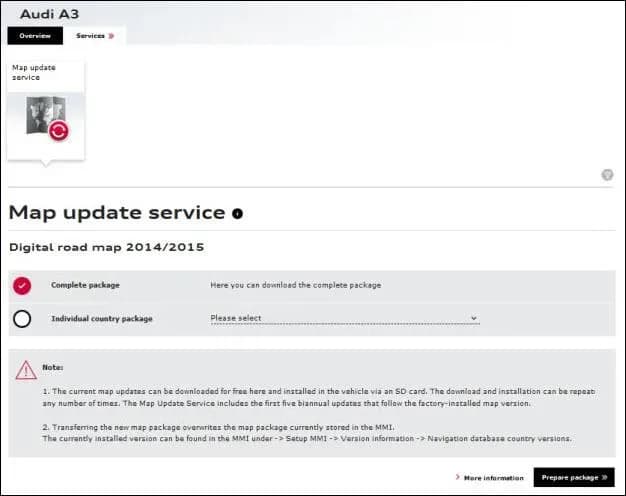
Si applica anche a
- Audi A4
- 2021
- Audi A5
- 2021
- Audi A6
- 2021
- Audi A7
- 2021
- Audi Q3
- 2021
- Audi Q5
- 2021
- Audi Q7
- 2021
- Audi Q8
- 2021
- Audi RS 5
- 2021
- Audi RS 6 Avant
- 2021
- Audi RS Q8
- 2021
- Audi S4
- 2021
- Audi S5
- 2021
- Audi S6
- 2021
- Audi S7
- 2021
- Audi S8
- 2021
- Audi SQ5
- 2021
- Audi SQ7
- 2021
- Audi SQ8
- 2021
- Audi TT
- 2021
- Audi TT RS
- 2021
- Audi TTS
- 2021
▸ Mostra altri 16▾ Mostra meno
This Technical Service Bulletin (TSB) addresses common customer concerns related to the Audi MMI navigation map update process for 2021 Audi vehicles. It outlines the various methods for updating navigation data, clarifies activation requirements, and provides troubleshooting steps for issues encountered during the update.
Symptoms of Navigation Map Update Issues
Owners of 2021 Audi vehicles may experience several issues with their MMI navigation system, indicating a need for a map update or a problem with the update process itself. These concerns include:
- The navigation map does not show the latest roads or points of interest.
- Difficulty performing map downloads from the myAudi website (www.audiusa.com/myAudi).
- Customers not knowing how to obtain map data or unable to perform the update after downloading the data.
- The MMI system being slow to respond or freezing during the map update process.
- For vehicles equipped with MIB2, the MMI over-the-air (OTA) map update may not allow for a full map update and might display greyed-out regions.
- Concerns that the OTA map update will consume excessive data from the Audi connect data subscription.
Important Warnings and What Owners Should Know
Audi has provided specific guidelines and warnings for both customers and service technicians regarding the Audi MMI navigation map update:
- No Charge for Map Data: "The customer must NEVER be charged for the map data on the SD card." Dealers should consider this map data a shop tool for service department use.
- Activation First: "Map activations should always be performed before updating the map data." This ensures the navigation system remains available and correct map data is installed.
- Specific Installation Method: "DO NOT install the map data via the red engineering menu of the MMI until AFTER the map activation is performed via ODIS >> Flash."
- OTA Data Usage: "The customer will not be billed for the data used when performing the OTA map update, but the customer must have an active Audi connect subscription to use the OTA map update feature in the MMI."
- SD Card Removal: During the update process, "The SD card (or other update media) should never be removed from the MMI main unit."
- MIB3 Updates: "MIB3 navigation database updates are not available via ETKA at this time." Available updates via ETKA are only for MIB2+ vehicles and will not work on MIB3 systems.
- Activation Documentation: "The customer only purchases the activation documentation to enable the map installation."
Technical Background
The MIB navigation system allows customers to update their vehicle's navigation system. As of March 2020, map updates are primarily available in the MMI via an Over-the-Air (OTA) update. However, for 2015-2016 Audi A3 models with MIB1, the OTA option is not available, requiring an SD card update method as detailed in the "MIB Map Update Strategy.pdf" attachment.
Map updates for MIB1 and MIB2 vehicles are free for the first 2.5 years after the vehicle's production date, or for the first five releases. After this period, activations can be purchased through Audi accessories to enable further updates. MIB2+ systems are pre-activated for five years, and MIB3 for ten years from the production date.
OTA updates for MIB2+ and MIB3 systems are designed to automatically select regions for update based on the customer's driving patterns, meaning manual region selection is not possible. For a complete North American Region (NAR) update on MIB2+ (not yet available for MIB3), a dealer-ordered SD card is required.
Map Update Procedure Summary
Updating your Audi MMI navigation map involves several steps, depending on your vehicle's MIB system and the update method chosen.
Required Tools and Media
To perform a manual update, you will need an SD card with specific characteristics:
- Capacity: For a full map update (typically 14GB–16GB), an SD card with at least 16GB of usable space is required. Due to formatting overhead, a larger SD card may be necessary.
- Partial Updates: Partial map updates (3GB–4GB) can use smaller SD cards.
- Formatting: The SD card must be formatted to FAT, FAT32, or exFAT. Mac-formatted SD cards are not compatible with the MMI MIB main unit.
- SD (FAT/FAT32): For 4GB and less.
- SDHC (FAT/FAT32): For 4GB, 8GB, and 16GB.
- SDXC (exFAT only): For 16GB, 32GB, 64GB, and higher (compatible with MIB, but not MMI3G+).
In-Vehicle Update Steps
- Insert SD Card: Insert the downloaded map update SD card into the MMI main unit.
- Initiate Update: The update does not start automatically. You must initiate it through the MMI system.
- For Audi A3, A6, and A7 models: Navigate to "Menu >> Setup MMI >> System Update."
- For Audi TT3, R8NF, Q7NF, and B9 A4 models: Navigate to "Menu >> Settings >> Left Option >> System maintenance >> System update."
- Select Source: The SD card containing the map data should appear highlighted in white. Select it as the update source.
- Start Update: The MMI screen will display the new map version (e.g., "New: Version 2014/2015"). Select "Start update" to begin.
- Background Process: The MMI will perform the update in the background, indicated by a file transfer icon in the lower left of the screen. The navigation system remains available during this time.
- Vehicle Operation During Update: The vehicle can be shut off during the update, but the SD card or other update media must remain inserted in the MMI main unit. If the vehicle is turned off, the MMI will continue the update in the background for approximately 30 minutes and resume on the next ignition cycle.
- Completion Time: A complete update using an SD card typically takes 60-90 minutes. Using a DVD or USB drive via AMI may take considerably longer.
- Confirmation: Upon successful completion, the file transfer icon will disappear, and a confirmation message "Component successfully updated: Navigation database" will appear on the MMI system update screen.
- Verify Update: To verify the update, check the MMI Version Information screen.
- For Audi A3, A6, and A7 models: Navigate to "MENU >> Setup MMI >> Version Information."
- For Audi TT3, R8NF, Q7NF, and B9 A4 models: Navigate to "MENU >> Settings >> Left Option >> System maintenance >> Version Information." Ensure the latest calendar year listing is shown under each region.
Revision History of this TSB
This Technical Service Bulletin, 91 21 76 2037809/8, was last revised on March 2, 2021. It supersedes Technical Service Bulletin Group 91 number 20-11 dated September 3, 2020. Key revisions include:
- Revision 8: Added a note concerning MIB3 Navigation Databases.
- Revision 7 (09/03/2020): Revised the Technical Background with an added tip and updated service steps for activation.
- Revision 6 (06/04/2020): Revised the title, updated content in the Technical Background, and removed myAudi download steps from the Service section.
This TSB also references TSB 2044694, which addresses "91 MMI navigation database concerns (Missing traffic info, Incorrect speed limits, Missing streets; POI not listed, etc.)."
Source: NHTSA ID: 10188602
Galleria
7 immagini
Frequently Asked Questions
- What are the common issues with the Audi MMI navigation map update?
- Common issues include the navigation map not showing the latest roads or points of interest, difficulty downloading maps from myAudi, MMI being slow or freezing during updates, and OTA updates not providing full map coverage. These issues are addressed in TSB 91 21 76 2037809/8.
- How do I update my Audi MMI navigation map using an SD card?
- To update using an SD card, you need a compatible SD card (FAT/FAT32/exFAT, 16GB+ for full updates) with the map data. Insert the card into the MMI, then navigate through the MMI menu (e.g., "Menu >> Setup MMI >> System Update") to initiate and confirm the update. Ensure the SD card remains inserted until the process is complete.
- Are Audi MMI navigation map updates free?
- For MIB1 and MIB2 systems, map updates are free for the first 2.5 years or five releases after the vehicle's production date. After this period, or for MIB2+ and MIB3 systems after their respective free periods (5 and 10 years), activations may need to be purchased. OTA updates do not incur data charges if you have an active Audi connect subscription.
- What kind of SD card do I need for an Audi MMI navigation map update?
- You will need an SD card formatted to FAT, FAT32, or exFAT. For full map updates, a card with at least 16GB of usable space is recommended, often requiring a 32GB or larger physical card. Specific types like SD, SDHC, and SDXC are compatible depending on capacity.
- What does TSB 91 21 76 2037809/8 address?
- TSB 91 21 76 2037809/8 provides a comprehensive guide for addressing customer concerns and procedures related to the Audi MMI navigation map update. It covers various MIB systems, update methods (SD card, OTA), and troubleshooting for common issues like 'Missing traffic info' or 'POI not listed'.
Related Articles
2021 Audi e-tron Electrical Malfunction and Power Loss
A 2021 Audi e-tron owner reported a severe 'Electrical Malfunction' resulting in complete loss of power on the highway. The issue has persisted despite dealer attempts to fix it over five months, posing significant safety risks.
2021-2026 Audi UTR Troubleshooting & FAQs TSB 2081409/1
This Audi Technical Service Bulletin (TSB 2081409/1) provides comprehensive answers to frequently asked questions and troubleshooting steps for the Audi Universal Traffic Recorder (UTR) accessory, covering topics like SD card compatibility, video playback, Wi-Fi issues, and more.
2021-2025 Audi Emergency Call System Fault TSB
Audi has released Technical Service Bulletin 2059528/18 to address an "Emergency call function: malfunction! Function unavailable. Please contact service" warning, often accompanied by a red SOS LED and DTC B200000. This issue affects various 2021-2025 Audi models and is due to a software problem…
2021-2026 Audi Adaptive Light System Fault C12B3FA TSB
Audi has released Technical Service Bulletin 2054202/7 to address an intermittent 'Audi adaptive light: system fault' message and DTC C12B3FA in various 2021-2026 models. This TSB outlines diagnosis and resolution for driver assistance system malfunctions.
2021-2026 Audi Parking Aid False Warnings TSB 2024323/12
This Technical Service Bulletin (TSB 2024323/12) details diagnostic and repair procedures for 2021-2026 Audi vehicles experiencing false parking aid warnings. Learn about environmental factors, sensor checks, and proper installation to resolve issues like 'Parking aid does not work / warning is…
Leave a comment
Comments are moderated and may take a moment to appear. Only your first name and the initial of your last name are shown publicly.
Comments
Be the first to comment.