2020-2024 Kia Models AVN Radio Icon Non-Responsive TSB
Kia has released Technical Service Bulletin ELE303 (Rev 1) for 2020-2024 models equipped with the 5th Generation AVN wide unit. This bulletin addresses a software issue that can cause the radio icon and hard key to become non-responsive, affecting AM, FM, and SXM radio functions.
 Ahmet Topcu2024 Kia Sportage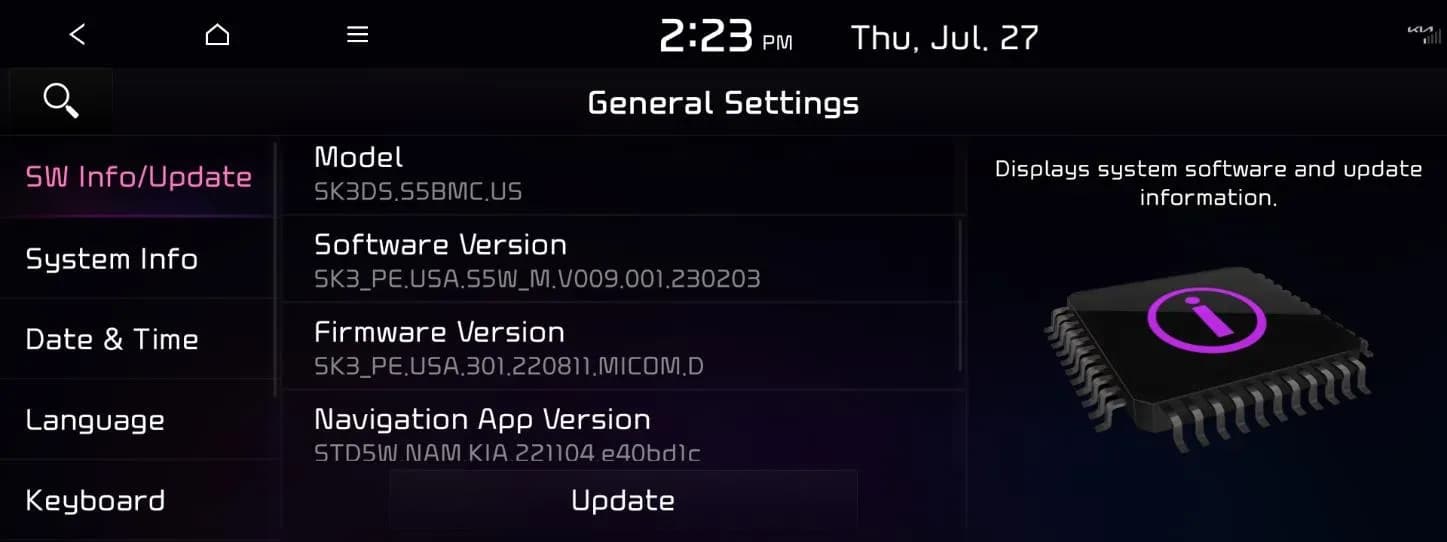
Gilt auch für
- Kia Carnival
- 2022–2023
- Kia EV6
- 2022–2023
- Kia Forte
- 2022–2023
- Kia K5
- 2021–2024
- Kia Niro
- 2021–2023
- Kia Seltos
- 2021–2022
- Kia Sorento
- 2021–2022
- Kia Soul
- 2021–2023
- Kia Sportage
- 2023
- Kia Stinger
- 2022–2023
▸ 4 weitere anzeigen▾ Weniger anzeigen
Symptoms
Owners of certain 2020-2024 Kia vehicles may experience an issue where the radio functions become inoperative. The primary symptom is a "non-responsive" or "inoperative" radio, affecting AM, FM, and SXM bands. This occurs when the AVN unit does not respond to input, either when pressing the physical 'RADIO' hard key/button or when selecting the 'RADIO' icon on the AVN menu screen. This issue indicates a problem with the 5th Generation AVN wide infotainment system.
Diagnosis / Trigger Conditions
The root cause of the "Kia AVN non-responsive radio" issue is outdated software on the 5th Generation AVN wide unit. Technicians will inspect the current software version displayed in the 'General Settings' menu of the AVN unit. If the existing software version matches one of the known affected versions (e.g., 221011, 221025, 221115, 221220, 221228), then the software update procedure applies. If the current software version is not among those listed, this Technical Service Bulletin does not apply to the vehicle.
Important Warnings
Kia has issued important advisories regarding this software update:
- "A Technical Service Bulletin is a field fix repair program without customer notification that may be performed during the warranty period. Any dealer requesting to perform this repair outside the warranty period will require DPSM approval."
- "If the current software version shown in 'General Settings' is not included in the software version listed below, this TSB does not apply."
- "CAUTION: DO NOT turn the ignition switch 'OFF', start the engine, and/or remove the USB drive from the vehicle during the update process." Doing so could interrupt the update and potentially damage the AVN unit.
- If the USB Flash Drive is not recognized, the 'Update' button will not be activated. In this case, remove the USB Flash Drive and repeat the initial setup steps.
Repair Procedure Summary
The repair involves updating the software on the 5th Generation AVN wide unit using a USB Flash Drive. The general steps are as follows:
- Turn the ignition switch to the 'ON' position.
- Select 'Confirm' on the AVN screen to acknowledge safety messages.
- Press the 'Power' button to turn the Radio/Media 'OFF'.
- Navigate to 'Setup' from the main menu.
- Select 'General' within the setup options.
- Inspect the last six digits of the AVN Software Version. If it's an affected version, proceed.
- Insert the appropriate USB Flash Drive (A or B, depending on the model) into the USB slot located underneath the AVN unit.
- From the 'General Settings' screen, select 'SW Info/Update', then 'Update'.
- Confirm the update by selecting 'OK' on the pop-up screen. If prompted, select 'Yes' to install the version again.
- Select 'Update' on the subsequent pop-up screen. The update process will take approximately 25 minutes, during which the system will be unavailable. The display may show the Kia logo or be black, which is normal.
- Once the update is complete, repeat steps 4-6 to confirm that the Software Version has been successfully updated to the new version, SK3_PE.USA.55W_M.V009.001.230203.
Required Tools or Parts
To perform this software update, specific USB Flash Drives are required:
- USB Flash Drive A: Applicable for Stinger (CK PE), Soul (SK3), Niro (DE P/HEV, EV), Sorento (MQ4 P/HEV), Cadenza (YG), EV6 (CV), K5 (DL3a), and Seltos (SP2) models.
- USB Flash Drive B: Applicable for Forte (BDm PE), Soul (SK3 PE), Niro (SG2 P/HEV, EV), Sportage (NQ5 P/HEV), Sportage (NQ5a), Carnival (KA4), and EV6 (CV) models.
These USB drives were auto-shipped to dealers. If a dealer needs a replacement, they can purchase one from Snap-On. Software update files can also be downloaded from Kia's update portal, requiring a 64GB USB Flash Drive. Refer to TSB ELE208 for detailed instructions on downloading software files using the Navigation Updater.
Owner Action
If you are experiencing a "Kia AVN non-responsive radio" in your 2020-2024 Kia vehicle, you should contact your authorized Kia dealer. Since this is a field fix repair program without customer notification, you may need to specifically mention Technical Service Bulletin ELE303 (Rev 1) to ensure the dealer is aware of the issue and the software update. The repair is typically performed under warranty, with a labor operation code of 96560F00 and an estimated time of 0.3 man-hours.
NHTSA ID: 10242982
Galerie
14 Bilder
Frequently Asked Questions
- What is the Kia AVN non-responsive radio issue?
- The Kia AVN non-responsive radio issue refers to a problem where the 5th Generation AVN wide infotainment unit in certain 2020-2024 Kia models does not respond when pressing the 'RADIO' hard key/button or selecting the 'RADIO' icon on the menu screen, making AM, FM, and SXM radio functions inoperative.
- Which Kia models are affected by the non-responsive radio icon?
- This issue affects multiple 2020-2024 Kia models equipped with the 5th Generation AVN wide unit, including various trims of the Cadenza, Niro, Soul, Seltos, Sorento, Stinger, EV6, Carnival, Forte, and K5. A full list of affected vehicles is available in the associated NHTSA document.
- How is the Kia AVN non-responsive radio problem fixed?
- The problem is resolved by updating the software on the AVN unit to version SK3_PE.USA.55W_M.V009.001.230203 using a specific USB Flash Drive. This procedure is detailed in Kia Technical Service Bulletin 303 (Rev 1) and should be performed by an authorized Kia dealer.
- Will I receive a notification from Kia about this software update?
- No, Kia states that this Technical Service Bulletin is a field fix repair program without customer notification. Owners experiencing the 'Kia AVN non-responsive radio' issue should proactively contact their dealer.
- What is the TSB number for the Kia AVN non-responsive radio fix?
- The relevant Technical Service Bulletin number for the Kia AVN non-responsive radio fix is ELE303 (Rev 1), dated September 28, 2023.
Related Articles
2022-2026 Kia External Damage to Ultrasonic Sensors
Kia has issued a Pitstop technical communication (PS797) regarding external damage to ultrasonic sensors affecting the Parking Distance Warning (PDW) system in 2022-2026 models. This can lead to false alarms or no alerts.
2024 Kia Models EGR Valve Assembly Replacement (SC320)
Kia has issued service campaign SC320 for certain 2024 Carnival, Sportage, and Niro models to replace the EGR Valve Assembly. This can cause the Malfunction Indicator Lamp (MIL) to illuminate with DTCs P040500, P064200, or P065200 due to emissions non-compliance.
2024-2025 Kia Connect Non-Operational DCU Guidance
Kia has issued Pitstop bulletin PS791 providing critical guidance for technicians on identifying and diagnosing issues with the Data Connectivity Unit (DCU) in 2024-2025 models. This bulletin addresses non-operational Kia Connect services and emphasizes proper replacement procedures to avoid…
2024 Kia Sportage Front Door Speaker Sound Quality Issue TSB
Kia has issued Service Action SA588 for 2024 Sportage models to address front door speaker issues like rattling, static, or crackling. This bulletin outlines the inspection and replacement procedure for poor sound quality.
2024 Kia Sportage EGR Valve Assembly Replacement (SC320)
Kia has identified that certain 2024 Kia Sportage, Carnival, and Niro vehicles may have an EGR Valve Assembly not manufactured to specifications. This can lead to increased air pollutants and trigger the Malfunction Indicator Lamp (MIL) with specific diagnostic trouble codes (DTCs).
Leave a comment
Comments are moderated and may take a moment to appear. Only your first name and the initial of your last name are shown publicly.
Comments
Be the first to comment.