2024 BMW X5 RSU Comfort Access Faults
BMW has issued Service Information Bulletin SIB 61 11 24 to address issues with Comfort Access and Passive Go/Exit features after a Remote Software Upgrade (RSU). Owners may experience reduced functionality and specific fault codes related to the FBD5 aerial.
 Ahmet Topcu2024 BMW X5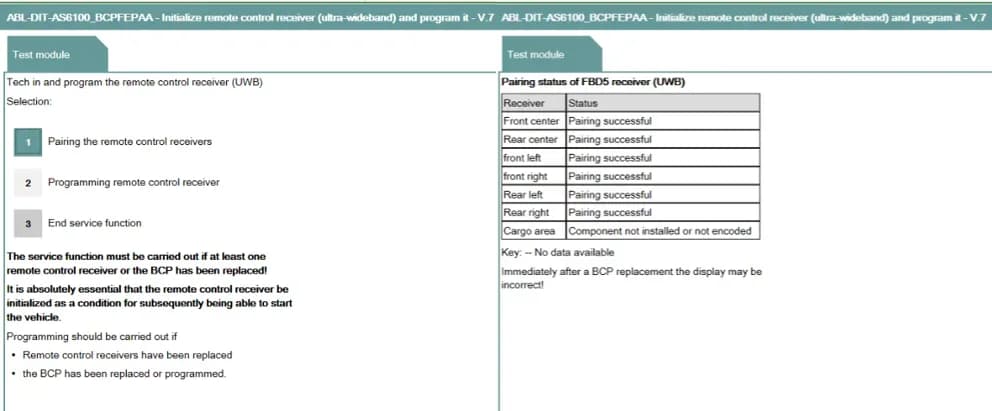
Gilt auch für
- BMW 530i
- 2024
- BMW 740i
- 2024
- BMW iX
- 2024
- BMW X2
- 2024
- BMW X6
- 2024
- BMW X7
- 2024
- BMW XM
- 2024
▸ 1 weitere anzeigen▾ Weniger anzeigen
After performing a BMW Remote Software Upgrade (RSU), owners of certain 2024 BMW models, including the 2024 BMW X5, may notice reduced functionality in their vehicle's Comfort Access and Passive Go/Exit features. This issue is detailed in BMW Service Information Bulletin SIB 61 11 24, which outlines the cause and correction for these problems.
Symptoms
If your vehicle has experienced a 2024 BMW X5 RSU fault, you might observe that the Comfort Access and Passive Go/Exit features do not work as expected. This reduction in functionality is typically accompanied by specific error memory entries stored in the Basic Central Platform (BCP) module.
Fault Codes / DTCs
The following error memory entries may be stored in the Basic Central Platform (BCP) module, indicating a programming defect in the remote control receivers (FBD5):
| Code | Description |
|---|---|
| 80424A | Remote control receiver at the front (FBD5 VM): Programming defective |
| 80424B | Remote control receiver at the rear (FBD5 HM): Programming defective |
| 80424C | Remote control receiver at the front left (FBD5s VL): Programming defective |
| 80424D | Remote control receiver at the front right (FBD5s VR): Programming defective |
| 80424E | Remote control receiver at the rear right (FBD5s HR): Programming defective |
| 80424F | Remote control receiver at the rear left (FBD5s HL): Programming defective |
Cause
The root cause of this 2024 BMW X5 RSU fault is attributed to unfavorable fault setting conditions for one or more receivers of the radio remote control, specifically the FBD 5 aerial (also known as the antenna). This condition arises after a Remote Software Upgrade, leading to the programming defects identified by the fault codes.
Important Warnings
Owners should be aware of specific conditions related to this bulletin:
- "When the fault codes above are stored but not currently present, they can be ignored and deleted. The procedure below does not apply."
- "Note: Make sure that no telephone is connected to the vehicle during programming."
- "Part replacement will not provide a solution."
Correction
To resolve the issue, the remote-control receivers (FBD5) must be programmed and paired using the ISTA Service functions. This process ensures that the FBD5 aerial components are correctly configured after the Remote Software Upgrade.
Repair Procedure Summary
For vehicles exhibiting the fault codes, the repair procedure involves several steps using the ISTA diagnostic system:
- Initiate Programming and Pairing: Technicians will use the service function, "ABL Initialize remote control receiver (ultra-wideband) and program it," found within ISTA under Vehicle Management > Service functions > Body > Locking and security functions > Remote control, key > Remote control receiver (UWB).
- Program Receiver: The test plan will be opened, and the option to "Programming remote control receiver" will be selected.
- Start Programming: The programming process is initiated by selecting "Program all (recommended)". It is crucial that no telephone is connected to the vehicle during this step, which can take up to 30 minutes.
- Return to Selections: After successful programming, the technician will return to the "Teach in and program" selections window.
- Pair Receivers: The next step is to select "Pairing the remote-control receivers."
- Verify Pairing: All receiver statuses must show "pairing successful" to confirm the process is complete.
- Clear Faults and Verify Functionality: Finally, any remaining fault codes are cleared, and the FBD5 receiver faults are confirmed not to have reoccurred. The Comfort Access and Passive Go/Exit features are then tested to ensure they are working as designed.
Required Tools or Parts
The primary tool required for this correction is the ISTA diagnostic system, which provides the necessary service functions for programming and pairing the remote-control receivers. No physical part replacement is needed, as the issue is software-related.
Owner Action
If you own a 2024 BMW X5, X6, X7, XM, 530i, 740i, iX, or X2 and are experiencing issues with your Comfort Access or Passive Go/Exit features after a Remote Software Upgrade, you should contact your authorized BMW dealership. Reference Service Information Bulletin SIB 61 11 24. The repair code associated with this fix is 6138460200. This repair is typically covered under the BMW New Vehicle Limited Warranty or the BMW Certified Pre-Owned Program.
NHTSA ID: 11013050
Galerie
3 Bilder
Frequently Asked Questions
- What does BMW SIB 61 11 24 address?
- BMW SIB 61 11 24 addresses issues with Comfort Access and Passive Go/Exit features that may occur in certain 2024 BMW models, including the 2024 BMW X5, after a Remote Software Upgrade (RSU).
- What specific fault codes are associated with this problem?
- The problem is associated with fault codes such as 80424A, 80424B, 80424C, 80424D, 80424E, and 80424F, all indicating a programming defect in the FBD5 remote control receivers.
- Will replacing parts fix the Comfort Access issue?
- No, the bulletin explicitly states that "Part replacement will not provide a solution." The issue is software-related and requires programming and pairing of the remote-control receivers using ISTA Service functions.
- How long does the repair procedure take?
- The programming portion of the repair procedure can take up to 30 minutes. The overall service visit duration will depend on the dealership's schedule and other required diagnostic steps.
- What should I do if my vehicle has these symptoms but no fault codes are currently present?
- According to the bulletin, if the fault codes are stored but not currently present, they can be ignored and deleted, and the outlined repair procedure does not apply.
Related Articles
2024-2025 BMW Taillamp Check Control Message TSB
BMW has released Service Information Bulletin SIB 63 07 25 to address an intermittent "CHECK CONTROL MESSAGE (CCM) PRESENT FOR THE TAILLAMPS" warning in certain 2024-2025 BMW X5 and 230i vehicles. This issue is caused by a software error and can be resolved with a software update.
2024 BMW X5/X7 Instrument Panel Depression SIB 51 04 26
BMW SIB 51 04 26 addresses a slight depression on the top passenger side of the instrument panel in 2024 BMW X5 and X7 vehicles. This bulletin clarifies that the outline is a normal characteristic from the passenger side airbag and does not require any parts replacement.
2024 BMW X Series Front Axle Rattling Noise SIB 31 03 26
BMW has issued Service Information Bulletin (SIB) 31 03 26 to address a rattling noise from the front axle in 2024 BMW X5, X6, and X7 models. This noise, typically heard at slow speeds over rough surfaces, is caused by premature aging and cracking of the tension strut hydro-mount elastomer…
2024 BMW X5 X3 330i KLE Control Unit Return TEC844
BMW has issued Parts Bulletin C32-0226-0620, also known as TEC844, concerning the inspection and return of specific KLE control units (part number 61 44 5 A60 2F9) for 2024 BMW X5, X3, and 330i vehicles. The issue involves missing 'MHD' labels on the component and BMW parts labels.
2024 BMW X-Series ACSM Sensor Service Action
BMW has issued a Service Action Notification-Reminder 22 Jan 2026 regarding potentially faulty Active Crash Safety Module (ACSM) sensors in certain 2024 X-Series vehicles. This issue can lead to deactivation of safety functions and restricted driving dynamics. Owners are advised to contact an…
Leave a comment
Comments are moderated and may take a moment to appear. Only your first name and the initial of your last name are shown publicly.
Comments
Be the first to comment.