2024-2025 Audi e-tron GT MMI Emergency Call Fault TSB 2079980/1
Audi has released Technical Service Bulletin (TSB) 2079980/1 to address various MMI function problems and an 'Emergency call fault' message that may appear in 2024-2025 e-tron GT and RS e-tron GT vehicles. This software update targets the MIB3 system and related control units.
 Ahmet Topcu2024 Audi RS e-tron GT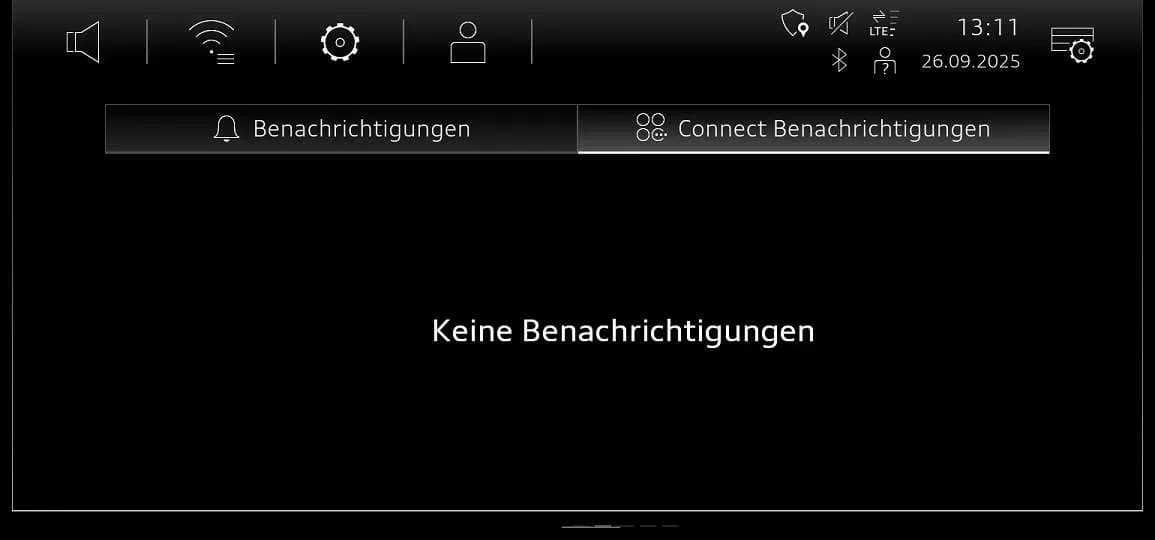
Gilt auch für
- Audi e-tron GT
- 2024–2025
Symptoms of MMI and Emergency Call Faults
Owners of 2024-2025 Audi e-tron GT and RS e-tron GT vehicles may experience various problems with the Multi Media Interface (MMI) functions. A common indicator of this issue is the display of an "Emergency call fault" message within the instrument cluster. These symptoms are typically linked to outdated software versions within the vehicle's electronic control units.
Technicians investigating these concerns often find that the vehicle's diagnostic address 5F, which pertains to the information electronics, has one of several specific software versions installed: 4014, 4026, 4318, or 4404. Additionally, the software version in diagnostic address 078E, related to the Android control unit (AED), may be identified as being below version 0621. These software discrepancies are the root cause of the reported MMI and emergency call system malfunctions, leading to the need for a software update as outlined in TSB 2079980/1.
Important Warnings and Owner Information
Audi Technical Service Bulletin 2079980/1 contains several critical instructions and warnings for both technicians and vehicle owners:
- Do not invoice Guided Fault Finding: Diagnostic entries logged in diagnostic address 0075 will be resolved by the software update. Therefore, Guided Fault Finding test plans should not be carried out and cannot be invoiced under warranty.
- Expect inactive time: A significant period of inactivity is to be expected during the software update process. Technicians are advised that they can work on a different vehicle during this time, and this is considered in the warranty accounting instructions.
- Time stamps not required: When performing this TSB, time stamps are not necessary for billing under warranty.
- ODIS update required: A newly developed test program is used for SVM code input. Ensure the diagnostic tester being used has the latest ODIS software, which includes the new test program for software updates.
- User input cues: The vehicle will use acoustic signals and flashing lights to indicate when user input is required during and at the end of the test program.
- Prepare USB-C sticks in advance: Two USB-C sticks are required for the software update, particularly for the Android control unit. These must be prepared before starting the repair. The update media can be used for multiple vehicles.
- Conditional AED update: The update for the Android control unit (078E) must only be performed if its current software version is below 0621.
- USB stick handling during update: "Please be certain to leave the USB stick inserted. The correct time to remove the USB stick is described further down." Removing it prematurely can interrupt the process. The procedure will only work if the USB stick is still inserted during certain download phases. "Now please remove the USB stick" at the appropriate time.
- Avoid SD cards and large USB-C sticks: Do not use an SD card with an adapter USB stick. Also, do not use a USB-C stick with a larger storage capacity than 32 GB, as such sticks may have a different formatting process that can cause issues.
- Invoicing restrictions: The USB-C stick itself and the process of downloading the software via the FMC (Flash Media Creator) cannot be invoiced.
Diagnosis and Trigger Conditions
The primary diagnostic step for the Audi e-tron GT MMI emergency call fault involves checking the software versions of specific control units. Technicians will typically connect to the vehicle's diagnostic system and verify the software version in diagnostic address 5F. If this address shows software versions 4014, 4026, 4318, or 4404, the vehicle is a candidate for this update. Additionally, the software version of the Android control unit (AED) in diagnostic address 078E must be checked; the update is only necessary if this version is below 0621.
These specific software versions are known to cause the reported MMI malfunctions and the "Emergency call fault" message. The update aims to standardize the software across these control units, resolving the underlying technical issues.
Repair Procedure Summary
The repair procedure outlined in TSB 2079980/1 involves a two-part software update process for the affected control units, primarily focusing on the AED control unit and the MIB3 infotainment system. This update is crucial for resolving the Audi e-tron GT MMI emergency call fault.
Part 1: Manual Software Update for AED Control Unit (078E)
- Preparation: Ensure the required USB-C stick, containing the update media for the AED control unit, is ready. This step can be skipped if the Android control unit (078E) already has software version 0621.
- Accessing the Red Menu: The AED control unit is updated via the red menu in the MMI. The technician inserts the USB update medium into the USB connection port.
- Initiating Update: The red menu is accessed by pressing specific buttons. From this menu, the technician selects "Update" and chooses the source where the update medium (USB connection) is inserted. The volume control is used for navigation. All control units designated for update, including the AED, are displayed. The technician scrolls down and starts the update.
- USB Stick Handling: It is critical that the USB stick remains inserted during this phase. The correct time to remove the USB stick will be indicated later in the process.
- MMI Restart: After the manual update completes, the MMI will restart. The technician must wait until the MMI is fully initialized, with the home screen displaying all applications.
- System Restart: The system is then restarted by pressing and holding the volume control for 10 seconds.
- Notification Check: The technician opens the notification center and navigates to the "Audi connect notifications" tab. The vehicle will indicate when user input is required using acoustic signals and flashing lights.
- Download and Removal: The system will download the software update, which takes approximately 5 minutes. During this download, the USB stick must remain inserted. Once the download is complete, a prompt will appear: "Now please remove the USB stick."
- Final Restart and Verification: The system is restarted again by pressing and holding the volume control. The technician then checks the notification center/Audi connect notifications to confirm that the update was successfully installed.
Part 2: SVM Code Update for Multiple Control Units
This part of the procedure updates the AED control unit, emergency call module (0075), gateway (0019), and information electronics (005F) using the "SVM - Authorized Multiple Code Entry" function in "Flash" mode.
- Exact SVM Code Entry: For the new software update program, the SVM code must be entered precisely, including commas and without spaces. Scanning a QR code with a hand-held scanner or copying and pasting the code chain is recommended.
- Market and Software Version Dependency: Different SVM code chains and QR codes are required depending on the market and the software version of the gateway (0019).
- Determine Gateway Software Version: The software version in diagnostic address 0019 is determined using the SVM code DUCIDENT0019 within the "SVM – Authorized Multiple Code Entry" function.
- Apply Correct SVM Code Chain:
- If the software version in diagnostic address 0019 is 0042, the following SVM code chain must be used:
078EA001,FLIGHTON0075MLB,ZGDOIP,CL3BPA001US,19A027,19B027,TGU1MDMVB,CL3BPA002US,FLIGHTOFF0075MLB. - For all other software versions in diagnostic address 0019, the following SVM code chain is applied:
078EA001,FLIGHTON0075MLB,ZGDOIP,CL3BPA001US,TGU1MDMVB,CL3BPA002US,FLIGHTOFF0075MLB.
- If the software version in diagnostic address 0019 is 0042, the following SVM code chain must be used:
- USB-C Stick Removal: The USB-C stick can be removed after the program has successfully completed. If the procedure is interrupted, step 2 must be repeated, and the test program will automatically perform the missing part of the update.
- Bus Sleep Mode: After the software update, the vehicle is put into bus sleep mode. The ignition is then switched back on, and the MMI is started.
- Emergency Call LED Check: The emergency call LED in the roof module must light up green again. If it does not, reference TSB 2079652, "Emergency call LED in roof module not lit up in green," for further diagnosis.
- End Diagnostic Session: Finally, the diagnostic session is ended, and the diagnostic log is sent online.
Required Tools and Parts
Performing the software update described in TSB 2079980/1 requires specific tools and parts to ensure a successful resolution of the Audi e-tron GT MMI emergency call fault. Technicians must prepare the following:
- USB-C Sticks: Two USB-C sticks are required. It is crucial to use USB 2.0, 32 GB sticks for the MIB3 update media. Do not use an SD card with an adapter USB stick, and do not use a USB-C stick with a larger storage capacity as these may have incompatible formatting processes.
- AED Control Unit Update Media: The part number for the AED control unit update media (for all models) is 8W0906961DQ.
- MIB3 Update Media: The part numbers for the MIB3 update media vary depending on the existing software version:
- For Audi e-tron GT vehicles with MIB3 SW versions 4014, 4026, or 4404, the required part number is 8W0906961GB.
- For Audi e-tron GT vehicles with MIB3 SW version 4318, the required part number is 8W0906961GF.
It is important to note that the USB-C stick itself and the process of downloading the software via the FMC (Flash Media Creator) cannot be invoiced under warranty.
Warranty Information
This Technical Service Bulletin (TSB) 2079980/1 is primarily informational if the vehicle is outside of its warranty period. However, for vehicles under warranty, specific service numbers and a damage code are provided for proper claim processing.
- Service Number 9145: This service number is used for complaints related to the emergency call function or online services.
- Service Number 9196: This service number is applicable for complaints concerning various MMI functions.
- Damage Code 0041: This is the damage code to be used when submitting warranty claims for this repair.
Labor operations are also specified for warranty claims:
- 0151 0010 (20 TU): This covers the preparation for the repair, including parking the vehicle and charging the 12V battery.
- 0151 0040 (100 TU or 60 TU): This covers the AED update (manual) and the launch of the software update for the MMI and emergency call module. The 60 TU applies if step 1 (manual AED update) was skipped because the AED control unit already had the required software version. This operation includes connecting the tester, starting ODIS, entering flash mode, using "Function Authorized Multiple Code Entry" with the correct SVM code chain, inserting the USB stick, allowing the program to run automatically, concluding the software update, ending the current test program, and removing the USB stick.
All warranty claims must adhere to the Audi Warranty Policies and Procedures Manual and are subject to review or audit by Audi Warranty. Time stamps are not required for billing when carrying out this TSB, and the update can be performed by non-productive personnel.
NHTSA ID: 11026269
Galerie
4 Bilder
Frequently Asked Questions
- What does the 'Emergency call fault' message mean in my Audi e-tron GT?
- The 'Emergency call fault' message, often accompanied by other MMI function problems, indicates a software issue within your vehicle's MIB3 infotainment system and related control units. Audi TSB 2079980/1 addresses this by providing a necessary software update.
- Which Audi e-tron GT models are affected by TSB 2079980/1?
- This Technical Service Bulletin applies to 2024 and 2025 Audi e-tron GT and RS e-tron GT vehicles. The specific VIN ranges for 2025 models are 900000-900949, while all 2024 models are affected.
- Can I perform the software update myself to fix the Audi e-tron GT MMI emergency call fault?
- No, the software update described in TSB 2079980/1 requires specialized diagnostic tools, specific USB-C update media, and precise SVM code entry. It should only be performed by an authorized Audi service center to ensure correct installation and prevent further issues.
- What is SVM code DUCIDENT0019 and why is it important?
- DUCIDENT0019 is a specific SVM (Software Version Management) code used by technicians to determine the current software version in diagnostic address 0019 (gateway control unit). This information is crucial for selecting the correct subsequent SVM code chain required for the comprehensive software update to resolve the Audi e-tron GT MMI emergency call fault.
- Are there any parts I need to buy for this repair?
- The repair requires specific USB-C update media. For the AED control unit, the part number is 8W0906961DQ. For the MIB3 system, part numbers vary by existing software version: 8W0906961GB for SW 4014, 4026, 4404, and 8W0906961GF for SW 4318. These parts are typically handled by the dealership during the service.
Related Articles
2022-2024 Audi e-tron GT Scraping/Knocking Noise TSB 2073030/2
Owners of 2022-2024 Audi e-tron GT and RS e-tron GT models may hear scraping or knocking noises from the front wheel housing. Audi Technical Service Bulletin 2073030/2 identifies the cause as dirt and debris accumulating around the radiator fans and provides a cleaning solution.
2024 Audi e-tron GT MyAudi App Charging & Climate Fault
This Technical Service Bulletin (TSB) 2075406/2 addresses an issue where 2024 Audi e-tron GT and RS e-tron GT owners cannot set air conditioning, charging timers, or charging locations using the myAudi app, resulting in error code BFF.4002. Audi has resolved this problem with a backend software…
2022-2025 Audi e-tron GT Power System Fault P000000 TSB
Audi has issued TSB 2080377/1 for 2022-2025 e-tron GT and RS e-tron GT models concerning a yellow or red instrument cluster warning fault. This issue is often accompanied by DTC P000000 in the hybrid battery manager, indicating an on-board power system fault.
2024-2025 Audi e-tron GT Electrical System Fault TSB
A Technical Service Bulletin (TSB 2080127/1) has been issued for 2024-2025 Audi e-tron GT and RS e-tron GT models regarding a 'Electrical system: fault' warning message. This issue prevents driving and is resolved by a software update.
2024 Audi e-tron GT MMI Tiles Cannot Be Moved TSB
If you own a 2024 Audi e-tron GT or RS e-tron GT and find that MMI main menu tiles jump back to their original position after being moved, Technical Service Bulletin (TSB) 2079913/1 describes a software update to resolve this issue.
Leave a comment
Comments are moderated and may take a moment to appear. Only your first name and the initial of your last name are shown publicly.
Comments
Be the first to comment.