2022 Audi e-tron GT Software Update for Battery & Range
Audi has issued Service Action 93P9 for 2022 e-tron GT vehicles to address potential 12V battery performance issues and enhance energy management. This software update aims to reduce the likelihood of battery drain and improve the vehicle's overall range, performed free of charge by authorized…

Audi has released Service Action 93P9, a crucial software update for its 2022 e-tron GT models. This update aims to enhance the vehicle's electrical system, specifically addressing the 12V battery performance and overall energy management. The goal is to reduce the chances of a decrease in 12V battery performance and improve the vehicle's driving range through more efficient energy use.
This 2022 Audi e-tron GT software update is part of Audi's commitment to customer satisfaction and applies to 3,479 vehicles in the U.S. and 399 in Canada. Owner notifications began in November 2022, advising affected vehicle owners to schedule this service with an authorized Audi dealer.
Why This Matters
The primary benefit of this software update is a reduced likelihood of 12V battery performance issues. For electric vehicles like the 2022 Audi e-tron GT, the 12V battery is essential for powering various vehicle systems, even though the main traction battery powers the drivetrain. An efficiently managed 12V battery contributes to reliable vehicle operation and overall vehicle health.
Furthermore, the update optimizes the energy management process, which can lead to a positive impact on the vehicle's achievable range. This means owners could experience more consistent and potentially extended driving distances on a single charge, enhancing the overall driving experience of their 2022 Audi e-tron GT software update.
Important Warnings and What Owners Should Know
Audi has issued several critical warnings and instructions for both technicians and owners regarding Service Action 93P9:
- Inventory Vehicles: Dealers are strictly required to complete this software update on all affected inventory vehicles before delivery to consumers. This ensures all new owners receive vehicles with the latest improvements.
- Safety Recalls: All outstanding Safety Recalls must be completed on the vehicle prior to performing Service Action 93P9. This prioritizes safety-critical repairs.
- Prohibited Diagnostic Methods: Technicians are explicitly instructed DO NOT USE Guided Fault Finding (GFF) to perform this flash. Using GFF will cause the flash to take longer, and requests for additional time will not be considered for reimbursement. The operating mode "Flash" must be used.
- Prohibited Wireless Connections: The VAS Diagnostics Interface MUST ONLY be connected to the tester with a USB cable. "Using Bluetooth or WiFi for this action is PROHIBITED!" as it increases the risk of losing connection during the update, which could result in damage to the control module. Damage caused to electronic components (e.g., ECM, TCM) during the SVM update process due to wireless connections is not covered.
- Radiator Fan Safety: "Radiator Fan(s) may cycle ON high speed during the Update Process! There is a serious risk that personal injury may result if contact is made with spinning fan blades. Keep hands and all objects away from Radiator Fan(s) during Update Process!"
- Battery Voltage Maintenance: The battery charger must be connected and maintain voltage above 12.5V throughout the update. "Control modules damaged by insufficient voltage will not be covered."
- Cost and Expiration: This service action will be performed free of charge only until September 01, 2027. If a customer wishes to have this service performed after this expiration date, normal dealership costs associated with the repair will apply.
- Owner Notification: Owner notification letters were sent in November 2022.
Repair Procedure Summary
The Service Action 93P9 involves a software update performed by an authorized Audi dealer. The procedure requires specific tools and careful adherence to steps to ensure a successful update and prevent damage to vehicle components.
Pre-Repair Checks
Before initiating the update, technicians must:
- Verify the vehicle's VIN qualifies for repair under this action by checking the Campaigns/Actions screen in Elsa. The campaign status must show "open."
- Print the Elsa screen showing the open status and attach it to the repair order.
- If multiple software update campaigns are open, they must be performed in order of their start date, with the oldest being performed first.
- Ensure all Safety Recalls are completed on the vehicle prior to proceeding with this campaign.
- Note that damages resulting from improper repair or failure to follow these work instructions are the dealer's responsibility and are not eligible for reimbursement.
Required Tools and Preparations
Specialized tools and specific vehicle preparations are necessary for this software update:
- Battery Charger: A battery tester/charger capable of a "minimum 90 Amp continuous supply," such as the VAS 5908, is required. The charger must be connected to the vehicle battery and remain connected throughout the update. Before starting, the charger must be switched off and then on again, ensuring its display switched off before restarting. It must be set to a 14.8 Volt charging voltage and operated in charging mode. When connecting, the positive cable goes to the positive charging terminal, and the negative cable to the grounding lug on the chassis. DO NOT connect the ground cable directly to the negative terminal of the battery.
- Diagnostic Tester: A Diagnostic Tester (VAS6150X/VAS6160X or equivalent) is needed. The tester must be plugged in using its supplied power adapters; it should NOT be used on battery power alone.
- Software Updates: The ODIS software on the diagnostic tester must be completely up to date.
- Vehicle Settings: The screen saver and power saving settings on the diagnostic tester must be turned off. In the vehicle, the ignition must be switched on, and all consumers (headlights, heated seats, climate control, etc.) must be switched off. The hazard warning lights must be turned ON to prevent the system from switching to bus sleep mode during the update.
- Connection: The VAS Diagnostic Tester must be connected to the vehicle via a USB cable. If Bluetooth or WiFi symbols are shown, the diagnostic head must be disconnected, the USB cable reconnected, and then reattached to the vehicle.
- Initial Scan: Before the update, a full diagnostic scan must be performed using "Diagnosis," and the diagnostic protocol sent online. The session should be saved.
- Bus Sleep: A bus sleep procedure must be performed with the 12V charger disconnected. This involves disconnecting the 12V charger and diagnostic interface, closing all doors, hood, and rear lid, locking the vehicle, and waiting 1-2 minutes for all interior lighting to go off.
Software Update Process
Once preparations are complete, the software update can proceed:
- From the home screen of the scan tool, highlight "Flash" and follow the on-screen prompts.
- Select "Starting Flashing" and follow the prompts.
- Select "No RO" when prompted.
- Highlight "SVM – Code Input."
- Select "Perform test."
- Enter the corrective action code (SVM code) 93P9A388.
- Select "Accept" and follow the remaining on-screen prompts.
- After receiving confirmation that the flash completed successfully (indicated by a green check mark), the ignition must be turned off for 60 seconds and then turned back on. This step is critical for clearing any faults stored during the update.
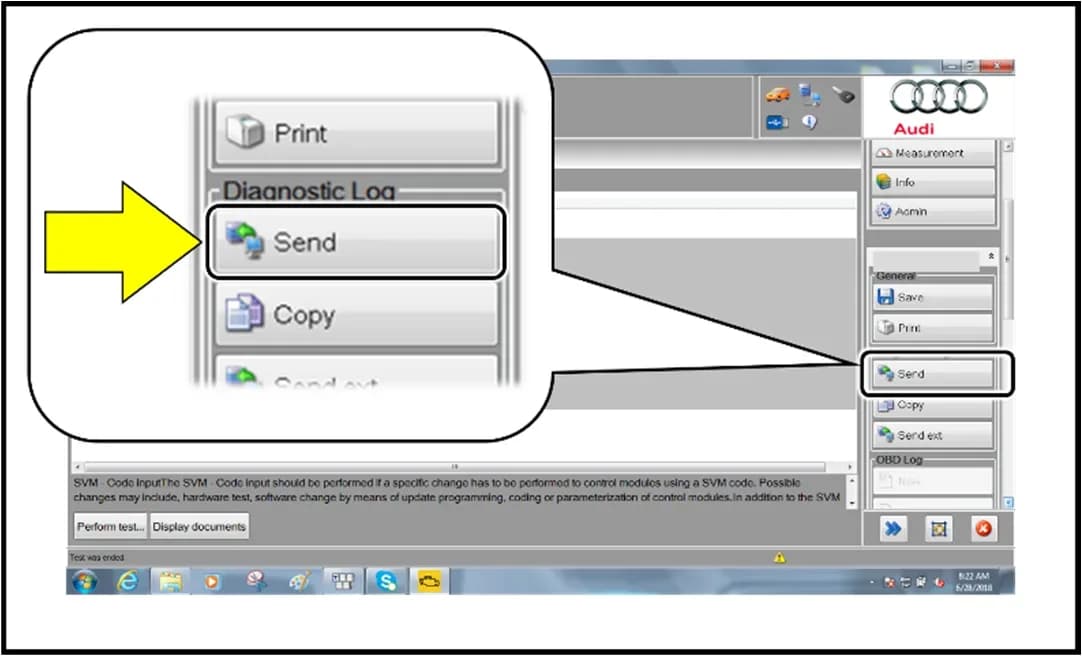
- After the flash session, select "Send" to send the diagnostic protocol online, then click "Flash" to exit the session.
- To clear any remaining event memory entries, perform another bus sleep: disconnect the diagnostic tester, remove the key from the vehicle, and lock the vehicle with the remote for 5 minutes.
Post-Update Procedures
After the software update, several checks and adjustments are required:
- Instrument Cluster Check: Verify that the instrument cluster displays no "fault messages or warning lamps."
- Parking Brake Calibration: If necessary, perform position detection for the parking brake. This involves pressing the brake pedal, moving the selector lever to "N" and waiting 5 seconds, waiting another 5 seconds, and then applying the parking brake. If the brake warning lamp is still flashing, the calibration must be performed again with an extended waiting time.
- Charging Profile Restoration: For vehicles equipped with a 22 kW onboard charger, the charging profiles must be restored to factory settings. This is done by using operating mode "Diagnosis," selecting "Self test," then navigating to "00C6 - High Voltage Battery Charger Control Module -J1050-," selecting "00C6 - High voltage battery charger control module, functions," and finally "C6 - Reset charging timer and charging profiles to factory settings." Exit Diagnosis and send the diagnostic protocol online.
Warranty Information
For claiming this service action, dealers should use the following details:
- Service Number: 93P9
- Damage Code: 0099
- Parts Vendor Code: 002
- Claim Type: For sold vehicles, use 7 10; for unsold vehicles, use 7 90.
- Causal Indicator: Mark labor as causal.
- Labor Operations:
- 2706 89 50: Connect battery charger (10 time units).
- 9301 25 99: Perform software update via Flash (time stated on diagnostic protocol).
Upon completion, the technician should stamp the repair order using item# AUD4927ENG (USA) or AUD4927FRE (Canada).
NHTSA ID: 10227572
Galerie
13 Bilder
What Audi e-tron GT owners report
Counted from the records in our database across 3 model years.
- 22
- Owner complaints
- 15
- Recalls
- 1,127
- Service bulletins
- 1
- Crashes reported
- 2
- Fires reported
- 0
- Injuries reported
The 2022 model year
8 complaints, the 2nd most of 3 model years on file. Owners reported 0 crashes, 0 fires and 0 injuries for this year, which also has 13 recalls on file.
Complaints by model year
| 2022 | 8 | |
|---|---|---|
| 2023 | 13 | |
| 2024 | 1 |
Most-reported systems
- Electrical System — 14
- Fuel/Propulsion System — 7
- Engine — 5
- Power Train — 3
- Service Brakes — 1
Latest recalls for the 2022 model year
- 25V900000 — Back Over Prevention (Dec 2025)
- 25V227000 — Air Bags (Apr 2025)
- 24V726000 — Electrical System (Sep 2024)
Complaints are owner reports filed with NHTSA. They are unverified, and counts depend on how many vehicles were sold, so they are not a failure rate.
Related Articles
2022-2025 Audi e-tron GT Hose Parts Update SM 48-2024
Audi has issued Special Notice SM 48-2024, instructing parts managers to return certain hose part numbers for the 2022-2025 Audi e-tron GT by September 16, 2024. This ensures updated parts are available for customers.
2022 Audi e-tron GT No Heat Customer Support
Audi is offering customer mobility support for 2022 e-tron GT owners experiencing a "no heat" concern. This includes reimbursement for loaner or rental vehicles while parts are unavailable.
2022 Audi e-tron GT No Heat Customer Loaner Support
Audi is providing customer mobility support for 2022 e-tron GT vehicles affected by a 'no heat' condition, specifically when repairs are delayed due to parts availability. This includes reimbursement for dealer loaners or outside rental vehicles. Owners should understand the conditions for…
2022 Audi e-tron GT 12V Battery Control Module Software Update
Audi has released a revision to Service Action 27K2 for the 2022 Audi e-tron GT, updating the 12V Battery Control Module software. This revision provides critical information regarding required voltage during the software update procedure.
2022 Audi e-tron GT 12V Battery Software Update
Audi has issued Service Action 27K2 for certain 2022 e-tron GT vehicles to update the 12V battery control module software. This addresses a potential issue where the 12V battery could discharge completely.
Leave a comment
Comments are moderated and may take a moment to appear. Only your first name and the initial of your last name are shown publicly.
Comments
Be the first to comment.